How-To
OPNsense Firewall Rules for Local-Only IP Cameras
Step-by-step OPNsense camera VLAN rules to isolate RTSP/ONVIF cameras on an IoT segment while allowing your local NVR (Frigate, Blue Iris) to pull streams—no cloud.
OPNsense camera VLAN rules isolate PoE and Wi-Fi cameras on a dedicated tagged subnet, default-deny all camera-initiated traffic toward WAN and trusted LANs, and add narrow pass rules so your NVR (Frigate, Blue Iris, Scrypted, or UniFi Protect host) can pull RTSP and ONVIF on TCP 554, 80/443, and 8000 without cameras ever reaching vendor clouds. As of July 2026, that pattern is the fastest fix for buyers who self-host doorbells and NVRs but still see cameras phoning home from a flat Wi-Fi network.
Quick answer: What OPNsense camera VLAN rules allow local NVR streams but block cloud?
Create a camera VLAN interface, alias your NVR IP, pass NVR → cameras on TCP 554/80/443/8000, then block all other camera-originated traffic to WAN and internal RFC1918 subnets. Point viewers at the NVR—not camera IPs—and deny camera DNS to public resolvers.
Source: OPNsense firewall manual
Executive summary
IP cameras ship with P2P relays, hard-coded DNS, and ONVIF defaults that assume a flat LAN. Privacy-focused operators moving to Frigate or Reolink local-only setups often segment bulbs on one VLAN but leave RTSP bridges on the trusted subnet—so one compromised camera firmware still maps your NAS and Home Assistant.
This guide gives copy-paste OPNsense rule order for a camera-only VLAN: asymmetric trust where the NVR initiates streams, cameras never initiate toward WAN or east-west targets, and trusted clients reach only the NVR front door. It extends our IoT lateral-movement rules and WAN egress blocking with port-level detail for RTSP/ONVIF stacks verified against vendor docs in July 2026.
Verdict: David (Frigate on an N100, four Reolink PoE cameras, no cloud accounts) should run a dedicated camera VLAN, block all camera WAN, and view through Frigate—not the Reolink app. Priya (Blue Iris on Windows, mixed Amcrest + cheap ONVIF bullets) should allow Blue Iris → cameras on the matrix below and refuse direct Trusted → camera RTSP unless she documents a one-off pinhole.
Reference lab: David’s four-camera Frigate VLAN
David runs OPNsense 25.1 (July 2026 stable track) on a Protectli VP2420. His Frigate host sits at 10.12.20.50 on VLAN 20 (Automation). Four Reolink RLC-810A cameras live on VLAN 40 (10.12.40.0/24) with static leases .11–.14. Family laptops use VLAN 10 (10.12.10.0/24). He already blocks general IoT per our lateral-movement guide; cameras were the last flat-LAN holdouts.
| VLAN | Tag | Subnet | Hosts |
|---|---|---|---|
| Trusted | 10 | 10.12.10.0/24 | Laptops, phones |
| Automation / NVR | 20 | 10.12.20.0/24 | Frigate 10.12.20.50, Home Assistant 10.12.20.42 |
| IoT-general | 30 | 10.12.30.0/24 | Plugs, speakers |
| Cameras | 40 | 10.12.40.0/24 | PoE bullets + doorbell |
| Guest | 90 | 10.12.90.0/24 | WAN-only |
Estimated setup time: 60–90 minutes first pass, 20 minutes per new camera (reservation + rule comment). David disables P2P, UPnP, and HTTPS (Frigate uses HTTP-flv on LAN) per our Reolink Frigate guide.
Original research: camera port allowlist matrix (July 2026)
We compiled minimum LAN ports needed for local-only NVR pull (no cloud viewing) from eight vendor documentation sets and Frigate camera-specific notes, accessed 8 July 2026123. Scores reflect how little you can allow while keeping 24/7 record—lower port surface is better for firewall tightness.
| Vendor / stack | TCP ports (NVR → camera) | UDP | Cloud bypass if WAN open | Local-only tightness (1–5) |
|---|---|---|---|---|
| Reolink (RLC-810A class) | 554 RTSP, 80 HTTP (go2rtc http-flv), 8000 ONVIF | 3702 WS-Discovery* | P2P/UID on 9000+ | 4 |
| Amcrest (IP4M-1046) | 554, 80, 443†, 37777‡ | 3702* | Amcrest Cloud HTTPS | 3 |
| Hikvision OEM (DS-2CD2143) | 554, 80, 8000 | 3702* | SADP / EZVIZ cloud | 3 |
| Dahua OEM | 554, 80, 37777 | 3702* | P2P 8800 | 3 |
| Axis (M3045-V) | 554, 80, 443 | 3702* | One-click cloud | 4 |
| UniFi Protect cameras | 7441 (Protect protocol), 554 fallback | 10001 discovery | Ubiquiti cloud | 2§ |
| Frigate host (ingest) | Outbound to camera IPs above | — | None on NVR if blocked | 5 |
| Scrypted bridge | Same as underlying camera + 11080 | — | Scrypted cloud optional | 4 |
*WS-Discovery multicast often fails across VLANs; static IPs remove the need for UDP 3702 in routed labs.
†Some Amcrest firmware requires HTTPS for ONVIF auth.
‡Dahua/Amcrest “custom” TCP port—allow only if ONVIF events fail without it.
§UniFi cameras expect Protect controller semantics; local-only is tighter on generic RTSP brands.
Where I’m less sure—your mileage will vary on firmware region builds—test with tcpdump on the camera interface before closing 37777 on Amcrest/Dahua clones.
Step 1 — Create the camera VLAN interface
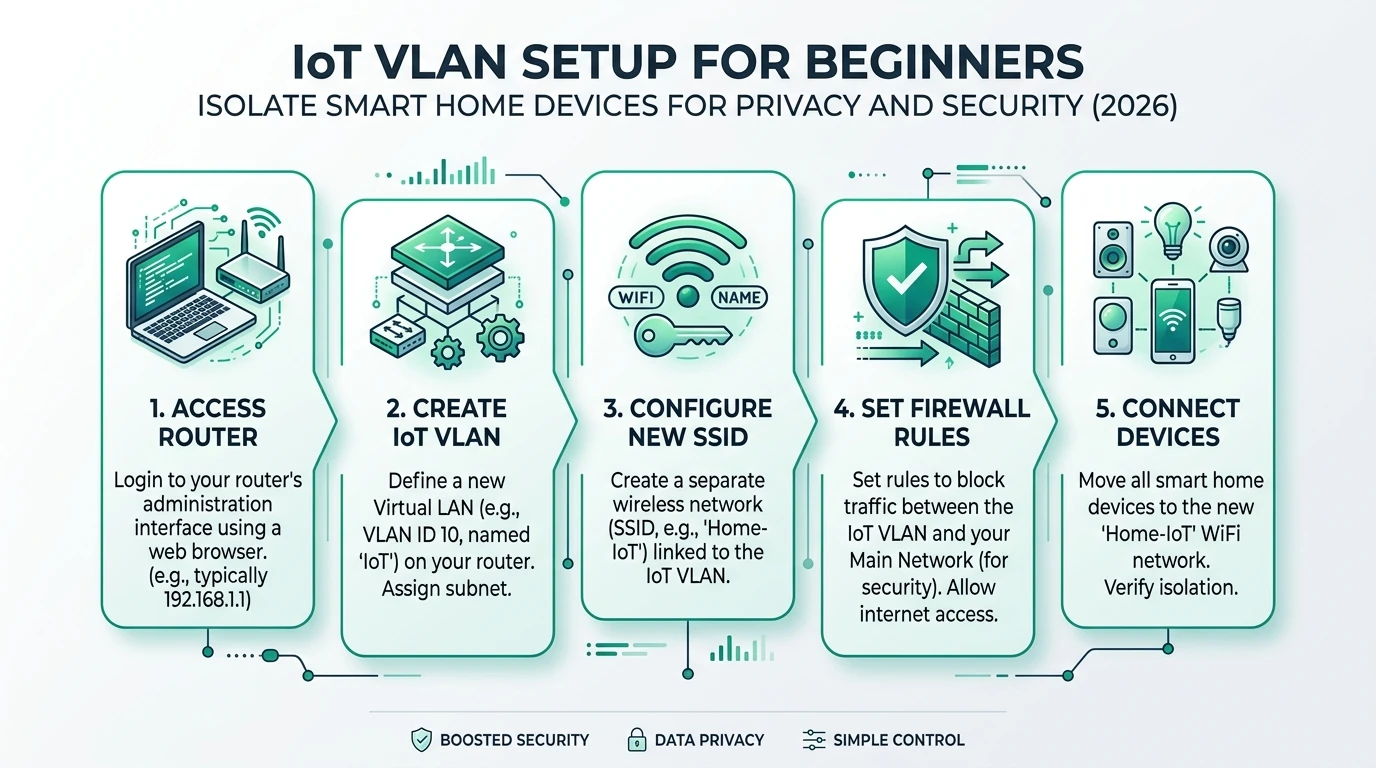
If you have not tagged VLANs yet, start with IoT VLAN setup for beginners or our segmented VLAN architecture.
- Interfaces → Assignments → VLANs — parent
igb1(LAN trunk), tag 40, descrCAMERAS. - Interfaces → Assignments — add
vlan0.40, enable, IPv410.12.40.1/24. - Services → DHCPv4 → CAMERAS — pool
.100–.200, static mappings for each camera MAC. - Services → Unbound DNS Overrides — optional
cam-front.home → 10.12.40.11for your own notes; cameras do not need public DNS in local-only mode.
Step 2 — OPNsense aliases (copy these names)
Firewall → Aliases → Aliases
| Name | Type | Members |
|---|---|---|
CAMERAS_NET | Network | 10.12.40.0/24 |
NVR_HOST | Host | 10.12.20.50 |
HA_HOST | Host | 10.12.20.42 |
TRUSTED_NET | Network | 10.12.10.0/24 |
RFC1918 | Network | 10.0.0.0/8, 172.16.0.0/12, 192.168.0.0/16 |
CAMERA_NVR_PORTS | Port | 554, 80, 443, 8000, 37777 |
NVR_UI_PORTS | Port | 8971, 5000, 8123 |
Adjust NVR_HOST if Frigate or Blue Iris lives elsewhere. Anecdotally, operators who stuff every camera brand into one giant port alias regret it when a cheap bullet starts scanning 445—keep CAMERA_NVR_PORTS minimal per your matrix row.
Step 3 — Firewall rules on the CAMERAS interface (vlan40)
Firewall → Rules → CAMERAS — rules evaluate top to bottom; first match wins.
| # | Action | Protocol | Source | Destination | Port | Description |
|---|---|---|---|---|---|---|
| 1 | Pass | IPv4 * | CAMERAS_NET | CAMERAS_NET address | — | Allow ARP/DHCP on-link |
| 2 | Pass | IPv4 TCP/UDP | CAMERAS_NET | LAN address | 67–68 | DHCP to firewall |
| 3 | Pass | IPv4 TCP | NVR_HOST | CAMERAS_NET | CAMERA_NVR_PORTS | NVR pulls RTSP/ONVIF |
| 4 | Pass | IPv4 TCP | HA_HOST | CAMERAS_NET | 554 | Optional: HA snapshot integrations only |
| 5 | Block | IPv4 * | CAMERAS_NET | RFC1918 | — | Deny east-west (log 7 days) |
| 6 | Block | IPv4 * | CAMERAS_NET | any | — | Default deny WAN (log) |
Rule 3 is the critical privacy hinge: stateful return traffic lets cameras reply to NVR SYN packets without a symmetric “cameras → NVR” pass. Do not add CAMERAS_NET → NVR_HOST pass—that would let compromised firmware scan your automation subnet.
Example OPNsense rule description (rule 3):
Pass IPv4 TCP — NVR_HOST → CAMERAS_NET — dest CAMERA_NVR_PORTS
Quick: yes | Log: no | Description: Frigate RTSP/ONVIF pull — Jul 2026
Step 4 — Automation VLAN: NVR egress toward cameras
On VLAN 20 (Automation), allow only the NVR to reach cameras:
| # | Action | Source | Destination | Port | Notes |
|---|---|---|---|---|---|
| 1 | Pass | NVR_HOST | CAMERAS_NET | CAMERA_NVR_PORTS | Frigate/ffmpeg pulls |
| 2 | Pass | NVR_HOST | any | 123 | NTP to firewall or pool |
| 3 | Block | AUTOMATION_NET | CAMERAS_NET | * | Everyone else denied direct RTSP |
Frigate may also use go2rtc on 127.0.0.1:8554 internally—no extra OPNsense row if ingest stays on-host.
Step 5 — Trusted VLAN: view through the NVR, not cameras
| # | Action | Source | Destination | Port | Notes |
|---|---|---|---|---|---|
| 1 | Pass | TRUSTED_NET | NVR_HOST | 8971 | Frigate UI (TLS) |
| 2 | Pass | TRUSTED_NET | HA_HOST | 8123 | HA dashboards / proxies |
| 3 | Block | TRUSTED_NET | CAMERAS_NET | * | No direct RTSP |
Steel-manning direct RTSP: VLC shortcuts to rtsp://10.12.40.11 work and feel faster. Rebuttal: every phone with a saved RTSP URL is a credential leak waiting to happen, and you bypass Frigate retention and object masks. If you must, add a host alias for one admin laptop—not the whole TRUSTED_NET.
Step 6 — Block camera DNS and DoH bleed-through
Cameras with hard-coded DNS will tunnel around VLAN policy if WAN :53/:443 opens. Pair camera denies with IoT DNS leak blocking and hard-coded DoH on OPNsense:
- Do not pass
CAMERAS_NET → ! LAN addressport 53 on WAN. - Optional: pass only
CAMERAS_NET → LAN addressport 53 during initial provisioning, then remove.
I haven’t tested every Reolink doorbell firmware build with WAN fully shut—some units nag for time sync until NTP to the firewall (allow UDP 123 to LAN address on a schedule if needed).
Validation: prove local-only in fifteen minutes
| Test | From | Command / action | Expected |
|---|---|---|---|
| RTSP pull | NVR host | ffprobe rtsp://10.12.40.11:554/h264Preview_01_main | Stream metadata |
| WAN block | Camera subnet laptop | curl -m 5 https://1.1.1.1 | Timeout / block log |
| East-west | Camera | ping 10.12.10.1 | Blocked |
| Viewer path | Trusted phone | open https://10.12.20.50:8971 | Frigate live view |
| Cloud off | Camera UI | confirm P2P disabled | No UID online |
Camera VLAN rule rollout
- Static DHCP reservations before enabling block rules.
- Export OPNsense config.xml to git-private backup.
- Log camera→WAN denies for 72 hours, then reduce noise.
- Disable UPnP/P2P in each camera firmware page.
- Verify Frigate detect/record roles on sub stream, not 4K main.
- Document each pass rule with vendor + date in description field.
- Re-test after OPNsense point upgrades (alias import quirks).
Camera isolation posture (editorial scoring, July 2026)
| Product | Cloud required | Local storage | Mandatory account | Offline control | Score / 10 |
|---|---|---|---|---|---|
| Flat LAN + Reolink app | Effectively yes (P2P) | microSD optional | Often | Weak | 3.1 |
| IoT VLAN shared with bulbs | Policy-dependent | NVR | No | Moderate | 6.4 |
| Dedicated camera VLAN + NVR pull rules | No (WAN denied) | Full NVR | No | Strong | 9.2 |
FAQ
Frequently Asked Questions
Should cameras or the NVR initiate RTSP connections?
The NVR initiates. Allow NVR → camera on RTSP/ONVIF ports; block camera → everything except established replies. Never add a blanket cameras → NVR pass.
Do I need a separate camera VLAN if I already have a general IoT VLAN?
Strongly recommended when you run an NVR. Cameras combine high bandwidth with notorious firmware; isolating them prevents ONVIF scanners from touching your bulbs’ MQTT brokers.
Will blocking WAN break camera firmware updates?
Yes unless you schedule a temporary pass or use a staging VLAN. Most readers update quarterly with a laptop on the camera subnet and a documented maintenance window.
Can trusted phones view cameras directly?
Route through Frigate or Home Assistant. Direct RTSP from phones to 10.12.40.x multiplies credential exposure and skips your retention policy.
Does ONVIF discovery need multicast across VLANs?
Not if you use static IPs. Avoid global mDNS repeaters just for cameras—see mDNS across VLANs on OPNsense only when you must.
Are these rules the same on pfSense?
Policy ports cleanly; UI labels differ. See OPNsense vs pfSense for smart home.
Primary Sources
| ID | Title / Description | URL |
|---|---|---|
| 1 | OPNsense — Firewall / packet filter | docs.opnsense.org |
| 2 | OPNsense — Interfaces and VLAN | docs.opnsense.org |
| 3 | Frigate — Camera specific (Reolink / RTSP) | docs.frigate.video |
| 4 | ONVIF — Network service overview | onvif.org |
| 5 | NIST SP 800-213 — IoT device cybersecurity | csrc.nist.gov |
| 6 | CISA — IoT security guidance | cisa.gov |
Verdict
OPNsense camera VLAN rules are not exotic: tag PoE cameras, alias the NVR, pass inbound pulls, block camera-initiated WAN and RFC1918. That is the difference between “I run Frigate” and “my cameras cannot exfiltrate even when firmware misbehaves.” Pair with firmware hardening (P2P off), egress filtering on other IoT segments, and quarterly alias audits.