How-To
Defending the Smart Home: OPNsense Rules to Block Lateral Movement
OPNsense IoT VLAN rules to block lateral movement: isolate TVs and assistants from LAN, NAS, and Home Assistant, with deny-by-default policy and selective allowed egress.
Quick answer: How do OPNsense IoT VLAN firewall rules stop lateral movement?
Put TVs, hubs, plugs, cameras, and voice assistants into a tagged IoT VLAN, then deny any new IPv4/v6 connections that originate from IoT destinations toward trusted LANs, NAS, management, printer, or Home Assistant subnets. Allow DHCP, DNS Resolver (or captive DNS redirect), HTTPS to the handful of domains or CDNs vendors require, explicit NTP toward the firewall, and nothing else unless you whitelist a narrowly scoped pinhole documented in firewall comments.
Executive Summary
Consumer IoT—including big-screen televisions with always-on microphones, cloud-first voice cylinders, Matter-over-Wi-Fi bulbs, and IP cameras—is increasingly treated as reusable infrastructure for attackers who pivot from compromised firmware or stolen credentials toward richer targets elsewhere on your LAN1. Researchers consistently document low patch cadence on home entertainment stacks, brittle vendor TLS validation, credential stuffing portals, and over-permissive multicast discovery that behaves like stealthy reconnaissance unless you tame it deliberately.
Defense does not demand expensive enterprise gear. Running OPNsense on a Protectli Vault, repurposed ThinkCentre, or other multi-NIC appliance gives you deterministic policy: VLAN tags become security boundaries written in firewall rules rather than vibes. PfSense behaves similarly—the FreeBSD-derived pf engine is comparable—but we standardize nomenclature on OPNsense’s MVC firewall UI plus built-in Resolver because it maps cleanly onto local-first labs we already documented for segmented smart homes.
Your objective is asymmetric trust. Trusted laptops, phones with banking apps, and storage loaded with backups sit in high-trust subnets. IoT subnets should only speak upstream to the WAN or to explicit service ports you enumerated. When a rogue smart TV probes for SMBv1 endpoints, Zigbee coordinators, Chromecasts, SSH on port 22, or Home Assistant dashboards, drop the packet locally, log anomaly counts, optionally feed CrowdSec, and iterate.
Bottom line: Design IoT egress as a spelled-out allowlist anchored on your firewall—not on device firmware promises. Explicitly block east-west chatter so that ransomware operators or nuisance botmasters cannot monetize compromised speakers as pivot nodes into your workstation VLAN.
Why Lateral Movement Is a Privacy Problem—not Only a Security Drama
“Lateral movement” is often explained with red-team language, yet the homeowner translation is sharper: attackers use an already-compromised but low-value device—say a kiosk-mode TV—as a beachhead from which they map internal IP ranges and attempt credential relays or plain-text interception on trusted segments2. Privacy-minded readers should care because the same reconnaissance exposes who is home (sensor patterns), copies media filenames from DLNA broadcasts, fingerprints NAS brands from banner grabs, scrapes Zigbee coordinators for automation metadata, or harvests mDNS PTR records leaking software versions.
Treat every IoT host as telemetry-generating—even when it is behaving—and assume its network stack eventually misbehaves. Segmentation minimizes how much incidental metadata bleeds sideways when benign apps become rogue.
Tactics households should plan for
| Attacker tactic (plain English) | What it looks like on the wire | VLAN policy counterweight |
|---|---|---|
| Network scanning | Bursts of TCP SYN sweeps across /24 subnets from a TV | IoT→LAN denies + Suricata home_net tuning |
| Credential brute force | RDP/SMB retries toward NAS or workstations | Dedicated NAS VLAN with lockout thresholds + forbid IoT |
| Service exploitation | HTTP POST to unsecured printer admin interfaces | Isolate printers; disallow IoT to printer mgmt IPs |
| Multicast recon | Queries for _googlecast._tcp, _matterc._udp, Chromecast discovery | Controlled Avahi/mdns-proxy or narrowly scoped UDP allows |
| DNS tunneling glow-up | High-entropy subdomain queries at odd intervals | Resolver logging + Sinkhole heavy repeat offenders |
Uncertainty remains on any given vendor patch timeline—you should disclose that when recommending aggressive blocking—so pairing deny rules with IDS visibility is honest engineering rather than theatrical fear.
Build the Reference Zones Before Touching Firewall Rules
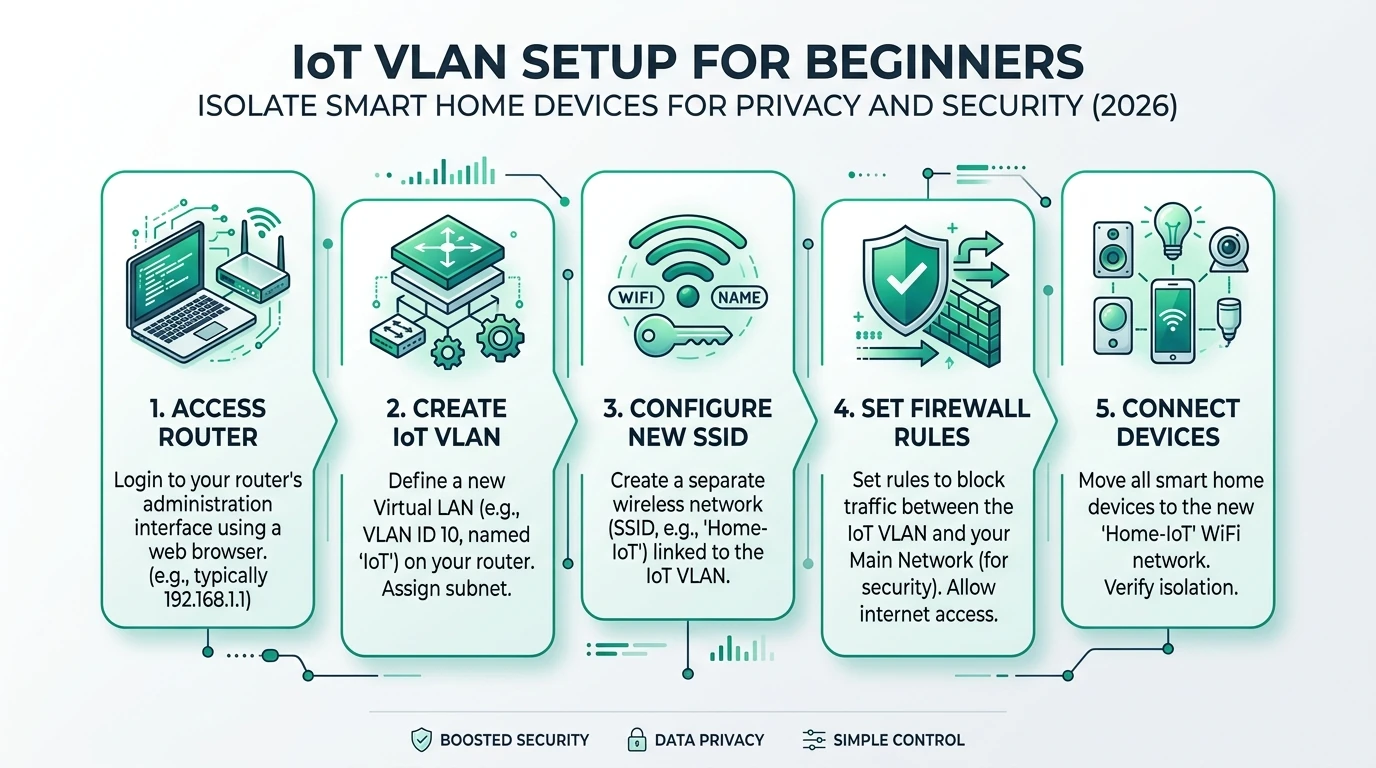
OPNsense already documented how to carve VLAN interfaces, assign gateways, DHCP pools, DHCP static reservations for hubs whose MAC addresses you verified, DNS overrides, firewall zones, NAT (where needed), and WireGuard tails for administrator remote access3. Readers who need scaffolding should walk our dedicated IoT VLAN setup guide first4.
A pragmatic lab layout separates management, automation, noisy entertainers, and bulk storage:
| Zone | Example VLAN tag | RFC1918 excerpt | Principals seated there |
|---|---|---|---|
| Trusted | 10 | 10.12.10.0/24 | Laptops, phones, trusted tablets |
| Automation | 20 | 10.12.20.0/24 | Home Assistant, Node-RED containers, Zigbee coordinators |
| IoT-general | 30 | 10.12.30.0/24 | Speakers, plugs, Matter Wi-Fi peripherals, televisions |
| Cameras/NVR | 40 | 10.12.40.0/24 | RTSP bridges, Coral TPU ingest, doorbell relays |
| Guest | 90 | 10.12.90.0/24 | Visitors phones; WAN-only egress |
| Mgmt | 99 | 10.12.99.0/24 | Switch/AP IP management; MFA-only admins |
Firewall evaluation order matters: interfaces tab → floating rules tab if you mirrored advanced labs—document your sequencing so troubleshooting does not devolve into whack-a-mole. Maintain aliases like RFC1918, WAN_NET, AUTO_SUBNET, NAS_SUBNET.
Deny-by-Default Semantics Under pf
OPNsense’s default-deny WAN posture is textbook; segmented LANs replicate that ethos per-interface. Stateful inspection means you mostly reason about first packet direction: who initiated the conversation? Trusted initiators can complete sessions to IoT (for MQTT or vendor APIs); IoT-initiated flows attempting to stab trusted hosts must terminate unless you sculpted an exception anchored to RFC8806-compliant documentation.
| Concept | Operational meaning |
|---|---|
| Pass on interface | Permits packets entering that interface before routing |
| Quick flag | Stops evaluating further conflicting rules once matched |
| Reply-to | Used with multi-WAN—you usually avoid on IoT except policy routing |
| Logging | Use sparingly; pair with syslog export or Insight graphs |
| Schedules / tags | Handy when kids’ TVs lose midnight cloud gaming patches |
PfSense equivalents exist with near-identical labels; divergence is UX—both retain pf anchors.
Authoritative IoT VLAN Rule Skeleton (IPv4 illustrative)
Assume interface vlan30 fronts general IoT, vlan20 fronts automation trusted enough to originate control sessions. Order shown is conceptual—merge with your WAN anti-spoof floats.
| Priority | Macro description | Typical action |
|---|---|---|
| 1 | DHCP + DHCPv6 essentials on-link | PASS from IoT VLAN to firewall for ports 67-68 helper traffic |
| 2 | ICMP echo to gateway for troubleshooting window | PASS then disable after stabilization |
| 3 | Resolver / DNS forward captive path | PASS to LAN address of Resolver or redirection IP |
| 4 | Explicit allowlist egress (HTTPS 443 TCP, optional 853 DoT outbound) toward vendor CDNs/IP sets | PASS with aliases like APPLE_VOICE_APIS, GOOGLE_TV_CIDR rebuilt monthly |
| 5 | NTP steer to firewall or local stratum | PASS UDP/TCP 123 to FW_ADDRESS |
| 6 | Default deny IPv4 IoT initiated to Trusted + Automation subnets | BLOCK + log bursts |
| 7 | Duplicate for IPv6 if you foolishly expose ULAs to IoT at all |
Why separate automation from IoT-general? Zigbee coordinators and ESPHome nodes still push telemetry you may not want blasting untrusted subnets, yet Home Assistant orchestration often needs unsolicited writes that would break if TVs could impersonate MQTT brokers. Isolate TV VLAN further if binge hardware vendors ship hyper-aggressive scanners.
Controlled multi-VLAN coexistence aligns with comparative guidance on segmented architectures published alongside our VLAN starter doc5.
See also blocking smart home WAN access once you stabilize east-west denies.
Device-Class Guidance: Screens, Speakers, Assistants
| Device archetype | Most dangerous lateral urge | Surgical mitigations beyond blanket deny |
|---|---|---|
| Smart TV / streamer dongle | DLNA enumeration, Chromecast mDNS raids, plaintext HTTP updater endpoints | Narrow UDP allows for Chromecast only if casting needed; segregate televisions from Matter bulbs |
| Cloud voice cylinders | Local discovery of casting targets, probing printers | Force DNS through Resolver; disallow IoT VLAN to printer administration ports |
| Matter commissioning phones | Bluetooth/Wi-Fi coupling windows | Keep ephemeral MAC policies on Wi-Fi WPA3 Enterprise if advanced; VLAN hop only during deliberate maintenance |
| IP cameras | ONVIF port-knocking across LAN | Dedicated camera VLAN denies everything except NVR IPs on RTSP/tcp 554 + health checks |
Maintain versioned spreadsheets of vendor endpoints when you widen HTTPS allowlists; privacy posture decays silently when dormant cloud domains revive.
Instrumentation complements blunt denies
Stateful VLAN blocks eliminate casual opportunistic scanning—the class of nuisance traffic that survives because flat networks never challenged it—but deterministic rules do not magically explain why a plug suddenly chatted with a Colombian VPS. Pair east-west denies with passive telemetry on IoT-facing interfaces rather than blindly scaling IPS throughput you never review.
Deploy Suricata in IDS mode against your IoT VLAN first. Inline IPS is seductive yet brittle when streaming televisions ship firmware that fingerprints oddly; begin with alerting, escalate only after validating false-positive tolerance with household stakeholders who refuse “another router reboot night.” Emerging Threat Open rules tuned to HOME_NET exclusions keep noise manageable while exposing horizontal scan bursts that deserve immediate alias tightening6.
If you adopt CrowdSec bouncers (os-crowdsec plugin ecosystem) treat reputation feeds as adjuncts to—not replacements for—local policy. IPs that pivot through residential DHCP pools churn quickly; reputational bans help WAN ingress more than nuanced IoT egress where vendors ride shared CDNs.
Zenarmor trial tiers can annotate application fingerprints when debating whether a benign-looking TLS flow is telemetry or patching. DPI ups privacy debate because decrypting TLS is usually off-brand for homeowner labs; DNS logging plus SNI-heavy metadata from Zenarmor’s passive mode often resolves arguments without brittle MITM rigs.
Splunk-ing OPNsense is optional; exporting filterlog lines to Grafana Loki or plain rsyslog on an automation VLAN syslog VM keeps local sovereignty intact while satisfying curiosity about chronological correlation between voice-assistant wakeword chatter and unexplained denies.
Optional scoring rubric anchors reader intuition:
Segmentation hardness vs usability trade-offs
| Product | Cloud required | Local storage | Mandatory account | Offline control | Score / 10 |
|---|---|---|---|---|---|
| Flat consumer Wi-Fi | Often yes | Router flash only | Usually yes | Limited | 2.9 |
| Single IoT VLAN + WAN block | Optional per device | DIY | No for router | Partial | 6.8 |
| Multi-VLAN deny-by-default via OPNsense | Cloud-optional by policy | Full syslog + PCAP possible | No | Strong | 9.4 |
Controlled Pinholes: Home Assistant Without Opening the Floodgates
Readers running local Home Assistant stacks should avoid symmetric “trust IoT VLAN” impulses. Prefer:
- Stateful pass inbound on automation interface originating from HA IP destined to narrowly aliased Zigbee gateways (HTTP or manufacturer APIs only).
- Deny mirrored return path from IoT to HA except response packets already permitted via state table.
- Use reverse proxies terminating TLS (
443→8123) only on automation VLAN—not IoT—for remote operator access bridged via WireGuard. - For Matter multi-admin sync, scrutinize commissioning tokens; ephemeral QR codes lessen exposure when LAN discovery is tightened.
Multicast bridging discussions appear in depth in our mdns VLAN explainer7; adopt Avahi proxies only after packet captures prove necessity.
DNS privacy complements firewall posture—see blocking IoT DNS leaks for captive Resolver patterns that align with segmented VLAN denies.
Operational Rhythm: Quarterly Alias Audits Matter More Than Fancy Diagrams
The hidden failure mode for gorgeous VLAN diagrams is bit rot on outbound allow aliases. CDN front doors for voice assistants reshuffle BGP announcements; HDR streaming boxes phone home through newly acquired startup domains forgotten on last quarter’s spreadsheets. Without cadence you either starve televisions of manifests they legitimately require or quietly re-open permissive wildcard allows “just until the weekend”—which inexplicably becomes permanent.
Establish a ninety-day playbook:
- Export sanitized
conf.xml, diff against previous revision in git (private repo only). - Replay PCAP or Resolver query logs categorized by entropy—flag queries not matching documented vendor lists.
- Refactor bloated HTTPS alias objects into hierarchical groups (“VoiceVendor-Core”, “VoiceVendor-CDN-Edge”).
- Retire pinholes referencing deprecated hardware sold on eBay lest buyers inherit mythical holes labeled “old Samsung panel.”
Document outages transparently inside rule descriptions (OPNsense allows multi-line annotations). Household operators deserve audit trails explaining why Chromecast required ephemeral UDP widening during playoff season—even if revisiting feels tedious.
Correlation with WAN posture helps: denying IoT WAN entirely per our WAN-blocking companion changes alias workload because devices either fail loudly or funnel through captive HTTP error pages—useful when deciding whether televisions truly need unrestricted ASNs.
Emergency rollback should never depend on WAN-only GUIs. Maintain serial console dongles, mirrored management VLAN jump boxes, or at minimum offline copies of minimal working rulesets importable via CLI when UI lockouts occur—a rare but memorable operator lesson.
Validation Checklist Operators Actually Run
- From guest wireless, traceroute verifies default route through OPNsense without exposing internal names.
- From IoT Wi-Fi VLAN, ping home assistant LAN IP fails (blocked) yet browsing vendor status page succeeds if HTTPS allow intact.
- Suricata on IoT interface logs zero unexpected SMB chatter after binge-watching streamed 4K test pattern for an hour—scripted televisions often misbehave silently.
- Wireshark PCAP on mirrored switch SPAN corroborates mDNS suppressed except approved repeaters.
Deploy / audit IoT VLAN deny rules safely
- Freeze MAC reservations for coordinators and speakers before cloning rules.
- Mirror alias membership for WAN CDNs quarterly (vendors reshuffle GCP buckets).
- Escalate logging only during rule pilot week; downgrade afterwards.
- Export sanitized `config.xml` backups off-box after milestone changes.
- Exercise rollback plan: VLAN lockout consoles through serial or IP KVM.
- Pair east-west denies with egress DNS capture to spot DoH bleed-through.
- Document rationale per rule—future you will forget why Chromecast needed UDP allowance.
FAQ
Frequently Asked Questions
Do these rules replace antivirus on PCs or phones?
No. Host protections still matter on trusted machines. VLAN policy shrinks blast radius when TVs, hubs, or speakers are abused as pivot hosts; it cannot fix malware that already compromises an administrator workstation.
Should IoT VLAN clients use the firewall as DNS Resolver?
Yes, wherever practical. Sending IoT VLAN DNS through Unbound on OPNsense exposes queries where you can log or filter them, instead of honoring hard-coded DNS-over-HTTPS endpoints on the IoT VLAN. Pair with WAN blocking documented in related guides once you stabilize Resolver answers.
Does blocking IoT→LAN break Chromecast, AirPlay, or Matter commissioning?
Some casting stacks require selective multicast bridging or narrowly scoped UDP pass rules. Pilot each entertainment workflow with packet captures rather than blindly opening entire IoT subnets to automation VLANs—home privacy wins when multicast is rationed deliberately.
Are these rules identical on pfSense?
The underlying firewall engine is materially the same. Menu labels differ between OPNsense MVC and pfSense forms, yet the mantra—deny IoT-initiated flows to trusted LAN—is portable. Readers comparing platforms can still follow our comparative pfSense rundown8.
How do I exempt Home Assistant safely?
Allow HA to originate control sessions toward IoT, not the reverse blanket allow. Narrow alias/IP membership, constrain ports per integration, and forbid IoT subnets from initiating to HA dashboards unless a vendor absolutely requires symmetrical flows—those cases deserve explicit ticketing.
What logging load should I expect?
Noisy televisions can saturate local logs quickly. Prefer remote syslog with rotation, Insight dashboards, or short pilot windows with verbose deny logging promoted to quieter steady-state denies without logging afterwards.
Primary Sources
| ID | Title / Description | URL |
|---|---|---|
| 1 | NIST SP 800-213 — IoT device cybersecurity guidance for customers | csrc.nist.gov |
| 2 | CISA — Internet of Things security topic hub | cisa.gov |
| 3 | OPNsense manual — Firewall / packet filter | docs.opnsense.org |
| 4 | OPNsense Wiki — Interfaces and VLAN primer | docs.opnsense.org |
| 5 | MITRE ATT&CK — lateral movement tactic | attack.mitre.org |
| 6 | OWASP — Internet of Things Project | owasp.org |
| 7 | IEEE 802.1Q bridging / VLAN tagging overview site | ieee802.org |
| 8 | Suricata open-source IDS/IPS project | suricata.io |
| 9 | Emerging Threats Open rules (common Suricata feed) | rules.emergingthreats.net |
Conclusion
Lateral containment is fundamentally a policy problem expressed as routing. OPNsense simply gives deterministic knobs: VLAN tags tied to cryptographic Wi-Fi WPA3 ESSIDs (Passphrase + PMF), stateful denies from IoT sources toward richer subnets, selective HTTPS allow aliases that you refresh as vendor CDNs rotate, Resolver logging tying DNS secrecy work to east-west denies, Suricata for residual anomaly detection—all without handing cloud dashboards the keys.
You still own maintenance: patching the firewall itself weekly, rewriting aliases when Hulu’s CDN footprints shift, resisting convenience toggles like “temporary allow RFC1918 for debugging” unless ticketed—because convenience erodes locality faster than ransomware operators spin up phishing landing pages2.
Document your playbook, rehearse restores, collaborate with household members whose streaming habits stress test policy, revisit rules after every new Matter device QR scan. Segmentation buys time to revoke credentials calmly instead of ripping Ethernet during dinner.
If you migrate hardware later, exporting rule JSON through OPNsense’s API retains intent more faithfully than photographing GUI screenshots—particularly when scaling from one IoT VLAN to screen-specific VLANs as threat models evolve.
Footnotes
-
CISA’s IoT security publications summarize ongoing threats from insecure defaults, weak update channels, and device classes frequently deployed on home LANs without enterprise governance. ↩
-
MITRE ATT&CK lateral movement tactic entries catalog network service scanning, credential reuse, remote services abuse—patterns mapped here to VLAN mitigations conceptually rather than asserting live campaign telemetry inside your LAN. ↩ ↩2
-
OPNsense manual sections on firewall and interface VLAN assignment document how
pfpolicies attach to VLAN parent interfaces plus Resolver integration. ↩ -
See /guides/iot-vlan-setup-for-beginners-smart-home-privacy-2026. ↩
-
Broader segmented VLAN deployment references live at /guides/setting-up-a-separate-vlan-for-smart-home-devices-privacy. ↩ ↩2
-
Suricata rule feeds such as Emerging Threat Open are commonly paired with segmented
HOME_NETdefinitions to alert on internal scan behavior without assuming a specific breach inside your LAN. ↩ -
Multicast and mDNS VLAN bridging trade-offs documented at /guides/mdns-cross-vlan-smart-home-discovery-privacy-2026. ↩ ↩2
-
See /guides/opnsense-vs-pfsense-for-smart-home-network-security-2026 for roadmap-level platform differences impacting lab ergonomics even when
pfrules themselves align. ↩ ↩2