How-To
IoT VLAN Setup for Beginners: Secure Your Smart Home
Learn how to set up VLANs to isolate IoT devices for enhanced privacy and security in your smart home by 2026.
Quick answer:
Executive Summary
Setting up a VLAN for your IoT devices is a crucial step in securing your smart home network. By isolating these devices from your main network, you can significantly reduce the risk of breaches and unauthorized access. This guide provides a comprehensive, step-by-step approach to VLAN setup, focusing on beginner-friendly instructions using popular systems like UniFi and TP-Link. You’ll learn about the privacy benefits, local control options, and offline reliability that come with a well-configured VLAN.
Bottom line: Implementing a VLAN for IoT devices enhances your home’s security and privacy, ensuring that your smart devices operate safely and efficiently without compromising your personal data.
Understanding VLANs and Their Importance
Virtual Local Area Networks (VLANs) are a powerful tool for network segmentation, allowing you to create isolated networks within a single physical network infrastructure. This is particularly beneficial for smart homes, where numerous IoT devices can pose security risks if not properly managed.
VLANs work by assigning separate IP ranges to different network segments, effectively isolating traffic and preventing unauthorized access between them. For instance, you can create a VLAN specifically for IoT devices, ensuring that they cannot communicate with devices on your trusted network. This isolation is crucial for preventing lateral attacks, where a compromised device could be used to access sensitive data on other devices.
The importance of VLANs in a smart home setting cannot be overstated. With the increasing number of connected devices, each potentially vulnerable to cyberattacks, VLANs provide a robust layer of security. They help mitigate risks associated with IoT devices, which are often targeted by hackers due to their limited security features.
Moreover, VLANs offer enhanced privacy by restricting IoT devices from initiating connections to your main network. This means that even if an IoT device is compromised, it cannot be used to access personal data stored on your computers or smartphones. By implementing VLANs, you can maintain a high level of control over your network, ensuring that your smart home remains secure and private.
If you already split guest Wi-Fi from IoT, see our guest Wi-Fi vs IoT VLAN comparison. For layered policy (DNS, blocking, Zigbee coordinators), combine this guide with how to block smart home devices from the internet.
Beginner glossary
| Term | Plain-English meaning |
|---|---|
| VLAN ID | A tag (e.g. 20) the switch/AP adds so traffic stays in the right “lane.” |
| Subnet | The IP pool for that lane (e.g. 192.168.20.0/24). |
| Trunk port | A cable carrying multiple VLAN tags—common between router and managed switch1. |
| Firewall rule | A policy that decides which VLANs may start new conversations with which2. |
Reference standards: VLANs are defined in IEEE 802.1Q; this guide stays vendor-agnostic so you can apply the same concepts on UniFi, Omada, or OpenWrt.
Step-by-Step Guide to Setting Up a VLAN
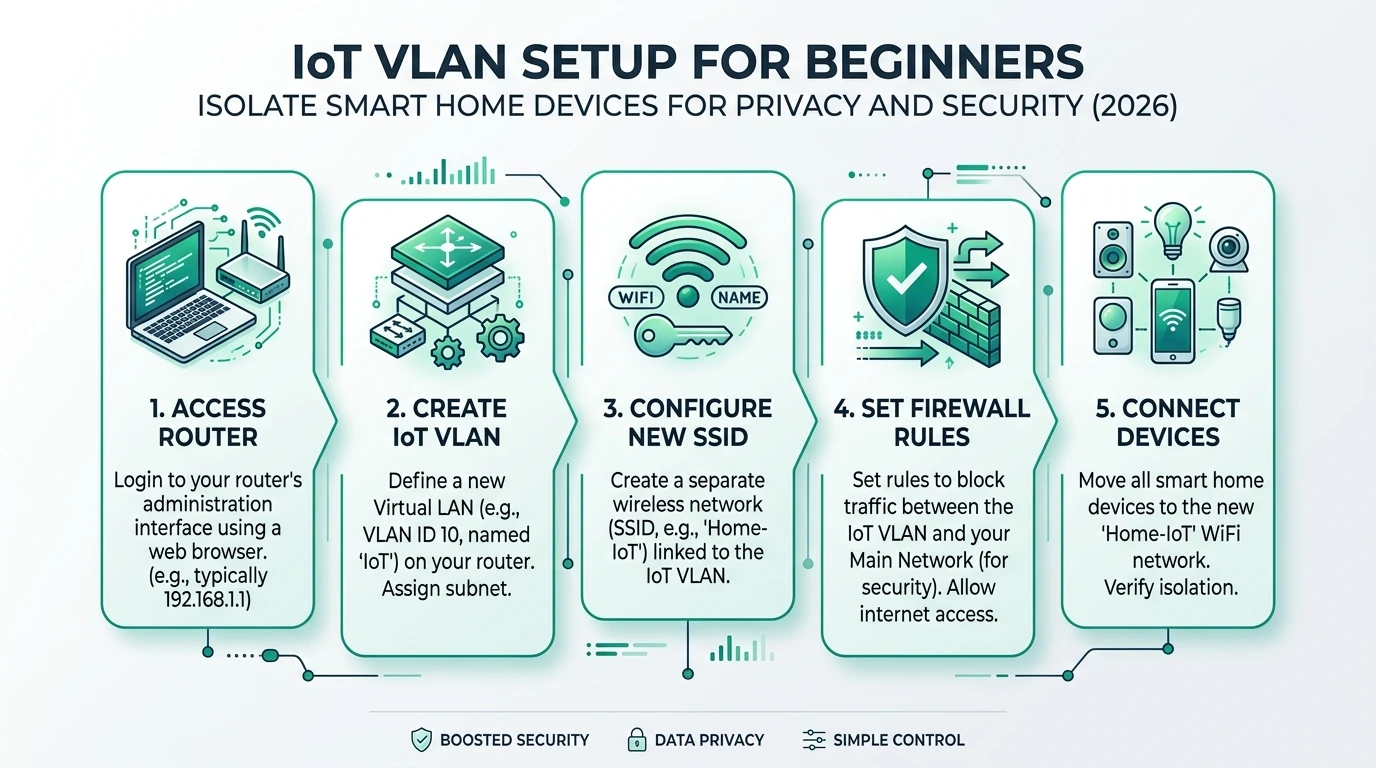
Setting up a VLAN for your IoT devices involves several key steps. This guide will walk you through the process using popular systems like UniFi and TP-Link, ensuring a smooth and effective setup.
Step 1: Create a VLAN
The first step is to create a VLAN on your router. This involves accessing your router’s settings and defining a new VLAN with a unique ID and IP range. For example, you might assign VLAN ID 20 with an IP range of 192.168.20.0/24 for your IoT devices. This step is crucial for isolating IoT traffic from your main network.
Step 2: Configure WiFi SSID
Next, configure a separate WiFi SSID for your IoT devices. This ensures that all IoT devices connect to the designated VLAN, keeping them isolated from other devices on your network. Use WPA3 encryption for enhanced security, and consider naming the SSID something like “Home-IoT” for easy identification.
Step 3: Set Up Firewall Rules
Firewall rules are essential for controlling traffic between VLANs. Configure your router to block any new connections initiated by IoT devices to your trusted network. This prevents unauthorized access and ensures that IoT devices can only communicate with the internet or specific devices you allow.
Step 4: Test and Verify
After setting up the VLAN, it’s important to test and verify that everything is working as expected. Check that IoT devices are connecting to the correct VLAN and that firewall rules are effectively blocking unwanted traffic. This step ensures that your network is secure and that your IoT devices are properly isolated.
Step 5: Monitor and Maintain
Finally, regularly monitor your VLAN setup to ensure it continues to function correctly. Update firewall rules as needed and check for any new vulnerabilities that may arise. Regular maintenance is key to keeping your smart home network secure.
Privacy and Security Benefits of VLANs
Implementing VLANs in your smart home network offers significant privacy and security benefits. By isolating IoT devices, you can prevent unauthorized access and protect your personal data from potential breaches.
Enhanced Privacy
One of the primary benefits of VLANs is enhanced privacy. By restricting IoT devices from accessing your main network, you can prevent them from collecting or transmitting sensitive data. This is particularly important for devices that connect to cloud services, as it reduces the risk of data exfiltration.
Improved Security
VLANs also improve security by limiting the potential attack surface. By isolating IoT devices, you can prevent lateral attacks, where a compromised device is used to access other devices on your network. This is crucial for protecting sensitive data and ensuring the integrity of your network.
Local Control
VLANs provide greater local control over your network. By configuring firewall rules, you can specify exactly which devices can communicate with each other, ensuring that only authorized traffic is allowed. This level of control is essential for maintaining a secure and efficient smart home network.
Offline Reliability
Finally, VLANs offer offline reliability by ensuring that IoT devices can continue to function even if your internet connection goes down. By configuring separate DHCP servers for each VLAN, you maintain local network functionality for automation even when WAN is down—as long as your controller and Zigbee/Matter radios stay reachable (see mDNS across VLANs for selective exceptions).
Typical privacy posture by router class (IoT VLAN)
| Product | Cloud required | Local storage | Mandatory account | Offline control | Score / 10 |
|---|---|---|---|---|---|
| ISP all-in-one (VLAN-limited) | Varies | N/A | Often yes (ISP app) | Partial | 4.5 |
| TP-Link Omada / UniFi stack | Optional cloud UI | Controller local option | Often optional if self-hosted | Strong with rules | 7.8 |
| OpenWrt / pfSense / OPNsense | None for core UI | Full local logs | None | Excellent | 8.6 |
Policy checklist (what “good” looks like)
| Rule pattern | What it blocks | Why it helps privacy |
|---|---|---|
| IoT → LAN deny new sessions | Cameras talking to laptops | Stops lateral movement after a breach2 |
| IoT → DNS redirect to Pi-hole/AdGuard | Hardcoded 8.8.8.8 lookups | Reduces telemetry and DNS bypass (pair with our DNS leak guide) |
| Management VLAN only for APs/switches | Everyday clients opening switch UI | Shrinks blast radius2 |
When Home Assistant must reach Matter/Thread bridges on IoT, prefer narrow allow-lists (single IPs/ports) over wide “allow all VLAN 20”, as modeled in our full VLAN segmentation guide.
Choosing the Right Equipment for VLAN Setup
Selecting the right equipment is crucial for a successful VLAN setup. This section will guide you through the key considerations and options available, ensuring that you choose the best hardware for your needs.
Routers and Switches
The foundation of any VLAN setup is a capable router and, if necessary, a managed switch. For most home setups, a VLAN-capable router like the UniFi Dream Machine or TP-Link ER605 will suffice. These routers offer user-friendly interfaces and robust VLAN support, making them ideal for beginners.
If you have a large number of devices or require multiple access points, a managed switch may be necessary. Managed switches allow for more granular control over VLAN configurations and can support larger networks with multiple VLANs.
Access Points
Access points (APs) are essential for extending your network’s reach and ensuring reliable connections for all devices. When selecting APs, look for models that support VLAN tagging and offer strong security features like WPA3 encryption. This ensures that your IoT devices remain isolated and secure.
Cost Considerations
When budgeting for your VLAN setup, consider both the initial hardware costs and any ongoing maintenance expenses. While a basic setup can be achieved with a $150 router, additional costs may arise if you need a managed switch or multiple APs. However, the investment is worthwhile for the enhanced security and privacy benefits.
Hidden Costs
Be aware of potential hidden costs, such as the time required to migrate devices to the new VLAN and any professional installation fees if you choose not to set up the network yourself. Additionally, some IoT devices may require manual configuration to work with the new VLAN, adding to the setup complexity.
Checklist
- Choose a VLAN-capable router
- Consider a managed switch for large networks
- Select APs with VLAN support
- Budget for initial and ongoing costs
- Plan for device migration and configuration
Common Challenges and Solutions in VLAN Setup
Setting up a VLAN for your IoT devices can present several challenges, especially for beginners. This section addresses common issues and provides practical solutions to ensure a smooth setup process.
Device Compatibility
One of the most common challenges is device compatibility. Some IoT devices may not support VLANs or may require manual configuration to connect to the new network. To address this, check the manufacturer’s documentation for VLAN support and be prepared to manually configure devices if necessary.
Network Performance
Another challenge is maintaining network performance. VLANs can introduce additional complexity, potentially affecting network speed and reliability. To mitigate this, ensure that your router and switch are properly configured and that you have sufficient bandwidth to support all devices.
Security Configuration
Configuring security settings can also be challenging, particularly for those unfamiliar with firewall rules and network protocols. To simplify this process, use pre-configured templates or guides provided by your router manufacturer. These resources can help you set up effective firewall rules and ensure that your network remains secure.
Troubleshooting
Finally, troubleshooting issues can be difficult, especially if you’re not familiar with network diagnostics. If you encounter problems, start by checking your VLAN configuration and firewall rules. Ensure that all devices are connected to the correct VLAN and that there are no conflicting settings. If necessary, consult online forums or seek professional assistance.
Primary Sources Table
| Index | Title/Description | Direct URL |
|---|---|---|
| 1 | Setting Up VLANs for IoT Devices: Secure Your Smart Home Network (UniFi steps) | Visit Source |
| 2 | Ultimate AP configuration guide for IoT - WiFi, VLANs, firewall (YouTube transcript) | Visit Source |
| 3 | Setting up a VLAN for your IOT devices (60-device migration) | Visit Source |
| 4 | How to Set Up VLANs for Smart Home Security (Steps with switch) | Visit Source |
| 5 | The 5 VLANs Every Home Network Should Have! (YouTube: Grandstream/UniFi/TP-Link) | Visit Source |
| 6 | 5 VLAN rules every smart home should have (XDA: IoT not for mgmt) | Visit Source |
| 7 | up to date guide to iot vlan (Ubiquiti Community: UI updates needed) | Visit Source |
Conclusion
Implementing VLANs for your IoT devices is a vital step in securing your smart home network. By isolating these devices, you can enhance privacy, improve security, and maintain local control over your network. While the setup process may present challenges, the benefits far outweigh the initial effort. With the right equipment and a clear understanding of the steps involved, you can create a secure and efficient network that protects your personal data and ensures the smooth operation of your smart home.
Frequently Asked Questions
What is a VLAN and why is it important for IoT devices?
A VLAN (Virtual Local Area Network) isolates network segments, enhancing security by preventing unauthorized access between devices. This is crucial for IoT devices, which often have limited security features.
How do I set up a VLAN for my smart home?
To set up a VLAN, create a new VLAN on your router, configure a separate WiFi SSID for IoT devices, and set up firewall rules to block unauthorized traffic.
What equipment do I need for VLAN setup?
You’ll need a VLAN-capable router, and possibly a managed switch and access points, depending on the size of your network and number of devices.
What are the privacy benefits of using VLANs?
VLANs enhance privacy by isolating IoT devices from your main network, preventing them from accessing or transmitting sensitive data.
Are there any hidden costs associated with VLAN setup?
Potential hidden costs include the time required for device migration and any professional installation fees. Some IoT devices may also need manual configuration.