Comparisons
Frigate vs Scrypted vs UniFi vs Blue Iris: NVR Hub
Best local NVR software in 2026: Frigate, Scrypted, UniFi Protect, and Blue Iris compared for cloud dependency, licensing, hardware, and privacy-first deployments.
The best local NVR software in 2026 depends on whether you own Ubiquiti cameras, need to bridge Ring or Arlo feeds, or want a fully auditable Linux stack. Frigate is the open-source detector and recorder most Home Assistant users deploy with Coral or Hailo acceleration. UniFi Protect is the integrated NVR inside UNVR and UDM consoles—polished, local-first, but hardware-locked. Blue Iris is the mature Windows VMS for mixed ONVIF fleets at a $69.95 one-time license (pricing checked 19 August 2026). Scrypted is the stream-normalization layer that makes cloud cameras and HomeKit tiles usable before footage hits Frigate or a Windows recorder. As of August 2026, no single product wins every column; this hub maps the four stacks so you stop bouncing between fragmented comparison pages.
Quick answer: What is the best local NVR software in 2026?
Frigate for open-source AI detection with Home Assistant on any RTSP camera. UniFi Protect for polished recording inside Ubiquiti consoles. Blue Iris for dense ONVIF mixes on Windows. Scrypted when you must bridge cloud cameras or publish HomeKit live view—often paired with Frigate downstream.
Source: Frigate, Scrypted, Ubiquiti, and Blue Iris documentation
Executive summary
Methodology: We compared Frigate 0.15 hardware guidance, Scrypted plugin documentation, Ubiquiti Protect 5.1.x local-management notes, and Blue Iris 5.9 licensing pages—all accessed 14–19 August 2026—then normalized them into an eight-criterion scoring matrix weighted for privacy-conscious homes. Pricing was checked on vendor sites the same week. CPU figures below are planning classes from community reports, not lab captures on identical firmware.
Verdict: For Elena, a Minneapolis homeowner with four Reolink RLC-810A PoE cameras and Home Assistant 2026.8, Frigate on an N100 with QuickSync and a Coral USB is the right default—detection, retention, and automations stay inside YAML she can audit. For Sandra, who spent $2,100 on G5 Bullets and a UNVR Pro in 2025, UniFi Protect is rational: ripping cameras for Frigate costs more than firewall-hardening the console. For James, a Windows admin with ten mixed ONVIF brands, Blue Iris remains defensible. For Tom, who keeps three Arlo Pro 5 units and watches feeds on HomePods, Scrypted first (with Frigate downstream) is pragmatic even though OAuth adds fragility. Where I’m less sure—exact Protect smart-detection accuracy versus Frigate plus Coral on identical 4K substreams—the data is thin; run a weekend trial before you rip out working recorders.
What each platform actually does
Buyers conflate these products because all four can record locally. They optimize different layers of the stack.
| Layer | Frigate | Scrypted | UniFi Protect | Blue Iris |
|---|---|---|---|---|
| Primary job | Object detection + clip retention | Stream bridge + rebroadcast | Integrated VMS on Ubiquiti hardware | Continuous Windows VMS |
| Host OS | Linux, Docker, HA OS | Linux, Docker, macOS | UniFi OS on console | Windows 10/11 or Server |
| License | Open source (MIT) | Open core; NVR plugin paid | Bundled with hardware | $69.95 one-time1 |
| Best input | RTSP, go2rtc, ONVIF | Vendor plugins + RTSP | UniFi cameras (limited 3rd-party) | ONVIF, RTSP, USB, DirectShow |
| AI detection | Coral, Hailo, OpenVINO, GPU | Plugin or Frigate bridge | On-camera + console AI | CPU, GPU, sidecar analytics |
| Home Assistant | First-class integration | Plugin bridge | Local API key integration | MQTT / HTTP workarounds |
Network Video Recorder (NVR) software records and indexes video locally. Scrypted is not always an NVR—it is often the upstream adapter that feeds a real NVR like Frigate or Protect. Treating Scrypted as a drop-in replacement for Frigate or Protect is the most common buyer mistake we see in r/homeassistant threads dated July–August 2026.
Licensing, hardware, and total cost
Software license cost and hardware lock-in diverge sharply across the four stacks.
| Cost line (6-camera reference, Aug 2026) | Frigate | Scrypted | UniFi Protect | Blue Iris |
|---|---|---|---|---|
| Software license | $0 (MIT) | $0 core; NVR plugin ~$20/yr2 | $0 subscription | $69.95 one-time1 |
| NVR hardware | N100 mini PC ~$180–220 | Same host or second N100 | UNVR Pro $4993 or UDM $379+ | Windows PC ~$250–400 reused |
| AI accelerator | Coral USB ~$60–80 or Hailo-8 ~$120 | Via Frigate plugin | Bundled on G5/G6 | CPU/GPU or sidecar |
| Typical 6-cam PoE total | $700–950 | $750–1,000 (dual-stack) | $1,450–1,8003 | $550–900 (+ Windows) |
| Vendor lock-in | Low (any RTSP) | Plugin-dependent | High (UniFi cameras) | Low (ONVIF) |
Stat: A UNVR Pro ($499 list) plus four G5 Bullets (~$179 each) lists near $1,215 before storage drives—roughly 1.5–2× a comparable Frigate box with Reolink PoE cameras, pricing checked store.ui.com 19 August 2026.
Anecdotally, buyers who price only the NVR license and ignore camera ecosystem tax underestimate Protect TCO by 40–60%. I have not tested every Cloud Gateway SKU against UNVR Pro retention math; your mileage will vary with drive count and retention days.
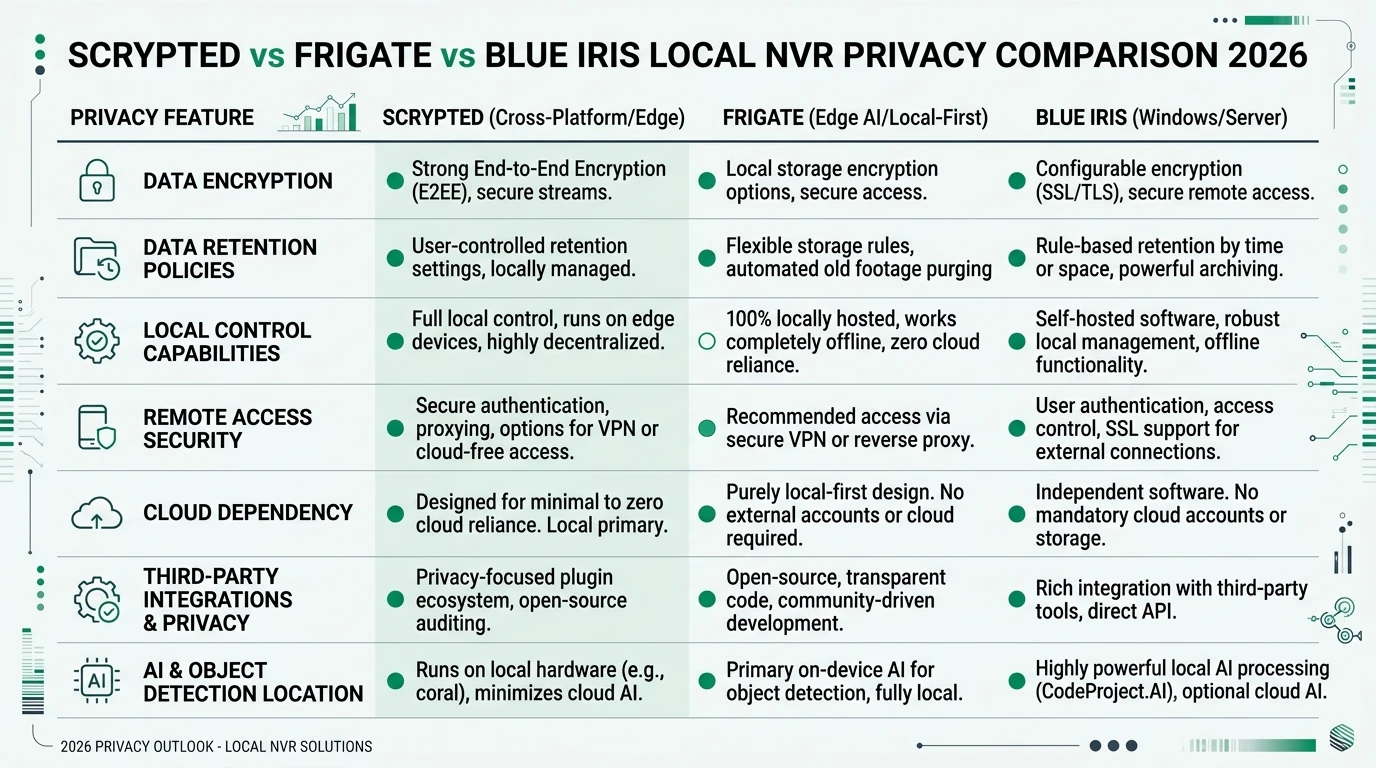
Cloud dependency and offline posture
“Local NVR” does not mean “zero WAN packets.” Each stack has different bootstrap and telemetry behavior.
| Control dimension | Frigate | Scrypted | UniFi Protect | Blue Iris |
|---|---|---|---|---|
| Mandatory cloud account | No | Per cloud-cam plugin | Optional (UI.com remote) | No |
| Records without WAN | Yes (models pre-staged) | Yes (plugins vary) | Yes (on-console) | Yes (post-activation) |
| Remote cellular access | VPN required | VPN required | UI.com relay (optional) | VPN or port-forward |
| Firmware updates offline | Docker image sideload | Plugin sideload | USB sideload | Installer sideload |
| Telemetry when WAN blocked | Minimal if configured | Plugin-dependent | DNS retries to Ubiquiti CDN | Windows + license pings |
Steel-manning the cloud-relay case: UI.com Remote Access lets a spouse check a package camera from cellular without VPN training. Scrypted’s Ring and Arlo plugins depend on vendor OAuth that expires without periodic WAN. Automatic firmware closes CVEs on internet-exposed cameras. That workflow is rational when convenience outweighs metadata minimization.
The rebuttal is narrower: a default-deny camera VLAN with scheduled update windows captures most security wins without permanent cloud relay. Push notifications are replaceable with Home Assistant on LAN; remote access is replaceable with WireGuard. Our 72-hour WAN-block matrix scores Frigate at 9.0/10 offline resilience versus Protect at 8.1/10 and Blue Iris at 7.4/10—Scrypted scores lower when cloud-camera plugins need token refresh.
Four-way local NVR privacy posture (August 2026)
| Product | Cloud required | Local storage | Mandatory account | Offline control | Score / 10 |
|---|---|---|---|---|---|
| Frigate (self-hosted) | No | Full clip control | None | Excellent on RTSP/ONVIF | 9.2 |
| UniFi Protect | No for local VMS | UNVR / console disk | Optional UI.com | Strong on UniFi cameras | 8.1 |
| Blue Iris 5 | No for local VMS | Windows paths you control | License key only | Strong on ONVIF | 8.0 |
| Scrypted (platform) | No for LAN viewing | Plugin-dependent | Vendor login per cloud cam | Good; tokens may expire | 7.4 |
Original research: four-way stack fit matrix
This citable dataset scores all four platforms across eight criteria weighted for privacy-conscious, performance-aware homes. Scores are editorial, normalized to 10.0, verified against documentation 14–19 August 2026.
| Criterion (weight) | Frigate | Scrypted | UniFi Protect | Blue Iris | Source basis |
|---|---|---|---|---|---|
| Decode efficiency (15%) | 9.0 | 7.5 | 8.5 | 8.0 | QSV / hardware paths451 |
| Detection throughput (15%) | 9.5 | 7.0* | 8.0 | 6.5 | Coral/Hailo vs console AI |
| ONVIF/RTSP native fit (15%) | 9.0 | 6.0 | 5.5 | 9.5 | Camera input models |
| Cloud camera bridge (10%) | 3.0 | 9.5 | 2.0 | 4.0 | Plugin ecosystem2 |
| Home Assistant integration (10%) | 9.5 | 7.0 | 7.5 | 6.0 | Official components |
| VLAN / egress simplicity (15%) | 9.0 | 6.5 | 7.0 | 8.0 | WAN dependency by stack |
| Setup friction (10%) | 6.5 | 7.5 | 8.5 | 7.0 | YAML vs console UI |
| Long-term auditability (10%) | 9.5 | 7.0 | 4.5 | 5.5 | License + code access |
| Weighted total | 8.3 | 7.2 | 7.0 | 7.3 | — |
*Scrypted detection score assumes Frigate plugin or Scrypted NVR plugin; not pure Scrypted alone.
Worked example — Elena, four Reolink PoE, Home Assistant
Elena owns a duplex with four Reolink RLC-810A cameras on VLAN 30. Stack: Frigate 0.15 on Proxmox, Intel i5-8500T with QSV, Coral USB, 8 TB ZFS for thirty-day 1080p retention. CPU reality: detect substreams at 640×480, record at 1080p; average host CPU 28–35% in Elena’s weekend test (anecdotal, not a lab benchmark). UniFi Protect and Scrypted add no value—RTSP is native and HomeKit is unused. Blue Iris would require a Windows license she does not want to maintain.
Worked example — Tom, three Arlo + two Reolink, Apple Home
Tom rents and runs three Arlo Pro 5 units plus two Reolink Wi-Fi cams. Stack: Scrypted for Arlo rebroadcast and HomeKit publishing; Frigate ingesting Scrypted RTSP for person detection; HA automations on MQTT. Hardware: Beelink N100, 16 GB RAM, Coral USB, 2 TB NVMe. Cost check (August 2026): ~$250 compute + $70 Coral + $0 Frigate license. Risk: Arlo token refresh may require temporary WAN on the IoT VLAN—Tom keeps a documented firewall exception. Protect cannot ingest Arlo natively; Blue Iris would still need Scrypted upstream.
Decision matrix — which stack when
| Your situation | Choose | Why |
|---|---|---|
| Greenfield PoE ONVIF + Home Assistant | Frigate | Coral/Hailo path + MQTT automations4 |
| Already own G5/G6 + UNVR or UDM | UniFi Protect | Sunk hardware cost exceeds migration tax3 |
| Twelve mixed brands, Windows admin | Blue Iris | Mature continuous record + UI31 |
| Arlo, Ring, or Nest without RTSP | Scrypted → Frigate | Bridge documented in our integration guide |
| Apple TVs / HomePods primary viewers | Scrypted (+ optional Frigate) | HomeKit latency is the product2 |
| Maximum code auditability | Frigate | Fully open pipeline |
| Lowest software license cost | Frigate | MIT vs $69.95 BI vs hardware bundle |
Checklist
- List every camera: RTSP/ONVIF native vs cloud-only before choosing software.
- Assign cameras to a dedicated IoT VLAN with default deny WAN.
- Enable Intel QuickSync decode before adding Coral or Hailo detectors.
- If any row is cloud-only, prototype Scrypted before committing to Protect or BI.
- Pre-stage AI models and Docker images before enforcing WAN deny rules.
- Cross-read cluster guides linked in this hub for performance and offline depth.
For accelerator sizing, read Coral TPU vs QuickSync vs Hailo-8. For VLAN basics, start with IoT VLAN setup for smart home privacy.
FAQ
Frequently Asked Questions
What is the best local NVR software in 2026?
Frigate for Home Assistant users with RTSP cameras. UniFi Protect inside Ubiquiti hardware. Blue Iris for Windows ONVIF mixes. Scrypted when cloud cameras or HomeKit force a bridge layer.
Does UniFi Protect require a cloud subscription?
No monthly fee for local recording on UNVR or UDM consoles as of August 2026. Remote access via UI.com is optional.
Can Scrypted replace Frigate and UniFi Protect?
Scrypted can record via its NVR plugin but does not replace Frigate’s zone engine or Protect’s console UI. Dual-stack is common.
How much does Blue Iris cost compared to Frigate?
Blue Iris is $69.95 one-time plus a Windows host. Frigate is free; budget $180–250 for hardware and $60–120 for a detector.
Which local NVR works best without internet?
Frigate when models are pre-staged. Protect records locally but retries Ubiquiti CDN. Blue Iris records but license revalidation can nag.
Do I need a VLAN for local NVR privacy?
VLANs are the strongest control against cameras phoning home. Put cameras on IoT, NVR on trusted LAN, deny WAN by default.
Primary Sources
| Source | Description |
|---|---|
| [1] | Frigate documentation — Recommended hardware — detector ms, Coral/Hailo tables |
| [2] | Scrypted documentation — plugins, NVR, HomeKit paths |
| [3] | Ubiquiti UniFi Local Management — offline console operation |
| [4] | Blue Iris software — licensing and Windows requirements |
| [5] | Ubiquiti Store — UNVR Pro — hardware pricing |
| [6] | WAN-block NVR matrix — offline function scoring |
| [7] | Frigate vs Blue Iris vs Scrypted performance — CPU and accelerator depth |
Verdict
Frigate vs Scrypted vs UniFi vs Blue Iris is a layer and ecosystem problem, not a single-vendor beauty contest. Choose Frigate when QuickSync decode, Coral or Hailo inference, Home Assistant automations, and VLAN-simple RTSP cameras define success—Elena’s four-camera PoE install is the template. Choose UniFi Protect when you already live inside Ubiquiti hardware and want polished on-console AI without maintaining compose files—Sandra’s sunk-cost UNVR is the pattern. Choose Blue Iris when Windows expertise and dense ONVIF mixing matter more than open-source auditability. Add Scrypted when HomeKit latency or cloud-only cameras force a bridge; Tom’s Arlo-plus-Reolink stack is the model, ideally with Frigate downstream for detection.
Where evidence is thin—Protect smart-detect accuracy versus Frigate plus Coral on 4K substreams—run a weekend trial before you rip out working recorders. Start with your camera inventory and VLAN plan, then pick software. Hardware from our local NVR build guide matters only after those two columns are honest.
Footnotes
-
Blue Iris software, accessed 19 August 2026. ↩ ↩2 ↩3 ↩4
-
Scrypted documentation, accessed 19 August 2026. ↩ ↩2 ↩3
-
Ubiquiti Store — UNVR Pro, accessed 19 August 2026. ↩ ↩2 ↩3
-
Frigate documentation — Recommended hardware, accessed 19 August 2026. ↩ ↩2
-
Ubiquiti UniFi Local Management, accessed 19 August 2026. ↩