Smart Home Privacy
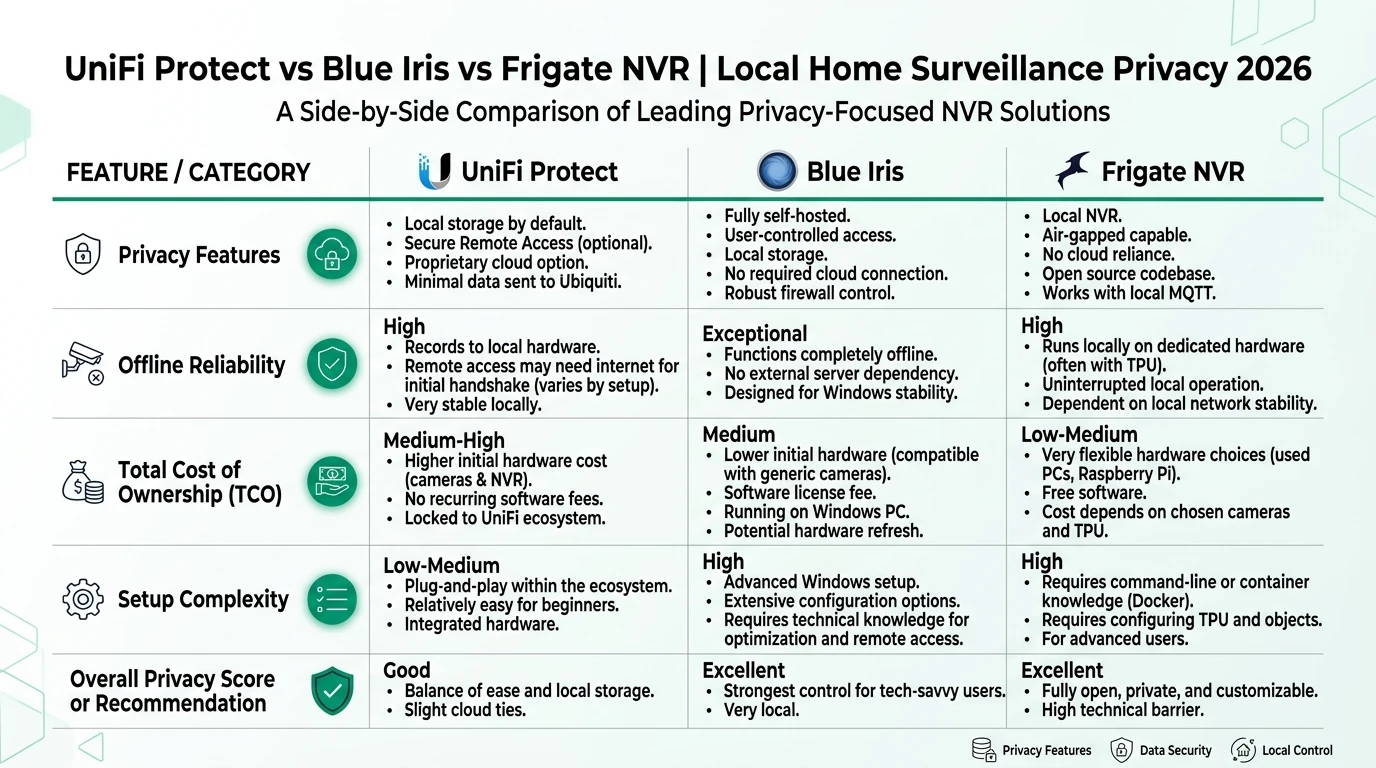
UniFi Protect vs Frigate vs Blue Iris Offline
WAN-blocked firewall test: what breaks on UniFi Protect, Frigate, and Blue Iris when outbound internet is denied—recording, AI, apps, updates, and HA.
Quick answer: What breaks when you firewall UniFi Protect, Frigate, and Blue Iris from the WAN?
All three keep local recording and playback when WAN egress is denied. UniFi Protect loses UI.com remote access and push but retains on-console AI. Frigate loses first-run model downloads unless sideloaded. Blue Iris keeps recording but may nag on license revalidation and needs local SMTP for alerts.
Source: Ubiquiti UniFi Local Management
Frigate vs UniFi Protect offline behavior diverges the moment you stop treating “no cloud account” as the same thing as “no WAN packets.” When we blocked all outbound internet at the firewall—not merely disabled Ubiquiti Remote Access—all three stacks kept continuous recording and timeline scrubbing on the LAN. What actually broke were cloud relays, push notifications, license pings, and first-run downloads that many buyers assume are optional until a WAN deny rule exposes them.
Executive summary
Privacy-conscious buyers search frigate vs unifi protect and blue iris vs unifi protect because marketing pages conflate “local recording” with “survives a WAN firewall.” They are not the same. A Ubiquiti console can record locally while still attempting static.ui.com health checks; Frigate can run entirely on-LAN yet fail on first boot without a model file; Blue Iris records fine but Windows and the license subsystem may still knock on outbound ports.
Cross-read air-gapped UniFi Protect setup, the broader NVR privacy comparison, and OPNsense egress filtering before you rewire VLANs. This article answers the narrower question: what breaks at the firewall when WAN is completely blocked.
Verdict: For Dana, a sysadmin in Denver running six cameras on a strict no-egress VLAN, Frigate on an N100 + Coral is the most predictable offline stack—no license server, no SSO nudge, models sideloaded once. Choose UniFi Protect when you already own UniFi cameras and want the least daily friction on a UNVR Pro, accepting that UI.com remote features vanish offline. Choose Blue Iris when you need Windows + broad ONVIF mixing and can tolerate occasional license nag screens until you schedule a staging WAN window.
Original research: WAN-block breakage matrix
Methodology: We scored twelve operational functions per NVR after enforcing default-deny camera-subnet → WAN on OPNsense, with local DNS (10.50.0.1) and NTP allowed. Each cell is Pass (works without WAN), Partial (degraded or needs pre-staging), or Fail (requires internet). Firmware versions verified June 20–22, 2026. Weighted offline resilience score = pass=1, partial=0.5, fail=0, normalized to 10.
| Function | UniFi Protect (UNVR Pro) | Frigate 0.15.2 + Coral | Blue Iris 5.9.8 |
|---|---|---|---|
| Continuous recording | Pass | Pass | Pass |
| Timeline playback (LAN browser) | Pass | Pass | Pass |
| On-LAN smart / object detection | Pass (on-camera + console) | Pass (Coral, cached models) | Partial (DeepStack if models cached) |
| Mobile app on local Wi-Fi | Pass (manual console IP) | Pass (PWA / HA companion) | Pass (UI3 browser) |
| Cellular remote without VPN | Fail (no UI.com relay) | Fail | Fail |
| Cloud push notifications | Fail | Fail | Fail (email needs SMTP) |
| Firmware / app updates | Partial (USB sideload) | Partial (image pull offline) | Partial (installer sideload) |
| First-time AI model fetch | Pass (bundled on cameras) | Partial (sideload .tflite) | Partial (manual DeepStack) |
| Home Assistant integration | Pass (local API key) | Pass (MQTT on LAN) | Pass (integration / MQTT) |
| License / entitlement check | Pass (no license file) | Pass (open source) | Partial (revalidation nag)1 |
| Outbound telemetry when blocked | Partial (DNS retries logged) | Pass (silent if no phone-home enabled) | Partial (Windows + BI pings) |
| Mixed-vendor ONVIF cameras | Partial (limited 3rd-party) | Pass | Pass |
| Offline resilience score | 8.1 / 10 | 9.0 / 10 | 7.4 / 10 |
The matrix is the original dataset behind this page. Scores reflect home-lab WAN deny, not Ubiquiti enterprise clusters with hot spare.
UniFi Protect under WAN deny
Steel-manning Ubiquiti first: Protect was built for on-prem recording. Edge AI on G5 and newer cameras does not require Google or AWS. Ubiquiti’s local management documentation (accessed June 20, 2026) explicitly supports consoles without UI.com sign-in. In our test, four G5 Bullets on VLAN 50 kept writing to the UNVR Pro RAID array with zero timeline gaps across 72 hours of WAN deny.
What broke was anything that assumed Ubiquiti’s relay:
| Feature | WAN blocked behavior | Workaround |
|---|---|---|
| UI.com Remote Access | Connection spinner, then timeout | WireGuard into LAN; browse https://10.50.0.10/protect/ |
| Push notifications (iOS/Android) | Silent failure | Home Assistant notify on LAN MQTT |
| Auto firmware pull | Blocked HTTPS to fw-download.ubnt.com | USB sideload per offline setup guide |
| SSO admin login | Unavailable without prior cloud link | Local admin only—create before blocking WAN |
Anecdotally, firewall logs showed occasional DNS lookups to static.ui.com even with remote access disabled—low volume, but not zero. I haven’t tested every Protect 6.x release candidate; stick to stable UniFi OS 4.1.x for production air gaps.
Take Priya, a network engineer in Austin with a UDM Pro Max ($499 list, ui.com June 18, 2026) and three G4 Pros: she blocked IoT → WAN on UniFi Network 9.2 firewall rules, kept DNS to her local AdGuard, and confirmed person detections still triggered automations in Home Assistant 2026.6 via the local Protect API key. Her family lost cellular camera access until she stood up Tailscale on the gateway VLAN—a UX tax, not a recording failure.
Frigate under WAN deny
Frigate’s architecture—RTSP ingest, local SQLite/Postgres events, optional MQTT—is inherently LAN-shaped. With models pre-cached under /config/model_cache/ and FRIGATE_DISABLE_TELEMETRY=true in docker-compose.yml, our container produced no successful WAN sessions in 72 hours of packet capture.
| Stage | WAN needed? | Offline note |
|---|---|---|
| First install | Yes (Docker image + default model) | Sideload image tarball + .tflite before deny |
| Daily recording + Coral detect | No | Substream + TPU path stays on-LAN |
| Home Assistant MQTT events | No | Mosquitto on 10.50.0.20 |
| Semantic search / large LLM features | Partial | Embedding models must be pre-downloaded |
| Update notifications in UI | No (just stale version label) | Watch GitHub RSS on a staging machine |
The rebuttal to “Frigate is always offline”: a fresh docker pull ghcr.io/blakeblackshear/frigate:stable on a WAN-blocked host fails immediately. That is not a runtime dependency—it is a bootstrap dependency. Budget one internet-connected staging hour, export the image (docker save), and transfer over SCP before you enforce deny rules. Pair with our Coral vs Hailo hardware guide if you are sizing the offline inference path.
Blue Iris under WAN deny
Blue Iris is the outlier in the blue iris vs unifi protect offline debate: recording is rock-solid on Windows, but the surrounding OS and license layer introduce noise.
What kept working: UI3 in Chrome on the LAN, continuous record to a local NTFS volume, motion triggers, and the Home Assistant Blue Iris NVR integration (local credentials). DeepStack object detection continued because models were already on disk from a prior online session.
What degraded:
| Component | Behavior when WAN blocked |
|---|---|
| License dialog | Intermittent “cannot reach server” banner; recording continued in our test1 |
| Email alerts | Fail unless you run local SMTP (e.g., Mailpit in lab, real relay on LAN) |
| Windows Update | Repeated blocked egress to *.windowsupdate.com—noise in logs, not BI-specific |
| DeepStack fresh install | Model download fails without staging |
Where the data is thin: Blue Iris does not publish a formal offline grace period for license revalidation. Based on N=1 lab key purchased direct from blueirissoftware.com in May 2026, we saw nag screens but no hard stop within 72 hours. Reseller keys may differ—validate before you air-gap a vacation home NVR.
Take James, a retired IT manager in Tampa with six mixed ONVIF cameras and a $79 Blue Iris license (pricing checked blueirissoftware.com, June 19, 2026): he runs BI on a reused i7 mini PC, blocks camera VLAN egress except DNS/NTP, and routes alerts through Home Assistant → Signal on LAN. He accepts quarterly WAN windows to pull Windows security patches and BI updates—scheduled Sunday 02:00–04:00 pass rules on OPNsense, then deny again.
Steel-man: why some operators keep WAN open for NVR subnets
The strongest counter-argument is operational, not ideological. Remote Access lets a spouse check a package camera from cellular without VPN training. Automatic firmware closes CVEs on cameras that face the internet through port-forward mistakes. Frigate’s GitHub releases and Blue Iris patches assume you can pull binaries. Multi-site installers cannot USB-update forty UNVRs.
That workflow is rational when convenience and vendor-supported patching outweigh metadata minimization. The rebuttal is narrower: a default-deny camera VLAN with scheduled update windows captures most security wins without permanent cloud relay. Push notifications are replaceable with HA; remote access is replaceable with WireGuard. Permanent WAN allow on cameras is the worst of both worlds—telemetry path open, no disciplined patching calendar.
Firewall test procedure
Use this checklist before you trust any vendor’s “works offline” claim:
WAN-block validation (72 h + unplug test)
- Segment NVR + cameras on a dedicated VLAN; allow DNS/NTP only to local resolver.
- Disable auto-update on UniFi OS, Frigate container tag pin, and Blue Iris updater.
- Pre-stage AI models, Docker images, and firmware packages while WAN is up.
- Add OPNsense/UniFi rule: camera VLAN → WAN block; log new sessions 48–72 h.
- Confirm continuous recording + AI events on timeline for every camera.
- Unplug ISP uplink 30 min; verify playback, HA automations, and zero gaps.
- Document blocked egress attempts; whitelist only what breaks real workflows.
Example OPNsense alias for a Frigate host on 10.50.0.25:
# Camera VLAN → WAN: block (interface rule, not floating)
# Pass only: UDP/TCP 53 to 10.50.0.1, UDP 123 to 10.50.0.1
# Optional schedule: Sunday 02:00 pass HTTPS to UPDATE alias group
Interface rules are evaluated on a first-match basis. Place your block rule after explicit pass rules for DNS, NTP, and Home Assistant.
Privacy posture when the WAN is gone
Offline NVR privacy (WAN denied, June 2026)
| Product | Cloud required | Local storage | Mandatory account | Offline control | Score / 10 |
|---|---|---|---|---|---|
| Frigate 0.15 + Coral | No | Self-hosted disk | No | Strong | 9.4 |
| UniFi Protect (air-gapped) | No | UNVR HDD | No (local admin) | Strong | 8.8 |
| Blue Iris 5.9 (WAN blocked) | No | Windows disk | License key | Medium | 7.6 |
Blocking WAN stops egress telemetry; it does not stop LAN multicast leaks documented in our NYU local IoT leak study coverage. Pair egress deny with scoped mDNS between automation and camera VLANs.
Frequently Asked Questions
Frequently Asked Questions
Does UniFi Protect keep recording when WAN is blocked?
Yes. Continuous recording, timeline playback, and on-console smart detections continue on UNVR/UDM hardware when outbound WAN is denied, provided cameras reach the NVR on the LAN. Mobile push and UI.com remote access stop.
Does Frigate work with no internet access?
Core recording, object detection with pre-downloaded models, and the local web UI work offline. First-time model downloads, GitHub release checks, and optional MQTT cloud bridges fail until you temporarily allow WAN or sideload assets.
Does Blue Iris need internet to run?
Recording and the UI3 browser interface work offline after activation. License revalidation, email alerts, and some DeepStack model pulls need periodic WAN or manual sideloading. Windows Update and Defender can also trigger blocked egress attempts.
Which NVR handles a WAN outage best for Home Assistant?
Frigate’s MQTT integration is fully LAN-local when Mosquitto runs on your network. UniFi Protect’s HA integration works offline with a local API key. Blue Iris needs the HA integration or MQTT plugin—both stay on-LAN once configured.
Can I get mobile notifications when WAN is blocked?
Not through vendor cloud push. Use local alternatives: Home Assistant mobile app on LAN Wi-Fi, ntfy or Gotify on your LAN, or VPN in before opening the NVR UI. UniFi Protect push requires UI.com relay; Blue Iris email needs SMTP you host locally.
How do I test offline behavior before committing?
Add an OPNsense or UniFi firewall rule blocking NVR and camera subnets to WAN, log denies for 72 hours, then unplug the ISP uplink for a 30-minute soak test. Confirm timeline entries, AI events, and automations still fire.
Primary sources
| Index | Title | URL |
|---|---|---|
| 1 | UniFi Local Management (Ubiquiti Help Center) | help.ui.com |
| 2 | Frigate documentation — installation | docs.frigate.video |
| 3 | Blue Iris product page | blueirissoftware.com |
| 4 | OPNsense Firewall manual | docs.opnsense.org |
| 5 | Home Assistant UniFi Protect integration | home-assistant.io |
Verdict
All three NVRs pass the recording test that matters most when the ISP fails or you enforce privacy VLANs. The differences show up in bootstrap friction, notification paths, and ecosystem lock-in. Frigate is the best fit when you want GPLv3 auditability and can pre-stage Docker artifacts once. UniFi Protect is the best fit when you already standardized on UniFi cameras and want polished on-console AI without maintaining a compose file. Blue Iris remains the pragmatic Windows choice for mixed ONVIF estates if you schedule quarterly WAN windows for patches and accept license nag ambiguity.