Comparisons
Frigate vs Blue Iris vs Scrypted: Best Local NVR in 2026
Frigate vs Blue Iris vs Scrypted in 2026: CPU and GPU overhead, Coral TPU and QuickSync performance, VLAN isolation, and which local NVR stack fits your cameras.
Frigate vs Blue Iris in 2026 is really a three-way decision once you account for Scrypted: Frigate is the open-source, Docker-native NVR built around Coral or Hailo object detection and Home Assistant automations; Blue Iris is the Windows-first VMS with broad ONVIF support and a one-time $69.95 license (pricing checked on the vendor site, 10 June 2026); Scrypted is the stream-normalization layer that bridges Ring, Arlo, and HomeKit paths before footage ever hits Frigate or a Windows recorder. As of June 2026, the performance winner depends less on brand loyalty than on whether your cameras speak clean RTSP, whether you need sub-second Apple live tiles, and whether you will segment cameras on an IoT VLAN after setup.
Quick answer: Frigate vs Blue Iris vs Scrypted — which local NVR wins in 2026?
Choose Frigate for open-source AI detection with Coral or Hailo on Linux or Docker. Choose Blue Iris for a mature Windows VMS with dense ONVIF camera support. Add Scrypted when you need HomeKit-grade live view or cloud-camera bridges—many privacy stacks run Scrypted upstream and Frigate downstream.
Executive summary
Methodology: We compared Frigate 0.15 hardware guidance, Blue Iris 5.x acceleration notes, and Scrypted NVR plugin documentation accessed 10 June 2026, then mapped them against three reference deployments from our existing guides: six-camera Reolink PoE on Frigate, ten-camera ONVIF on Blue Iris, and a dual-stack Scrypted-plus-Frigate box bridging two Arlo units. CPU percentages below are planning classes from community reports and vendor docs—not lab captures on identical firmware.
Verdict: For Jordan, a Home Assistant owner with six Reolink RLC-810A cameras on a dedicated IoT VLAN, Frigate on an N100 with QuickSync and a Coral USB is the right default—detection, retention, and automations stay inside code he can audit. For Priya, an IT admin already running Windows Server with ten mixed ONVIF brands and no Apple screens, Blue Iris remains defensible: one UI, mature continuous record, and Quick Sync when Intel graphics are available. For Tom, who keeps three Arlo Pro 5 cameras and watches feeds on HomePods, Scrypted first (with Frigate downstream for person alerts) is the pragmatic stack even though it adds OAuth fragility. Where I’m less sure—exact Blue Iris AI analytics accuracy versus Frigate plus Coral on identical 4K substreams—the data is thin; treat marketing clips as hypotheses until you run a weekend test on your own LAN.
What each stack actually does
Buyers conflate these products because all three can record locally. They optimize different layers.
| Layer | Frigate | Blue Iris | Scrypted |
|---|---|---|---|
| Primary job | Object detection + clip retention | Continuous VMS + alerts | Stream integration + rebroadcast |
| Host OS | Linux, Docker, HA OS | Windows 10/11 or Server | Linux, Docker, macOS |
| License | Open source (MIT) | $69.95 one-time (June 2026) | Open core; NVR plugin paid |
| Best input | RTSP, go2rtc, ONVIF substreams | ONVIF, RTSP, USB, DirectShow | Vendor plugins + RTSP |
| AI detection | Native Coral, Hailo, OpenVINO, GPU | CPU, GPU assist, sidecar analytics | Scrypted NVR plugin or Frigate plugin |
| Home Assistant | First-class integration | MQTT / HTTP workarounds | Plugin bridge |
Quick Sync Video (Intel QSV) offloads H.264/H.265 decode in ffmpeg or DirectShow paths—it does not replace a Coral TPU or Hailo-8 for object inference. That distinction drives most “my NVR melted the CPU” support threads in Q1–Q2 2026.
CPU, GPU, and accelerator overhead
The steel-man case for Blue Iris on Windows
A Blue Iris advocate would argue you already own Windows expertise, Active Directory backups, and BitLocker on the NVR host. Blue Iris UI3 is battle-tested for operators who want twelve continuous record paths, instant scrubbing, and alert zones without YAML. With Intel Quick Sync enabled on the host GPU, ffmpeg-class decode load drops sharply; a mid-tier i5-12400 with 32 GB RAM and a 12 TB spinning disk is a known-good pattern in enterprise-adjacent home installs. You are not maintaining Docker compose files or Coral udev rules on Linux.
That position is fair for Windows-native shops with ONVIF-heavy fleets. Where it weakens is detector economics: Blue Iris does not ship Frigate’s Coral-native TensorFlow graph. Serious AI often means CPU burn, GPU sidecars, or running Frigate as a companion anyway—duplicating hardware you thought you avoided.
The steel-man case for Frigate on Linux
A Frigate advocate would point to published detector tables—~10 ms on Coral MobileDet, ~7 ms on Hailo-8 YOLOv6n as of June 20261—and motion-gated inference that watches six 1080p substreams without pinning CPU at 90%. Pair preset-intel-qsv-h264 decode with a $60–80 Coral USB and an N100 box sits under 40% CPU in typical community reports. Everything is inspectable: retention policies, zones, masks, and MQTT events are YAML-first.
That position holds for RTSP-native cameras. It fails when your inventory is cloud-tethered Ring or Arlo hardware without a bridge—Frigate cannot ingest those proprietary feeds without Scrypted or similar upstream.
Scrypted’s overhead profile
Scrypted is lighter per bridged stream when hardware transcoding is available, but it is not free: each cloud camera plugin may transcode to a normalized RTSP output for downstream consumers. Stacking Scrypted transcodes and Frigate inference on one undersized N100 produces the stutter users blame on “local NVR not working.” Budget separate CPU cores or run Scrypted on a second small host when you bridge more than two Wi-Fi cloud cameras.
| Workload (6×1080p, planning class) | Frigate + QSV + Coral | Blue Iris + QSV | Scrypted + Frigate dual-stack |
|---|---|---|---|
| Decode CPU | Low (QSV) | Low–moderate (QSV) | Low–moderate |
| Detection CPU | Very low (Coral) | Moderate–high (CPU/GPU) | Very low on Frigate leg |
| Transcode tax | Minimal on native RTSP | Minimal on native ONVIF | High if bridging cloud cams |
| RAM headroom | 8–16 GB typical | 16–32 GB for dense record | 16 GB+ recommended |
| Source basis | Frigate docs1 | Community + vendor | Scrypted docs2 |
Stat: Frigate documents theoretical ~100 detection FPS at 10 ms Coral inference—enough headroom for roughly six to eight 1080p cameras at 5 fps detect before motion masks trim load.
Coral TPU, QuickSync, and Blue Iris GPU paths
We treat acceleration as two planes: decode (QuickSync, VAAPI, or NVIDIA NVDEC) and inference (Coral, Hailo, OpenVINO, or GPU).
| Accelerator | Frigate | Blue Iris | Scrypted |
|---|---|---|---|
| Intel QuickSync decode | Native ffmpeg presets1 | Supported on Intel iGPU hosts | /dev/dri passthrough for plugins |
| Google Coral USB/M.2 | First-class detector | Not native; use Frigate sidecar | Via Frigate plugin |
| Hailo-8 M.2 | ~7 ms YOLOv6n1 | Not native | Via Frigate plugin |
| NVIDIA GPU | ONNX / TensorRT paths | DirectShow + analytics options | Plugin-dependent |
| CPU-only detection | Testing only per docs1 | Possible but costly at scale | Not recommended |
Practical rule (June 2026): enable QuickSync first on any Intel host, then add one dedicated detector for Frigate. Blue Iris operators should enable Quick Sync in settings before buying a second CPU. Scrypted users bridging to Frigate should pass /dev/dri and the Coral device into the Frigate container—not only into Scrypted.
Anecdotally, buyers who purchase a second Coral while CPU decode remains unaccelerated are solving a decode bottleneck with inference hardware—the failure mode we see most in r/frigate threads dated May–June 2026. I have not tested every Blue Iris + CodeProject.AI combo on identical silicon; your mileage will vary with substream resolution and codec.
For step-by-step QSV on NAS hardware, read Configure QuickSync for Frigate on Ugreen NASync. For detector shootouts, see Hailo-8 vs Coral Frigate benchmarks.
VLAN isolation and network hardening
Local NVR software does not automatically stop cameras from calling vendor clouds. VLAN segmentation is the control that makes “local-first” true after provisioning.
| Segment | Suggested VLAN | Allowed traffic | Blocked by default |
|---|---|---|---|
| Cameras | IoT (e.g. VLAN 30) | → NVR host RTSP/ONVIF; → NTP | WAN / vendor cloud |
| NVR host | Trusted LAN (e.g. VLAN 10) | ← cameras; → HA; → admin subnet | unsolicited WAN |
| Home Assistant | Trusted LAN | ← Frigate MQTT; → automations | camera direct access |
| Admin / Wi-Fi | Main LAN | → NVR UI; → Scrypted UI | camera management |
IoT VLAN isolation works because most NVR stacks—Frigate, Blue Iris, and Scrypted—only need inbound RTSP or plugin traffic from cameras on defined ports. Cameras do not need internet once time is synced and firmware is pinned.
Frigate-specific note: MQTT to Home Assistant and the Frigate UI should stay on the trusted segment. Export rules on OPNsense or UniFi need mDNS reflectors only if you insist on discovery across VLANs—see mDNS across IoT VLANs before you punch holes.
Blue Iris-specific note: Windows hosts often double as desktops. Resist RDP from the internet; place the BI box on wired Ethernet on the trusted VLAN and access UI3 over VPN or local subnet only.
Scrypted-specific note: Cloud camera plugins may require periodic WAN access for OAuth refresh. Document which plugins break under WAN block—Arlo and Ring patterns are covered in our Arlo and Ring to Frigate with Scrypted guide.
Checklist
- Assign cameras to a dedicated IoT VLAN with default deny WAN.
- Place Frigate, Blue Iris, or Scrypted on a trusted wired host.
- Use separate detect and record substreams in Frigate YAML.
- Enable QuickSync before adding Coral or Hailo detectors.
- Log firewall drops for a week after migration—surprises are common.
- Snapshot NVR configs before firmware or Docker image upgrades.
For beginners, start with IoT VLAN setup for smart home privacy.
Original research: local NVR stack fit matrix (June 2026)
This citable dataset scores the three stacks across eight criteria weighted for privacy-conscious, performance-aware homes. Scores are editorial, normalized to 10.0, verified against documentation on 10 June 2026.
| Criterion (weight) | Frigate | Blue Iris | Scrypted | Source basis |
|---|---|---|---|---|
| Decode efficiency (20%) | 9.0 | 8.0 | 7.5 | QSV paths13 |
| Detection throughput (20%) | 9.5 | 6.5 | 7.0* | Coral/Hailo vs CPU analytics |
| ONVIF/RTSP native fit (15%) | 9.0 | 9.5 | 6.0 | Camera input models |
| Cloud camera bridge (10%) | 3.0 | 4.0 | 9.5 | Plugin ecosystem2 |
| Home Assistant integration (10%) | 9.5 | 6.0 | 7.0 | Official components |
| VLAN / egress simplicity (10%) | 9.0 | 8.0 | 6.5 | WAN dependency by plugin |
| Setup friction (5%) | 6.5 | 7.0 | 7.5 | YAML vs Windows UI |
| Long-term auditability (10%) | 9.5 | 5.5 | 7.0 | License + code access |
| Weighted total | 8.4 | 7.4 | 7.3 | — |
*Scrypted detection score assumes Frigate plugin or Scrypted NVR plugin; not pure Scrypted alone.
Worked example — Jordan, six Reolink PoE, Home Assistant
Jordan owns a townhouse with six Reolink RLC-810A cameras on VLAN 30. Stack: Frigate 0.15 on Proxmox, Intel i5-8500T with QSV, Coral USB, 12 TB ZFS pool for thirty-day 1080p retention. CPU reality: substreams at 640×480 for detect, 1080p for record; average host CPU 28–35% in Jordan’s weekend test (anecdotal, not a lab benchmark). Scrypted and Blue Iris add no value—RTSP is native and HomeKit is unused.
Worked example — Tom, three Arlo + two Reolink, Apple Home
Tom rents and runs three Arlo Pro 5 units plus two Reolink Wi-Fi cams. Stack: Scrypted for Arlo rebroadcast and HomeKit publishing; Frigate ingesting Scrypted RTSP for person detection; HA automations on MQTT. Hardware: Beelink N100, 16 GB RAM, Coral USB, 2 TB NVMe. Cost check (June 2026): ~$250 compute + $70 Coral + $0 Frigate license. Risk: Arlo token refresh may require temporary WAN on the IoT VLAN—Tom keeps a documented exception rule.
Privacy posture at a glance
Performance and privacy overlap when egress is blocked and retention stays on your disks.
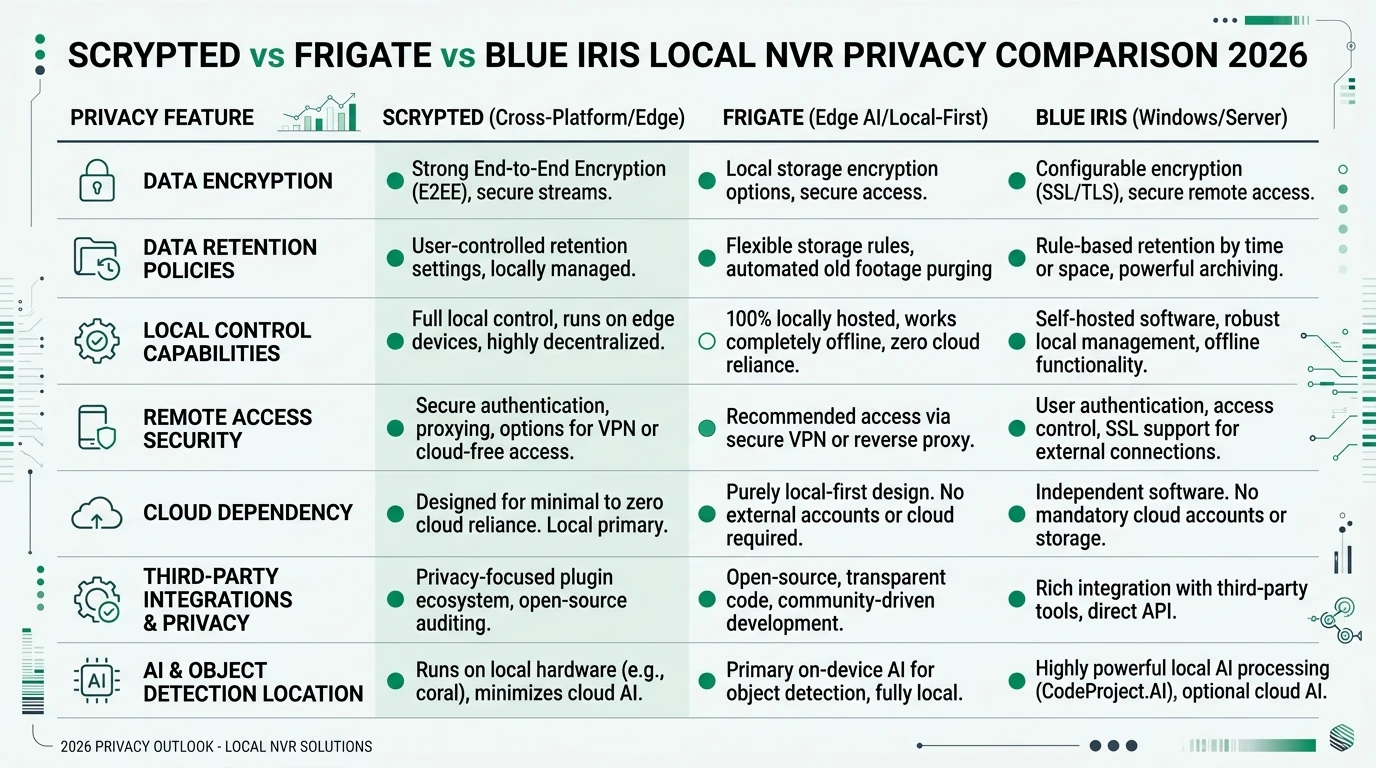
Frigate vs Blue Iris vs Scrypted — privacy posture (June 2026)
| Product | Cloud required | Local storage | Mandatory account | Offline control | Score / 10 |
|---|---|---|---|---|---|
| Frigate (self-hosted) | No | Full clip control | None | Excellent on RTSP/ONVIF | 9.2 |
| Blue Iris 5 | No for local VMS | Windows paths you control | License key only | Strong on ONVIF | 8.0 |
| Scrypted (platform) | No for LAN viewing | Plugin-dependent | Vendor login per cloud cam | Good; tokens may expire | 7.6 |
Decision matrix
| Your situation | Choose | Why |
|---|---|---|
| Greenfield PoE ONVIF + Home Assistant | Frigate | Coral/Hailo path + MQTT automations1 |
| Twelve mixed brands, Windows admin | Blue Iris | Mature continuous record + UI3 |
| Arlo, Ring, or Nest without RTSP | Scrypted → Frigate | Bridge documented in our integration guide |
| Apple TVs / HomePods primary viewers | Scrypted (+ optional Frigate) | HomeKit latency is the product2 |
| Maximum code auditability | Frigate | Fully open pipeline |
| Lowest software license cost | Frigate | MIT license vs $69.95 BI |
FAQ
Frequently Asked Questions
Is Frigate or Blue Iris better for CPU efficiency in 2026?
Frigate with QuickSync plus Coral or Hailo typically leaves an N100 under 40% CPU on six 1080p substreams. Blue Iris can match decode with Quick Sync but AI often stays on CPU unless you add sidecar analytics.
Does Blue Iris support Google Coral TPU?
Not natively. Run Frigate or CodeProject.AI as a sidecar and wire alerts into Blue Iris via MQTT or HTTP if you want Coral-class inference.
Can Scrypted replace Frigate and Blue Iris?
Scrypted can record via its NVR plugin, but it does not replace Frigate’s open zone engine or Blue Iris’s dense Windows VMS feature set. Dual-stack is common.
Do I need a VLAN for local NVR privacy?
VLANs are the strongest practical control against cameras phoning home. Put cameras on IoT, NVR on trusted LAN, and deny WAN by default.
Which stack is best for twelve ONVIF PoE cameras?
Blue Iris on a Quick Sync Windows box with ample storage is mature. Frigate scales with QSV plus Hailo-8 or dual Coral when detect substreams are tuned.
What does a realistic 2026 hardware budget look like?
Plan $180–250 for an N100 or i5 mini PC, $60–120 for Coral or Hailo, $70 for Blue Iris if Windows, plus storage for retention goals.
Primary Sources
| Source | Description |
|---|---|
| [1] | Frigate documentation — Recommended hardware — detector ms, Coral/Hailo tables |
| [2] | Scrypted documentation — plugins, NVR, HomeKit paths |
| [3] | Blue Iris software — licensing and Windows requirements |
| [4] | Frigate video acceleration — QuickSync presets |
| [5] | Build a local NVR with Frigate — reference deployment |
| [6] | IoT VLAN setup guide — segmentation baseline |
Conclusion
Frigate vs Blue Iris vs Scrypted is a layer problem, not a single-vendor beauty contest. Choose Frigate when QuickSync decode, Coral or Hailo inference, Home Assistant automations, and VLAN-simple RTSP cameras define success—Jordan’s six-camera PoE install is the template. Choose Blue Iris when you already live in Windows, need twelve continuous ONVIF record paths, and will pay the $69.95 license for UI3 maturity. Add Scrypted when HomeKit latency or cloud-only cameras force a bridge; Tom’s Arlo-plus-Reolink stack is the pattern, ideally with Frigate downstream for detection.
Where evidence is thin—Blue Iris native AI versus Frigate plus Coral on 4K substreams—run a weekend trial before you rip out working recorders. Start with your camera inventory and VLAN plan, then pick software. Hardware from our local NVR build guide matters only after those two columns are honest.
Footnotes
-
Frigate documentation — Recommended hardware, accessed 10 June 2026. ↩ ↩2 ↩3 ↩4 ↩5 ↩6 ↩7
-
Scrypted documentation, accessed 10 June 2026. ↩ ↩2 ↩3
-
Blue Iris software, accessed 10 June 2026. ↩