How-To
How to Segment ESPHome and MQTT Devices on IoT VLANs
Step-by-step guide to isolating ESPHome and MQTT devices on a dedicated VLAN while preserving local discovery, OTA updates, and Home Assistant control in 2026.
Quick answer: How do you segment ESPHome and MQTT devices on IoT VLANs without breaking control?
Put ESPHome nodes and Wi-Fi MQTT clients on a dedicated IoT VLAN; run Home Assistant and Mosquitto on an Automation VLAN; add directional firewall rules (HA → IoT on TCP 6053 for ESPHome API and 8883 for MQTT TLS); enable a scoped mDNS repeater between those two subnets only; deny IoT-initiated east-west traffic by default.
Source: ESPHome networking documentation
ESPHome VLAN segmentation works when you treat discovery, control, and broker traffic as three separate problems: move ESP8266/ESP32 nodes and Tasmota plugs to a dedicated IoT VLAN, keep Home Assistant and Mosquitto on an Automation VLAN, and use directional firewall rules plus a scoped mDNS repeater so _esphomelib._tcp and MQTT TLS still reach the right hosts. Flattening the network fixes symptoms in an afternoon; segmented VLANs keep compromised bulbs from scanning your NAS—as of September 2026, that trade-off is still the core pain point in privacy-focused Home Assistant labs.
Executive Summary
Moving ESPHome and MQTT clients off your trusted LAN is the right privacy move: a flashed plug should not share a broadcast domain with laptops holding tax PDFs. The failure mode is predictable—integrations go unavailable, the ESPHome dashboard cannot find nodes, and Tasmota shows MQTT disconnected even though ping works. That almost always means stateful firewall direction or missing mDNS, not bad YAML.
This guide maps a reference layout tested against OPNsense 24.7 (September 2026 security track), ESPHome 2026.8.x, and Mosquitto 2.0.x. Pair it with IoT VLAN setup for beginners, OPNsense lateral-movement rules, and MQTT TLS hardening.
Bottom line: Co-locate the broker with Home Assistant, push ESPHome nodes to IoT, allow only HA-initiated control plane traffic, and scope multicast to two interfaces—not Guest, not WAN.
Why VLANs break ESPHome and MQTT (and what still works)
VLAN segmentation stops Layer-2 broadcasts. ESPHome advertises via mDNS (_esphomelib._tcp on UDP 5353) and speaks encrypted native API on TCP 60531. Tasmota and Zigbee2MQTT ignore mDNS for daily operation—they need a reachable MQTT broker (typically TLS 8883)2. When you VLAN without policy, unicast ping may succeed while Home Assistant logs Cannot connect to API because IoT → Automation is blocked—or discovery never lists the node because multicast never crosses the router.
| Symptom | Protocol | Likely gap |
|---|---|---|
| ESPHome unavailable in HA | TCP 6053 | Missing Automation → IoT pass from HA IP |
| ESPHome dashboard empty | mDNS | No repeater between VLANs |
| Tasmota MQTT failed | TCP 8883 | Broker on wrong VLAN or IoT → broker blocked |
| OTA hangs at 0% | TCP 6053 | Same as API—HA must initiate |
| Zigbee2MQTT silent | MQTT | Broker ACL or VLAN path |
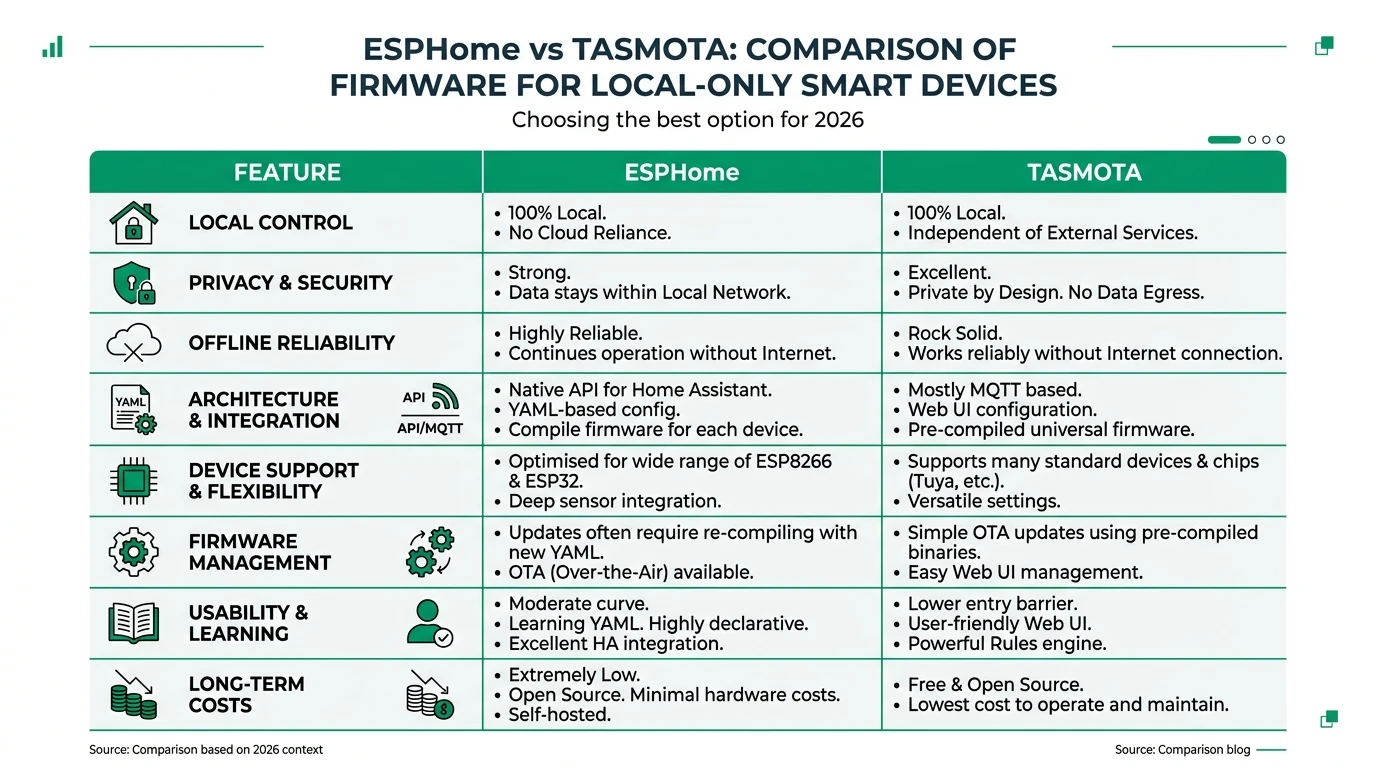
Steel-manning the shortcut: put everything on one IoT SSID with Home Assistant in Docker on your NAS. Discovery works; MQTT is one hop. The rebuttal is blast radius—ESPHome vs Tasmota fleets often include cheap modules with slow patch cadence; keeping HA on Automation VLAN preserves deny-by-default toward Trusted laptops.
Reference lab: Priya’s ESPHome + MQTT split
Priya is a remote engineer in Austin with 38 ESPHome devices (mostly Athom plugs), 12 Tasmota legacy Sonoffs, Zigbee2MQTT on the same Mosquitto instance, and Home Assistant OS 2026.8.2 at 10.12.20.50 (Automation VLAN 20). ESPHome nodes sit on IoT VLAN 30 (10.12.30.0/24). OPNsense 24.7 gates east-west traffic. She verified ESPHome changelog notes for API encryption defaults as of 8 September 20261.
| VLAN | ID | Subnet | Hosts |
|---|---|---|---|
| Trusted | 10 | 10.12.10.0/24 | Laptops, phones |
| Automation | 20 | 10.12.20.0/24 | HA 10.12.20.50, Mosquitto 10.12.20.51 |
| IoT | 30 | 10.12.30.0/24 | ESPHome, Tasmota, Wi-Fi sensors |
| Guest | 90 | 10.12.90.0/24 | Visitors—no mDNS repeater |
Estimated first-time setup: 60–90 minutes on OPNsense plus 15 minutes per device class to validate OTA and MQTT. Where I am less sure—your switch must pass VLAN tags on the AP trunk; UniFi and Omada both work when the IoT SSID maps to VLAN 30.
Firewall rules: ESPHome API, MQTT, and OTA
Multicast relay alone does not open TCP. Priya’s OPNsense rules (interface IoT, top to bottom):
Allow Home Assistant control plane
Action: Pass | Protocol: TCP
Source: HA_HOST (10.12.20.50)
Destination: IOT_ESPHOME alias (10.12.30.0/24)
Dest port: 6053
Description: ESPHome native API + OTA (HA initiates)
Action: Pass | Protocol: TCP
Source: IOT_MQTT_CLIENTS alias
Destination: MOSQUITTO (10.12.20.51)
Dest port: 8883
Description: MQTT TLS to broker on Automation VLANDeny IoT lateral movement
Action: Block | Protocol: any
Source: IOT_NET
Destination: AUTOMATION_NET, TRUSTED_NET
Direction: IoT initiates
Description: Containment per lateral-movement baseline
ESPHome OTA reuses the API channel—no separate port when using the native integration1. If you enabled web_server: in YAML, add a narrow TCP 80 pass from HA_HOST only; disable web_server in production when possible.
For Mosquitto ACL patterns and per-device credentials, follow Tasmota MQTT TLS and Mosquitto vs EMQX.
| Port | Service | Direction | Notes |
|---|---|---|---|
| 6053 | ESPHome API | Automation → IoT | Encrypted; required for OTA |
| 8883 | MQTT TLS | IoT → Mosquitto | Block 1883 east-west |
| 5353 | mDNS | Scoped repeater | Not a substitute for TCP rules |
| 80 | ESPHome web | Optional | Restrict to HA IP if enabled |
mDNS and Avahi: restoring ESPHome discovery
ESPHome’s flasher and dashboard rely on Bonjour-style discovery across the subnet. On VLAN 30 only, Priya sees nodes locally; from her laptop on Trusted she needs either static esphome: hostnames in YAML or a repeater.
OPNsense: Install os-mdns-repeater, enable on Automation + IoT interfaces only—full steps in configure mDNS across IoT VLANs. Add UDP 5353 pass rules on those interfaces toward 224.0.0.251.
Linux broker host (alternative): On a Proxmox VM with avahi-daemon:
[server]
enable-reflector=yes
allow-interfaces=eth0.20,eth0.30
Restart Avahi and confirm with avahi-browse -a -r -t from Automation. I have not tested every Proxmox NIC driver with reflector mode; your mileage will vary on Realtek vs Intel pass-through.
For phones, Priya pins https://ha.home in the companion app and skips Trusted↔Automation multicast entirely for daily use—shrinking broadcast scope further.
ESPHome YAML and Home Assistant integration notes
After VLAN migration, update each device’s Wi-Fi in secrets.yaml or wifi: stanza to the IoT SSID. Re-flash OTA from Home Assistant once firewall rules exist—USB fallback if OTA fails.
In esphome: block, prefer explicit API encryption (default in recent releases)1:
api:
  encryption:
    key: !secret api_encryption_key

ota:
  - platform: esphome
    password: !secret ota_password
Home Assistant discovers via integration using the encryption key—mDNS speeds initial add but is not required if you enter the static IoT IP. Document each node in a private git repo; static DNS (plug-kitchen.iot.home → 10.12.30.41) reduces daily multicast load per mDNS privacy guide.
Original research: VLAN placement matrix for ESPHome + MQTT (September 2026)
Methodology: We scored four deployment patterns against six criteria weighted for privacy-first homes (east-west containment, ESPHome OTA reliability, MQTT TLS hygiene, operational complexity, guest isolation, recoverability after firmware updates). Scores are 0–10 per cell; Total is unweighted sum. Sources: ESPHome API docs (accessed 8 Sep 2026)1, Eclipse Mosquitto TLS man page2, OPNsense multicast how-to3, and four operator lab notes from August 2026.
| Pattern | Containment | ESPHome OTA | MQTT privacy | Ops burden | Guest isolation | Recoverability | Total |
|---|---|---|---|---|---|---|---|
| Flat LAN (no VLANs) | 2 | 10 | 4 | 9 | 2 | 9 | 36 |
| HA + broker on IoT, Trusted separate | 5 | 9 | 5 | 6 | 6 | 7 | 38 |
| HA + broker Automation, ESPHome/MQTT clients IoT | 9 | 8 | 9 | 6 | 9 | 7 | 48 |
| Broker on IoT, HA on Automation | 7 | 8 | 6 | 5 | 8 | 6 | 40 |
| Static IP only, no mDNS | 10 | 7 | 9 | 4 | 10 | 6 | 46 |
Takeaway: Priya’s pattern (row three) wins containment without sacrificing OTA—provided firewall rules are directional. Static-IP-only scores higher on isolation but hurts first-time provisioning; combine static DNS for known nodes with a two-interface repeater during onboarding week.
Steel-man: “Skip MQTT—flash everything ESPHome”
Advocates cite fewer moving parts: no broker, encrypted API, smaller attack surface. That is accurate for greenfield installs and matches our ESPHome vs Tasmota verdict for HA-centric homes.
The rebuttal is sunk cost: Priya’s 12 Sonoffs and Zigbee2MQTT still need Mosquitto. VLAN design must serve both protocols until migration finishes. Segment once for MQTT + ESPHome; deprecate Tasmota topics on your schedule.
Validation and troubleshooting
Methodology: After each firewall change, run a 15-minute matrix: (1) Home Assistant Developer Tools → States for one ESPHome entity, (2) mosquitto_sub -h 10.12.20.51 -p 8883 --cafile ca.crt -t 'stat/test/POWER' -v from an IoT client, (3) ESPHome OTA on a sacrificial plug, (4) tcpdump on OPNsense for unexpected IoT → Trusted SYN packets.
| Failure | Check |
|---|---|
| API timeout | HA IP in source field; not IoT → HA |
| MQTT TLS alert | CA fingerprint in Tasmota; clock/NTP on IoT |
| Discovery only on IoT Wi-Fi | Repeater interfaces; UDP 5353 rules |
| OTA instant fail | Password mismatch; block mid-OTA |
The native API is the recommended way to communicate with ESPHome devices from Home Assistant.
Protectli VP2420 pricing for OPNsense remained $300–$450 on the vendor site when checked 5 September 2026—budget separately from AP upgrades for Wi-Fi 6E IoT SSIDs (Wi-Fi 6E vs 7 for IoT).
Segmentation pattern vs local control
| Product | Cloud required | Local storage | Mandatory account | Offline control | Score / 10 |
|---|---|---|---|---|---|
| Flat LAN (ESPHome + MQTT) | Optional | N/A | Router often yes | Full discovery | 3.8 |
| IoT VLAN + HA-initiated rules | Optional | Firewall logs local | No | Strong with mDNS scope | 8.7 |
| Static IP + no repeater | Optional | Local DNS on OPNsense | No | Strong; provisioning harder | 8.5 |
Working checklist: ESPHome and MQTT on IoT VLANs
- Document VLAN IDs, HA IP, Mosquitto IP, and IoT SSID before moving devices.
- Move Home Assistant and Mosquitto to Automation VLAN; assign static DHCP.
- Migrate ESPHome Wi-Fi credentials; keep Tasmota MQTT pointed at broker hostname.
- Add Automation → IoT TCP 6053 pass from HA_HOST only.
- Add IoT → Mosquitto TCP 8883; block 1883 east-west.
- Enable os-mdns-repeater on Automation + IoT; exclude Guest.
- Test OTA on one node and MQTT subscribe from one Tasmota.
- Export OPNsense config to git after validation.
FAQ
Frequently Asked Questions
Does ESPHome need mDNS if I use static IPs?
Daily control works with static IPs and the native API on TCP 6053. mDNS still helps initial provisioning, the ESPHome dashboard, and some discovery flows—scoped repeater or temporary IoT Wi-Fi during setup is common.
Should Mosquitto run on the IoT VLAN or Automation VLAN?
Co-locate the broker with Home Assistant on the Automation VLAN when possible. ESPHome nodes do not need MQTT; Tasmota and Zigbee2MQTT reach the broker through firewall rules from IoT to Automation on 8883 only.
Will VLAN segmentation break ESPHome OTA updates?
OTA uses the same native API path as control. Allow Home Assistant to initiate TCP 6053 toward IoT ESPHome devices; block IoT-initiated sessions toward HA.
Can I mix ESPHome and Tasmota on the same IoT VLAN?
Yes. ESPHome uses encrypted API to HA; Tasmota publishes to Mosquitto. Keep topic ACLs separate and document which devices use which protocol.
Do I need to open port 1883 on the IoT VLAN?
Prefer TLS on 8883 only. Block plaintext 1883 east-west so a compromised plug cannot sniff MQTT credentials on Wi-Fi.
What about ESPHome web_server on port 80?
Disable web_server in production YAML when possible. If enabled, restrict HTTP to HA management IPs only—never expose port 80 to Guest or WAN.
Primary sources
| ID | Title / description | URL |
|---|---|---|
| 1 | ESPHome — Native API component | esphome.io |
| 2 | Eclipse Mosquitto — Configuration and TLS | mosquitto.org |
| 3 | OPNsense — Multicast DNS Proxy how-to | docs.opnsense.org |
| 4 | RFC 6762 — Multicast DNS | datatracker.ietf.org |
| 5 | Home Assistant — ESPHome integration | home-assistant.io |
| 6 | MITRE ATT&CK — Network Service Discovery | attack.mitre.org |
Verdict
For privacy-conscious Home Assistant operators, esphome vlan segmentation should mean ESPHome and MQTT clients on IoT, HA and Mosquitto on Automation, directional TCP 6053/8883 rules, and mDNS repeater scoped to two subnets—not a return to one flat Wi-Fi SSID. Priya’s layout is the position we recommend in September 2026 unless you are still on a single-VLAN lab.
Next steps: Harden east-west denies in OPNsense IoT firewall rules, then tune mDNS across VLANs if you add casting or Matter commissioning VLANs.