How-To
Tasmota MQTT TLS for Home Assistant Privacy 2026
Harden Mosquitto for Tasmota and Home Assistant: TLS on port 8883, ACLs, VLAN placement, certificate options, and keeping MQTT off the public internet in 2026.
Quick answer: How do I run Tasmota with MQTT securely for Home Assistant?
Run Mosquitto (or EMQX) with TLS on 8883, issue per-client credentials or certificates, restrict topics with ACLs, and keep the broker on a trusted VLAN with no inbound WAN. In Tasmota set MqttHost, MqttPort 8883, enable TLS, and verify the broker fingerprint or CA.
Source: Eclipse Mosquitto TLS
Executive Summary
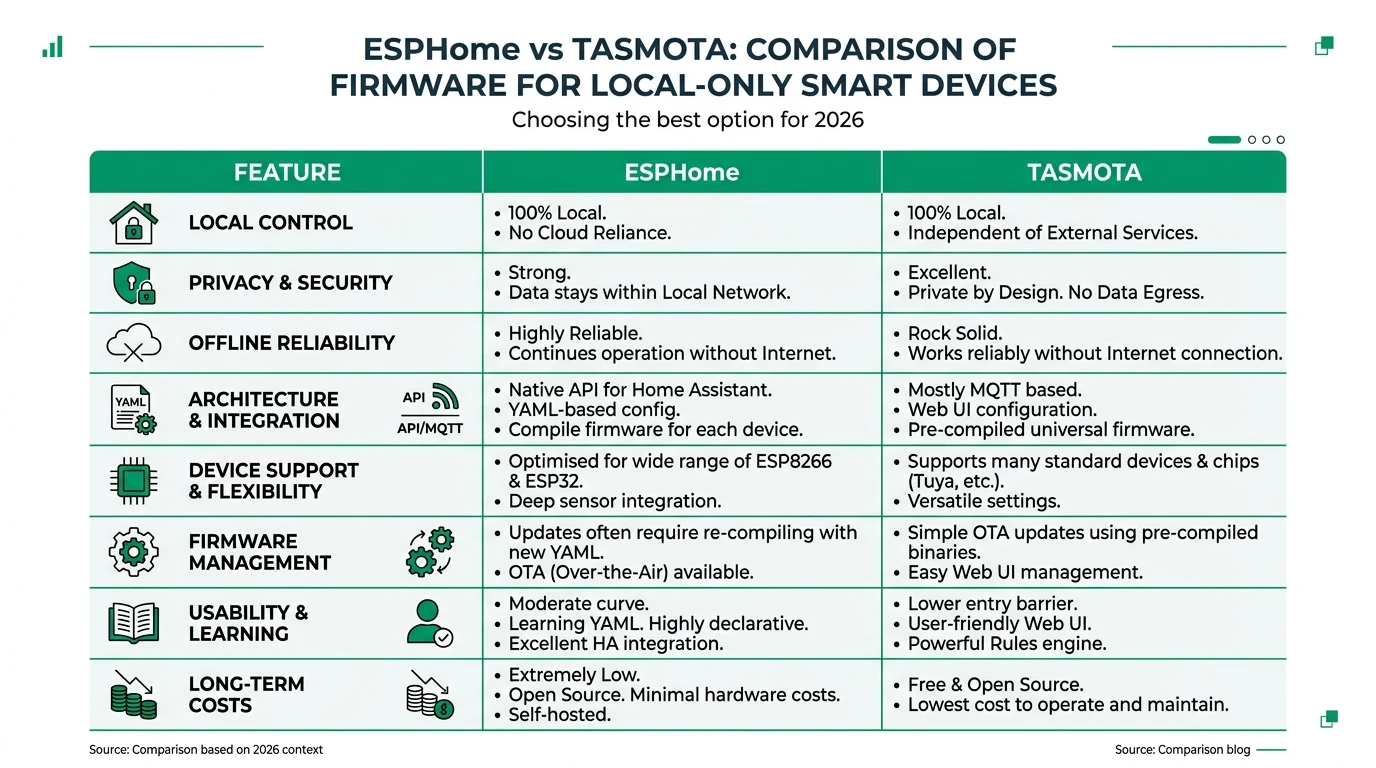
Tasmota’s default MQTT is powerful but often plaintext on port 1883. Encrypting MQTT with TLS protects passwords and telemetry from passive sniffing on Wi-Fi or compromised IoT VLANs. This guide complements ESPHome vs Tasmota—here we assume you stay on Tasmota and want broker-grade privacy.
If you plan to leave MQTT entirely, see migrate Tasmota to ESPHome.
Bottom line: TLS + ACLs + no port-forward is the minimum credible stack for MQTT in 2026.
Threat model: what TLS fixes (and does not)
| Risk | TLS helps? | Also need |
|---|---|---|
| Wi-Fi eavesdropper | Yes | Strong Wi-Fi passwords / WPA3 |
| Rogue device on VLAN publishing garbage | Partially | ACLs + topic prefixes |
| Internet-exposed broker | No—do not expose | Firewall deny inbound 1883/8883 |
Broker placement and network design
Run Mosquitto on the same host as Home Assistant (add-on) or a small VM on your trusted LAN. Put IoT Wi-Fi on a guest vs IoT VLAN and allow only:
- Tasmota → broker
8883/TCP - Home Assistant → broker
8883/TCP - Admin SSH → management interface
TLS options: CA-signed vs fingerprint
| Approach | Pros | Cons |
|---|---|---|
| Public CA (Let’s Encrypt) | Easy for split-DNS | Renewal automation |
| Private CA | Full control | Distribute CA to clients |
| MqttFingerprint (Tasmota) | Quick for LAN | Rotate cert = update all devices |
Tasmota supports SHA-256 fingerprint validation—document the fingerprint in your password manager and update when the server cert rotates1.
Mosquitto configuration sketch
Use listener 8883 with cafile, certfile, keyfile, and require_certificate false unless you issue client certs. Enable password_file or use_identity_as_username for per-device users2.
Tasmota console settings (conceptual)
Set MqttHost, MqttPort 8883, MqttUser, MqttPassword, enable TLS per Tasmota MQTT docs, and set MqttFingerprint to match your broker cert. Test one device before pushing to dozens.
Home Assistant integration
Use the MQTT integration with the same TLS endpoint; store credentials in secrets.yaml. Align topic prefixes (tasmota/discovery vs custom) with your ACL file.
ACL pattern (example logic)
| User | Subscribe | Publish |
|---|---|---|
tasmota_garage | cmnd/garage/# | stat/garage/#, tele/garage/# |
homeassistant | +/+# (careful) | homeassistant/# |
Principle of least privilege: no device user should publish to cmnd/other/#.
Checklist
- Generate TLS cert and record fingerprint before flashing Tasmota TLS flags.
- Create unique MQTT users per device class or per device.
- Block inbound WAN to broker IP; allow only LAN/L2TP/Tailscale as needed.
- Test subscription with mosquitto_sub before enabling fleet-wide.
- Document cert expiry and automate renewal if using public CA.
FAQ
Frequently Asked Questions
Can I use EMQX instead of Mosquitto?
Yes—both support TLS; EMQX adds clustering and richer ACLs at the cost of complexity.
Does TLS add latency for automations?
Minimal on LAN; avoid routing MQTT through VPN unless necessary.
Should client certificates be mandatory?
High-security homes can require mutual TLS; most users start with username/password over TLS.
What about Zigbee2MQTT MQTT?
Same broker can serve Z2M topics—see Zigbee2MQTT vs ZHA and isolate topic trees via ACLs.
Do I still need ESPHome if MQTT is encrypted?
Encryption does not remove MQTT complexity—ESPHome native API still reduces moving parts; compare in the main vs article.
Primary sources
| ID | Source | URL |
|---|---|---|
| 1 | Tasmota MQTT | tasmota.github.io |
| 2 | Mosquitto config | mosquitto.org |
Conclusion
TLS transforms MQTT from “convenient” to “defensible” on a smart home LAN. Pair encryption with segmentation and least-privilege ACLs—then revisit whether long-term you want fewer MQTT devices via ESPHome migration.