Buying Guides
Best Pre-Flashed ESPHome & Tasmota Smart Plugs (2026)
Compare Athom pre-flashed ESPHome and Tasmota plugs with Shelly Plus ESP32 paths and DIY flashing risks—local Home Assistant control without UART work or cloud exploits.
Quick answer: Where should I buy a smart plug that already runs ESPHome or Tasmota?
Start with vendors who advertise ESPHome or Tasmota images compiled against known ESP8266/ESP32 boards—Athom’s EU/US/UK SKUs are the clearest examples—then validate behavior in Home Assistant, flash checksums when published, and immediately move the plug to an IoT VLAN with outbound filtering. Shelly Plus plugs are a parallel path: stock firmware emphasizes local RPC rather than ESPHome, but the platform is ESP32-based for users who accept a self-managed reflash.
Executive Summary
Readers landing on “pre flashed esphome smart plug” are usually trying to dodge two pain points at once: cloud-captive Wi‑Fi stacks they cannot trust, and physical flashing workflows that expose mains-adjacent hardware to slipshod tooling. Pre-flashed specialty plugs solve the operational half of the problem—you unbox, adopt the device into Home Assistant, and keep telemetery on the LAN—but they do not magically remove Wi‑Fi listening, compromised supply chains, or the need for segmentation.
Bottom line: If you want ESPHome without touching UART pins, prioritize Athom (and comparably transparent regional shops) while you double-check SKU-specific documentation in the ESPHome device index and vendor changelogs. If you want vendor-backed local APIs without recompiling YAML, examine Shelly Plus plugs that run ESP32 silicon under Shelly firmware, then decide whether stock local control is enough or whether you will shoulder a community ESPHome port. Either way, pair the hardware with device-level egress controls so “local-first” is enforceable, not aspirational.
Why pre-flashed hardware shows up in privacy searches
Privacy advocates care about data ownership, not just marketing adjectives. A typical mass-market Wi‑Fi plug pushes you through a mobile app, cloud account, and opaque OTA channel; even if you later reflash, there is a window where unknown firmware owns the radio. Specialty vendors responded by shipping ESPHome or Tasmota images tied to predictable pinouts, documented in YAML templates or Tasmota templates, so Home Assistant adopters skip the hazardous middle step.
That does not mean the device is passive. Wi‑Fi plugs still join your SSID, still run a TCP stack, and still deserve the same VLAN discipline you would apply to any IoT SKU. The win is narrower: you remove UART adapters pressed against line-voltage-adjacent boards, closed-source flashing tools, and brittle OTA downgrade chains that historically made Tuya-style devices a cat-and-mouse game.
Firmware fork in the road: ESPHome versus Tasmota at purchase time
Both stacks are legitimate for local automation, but the integration shape differs. ESPHome speaks the native Home Assistant API (optional encryption keys) and stores configuration as YAML that recompiles into firmware; Tasmota leans on MQTT topics plus a mature web UI for live parameter tweaks. If you already run a hardened broker, Tasmota may fit your MQTT posture; if you want to avoid brokers entirely, ESPHome is usually less moving parts. Our full decision record lives in ESPHome vs Tasmota—use this buyer guide when the question is specifically where to buy the plug, not how the protocols differ sentence by sentence.
| Buyer profile | Lean ESPHome pre-flashed | Lean Tasmota pre-flashed |
|---|---|---|
| Home Assistant-centric, no MQTT | Native API adoption, fewer daemons | Requires broker even if plug is local |
| Rapid template iteration on device | YAML edit + recompile | WebUI + Backlog commands |
| Strict TLS everywhere | Encrypt HA API path | Needs TLS on MQTT (port 8883) |
| Future migration plans | YAML is portable between boards | MQTT topic layout can be reused in ESPHome later via migration tooling1 |
After you choose, run through the same baseline hardening checklist regardless of firmware: change default passwords, disable unused features, document which GPIO drives the relay, and snapshot energy calibration values if your plug reports power.
Athom and other specialty vendors (what buyers actually receive)
Athom (reference pattern for ESPHome-native retail)
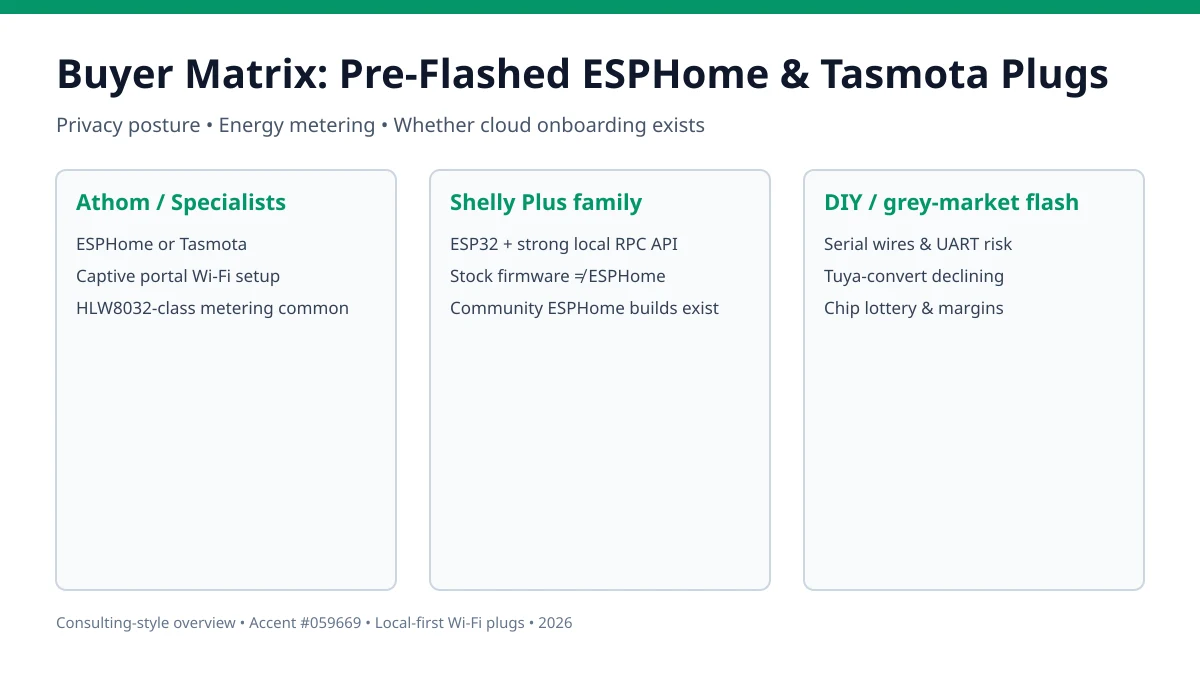
Athom publishes multiple wall-form factors—EU, US, UK—with explicit ESPHome and Tasmota listings, usually built around ESP8266 or newer ESP32 / ESP32-C3 silicon depending on the revision. Typical value props in their materials include energy monitoring chips such as HLW8032-class front-ends (names vary per revision) and captive-portal onboarding that keeps you off a cloud app. Community write-ups and the ESPHome device directory catalog specific board IDs—use them before you automate sensitive loads.2
Because Athom optimizes for Home Assistant adopters, it is the default answer when someone searches for Athom ESPHome plug with bottom-of-funnel intent: you pay a modest premium versus random Amazon no-name hardware, but you buy back weekends lost to bricked relays.
Regional Tasmota-first resellers
Smaller vendors (for example My Local Bytes in Europe or geographically focused shops advertising factory Tasmota) pitch similar value: MQTT-ready plugs where GPIO mappings are already validated. Due diligence differs slightly—confirm whether they ship upstream Tasmota binaries, publish SHA sums, and honor GDPR-aligned shipping disclosures if you care about vendor data handling.
Crowdfunded / boutique batches
Treat limited-run batches like security audits: fascinating, but volatile. Pinouts and flash sizes can change between tape reels. If you depend on reproducibility across dozens of plugs for a rental portfolio or family rollout, favor SKUs with public documentation deltas, not Discord-only folklore.
Shelly Plus plugs: local control without claiming “factory ESPHome”
Shelly deserves mention because privacy-conscious shoppers often pair Shelly + Home Assistant even though Shelly does not market “pre-flashed ESPHome.” Instead, Gen2 Plus hardware exposes documented local RPC endpoints over Wi‑Fi—meaning automations can stay on-net without tying accounts to a cloud UI if you engineer onboarding carefully.3
From a buyer’s standpoint the trade is:
| Factor | Shelly Plus (stock firmware) | Athom ESPHome bundle |
|---|---|---|
| Firmware lineage | Vendor-maintained, RPC-documented | Community-driven ESPHome YAML |
| Typical HA integration | Integration over LAN APIs | Native ESPHome API |
| ESPHome conversion | Community-maintained procedures | Already aligned |
| Vendor longevity | Larger EU presence | Specialty OEM |
If your editorial requirement is “absolutely ESPHome bytecode day zero,” Shelly is rarely the SKU—even though it may outperform cloud-branded plugs on local leverage. If your requirement is “documented LAN control without Xiaomi/Tuya clouds,” Shelly frequently wins on transparency.
Specifications that affect privacy more than marketing bullets
Energy monitoring sells plugs, but accuracy and calibration determine whether telemetry is trustworthy—or dangerously misleading when automating heaters.
| Specification | Why privacy-aware buyers care |
|---|---|
| Metering IC family | Determines whether VAT-factor calibration is trivial or manual |
| Relay rating vs plug form factor | Undersized relays weld closed—physical safety risk |
| ESP8266 vs ESP32 vs ESP32-C3 | RAM/RTOS features affect TLS stacks and BLE coexistence |
| Exposed UART pads | Useful for rescue but also physical attack surface in hostile households |
| Default BLE/Wi‑Fi provisioning modes | Misconfigs can leave radios discoverable longer than expected |
Document readings before trusting automations that gate sump pumps or heaters. When firmware exposes ugly realities (noise on low loads, drift when motors spin up), fix it with YAML filters in ESPHome or follow Tasmota power monitoring calibration guidance rather than piping raw numbers into alarm workflows.
Network posture after the plug joins Home Assistant
Buying honest firmware gets you halfway; segmentation completes the story.
Checklist
- Place plugs on an IoT SSID/VLAN without routed access to workstations or NAS.
- Apply DNS filtering (Pi-hole, AdGuard Home, or router policies) so stray NTP/update calls are visible.
- Block WAN egress entirely when you intend air-gapped switching; verify schedules still fire.
- Mirror syslog or HA logs during the first 48 hours to catch unexpected SYN floods.
- Document firmware update cadence—ESPHome YAML bumps vs Tasmota binary OTAs.
If you expose Home Assistant beyond the LAN, do not punch holes straight to MQTT or ESPHome APIs—use WireGuard or Tailscale comparisons so authentication terminates on infrastructure you control.
Comparative privacy posture (illustrative scoring)
Scores summarize policy leverage, not electrical engineering merit—use them as a sorting hat before reading deeper reviews.
Illustrative privacy leverage (Wi-Fi plugs)
| Product | Cloud required | Local storage | Mandatory account | Offline control | Score / 10 |
|---|---|---|---|---|---|
| Athom ESPHome/Tasmota bundles | No for setup if captive portal suffices | Telemetry stays on MQTT or HA DB | No vendor login typical | Yes once adopted | 9.2 |
| Shelly Plus plug (stock firmware) | No when LAN onboarding honored | Energy stats via HA recorder | Often optional | Yes | 8.7 |
| Brand-name Wi-Fi plug + DIY flash | During initial captive portal risk window | Depends on successor firmware | Frequently yes before flash | Yes post-success | 6.5 |
When DIY still makes sense
Our ESPHome DIY plug tutorial remains relevant when you need odd form factors, UL-listed enclosures paired with ESP modules you sourced yourself, or classroom budgets where labor is cheaper than hardware premiums. DIY also teaches inductive reasoning about mains separation—valuable when evaluating whether a pre-flashed vendor cut corners.
FAQ
Frequently Asked Questions
What does “pre-flashed” mean for a smart plug?
The vendor ships the ESP8266/ESP32-class microcontroller already programmed with ESPHome or Tasmota before you open the box. You typically join it to Wi‑Fi through a captive portal or USB/UART tooling supplied by the vendor, instead of soldering wires to flash blank modules yourself.
Is Athom the only trustworthy source for pre-flashed ESPHome plugs?
Athom is the most frequently cited specialty OEM among Home Assistant users, but regional resellers also advertise factory Tasmota or ESPHome loads—My Local Bytes in the UK/EU and smaller shops elsewhere. Treat every vendor as untrusted until you verify checksums, forum reputation, and whether images match upstream ESPHome/Tasmota releases described in documentation.24
Do Shelly plugs ship with ESPHome from the factory?
Generally no—Shelly Plus devices ship with Shelly firmware exposing a documented local RPC API over the LAN. Many privacy-focused buyers still pick Shelly because the stock stack can be operated without a cloud login, while advanced users optionally replace firmware with community ESPHome builds at their own risk.3
Are pre-flashed plugs more private than cloud apps on their own?
Firmware choice is necessary but not sufficient. A Wi‑Fi plug can still try to reach the internet for NTP, firmware checks, or misconfiguration. Put IoT segments on an isolated VLAN, block WAN egress where appropriate, and audit DNS—see our IoT VLAN primer and internet blocking patterns.
Should I pick ESPHome or Tasmota when both are offered on the same hardware?
ESPHome shines when you want Home Assistant’s encrypted native API without standing up MQTT infrastructure; Tasmota is ideal when you want rapid template-based setup and MQTT as your integration backbone. For a deeper trade study, read ESPHome vs Tasmota and migration notes.
Why avoid Tuya-convert or serial flashing if I am privacy-focused?
Supply chains change GPIO maps and chip revisions without notice, UART access often requires destructive case entry, and some historical “phone-home” exploits targeted exactly the provisioning windows vendors expect customers to use. Buying hardware already aligned with open firmware removes an entire class of mistakes where a mis-flash bricks a device or leaves it briefly running unknown stock firmware.
Primary Sources Table
| ID | Source Title / Description | Direct URL |
|---|---|---|
| 1 | ESPHome documentation (native API overview) | https://esphome.io/ |
| 2 | ESPHome device database (community hardware references) | https://devices.esphome.io/ |
| 3 | Shelly Gen2 API documentation | https://shelly-api-docs.shelly.cloud/ |
| 4 | Tasmota documentation hub | https://tasmota.github.io/docs/ |
| 5 | Home Assistant ESPHome integration docs | https://www.home-assistant.io/integrations/esphome/ |
Conclusion
Pre-flashed ESPHome and Tasmota plugs exist because the smart-home privacy niche demanded hardware that skips risky onboarding theatrics. Athom-style bundles remain the fastest mental model for true ESPHome-from-day-zero, while Shelly Plus hardware appeals when vendor-documented LAN RPC beats compiling YAML for every relay swap.
Next steps: reconcile firmware choice inside ESPHome vs Tasmota, plan MQTT TLS if you choose Tasmota, and contrast ecosystem incentives in Aqara vs Shelly vs Tuya before expanding beyond plugs.
Footnotes
-
ESPHome documentation hub — integration expectations for ESPHome-managed devices (https://esphome.io/). ↩
-
Representative Athom listings appear across marketplace storefronts (for example Tindie Athom storefront listings); compare advertised MCU revisions against ESPHome board YAML before relying on sensor graphs for safety automation. ↩ ↩2
-
Shelly Gen2 local WebSocket/RPC overview (Shelly API docs). ↩ ↩2
-
My Local Bytes advertises plugs “preflashed & preconfigured” with open firmware choices (product documentation). ↩