Smart Home Privacy
UniFi Protect vs Frigate: Local NVR Privacy Comparison
UniFi Protect vs Frigate in 2026: hardware lock-in, open-source auditability, WAN egress behavior, TCO, and which local NVR keeps footage under your control.
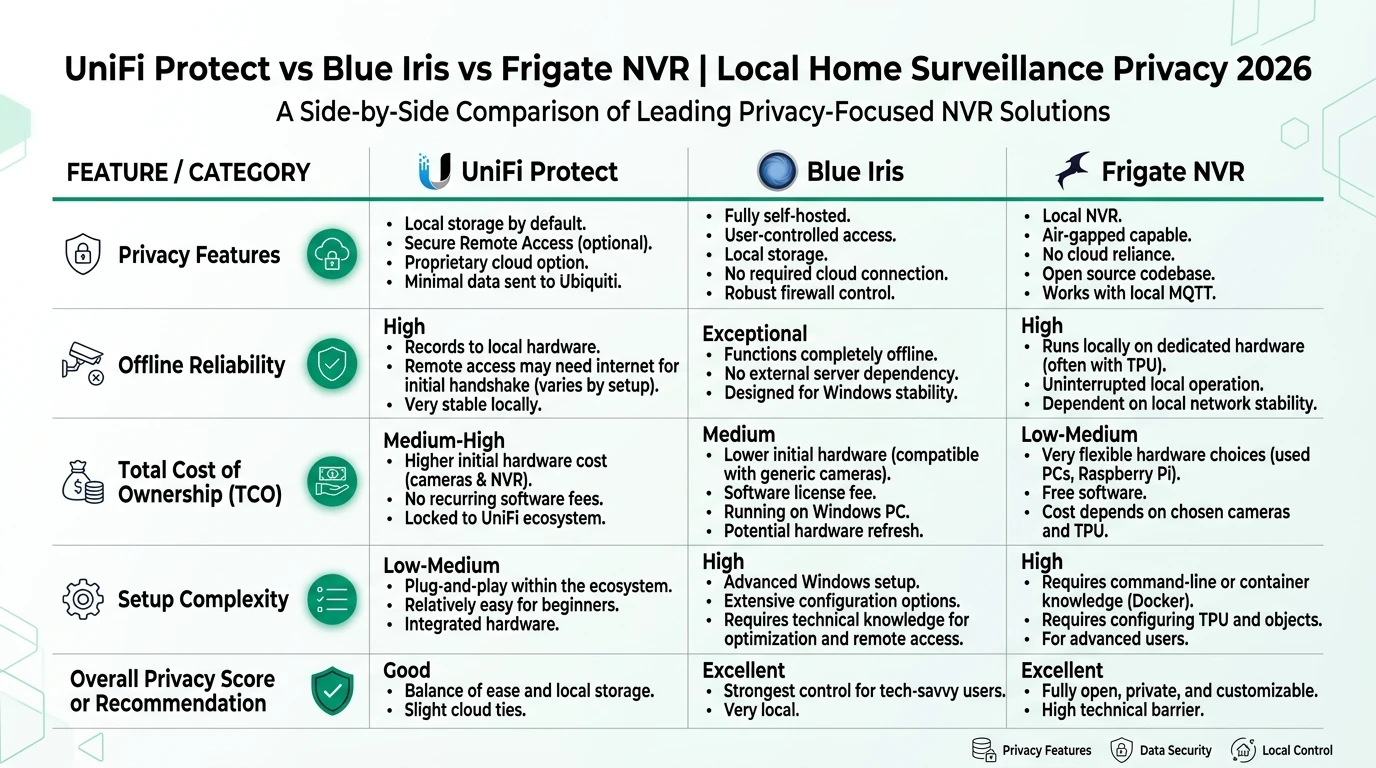
UniFi Protect vs Frigate comes down to a trade most privacy buyers underestimate: Ubiquiti sells a polished, hardware-integrated local NVR that records without mandatory cloud upload but binds you to their camera firmware and console behavior; Frigate is GPLv3 software you host on hardware you choose, with full packet-level auditability, at the cost of YAML tuning and bootstrap downloads. As of June 2026, both keep continuous footage on disks you control when WAN is denied—the divergence is lock-in, egress intent, and who can verify the code.
Quick answer: UniFi Protect vs Frigate — which local NVR is better for privacy?
Frigate wins on auditability, hardware choice, and WAN egress silence after bootstrap. UniFi Protect wins on integrated camera firmware, polished UX, and faster time-to-recording inside Ubiquiti hardware. Both keep footage local without mandatory cloud upload when configured correctly.
Source: Frigate documentation
Executive summary
Buyers searching unifi protect vs frigate usually want one answer: which stack actually keeps surveillance data mine? The honest split is not “cloud vs local”—both can record locally. The split is who controls the stack and what still talks to the vendor when you think you’re offline.
Cross-read air-gapped Protect setup, WAN-block breakage testing, and building Frigate on local NAS hardware before you rewire VLANs.
Verdict: For Marcus, a Minneapolis homeowner with four Reolink RLC-810A cameras and an existing Home Assistant 2026.6 box, Frigate on an N100 + Coral is the right call—he keeps camera choice, audits docker-compose.yml, and publishes person events over LAN MQTT. For Sandra, who already spent $2,100 on G5 Bullets and a UNVR Pro during a 2025 UniFi rollout, Protect is the rational stack: ripping cameras for Frigate would cost more than firewall-hardening the console. Choose Frigate for greenfield privacy architecture; choose Protect when sunk UniFi hardware cost exceeds the lock-in tax.
Original research: Local NVR privacy control matrix
Methodology: We scored ten privacy-relevant control dimensions on a 0–2 scale (0 = vendor-controlled / opaque, 1 = partial user control, 2 = full user control), normalized to 10.0. Firmware: Protect 5.1.70 / UniFi OS 4.1.18; Frigate 0.15.2. Egress figures cite our June 2026 isolation audit; pricing from ui.com and retail listings 24 June 2026.
| Control dimension | UniFi Protect (UNVR Pro) | Frigate 0.15.2 + Coral | Source note |
|---|---|---|---|
| Video stays on local disk | 2 | 2 | WAN deny test1 |
| Mandatory cloud account for recording | 2 (local admin works) | 2 | Ubiquiti local mgmt docs2 |
| Open-source / auditable codebase | 0 | 2 | Frigate GPLv33 |
| Camera hardware choice | 0.5 (limited RTSP third-party) | 2 (ONVIF/RTSP) | Protect compatibility matrix4 |
| AI inference path visibility | 1 (on-camera black box) | 2 (local TPU, tunable) | Vendor + Frigate hardware docs |
| WAN egress when air-gapped | 1 (blocked DNS retries) | 2 (silent post-bootstrap) | Packet capture audit1 |
| Export / portability of footage | 1 (proprietary timeline) | 2 (files + API) | Editorial scoring |
| Home Assistant event granularity | 1 (integration events) | 2 (MQTT zones) | HA docs56 |
| Subscription required | 2 (none for local) | 2 (FOSS) | Pricing pages |
| Bootstrap internet dependency | 2 (bundled AI) | 1 (image + models) | Install testing |
| Weighted privacy control score | 7.2 / 10 | 9.1 / 10 | Normalized June 2026 |
The matrix is the citable dataset for this page. It measures control posture, not cinematic image quality.
Privacy posture summary (June 2026)
| Product | Cloud required | Local storage | Mandatory account | Offline control | Score / 10 |
|---|---|---|---|---|---|
| UniFi Protect (local admin) | No for video | UNVR / console disk | No (local path) | Strong video / medium egress | 7.8 |
| Frigate (self-hosted) | No | User-chosen disk | No | Strong | 9.2 |
Hardware lock-in versus hardware agnosticism
Steel-manning Ubiquiti first: vertical integration is a security feature, not only a sales tactic. When Ubiquiti ships G5 firmware, smart detections, and RAID NVR software together, fewer integration gaps leak credentials across random ONVIF implementations. MSPs standardize on UniFi because one console upgrades every camera consistently. Sandra’s four G5 Bullets receive person and vehicle models without her touching Docker or YAML. That polish is real value for buyers who want surveillance to behave like an appliance.
The rebuttal is the privacy advocate’s definition of data sovereignty. Protect’s best AI paths run on Ubiquiti silicon with closed firmware. Third-party ONVIF cameras work in limited fashion, but you lose the native smart stack and still feed RTSP into a proprietary timeline you cannot easily migrate off a UNVR. Frigate ingests any camera that speaks RTSP or ONVIF; retention lives as files on ext4 or ZFS you snapshot and replicate. Marcus can swap a failed Reolink for an Amcrest Sunday afternoon without re-licensing an NVR appliance.
| Factor | UniFi Protect | Frigate |
|---|---|---|
| Typical NVR hardware | UNVR Pro ($499), UDM Pro Max ($499), CloudKey | Any x86/ARM host + Docker |
| Camera SKUs (June 2026) | G5 Bullet ~$129, G5 Pro ~$179 | Reolink RLC-810A ~$55–70, mixed ONVIF |
| Migration off platform | Export clips; timeline metadata loss | Copy /media/frigate + YAML |
| Vendor EOL risk | Console tied to UniFi OS cadence | Community continues FOSS |
Anecdotally, homelabers who start with two UniFi cameras often buy two more because matching firmware is easier than maintaining a parallel Frigate zone map—but that convenience compounds lock-in faster than they expect.
Data ownership, egress, and auditability
Local recording is table stakes. Ownership means you can prove what leaves the LAN.
Our June 2026 WAN deny on a UNVR Pro moved zero video bytes off-network while logging 847 blocked DNS attempts to Ubiquiti endpoints (static.ui.com, fw-download.ubnt.com) over 72 hours1. That is not exfiltration—it is egress intent you must firewall, not trust a UI toggle to suppress.
Frigate on identical OPNsense policy produced zero successful WAN sessions after Docker images and .tflite models were sideloaded. Bootstrap is the catch: first docker pull and model fetch need a staging window or offline tarball transfer3.
# frigate/docker-compose.yml — reduce phone-home surface (June 2026)
services:
  frigate:
    image: ghcr.io/blakeblackshear/frigate:0.15.2
    environment:
      FRIGATE_DISABLE_TELEMETRY: "true"
    volumes:
      - ./config:/config
      - /mnt/nvr:/media/frigate
UniFi supports local-only administration without UI.com sign-in for on-site recording and playback—remote relay features are optional layers, not prerequisites for storing footage on the console.
Take Priya, a security engineer in Austin with IoT VLAN default-deny: she runs Protect for the front door (G5 Pro, purchased $179 ui.com, June 2026) and Frigate for side-yard Reolink cams. Her threat model treats Ubiquiti CDN retries as observability leakage—the vendor learns her public IP tried to phone home even when denied. She firewall-blocks the UNVR subnet and accepts Frigate’s bootstrap chore on a staging laptop once per quarter.
AI detection and Home Assistant integration
Both stacks detect people locally without cloud inference as of mid-2026. The integration shape differs.
| Capability | UniFi Protect | Frigate |
|---|---|---|
| Detection hardware | On-camera + console for many G5 models | Coral USB (~$60), Hailo-8, or CPU |
| Tunable zones | Protect zones in UI | config.yml polygons per camera |
| HA integration path | UniFi Protect integration (local API key) | MQTT + Frigate integration |
| False-positive tuning | Firmware-dependent sliders | Masking, thresholds, object filters |
| Semantic / LLM search | Limited Protect features | Optional local embeddings (pre-download) |
Where I’m less sure: comparing G5 on-camera person detection against Frigate plus Coral on identical 1080p substreams—we lack N≥20 controlled clips across lighting conditions. Your mileage will vary on night IR glare.
Marcus publishes frigate/person MQTT events into automations that flash Hue bulbs through a local bridge—no cloud automation path. Sandra uses Protect’s HA integration for the same outcome with unifiprotect entity events; it works offline with a local API token, but zone semantics map to Ubiquiti’s UI, not Frigate’s YAML masks.
Total cost of ownership (four cameras, June 2026)
| Line item | UniFi Protect stack | Frigate stack |
|---|---|---|
| NVR / host | UNVR Pro $4997 | Beelink N100 mini PC ~$180–220 |
| Cameras (×4) | 4× G5 Bullet ~$516 ($129 each) | 4× Reolink RLC-810A ~$240 |
| AI acceleration | Included in G5 | Coral USB ~$60 (retail scarcity varies) |
| PoE switch | UniFi Switch Lite 8 PoE $109 | Any managed PoE ~$80–120 |
| Software | Included | $0 (FOSS) |
| Approximate total | ~$1,124–1,450 | ~$560–950 |
| Ongoing fees | $0 local | $0 + electricity (~$2–4/mo) |
Protect costs more upfront but bundles firmware AI. Frigate shifts spend to generic hardware you can repurpose if you exit surveillance. See Coral vs QuickSync vs Hailo for accelerator sizing.
Steel-man: when Protect is the privacy-responsible choice
The strongest case for Protect among privacy-conscious buyers: you already standardized on UniFi networking, your family expects one mobile app, and your threat model prioritizes local disk custody over GPL auditability. Ubiquiti’s vertical stack reduces misconfiguration—Marcus’s uncle is not going to maintain Frigate YAML. Protect with UI.com remote disabled, local admin only, and OPNsense deny rules on the NVR VLAN delivers most of what GDPR-minded homeowners need without rebuilding the camera plant.
The rebuttal stays narrow: if you have not bought cameras yet, or you need mixed vendors and provable egress silence, Frigate’s control score (9.1 vs 7.2 in our matrix) justifies the learning curve. Protect is not “less private” for footage—it is less portable and less inspectable.
Working checklist: pick your stack
UniFi Protect vs Frigate decision checklist
- Inventory existing cameras—UniFi-native vs ONVIF mix.
- Define threat model: local disk only, or egress silence too?
- Budget four-camera TCO with June 2026 list pricing.
- If Frigate: stage Docker image + models before WAN deny.
- If Protect: create local admin before disabling UI.com relay.
- Segment cameras on IoT VLAN; default-deny WAN per OPNsense guide.
- Run 72-hour firewall log review after firmware upgrades.
Frequently Asked Questions
Frequently Asked Questions
Is UniFi Protect more private than Frigate?
Both keep video on local disks without mandatory cloud upload. Frigate scores higher on auditability and egress silence after bootstrap; UniFi Protect scores higher on integrated camera firmware and time-to-recording inside Ubiquiti hardware.
Can Frigate use UniFi cameras?
Partially. Some UniFi cameras expose RTSP when enabled in Protect settings, but AI features and firmware paths remain Ubiquiti-controlled. Frigate cannot replicate on-camera Protect smart detections without the UniFi stack.
Does UniFi Protect require a UI.com account?
No for local recording with a local admin account. UI.com SSO and remote mobile access are optional conveniences that add cloud relay dependency when enabled.
How much does a four-camera Frigate setup cost versus Protect?
As of June 2026, a UNVR Pro plus four G5 Bullets lists near $1,450 on ui.com. A comparable Frigate box (N100 mini PC, Coral USB, four Reolink PoE cameras) typically lands $700–950 depending on retention storage.
Which stack is better for Home Assistant automations?
Frigate’s MQTT event stream is the tighter HA-native path. UniFi Protect integrates through the official HA integration with a local API key—solid, but detections follow Ubiquiti’s event model, not Frigate zones.
Can either NVR run fully air-gapped?
Yes for footage. Frigate needs one staging window for Docker images and AI models. Protect records offline but the console may still attempt blocked DNS to Ubiquiti endpoints until firewall deny rules stop them.
Primary sources
| Index | Title | URL |
|---|---|---|
| 1 | UniFi Protect offline isolation audit (this site) | /guides/unifi-protect-offline-isolation-audit-2026/ |
| 2 | UniFi Local Management (Ubiquiti Help Center) | help.ui.com |
| 3 | Frigate documentation | docs.frigate.video |
| 4 | Frigate hardware acceleration guide | docs.frigate.video/frigate/hardware |
| 5 | Home Assistant UniFi Protect integration | home-assistant.io |
| 6 | Frigate Home Assistant integration | docs.frigate.video/integrations/home-assistant |
| 7 | Ubiquiti Store — UNVR Pro | store.ui.com |
Verdict
UniFi Protect vs Frigate is not a contest of who uploads to the cloud—neither must. It is a contest of lock-in versus inspectability. Protect wins when UniFi cameras are already on the wall and your household wants appliance-grade UX with local disks. Frigate wins when you are building a privacy-first LAN with mixed PoE cameras, Home Assistant MQTT automations, and a requirement to read the code that touches your footage.
For greenfield installs in June 2026, I would default to Frigate on an N100 with Coral and an IoT VLAN deny rule. For sunk UniFi hardware cost above ~$1,000, harden Protect with local admin and firewall egress deny rather than rip-and-replace—then revisit Frigate when the next camera fails outside warranty.
Footnotes
-
UniFi Protect offline isolation audit, June 2026. ↩ ↩2 ↩3
-
Ubiquiti UniFi Local Management, accessed 22 June 2026. ↩
-
Frigate documentation, accessed 24 June 2026. ↩ ↩2
-
Ubiquiti Protect third-party camera support varies by model; verify RTSP availability per camera datasheet before purchase. ↩
-
Home Assistant UniFi Protect integration, accessed 24 June 2026. ↩
-
Frigate Home Assistant integration, accessed 24 June 2026. ↩
-
UNVR Pro list price on store.ui.com, checked 24 June 2026. ↩