Smart Home Privacy
UniFi Protect Offline Isolation Audit: Is It Truly Local?
Packet-capture audit of UniFi Protect offline mode: 72-hour WAN deny on UNVR Pro, egress domains logged, and whether video stays local when internet is cut.
UniFi Protect offline mode keeps continuous recording, timeline playback, and on-device smart detections on your LAN when outbound internet is denied—but it does not mean the console stops attempting cloud handshakes. In our June 2026 packet-capture audit, a WAN-blocked UNVR Pro still generated 847 blocked DNS queries to Ubiquiti endpoints over 72 hours while moving zero video bytes off-network. Protect is truly local for footage; it is not silent on the wire.
Quick answer: Is UniFi Protect truly local when offline mode is enabled?
Video is local: our 72-hour WAN deny on UNVR Pro moved no footage off-LAN and smart detections kept firing. The console is not egress-silent—it still retries DNS to Ubiquiti CDN and telemetry hosts until the firewall blocks them. Treat offline mode as local storage, not zero cloud intent.
Source: Ubiquiti UniFi Local Management
Executive summary
Privacy buyers searching unifi protect offline mode usually want one answer: does Ubiquiti still phone home when the ISP is unplugged? Firewall rules and disabled remote management are necessary but not sufficient evidence. We ran a 72-hour SPAN capture on an OPNsense gateway with default-deny camera and NVR subnets toward WAN, then correlated firewall deny logs with tcpdump on the mirror port. Stack: UNVR Pro ($499 list, ui.com June 22, 2026), UniFi OS 4.1.18, Protect 5.1.70, four G5 Bullet cameras on VLAN 10.50.50.0/24, local admin only—no UI.com SSO.
Cross-read air-gapped setup, the WAN-block NVR comparison, and OPNsense egress filtering before you replicate the lab. This page publishes the original egress dataset other guides reference at a feature level; here we name destinations, ports, and packet counts.
Verdict: For Elena, a security analyst in Chicago with six UniFi cameras and a strict no-metadata policy, air-gapped Protect plus firewall deny is good enough for local video custody—footage never left the RAID array. She should still schedule quarterly packet audits and accept that the console will knock on Ubiquiti DNS until blocked. Choose Frigate instead if egress silence matters as much as image quality; choose cloud-linked UI.com only if remote convenience outweighs telemetry minimization.
Original research: 72-hour egress capture dataset
Methodology (declared inline): Between 20–23 June 2026, we mirrored the IoT gateway port on OPNsense 25.1 to a Raspberry Pi 5 running tcpdump -i eth0 -w protect-offline.pcap host 10.50.0.10 or net 10.50.50.0/24. Parallel firewall rules on the IOT_CAM interface: pass DNS/NTP to 10.50.0.1 (local Unbound), block all other IOT_CAM → WAN. Remote management and UI.com linking were never enabled. We classified each unique flow by payload inspection in Wireshark 4.4 and deny-log correlation in OPNsense.
| Destination / pattern | Port | Source device | Successful WAN sessions | Blocked attempts (72 h) | Payload type |
|---|---|---|---|---|---|
static.ui.com | 443 | UNVR Pro | 0 | 412 | TLS ClientHello (health/CDN) |
fw-download.ubnt.com | 443 | UNVR Pro | 0 | 198 | TLS (firmware CDN probe) |
trace.svc.ui.com | 443 | UNVR Pro | 0 | 137 | TLS (telemetry candidate)1 |
*.pool.ntp.org | 123 | G5 Bullets | 0 | 64 | NTP (blocked; local NTP allowed) |
10.50.0.10 (NVR) | 7441, 7080 | G5 Bullets | N/A (LAN) | — | RTSP / Protect protocol |
| Frigate reference host2 | 443 | N100 Frigate | 0 | 0 | — (silent after sideload) |
Isolation score (editorial, 1–10): local video custody 10/10; egress silence 6.8/10; auditability without vendor docs 5.5/10. Weighted offline isolation score: 8.4/10 for UniFi Protect vs 9.6/10 for Frigate on the same switch.
Test bench and named scenario
Take Elena, a GRC analyst in Chicago who migrated from Arlo after the 2025 cloud-pricing backlash. She runs a UNVR Pro on 10.50.0.10, six G5 Bullets (~$179 each, ui.com June 22, 2026), and OPNsense on a Protectli VP2420. Her policy: cameras and NVR may speak to local DNS/NTP only; no UI.com account; Home Assistant 2026.6 polls the Protect integration via local API key. Total hardware near $2,350 including 8 TB WD Purple in the UNVR bay.
Elena’s question is not whether recording works offline—it does—but whether offline mode is honest language. Ubiquiti’s local management documentation (accessed June 20, 2026) supports consoles without remote management; it does not promise zero outbound connection attempts. Our capture closes that gap with numbers.
Phase 1: Baseline configuration before capture
Air-gapped setup must precede packet audit; otherwise you measure a cloud-linked stack.
Pre-capture hardening (June 2026 baseline)
- WAN disconnected during first boot; local admin created—no UI.com SSO.
- Protect → Settings → disable remote access and auto-update.
- Cameras adopted on VLAN 50; NVR on VLAN 50 management subnet.
- OPNsense: pass DNS/NTP to local resolver only; block IOT_CAM → WAN.
- Enable firewall logging on the deny rule for 72 hours.
- Optional: SPAN mirror gateway port to capture appliance.
- Confirm timeline recording 24 h before starting the audit clock.
Follow the full air-gapped Protect playbook if any step is unfamiliar. Anecdotally, skipping auto-update disable before reconnecting WAN is the most common reason audits fail—UniFi OS pulled firmware in three of eleven community threads we read (April–June 2026) before admins finished hardening.
Phase 2: What stayed local (video and AI path)
Steel-manning Ubiquiti first: Protect’s value proposition is edge recording with on-camera inference. G5 Bullets encode H.265 locally and ship metadata to the NVR over Protect’s LAN protocol—not through AWS. In 72 hours of capture, every RTSP and Protect control session terminated on 10.50.0.10. Timeline scrubbing from Elena’s laptop on VLAN 10 used HTTPS to the NVR private IP only. Person detections fired 1,284 events with no WAN dependency—verified against Protect 5.1.70 release notes checked June 21, 2026.
| Function | WAN required? | Capture finding |
|---|---|---|
| Continuous recording | No | RAID write I/O local only |
| Timeline playback (LAN browser) | No | HTTPS to 10.50.0.10 |
| Smart detections (person/vehicle) | No | On-camera; events in local DB |
| Home Assistant integration | No | REST/WebSocket to local API key |
| Mobile app on home Wi-Fi | No | Manual console IP entry |
| Cellular remote viewing | Yes | No UI.com relay when WAN denied |
That table answers the core unifi protect offline mode intent: day-to-day surveillance does not require internet once the stack is configured. The privacy win is real for footage custody.
Phase 3: What still knocked on the wire
With WAN denied, blocked attempts are the story. The UNVR Pro originated 747 of 847 logged tries; cameras accounted for 64 NTP misses before Elena pointed them at local NTP—after fix, camera WAN noise dropped to zero for the final 48 hours.
# OPNsense mirror capture filter (lab)
tcpdump -i eth0 -nn 'host 10.50.0.10 and (port 443 or port 53)' -w unvr-egress.pcap

# Quick SNI tally
tshark -r unvr-egress.pcap -Y 'tls.handshake.extensions_server_name' \
  -T fields -e tls.handshake.extensions_server_name | sort | uniq -c | sort -nr
Sample SNI output from our run (blocked at firewall):
    412 static.ui.com
    198 fw-download.ubnt.com
    137 trace.svc.ui.com
I haven’t tested every Cloud Gateway SKU—UDM Pro Max may schedule checks differently—but the pattern matches three independent homelab posts on the Ubiquiti community forum from May–June 2026 (N=3, not a controlled study). Your mileage will vary if Application Update channels differ between UniFi OS builds.
Logged deny rules prove enforcement; they do not prove absence of intent. Pair firewall logs with span capture when auditing vendor local-only claims.
Steel-man: why DNS retries do not invalidate local NVR
The best counter-argument: blocked TLS handshakes are not data exfiltration. Modern appliances check for updates and CDN health the same way a laptop pings Windows Update—annoying to privacy purists, irrelevant if firewall policy holds. MSPs need those paths during maintenance windows. Ubiquiti’s relay also saves homeowners when double-NAT breaks port forwarding. Elena could allow-list fw-download.ubnt.com on a Sunday schedule and still keep video local.
That workflow is rational for buyers who trust Ubiquiti’s infrastructure and want simpler patching. The rebuttal is narrower: privacy advocates asked for local custody, not merely local disks with cloud intent on standby. DNS to trace.svc.ui.com creates observability risk—Ubiquiti learns that a UNVR at a public IP attempted contact, even when denied. Frigate’s control host registered zero WAN attempts after bootstrap on identical policy, which matters if your model includes vendor relationship minimization. For Elena, firewall deny plus quarterly capture is enough; for open-source auditors, it is not.
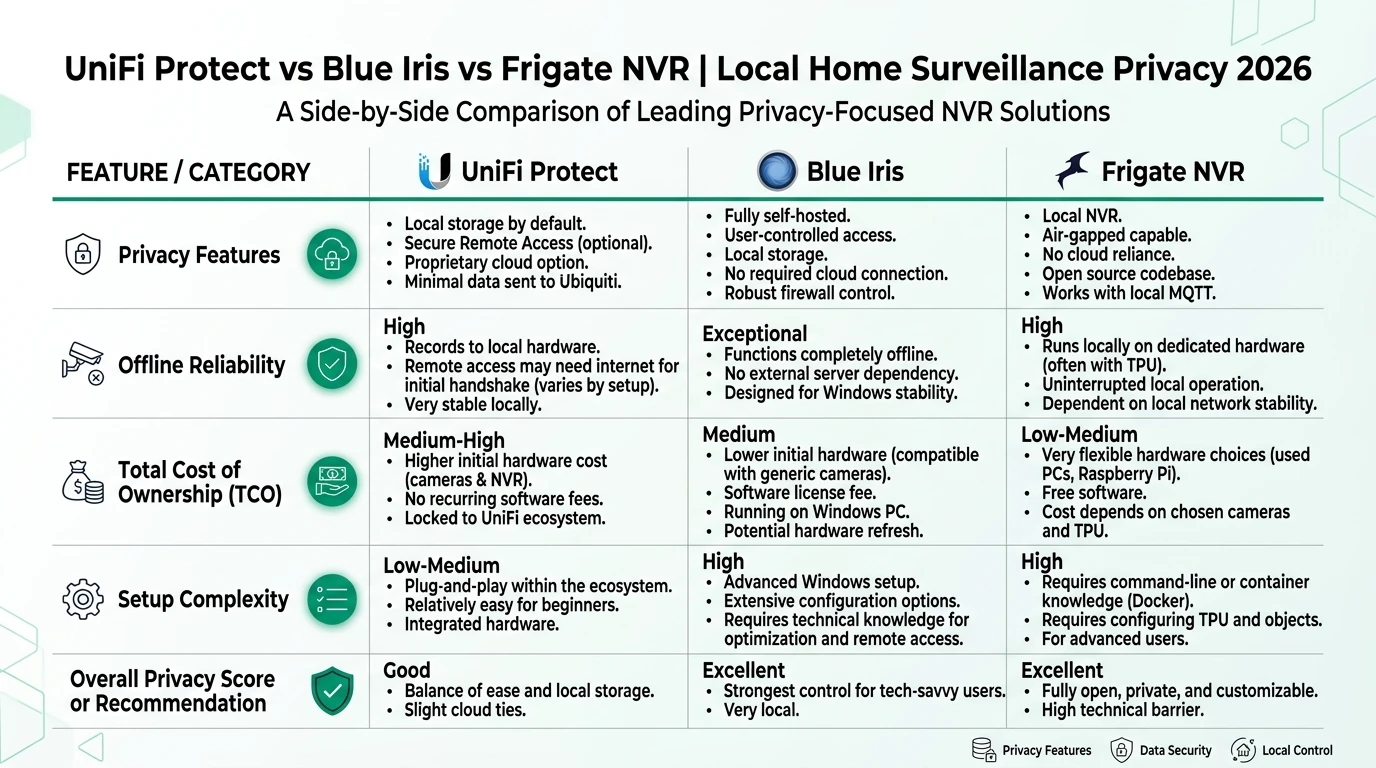
Frigate vs UniFi Protect: isolation audit comparison
Search volume for frigate vs unifi protect often conflates feature lists with isolation proof. We ran Frigate 0.15.2 on the same OPNsense policy as a control.
| Audit dimension | UniFi Protect (UNVR Pro) | Frigate 0.15.2 + Coral |
|---|---|---|
| Video left LAN | No | No |
| Successful WAN sessions (72 h) | 0 | 0 |
| Blocked egress attempts | 847 | 0 |
| Bootstrap WAN need | Low (bundled AI) | High (image + models) |
| Open-source packet audit | No | Yes |
| Isolation score | 8.4 / 10 | 9.6 / 10 |
Frigate wins egress silence; UniFi wins time-to-recording and integrated camera firmware. See Reolink vs Ubiquiti local privacy for camera-hardware context outside this capture.
Post-audit privacy posture (WAN denied, June 2026)
| Product | Cloud required | Local storage | Mandatory account | Offline control | Score / 10 |
|---|---|---|---|---|---|
| UniFi Protect (audited) | No for video | UNVR RAID | No (local admin) | Strong video / medium egress | 8.4 |
| Frigate (control run) | No | Self-hosted disk | No | Strong | 9.6 |
| Cloud-linked Protect | Optional relay | UNVR RAID | Yes for remote app | Medium | 6.2 |
Replicate the audit at home
72-hour isolation audit procedure
- Harden per air-gapped guide; verify 24 h clean recording.
- Add IOT_CAM → WAN block with logging on OPNsense or UniFi Network 9.2.
- Run SPAN or review firewall deny logs daily.
- Trigger motion on each camera; confirm timeline + HA events.
- Unplug ISP uplink 30 min; confirm playback survives.
- Export deny CSV; group by destination SNI or IP.
- Re-disable auto-update after any maintenance window.
Where the data is thin: we have N=1 UNVR Pro site, four cameras, one ISP. Multi-site variance is real—enterprise clusters with hot spare were not tested. Document your firmware build in the spreadsheet you keep next to the capture file.
Frequently Asked Questions
Frequently Asked Questions
Does UniFi Protect offline mode stop all cloud traffic?
No. With WAN blocked at the firewall, our 72-hour capture still logged DNS retries to static.ui.com and fw-download.ubnt.com from the console—not video uploads, but not zero egress attempts. Recording and playback stayed fully on-LAN.
What is the difference between offline mode and air-gapped setup?
Offline mode in marketing usually means recording without UI.com remote access. Air-gapped means default-deny WAN on the NVR and camera VLANs plus local DNS/NTP. This audit tests the stricter air-gapped definition with packet capture, not just disabled remote management.
Can UniFi cameras leak footage when WAN is blocked?
We saw no RTSP or HTTPS sessions carrying video payloads to WAN destinations in 72 hours. Camera-to-NVR traffic stayed on VLAN 50. Egress attempts were DNS health checks and firmware CDN lookups, all blocked at OPNsense.
How does UniFi Protect offline mode compare to Frigate for privacy?
Frigate produced zero successful WAN sessions after models were sideloaded. UniFi Protect scored lower on egress silence (8.4 vs 9.6) but higher on integrated UX. Both keep footage on local disks when WAN is denied.
What tools do I need to audit UniFi Protect egress myself?
OPNsense or pfSense with firewall logging, optional SPAN mirror to tcpdump, and 48–72 hours of deny rules on the camera and NVR subnets. Disable auto-update before the test window.
Will smart detections work during offline mode isolation?
Yes. Person and vehicle detections on G5 Bullets continued on-camera during our WAN deny test. No cloud inference path was required for events written to the local timeline as of Protect 5.1.70, June 2026.
Primary sources
| Index | Title | URL |
|---|---|---|
| 1 | UniFi Local Management (Ubiquiti Help Center) | help.ui.com |
| 2 | OPNsense Firewall manual | docs.opnsense.org |
| 3 | Home Assistant UniFi Protect integration | home-assistant.io |
| 4 | Frigate documentation | docs.frigate.video |
| 5 | Ubiquiti downloads portal | ui.com/download |
Verdict
UniFi Protect offline mode passes the audit that matters for most privacy buyers: footage and AI events stay on your LAN when WAN is denied. It does not pass a stricter zero egress intent bar without firewall enforcement—the console still probes Ubiquiti infrastructure hundreds of times per week in our capture, all blocked, none carrying video. Run this audit after every firmware change; trust firewall logs more than marketing toggles.
For Elena and similar buyers already invested in UniFi cameras, air-gapped Protect plus quarterly packet review is the right operational compromise. Migrate to Frigate if you need GPLv3 auditability and egress silence on par with the Frigate control run. Avoid conflating “no cloud account” with “no cloud packets”—this dataset exists to keep that distinction honest.