Smart Home Privacy
Replicating Home Assistant Add-ons with Docker Compose
Home Assistant Container add-ons replaced with Docker Compose: run Mosquitto, Zigbee2MQTT, and Node-RED locally—no Supervisor, privacy-first wiring.
Home Assistant Container add-ons are not missing—they are Supervisor-packaged services you run yourself. On Container you get Home Assistant Core in Docker without the add-on store; you replicate the three stacks most people install first on Home Assistant OS—Mosquitto (MQTT), Zigbee2MQTT (Zigbee radio path), and Node-RED (visual automations)—as separate services in one compose.yaml on a private bridge network. Home Assistant reaches them by service name (mqtt, zigbee2mqtt, nodered), Zigbee2MQTT publishes device state to Mosquitto, and Node-RED subscribes to the same broker while calling the Home Assistant API on your LAN.
That pattern keeps MQTT and Zigbee pairing on your hardware, avoids Nabu Casa or cloud workflow hosts by default, and matches what privacy-focused users expect after choosing Container over OS in our installation comparison.
Quick answer: How do I replace Home Assistant add-ons on Container?
Define Mosquitto, Zigbee2MQTT, and Node-RED as Compose services on a shared bridge network. Home Assistant uses mqtt://mqtt:1883; Zigbee2MQTT uses the same broker; Node-RED flows call HA locally. Mount persistent volumes, map USB by-id, and pin image tags.
Executive Summary
Readers who pick Home Assistant Container usually already accept more YAML in exchange for transparent data paths: which container holds the Zigbee coordinator database, which process owns MQTT ACLs, and whether Node-RED flows ever call outbound webhooks. This guide is the practical follow-up to “Container vs OS”: a single Compose stack for Mosquitto, Zigbee2MQTT, and Node-RED—the trio that replaces the most-installed Supervisor add-ons without sending automations to a cloud editor.
Bottom line: Treat Docker Compose as your supervisor—git-backed compose.yaml, named volumes, service-name DNS inside the stack, and deliberate port publishing so IoT VLANs cannot reach broker admin interfaces by accident.
| Layer | Supervisor add-on analogue | Compose service role |
|---|---|---|
| MQTT | Mosquitto add-on | mqtt (Eclipse Mosquitto) |
| Zigbee | Zigbee2MQTT add-on | zigbee2mqtt + USB devices: |
| Flows | Node-RED add-on | nodered + HA API credentials |
Cross-read broader Compose patterns including DNS, Mosquitto vs EMQX, Zigbee stack choice, and Node-RED vs native automations before you commit to Node-RED for everything.
What you lose—and gain—without the Supervisor
Home Assistant OS wraps adjacent daemons so beginners never write Compose. Container means Home Assistant is one image; anything that used to be an “add-on” is an upstream container you configure, upgrade, and backup yourself. That is extra work, but it is also the clearest privacy story: you see every image tag, every published port, and every volume path in one file you can diff in Git.
Most breakage we see in community threads is not “Container is broken” but boundary mistakes: Home Assistant still pointing at localhost:1883 (which inside the HA container is not the host’s Mosquitto), Zigbee sticks renumbered after a kernel update, or Node-RED flows hard-coded to an old LAN IP after DHCP changed. Compose makes those boundaries explicit—similar to infrastructure-as-code for a single NUC or NAS.
| Concern | Home Assistant OS + add-ons | Container + Compose |
|---|---|---|
| Service discovery | Supervisor UI | services: hostnames on ha_internal |
| USB Zigbee radio | Often “just works” | devices: + udev stable symlinks |
| Upgrade cadence | Coupled to HA/OS images | Independent per service |
| Audit trail | Manifests behind UI | Your compose.yaml in version control |
Official Container install steps remain the source of truth for prerequisites (Docker Engine, Compose plugin, timezone, /config mount)1.
Add-on store vs Compose: what actually changes
Supervisor add-ons are curated wrappers: pinned versions, default volumes, sometimes s6-init scripts, and UI toggles in Settings. Underneath, Mosquitto and Zigbee2MQTT add-ons are still containers—Home Assistant OS just hides the wiring. When you move to Compose, you inherit three responsibilities the Supervisor handled implicitly: image selection, volume paths, and restart policy. None of that is exotic; it is the same operational work NAS admins already do for Frigate or Plex.
The privacy upside is visibility. You can grep your repo for image:, ports:, and env_file: before guests arrive on the network. You can refuse Node-RED palette nodes that call SaaS APIs. You can keep Mosquitto off WAN entirely while still letting Home Assistant call local devices. The downside is support surface: when Zigbee2MQTT releases a breaking change, you read its notes—not only Home Assistant’s OS release notes.
Network design: one bridge, minimal exposure
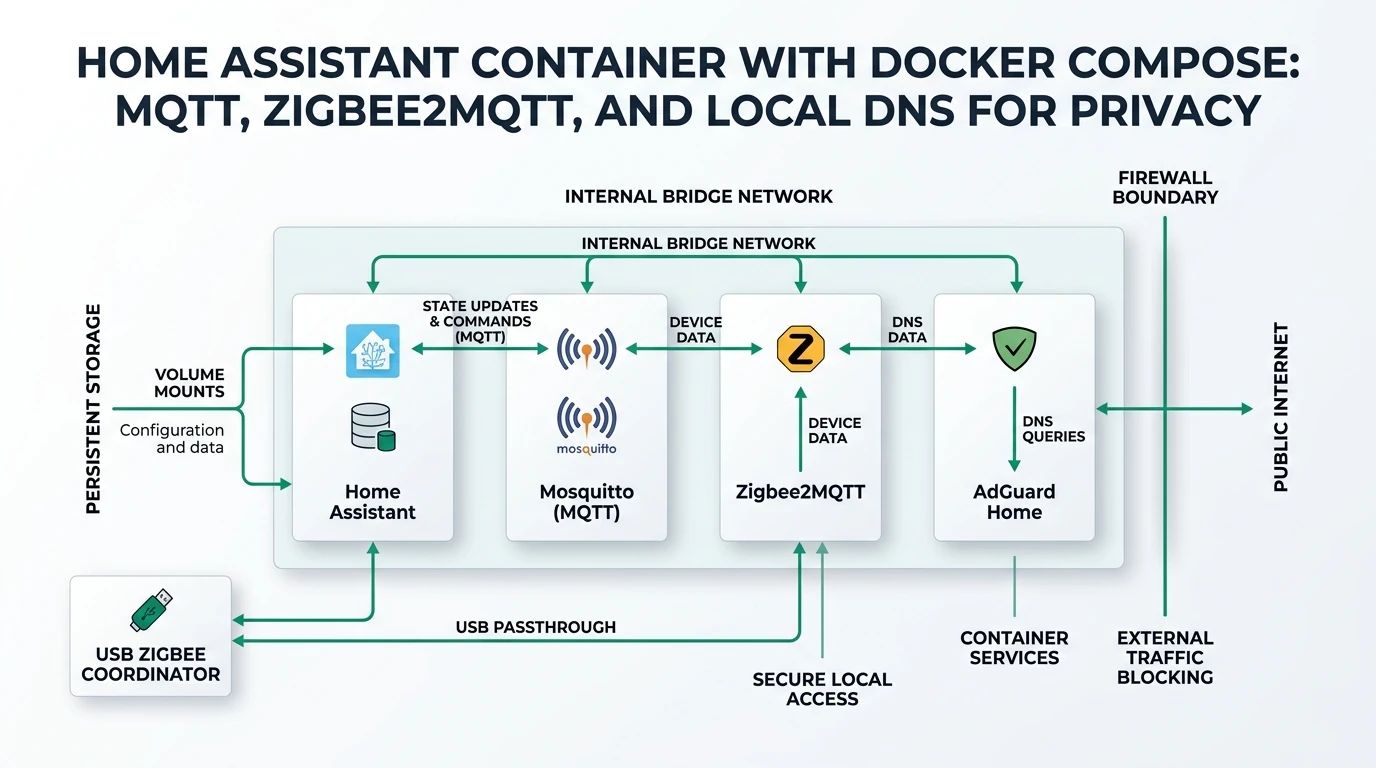
A resilient default for this trio is a custom bridge network shared by all four containers (Home Assistant, Mosquitto, Zigbee2MQTT, Node-RED). Containers resolve each other by service name—mqtt, zigbee2mqtt, nodered, homeassistant—without publishing MQTT to 0.0.0.0 unless LAN clients (ESPHome on Wi‑Fi, phones running MQTT tools) genuinely need it.
When you do publish ports, bind to a management IP or loopback, not every interface. Node-RED’s editor (1880) and Zigbee2MQTT’s frontend (8080) are frequent leak points; keep them off guest Wi‑Fi and IoT VLANs unless you add authentication and reverse-proxy TLS later.
| Pattern | Use when | Risk if misapplied |
|---|---|---|
| Internal bridge only | All MQTT clients are containers | LAN ESPHome cannot reach broker |
Publish 1883 to IoT VLAN IP | Wi‑Fi MQTT devices exist | Weak broker passwords → lateral movement |
127.0.0.1:8080:8080 for Z2M UI | You SSH-tunnel for pairing | Family cannot pair from phones on LAN |
| Host network for Zigbee2MQTT | Rare doc-mandated cases | Harder firewalling; port clashes |
Home Assistant’s MQTT integration should use mqtt://mqtt:1883 (or TLS on 8883 once configured)—not localhost. From inside the HA container, localhost is the HA process itself, not the Mosquitto container on the host.
Compose skeleton: Home Assistant, Mosquitto, Zigbee2MQTT, Node-RED
The YAML below is a teaching layout. Replace host paths (/srv/ha/...), user IDs, and image tags for your distribution. Pin tags in production (home-assistant:2026.5.x, eclipse-mosquitto:2.0.x, koenkk/zigbee2mqtt:2.x.x, nodered/node-red:3.x) instead of floating latest.
name: ha-container-stack
services:
  homeassistant:
    container_name: homeassistant
    image: ghcr.io/home-assistant/home-assistant:stable
    volumes:
      - /srv/ha/homeassistant:/config
      - /etc/localtime:/etc/localtime:ro
    restart: unless-stopped
    networks: [ha_internal]
    depends_on: [mqtt]
    environment:
      - TZ=America/Chicago

  mqtt:
    container_name: mosquitto
    image: eclipse-mosquitto:2
    restart: unless-stopped
    networks: [ha_internal]
    ports:
      # Optional: bind to IoT VLAN gateway, not 0.0.0.0
      - "127.0.0.1:1883:1883"
    volumes:
      - /srv/ha/mosquitto/config:/mosquitto/config
      - /srv/ha/mosquitto/data:/mosquitto/data
      - /srv/ha/mosquitto/log:/mosquitto/log

  zigbee2mqtt:
    container_name: zigbee2mqtt
    image: koenkk/zigbee2mqtt:latest
    restart: unless-stopped
    networks: [ha_internal]
    depends_on: [mqtt]
    volumes:
      - /srv/ha/zigbee2mqtt:/app/data
    devices:
      - /dev/serial/by-id/usb-ITEAD_SONOFF_Zigbee_3.0_USB_Dongle_Plus_V2-if00-port0:/dev/ttyUSB0
    environment:
      - TZ=America/Chicago
    ports:
      - "127.0.0.1:8080:8080"

  nodered:
    container_name: nodered
    image: nodered/node-red:latest
    restart: unless-stopped
    networks: [ha_internal]
    depends_on: [mqtt]
    environment:
      - TZ=America/Chicago
    volumes:
      - /srv/ha/nodered:/data
    ports:
      - "127.0.0.1:1880:1880"

networks:
  ha_internal:
    driver: bridge
Ordering: depends_on reduces noisy boot logs; it does not guarantee Mosquitto finished loading ACL files—always check docker compose logs mqtt after changes.
Volumes: Every stateful service needs a real mount. Losing /srv/ha/zigbee2mqtt after a rebuild without backup can mean re-pairing dozens of Zigbee routers—the expensive failure mode this guide is trying to prevent.
Mosquitto: broker config Home Assistant and Node-RED share
Mosquitto is the shared event bus. Zigbee2MQTT publishes zigbee2mqtt/# discovery payloads; Home Assistant’s MQTT integration consumes them; Node-RED mqtt-in/out nodes mirror the same topics. For privacy, default to local-only listeners, password files or ACLs, and avoid anonymous publish on LAN-facing listeners.
Minimal mosquitto.conf patterns:
listener 1883bound inside the container (Docker publishes selectively)allow_anonymous falseonce passwords existpassword_file /mosquitto/config/passwdcreated withmosquitto_passwd- Persistence directory on a mounted volume so retained messages survive restarts
Home Assistant setup (Settings → Devices & services → MQTT): broker mqtt, port 1883, no TLS until you configure it. If discovery does not appear, verify Zigbee2MQTT homeassistant: true in configuration.yaml and that topic prefixes match your HA version’s expectations2.
| Symptom | Likely cause |
|---|---|
| HA “Cannot connect” | Wrong host (localhost vs mqtt) |
| Devices unknown | Discovery off or ACL blocking publish |
| Duplicate entities | Changed base_topic without cleaning HA |
| Disk growth | Retained messages + debug logging left on |
For broker selection beyond Mosquitto, see Mosquitto vs EMQX—Mosquitto remains the default pairing in Zigbee2MQTT documentation2.
Zigbee2MQTT: USB mapping, configuration.yaml, and backups
Zigbee2MQTT replaces the ZHA or deCONZ add-on when you want the Zigbee2MQTT device ecosystem and MQTT-native discovery. In Compose, success hinges on stable USB passthrough and MQTT pointed at the mqtt service.
Example configuration.yaml essentials (file lives in the mounted /app/data):
homeassistant: true
mqtt:
  base_topic: zigbee2mqtt
  server: mqtt://mqtt:1883
serial:
  port: /dev/ttyUSB0
  adapter: ezsp
frontend:
  port: 8080
Use the adapter value your coordinator documentation requires (ezsp, zstack, etc.)—copying a random example from a forum is a common reason radios “work in ZHA but not Z2M.”
Backups before upgrades: archive the entire data directory, especially coordinator database files Zigbee2MQTT maintains. Read release notes for database migrations. Firmware: upgrade coordinator firmware only when release notes instruct; some updates change channel plans.
permit_join: enable only during pairing windows; leaving join open is an open invitation on RF, not just “cloud risk.”
Cross-read Zigbee2MQTT vs ZHA vs deCONZ before migrating an existing mesh—network moves are painful.
LAN MQTT clients (ESPHome, Tasmota, phones)
Not every MQTT publisher lives in Docker. ESPHome and Tasmota devices on Wi‑Fi often need 1883 reachable on an IoT VLAN interface IP, not inside the bridge. A common pattern:
- Keep HA, Z2M, Node-RED, Mosquitto on
ha_internal - Publish
1883as192.168.30.1:1883:1883(gateway IP of IoT VLAN on the Docker host) - Firewall IoT → Mosquitto only; deny IoT → HA
8123and Node-RED1880
Use per-device MQTT credentials where firmware supports it; segment topics by device class (esphome/#, zigbee2mqtt/#) and ACL accordingly. For TLS on ESPHome, see Tasmota MQTT TLS—many ESPHome setups remain plaintext on a segmented VLAN, which is acceptable only when VLAN egress is denied.
Phones running MQTT diagnostic apps should use the same IoT or management VLAN—never port-forward Mosquitto to the internet without TLS, strong auth, and rate limits.
Node-RED: replacing the Supervisor add-on locally
The Node-RED Supervisor add-on pre-wires MQTT and Home Assistant nodes. In Compose you recreate that with:
- MQTT nodes pointing at
mqtt:1883(same broker as HA) - Home Assistant nodes using a long-lived access token from a dedicated HA user—not your admin account
- Volume
/datafor flows (/srv/ha/noderedhost path above)
Create credentials in Home Assistant (Profile → Security → Long-Lived Access Tokens). In Node-RED’s homeassistant-server config, base URL is typically http://homeassistant:8123 if you attach Node-RED to the same Docker network and HA allows that hostname—or use the host LAN IP with firewall rules you document.
Privacy habits for Node-RED:
- Audit palette installs; community nodes can call external URLs
- Disable editor on
0.0.0.0in production; use VPN or SSH tunnel to127.0.0.1:1880 - Prefer MQTT + local HA API over cloud hooks (IFTTT, undocumented SaaS nodes)
- Export flows to Git when you change safety automations (locks, water shutoffs)
Node-RED is optional. Home Assistant automations remain fully capable on Container. Use Node-RED when visual flows, complex MQTT routing, or legacy flows migrated from OS justify another moving part—see n8n vs HA vs Node-RED for division of labor.
Home Assistant integration checklist (MQTT + entities)
After docker compose up -d:
docker compose logs -f mqtt— confirm listener and ACL parse successdocker compose logs -f zigbee2mqtt— coordinator detected, join disabled by default- Home Assistant → MQTT → configure with host
mqtt, port1883 - Pair one test device with
permit_jointrue; confirm entity appears - Node-RED: deploy a test inject → mqtt-out → mqtt-in loop on
zigbee2mqtt/test
Validate from the host (examples):
docker compose exec mqtt mosquitto_sub -h localhost -t 'zigbee2mqtt/#' -vIf subscriptions work on the host but not in HA, you are debugging network namespaces, not Zigbee RF.
Troubleshooting matrix (symptom → first checks)
Container stacks fail in predictable places. Use this matrix before re-flashing coordinators or wiping /config.
| Symptom | First checks | Second checks |
|---|---|---|
| HA MQTT “Failed to connect” | Broker host is mqtt, not localhost | docker compose ps; firewall on published 1883 |
| Z2M starts, no devices | USB devices: path; serial.port matches | permit_join; Wi‑Fi channel overlap with Zigbee |
| Duplicate MQTT entities | Changed base_topic | Remove stale MQTT devices in HA before re-discovery |
| Node-RED “Cannot reach HA” | Token expired; URL uses reachable hostname | HA trusted_proxies if behind reverse proxy |
| High CPU on NAS | Debug logging in Mosquitto/Z2M | Frigate or other stacks on same USB bus |
When Zigbee “worked yesterday,” check host kernel updates first—USB re-enumeration is more common than mystical RF interference. ls -l /dev/serial/by-id/ on the host should match your Compose devices: line byte-for-byte.
MQTT authentication and TLS (when LAN is not “trusted”)
A flat LAN is not a security boundary once guest Wi‑Fi or IoT VLANs exist. After the stack boots cleanly with open internal MQTT (containers only), add:
mosquitto_passwdandallow_anonymous falseon listeners that face VLANs- ACL files limiting which usernames may publish
zigbee2mqtt/#vshomeassistant/# - Optional TLS listener on
8883with a local CA or step-ca cert
Home Assistant MQTT integration supports TLS when you upload CA material; Zigbee2MQTT accepts mqtts:// in server with user/password keys. Node-RED mqtt nodes need matching TLS settings—test with a single inject node before migrating production automations.
Plaintext MQTT on an isolated container-only bridge is acceptable for some threat models; plaintext on 0.0.0.0:1883 facing an IoT VLAN is not. Document which listener is which in comments above ports: so future-you does not “temporarily open” the wrong interface during debugging.
Migrating from Home Assistant OS add-ons
If you are moving off a Yellow/Green/ODROID with Supervisor add-ons:
- Export Node-RED flows (
flows.json) from the add-on UI or volume backup - Backup Home Assistant full snapshot and Zigbee2MQTT
data/from the Mosquitto/Z2M add-on paths (Supervisor → backup, or SSH into the appliance) - Install Container on new hardware; restore
/configinto the HA volume mount - Stand up Compose before unplugging the Zigbee stick—avoid simultaneous coordinator moves
- Import Node-RED flows; replace
supervisorhostnames withmqtt/homeassistantservice names - Run one room of devices in parallel (old + new) only if you accept duplicate entities—usually prefer a hard cutover during a maintenance window
Zigbee networks are not portable between ZHA and Zigbee2MQTT by copy-paste; if you change stacks, plan re-pairing or use documented migration tooling. Switching only the host (OS → Container) while staying on Zigbee2MQTT is far easier: keep the same configuration.yaml and coordinator database files.
Hardware hosts: NUC, NAS, and Proxmox notes
The Compose file is portable; USB passthrough is not. Proxmox LXC often cannot pass USB serial cleanly—use a VM with USB passthrough or run Zigbee2MQTT on bare metal while HA stays in Container. Synology/QNAP Docker UIs sometimes hide devices:—CLI docker compose on SSH is more reliable.
CPU sizing for this quartet on one host: 2–4 cores and 4–8 GiB RAM is comfortable for medium homes; Node-RED spikes during flow deploys, Zigbee2MQTT is modest, Mosquitto is light, Home Assistant dominates RAM with history and integrations. Keep the Zigbee coordinator on a powered USB extension away from USB3 noise from NVMe or coral accelerators—RF issues masquerade as software bugs.
For host selection context, read Raspberry Pi vs mini PC vs NAS and Proxmox vs Docker vs bare metal before you split services across VMs.
Upgrades, secrets, and Git hygiene
Compose stacks leak secrets when .env files land in public repos. Keep MQTT passwords and HA tokens in git-ignored env_file paths or Docker secrets, not inline in compose.yaml you paste into forums.
Suggested upgrade order when Zigbee is in production:
- Read Zigbee2MQTT release notes
- Snapshot Z2M data volume
- Pull Mosquitto image if broker release notes mention ACL syntax changes
- Upgrade Home Assistant on its own schedule
- Upgrade Node-RED after exporting flows
Home Assistant breaking changes sometimes affect MQTT discovery prefixes—cheap Tuya clones ship hard-coded topics that survive HA upgrades but surprise you in Node-RED if topics were hand-typed.
Backups, observability, and recovery order
Treat four directories as production data, not disposable cache:
- Home Assistant
/config— automations, entities, recorder DB - Zigbee2MQTT
/app/data— coordinator pairing database andconfiguration.yaml - Mosquitto
data/— retained messages if enabled (watch disk) - Node-RED
/data—flows.json, credentials, installed nodes
Snapshot volumes before Zigbee2MQTT major upgrades and before Home Assistant releases that mention MQTT discovery changes. Test restores quarterly—a backup you have never restored is a hypothesis.
Logging: forward container logs to your homelab standard (journald, Loki, or simple logrotate on bind-mounted Mosquitto logs). Alerts worth automating:
- MQTT client disconnect rate spikes (HA, Z2M, Node-RED)
- Zigbee2MQTT restart loops after USB errors
- Mosquitto ACL deny lines climbing (possible compromised IoT password)
Recovery order after host failure:
- Restore Mosquitto config + data (broker first)
- Start Zigbee2MQTT with unchanged data volume (preserve mesh)
- Start Home Assistant
/config - Start Node-RED and re-import flows only if volume lost
Skipping step 2 discipline is how forums fill with “all my Zigbee devices disappeared” threads.
Privacy hardening beyond “it runs on my NAS”
Local containers do not stop Wi‑Fi plugs from calling vendor clouds. Pair this stack with VLAN egress rules and DNS policy from blocking IoT DNS leaks and IoT VLAN setup.
Concrete controls:
- Deny IoT VLAN → WAN except documented NTP/DNS paths you intend
- MQTT TLS (
8883) where clients support it; segment plaintext ESPHome on IoT VLAN - Restrict broker and Node-RED ports to management networks
- Log MQTT disconnect storms before household “automations stopped” reports
Checklist
- Pin image tags for homeassistant, mosquitto, zigbee2mqtt, and nodered.
- Use /dev/serial/by-id for Zigbee USB in devices:.
- Point HA MQTT at mqtt:1883 on the ha_internal network.
- Disable permit_join except during pairing windows.
- Back up Zigbee2MQTT data before coordinator or Z2M upgrades.
- Restrict 1880/8080/1883 to loopback or management VLAN IPs.
- Audit Node-RED palette nodes for outbound network calls.
FAQ
Frequently Asked Questions
Does Home Assistant Container include the add-on store?
No. Container installs ship Home Assistant Core only. You replicate add-ons by running upstream container images—Mosquitto, Zigbee2MQTT, Node-RED—in Docker Compose beside HA1.
Can Home Assistant talk to Mosquitto on the Docker network?
Yes. Point the MQTT integration at mqtt://mqtt:1883 when both containers share the same bridge network. Publish broker ports to the LAN only when Wi-Fi MQTT clients need access.
How do I pass the Zigbee USB stick into Zigbee2MQTT?
Map /dev/serial/by-id/… in the devices: block so reboots do not renumber ttyUSB paths. Verify permissions on the host before blaming Zigbee2MQTT.
Is Node-RED required with Home Assistant Container?
No. Many users run automations entirely in Home Assistant. Node-RED is the common substitute for the Supervisor Node-RED add-on when you want visual flows and MQTT glue without Home Assistant OS.
Should I use host networking for Zigbee2MQTT?
Start with bridge networking and explicit ports. Move to host mode only when upstream docs or a reproducible issue require it—host mode weakens firewall boundaries.
How is this different from the AdGuard-focused Compose guide?
Our companion article adds local DNS (AdGuard-style) to the same pattern. This guide focuses on the automation triad—MQTT, Zigbee2MQTT, and Node-RED—that most users install immediately after leaving Home Assistant OS.
Primary Sources
| ID | Source | Direct URL |
|---|---|---|
| 1 | Home Assistant — Container on Linux | https://www.home-assistant.io/installation/linux#install-home-assistant-container |
| 2 | Zigbee2MQTT — Docker installation | https://www.zigbee2mqtt.io/guide/installation/02_docker.html |
| 3 | Eclipse Mosquitto documentation | https://mosquitto.org/documentation/ |
| 4 | Node-RED — Running under Docker | https://nodered.org/docs/getting-started/docker |
| 5 | Docker Compose specification | https://docs.docker.com/compose/ |
Conclusion
Home Assistant Container does not deny you Mosquitto, Zigbee2MQTT, or Node-RED—it asks you to own them in Docker Compose with explicit networks, volumes, and ports. That is the practical answer to “how do I replace add-ons?” after you chose Container for control: one git-backed stack, service-name DNS inside the bridge, backups that treat Zigbee data as precious, and Node-RED only where visual flows earn their operational cost.