Smart Home Privacy
HA Container + Docker Compose Add-Ons Locally 2026
Home Assistant Container without Supervisor: Docker Compose patterns for MQTT, Zigbee2MQTT, and AdGuard Home-style DNS—privacy-first networking, USB radios, backups, and hardening.
Quick answer: How do I replace Home Assistant add-ons when I run Container?
Model each add-on as its own service in Docker Compose: Home Assistant talks to Mosquitto, Zigbee2MQTT, and local DNS (for example AdGuard Home) over a private Docker network. Mount `/config`, pass USB radios with `devices`, pin image tags, and block unnecessary WAN egress from IoT VLANs.
Executive Summary
If you chose Home Assistant Container, you traded the Supervisor’s one-click add-ons for explicit infrastructure. That is often the right trade for privacy: you decide which containers exist, which ports are exposed, and which subnets can reach the public internet. This guide walks through a practical Docker Compose layout for the three services people miss most after leaving Home Assistant OS: an MQTT broker, a Zigbee coordinator path via Zigbee2MQTT, and local DNS filtering that behaves like an AdGuard Home add-on without requiring Home Assistant to own those packages.
You are not “missing features” so much as moving them one layer down to the orchestrator that already runs your home lab. The comparison article on HA OS vs Container vs Supervised explains why this path suits advanced users; here we focus on repeatable wiring, safe defaults, and failure modes that affect real homes (radio paths, mDNS, backups, and accidental cloud dependency).
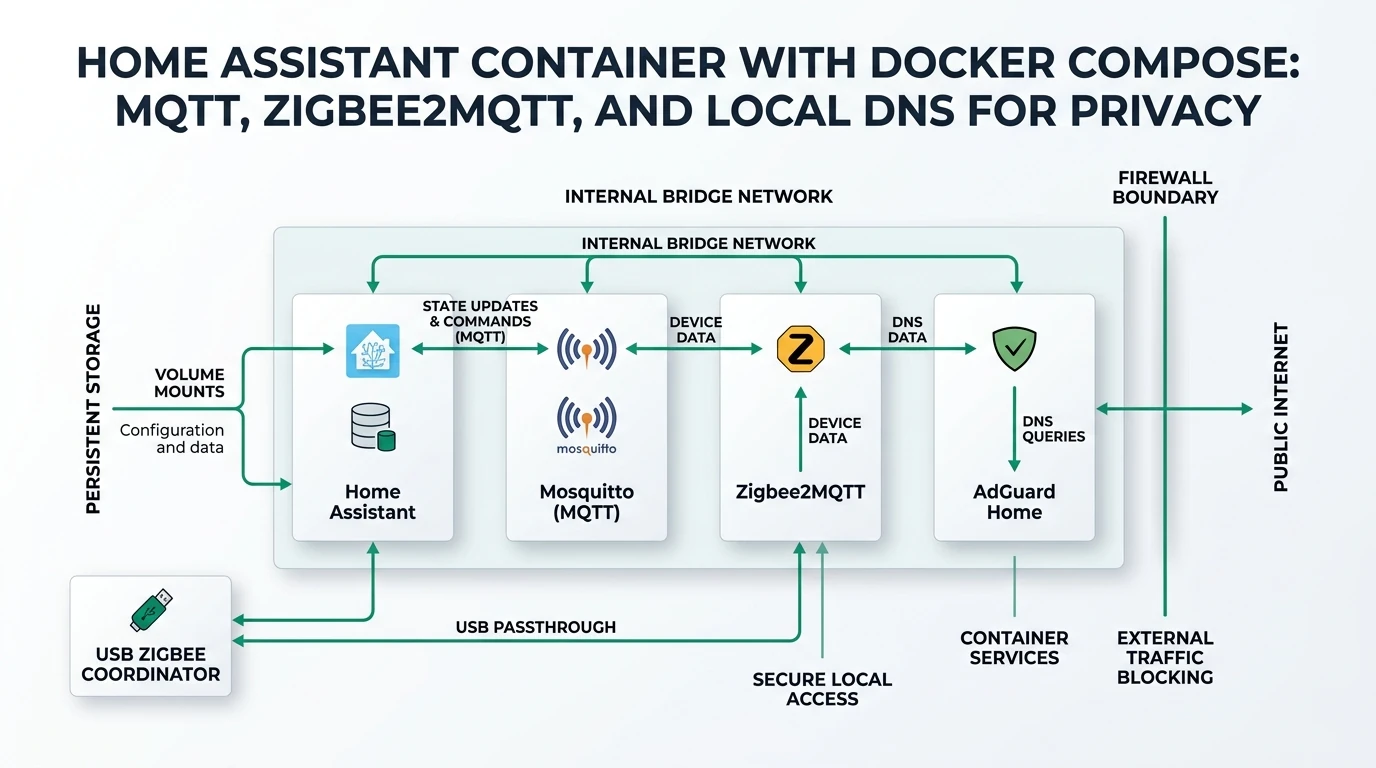
Bottom line: Treat Compose as your supervisor: one git-backed compose.yaml, named volumes, a single internal bridge network, explicit published ports only where needed, and a firewall posture that keeps cameras and voice assistants from “phoning home” when you intended local control.
Why Container users plan around Compose (not magic add-ons)
On Home Assistant OS, add-ons wrap commonly paired services so beginners avoid YAML for adjacent containers. On Container, Home Assistant is just another container image; anything else—MQTT brokers, Zigbee gateways, DNS, Frigate—is your responsibility to define, version, and upgrade. That sounds like extra work, and it is—but it is also the clearest way to reason about data flows: Zigbee radios touch Zigbee2MQTT, MQTT clients talk to Mosquitto, Home Assistant subscribes to topics, and DNS resolvers decide whether a cheap Wi‑Fi plug can resolve *.tuya.com over TLS.
Most stability issues we see in community reports are not “Home Assistant bugs” but integration boundaries: wrong network_mode, devices moved between USB paths after kernel updates, or a broker restarted without persistence because ./data was never mounted as a volume1. Compose forces those boundaries into a file you can diff, review, and restore—similar in spirit to infrastructure-as-code for a single host.
| Decision | Home Assistant OS + add-ons | Home Assistant Container + Compose |
|---|---|---|
| Who defines extra services? | Supervisor manifests | You, in Compose |
| Upgrade cadence | Often coupled to HA releases | Independent per image tag |
| USB radio access | Abstracted | Explicit devices: mapping |
| Rollback story | Backup/restore focused | Pin tags + volume snapshots |
| Privacy levers | Still good; less transparent | Maximum transparency |
If you are new to Container installs, read the official Linux container instructions and confirm you are not confusing Core (Python venv) with the supervised deprecation story—they overlap in community threads but mean different support expectations1.
Network layout: bridge networks, published ports, and DNS loops
A resilient default is: one custom bridge network (for example ha_internal) shared by Home Assistant, Mosquitto, Zigbee2MQTT, and AdGuard Home. Use service names as hostnames (mqtt, zigbee2mqtt, homeassistant) so containers can reach each other without exposing broker ports on 0.0.0.0 unless you truly need LAN clients.
Many users accidentally create DNS loops when AdGuard listens on the same Docker host Home Assistant queries for upstream resolution. A simple pattern is: AdGuard listens on a LAN or VLAN interface; Home Assistant container sets dns: in Compose to that resolver only after you verify forwarders (unbound, your ISP, or DoT upstreams). Until then, point Home Assistant at a known-good upstream during bootstrap, then switch to local filtering.
| Pattern | When it helps | Pitfall |
|---|---|---|
| Internal bridge only | All MQTT clients are containers | LAN devices cannot publish without extra exposure |
| Publish MQTT to LAN | ESPHome devices on Wi‑Fi | Weak ACLs on broker |
| Host network for Zigbee2MQTT | Odd USB + mDNS edge cases | Harder to firewall; port clashes |
| MACVLAN for Zigbee2MQTT | Isolated L2 appearance | More ops burden |
Cross-read MQTT broker comparison when choosing Mosquitto vs EMQX; Mosquitto remains the default pairing in Z2M docs and many compose examples, but EMQX can simplify clustering if you outgrow a single broker2.
Compose skeleton: Home Assistant + Mosquitto + Zigbee2MQTT + AdGuard Home
The following is a pattern, not a copy-paste for every distribution: adapt paths, user namespace options (PUID/PGID), and device nodes. Always pin image tags in production (image: ghcr.io/home-assistant/home-assistant:2026.x.y style) instead of :latest.
You will usually mount:
- Home Assistant:
/configto a host path or named volume - Mosquitto:
mosquitto.conf,passwd, persistence directories - Zigbee2MQTT:
/app/datawithconfiguration.yamlpointing atmqtt://mqtt:1883 - AdGuard Home: its work + conf directories per upstream docs
Environment knobs worth documenting in your repo:
TZconsistent across stacks (automation timestamps and log correlation)ZIGBEE2MQTT_CONFIGpath if you prefer file injection- Home Assistant
homeassistant.external_url/internal_urlwhen you later add reverse proxies—see Caddy vs Traefik vs NPM before exposing anything.
Operational habits matter as much as YAML:
docker compose pull && docker compose up -don a schedule you can sustain- Watch for SELinux/AppArmor profiles on NAS distributions blocking USB access
- Snapshot volumes before Zigbee2MQTT major upgrades (network rebuild pain is real)
- Keep Zigbee coordinator firmware reasonably current—but read release notes; some updates change channel plans
| Service | Typical internal hostname | Port(s) to LAN |
|---|---|---|
| Home Assistant | homeassistant | 8123 via reverse proxy or LAN only |
| Mosquitto | mqtt | optional 1883 if LAN MQTT clients exist |
| Zigbee2MQTT | zigbee2mqtt | optional 8080 for UI—restrict by firewall |
| AdGuard Home | adguard | 53 UDP/TCP on LAN/VLAN interfaces |
Annotated compose.yaml pattern (Home Assistant + Mosquitto + Zigbee2MQTT)
Below is a teaching skeleton you can adapt. Paths are placeholders (/srv/ha/...); replace with your NAS share, BTRFS subvolume, or ZFS dataset. Comments inline explain why each stanza matters for privacy and recoverability.
name: homeassistant-stack
services:
  homeassistant:
    container_name: homeassistant
    image: ghcr.io/home-assistant/home-assistant:stable # pin to 2026.x.y in real deployments
    volumes:
      - /srv/ha/homeassistant:/config
      - /etc/localtime:/etc/localtime:ro
    restart: unless-stopped
    networks: [ha_internal]
    depends_on: [mqtt]
    # Uncomment after AdGuard is stable on your LAN; avoid resolver loops during first boot
    # dns:
    #   - 10.0.20.2
    environment:
      - TZ=Etc/UTC

  mqtt:
    container_name: mosquitto
    image: eclipse-mosquitto:2
    restart: unless-stopped
    networks: [ha_internal]
    ports:
      # Publish 1883 to the LAN only if Wi-Fi MQTT clients need it; otherwise omit ports:
      # - "192.168.10.5:1883:1883"
      - "127.0.0.1:1883:1883"
    volumes:
      - /srv/ha/mosquitto/config:/mosquitto/config
      - /srv/ha/mosquitto/data:/mosquitto/data
      - /srv/ha/mosquitto/log:/mosquitto/log

  zigbee2mqtt:
    container_name: zigbee2mqtt
    image: koenkk/zigbee2mqtt:latest # pin a release tag when you trust the stack
    restart: unless-stopped
    networks: [ha_internal]
    depends_on: [mqtt]
    volumes:
      - /srv/ha/z2m:/app/data
    devices:
      # Prefer by-id symlinks so USB re-enumeration does not break pairing
      - /dev/serial/by-id/usb-ITEAD_CHIP12345-if00-port0:/dev/ttyUSB0
    environment:
      - TZ=Etc/UTC
    ports:
      # Expose UI only on loopback if you SSH-tunnel, or bind to management VLAN IP
      - "127.0.0.1:8080:8080"

  adguardhome:
    container_name: adguardhome
    image: adguard/adguardhome:latest
    restart: unless-stopped
    network_mode: host # common for DNS; see AdGuard docs for Docker caveats on your distro
    volumes:
      - /srv/ha/caddy/adguard/work:/opt/adguardhome/work
      - /srv/ha/caddy/adguard/conf:/opt/adguardhome/conf

networks:
  ha_internal:
    driver: bridge
What this layout encodes:
- Home Assistant waits on MQTT (
depends_on) so logs during boot are less noisy—not a guarantee Mosquitto finished loading ACLs, but a practical ordering hint. - Broker port bound to loopback in the example keeps ESPHome off-LAN MQTT from working until you deliberately publish to a trusted interface. When you are ready, bind to your IoT VLAN gateway IP instead of
0.0.0.0. - Zigbee2MQTT UI on localhost reduces attack surface; pair Zigbee from a machine that can reach that port, or add HTTP auth + reverse proxy later.
- AdGuard
network_mode: hostis common because DNS listeners are awkward behind Docker NAT. If you dislike host mode, study macvlan/ipvlan patterns—but budget time; DNS is not a five-minute side quest.
After docker compose up -d, validate from the host:
docker compose logs -f mqtt—look for clean listener startup and ACL parse errorsdocker compose exec mosquitto mosquitto_sub ...—verify anonymous publish is disabled if you enabled passwords- Home Assistant → Settings → Devices—ensure MQTT integration points at
mqtt://mqtt:1883inside the stack (service name DNS)
| Symptom | First checks |
|---|---|
| HA cannot reach broker | Same Docker network? Typo in service name? Firewall on host blocking bridge? |
| Zigbee2MQTT starts, no traffic | Radio permissions, permit_join, channel conflict with Wi-Fi |
| DNS works on laptop, not HA | HA dns: still pointing at WAN while AdGuard filters upstream |
| Disk fills overnight | retained MQTT messages + aggressive debug logging |
Operational upgrades, secrets, and Git hygiene
Compose users routinely leak .env files into public GitHub repos. Keep secret material in a password manager and reference it with env_file: .secrets/mqtt.env that is git-ignored. For Home Assistant long-lived tokens, prefer the UI-backed secrets or secrets.yaml patterns documented upstream—never paste API keys into Compose files you email to yourself.
Upgrade discipline:
- Read Mosquitto, Zigbee2MQTT, and Home Assistant release notes in that order when Zigbee is involved—Z2M occasionally bumps defaults that require
configuration.yamltweaks - Take filesystem snapshots before Zigbee2MQTT bumps that mention database migrations
- For Home Assistant, watch breaking changes for MQTT discovery prefixes—cheap Tuya derivatives sometimes ship hard-coded topics
If you integrate Frigate or other NVR software later, isolate their heavy CPU spikes from Zigbee coordination by CPU affinity or separate bare-metal hosts; Zigbee is sensitive to USB noise and scheduling latency on oversubscribed NAS CPUs.
USB radios: Linux device paths, firmware, and coordinator choice
Zigbee2MQTT needs stable access to /dev/ttyUSB* or /dev/serial/by-id/.... Prefer by-id symlinks in Compose devices: so reboots do not silently renumber ports. If you stack multiple UART bridges, label the physical stick and verify with udevadm.
Coordinator selection is a site decision, not something this guide ranks as “best.” What matters for privacy workflows is: local pairing, support in Zigbee2MQTT, and whether you can run multi-network setups if you segment test hardware. For integration semantics inside Home Assistant, skim Zigbee2MQTT vs ZHA vs deCONZ before you commit—migrating Zigbee networks later is costly.
Backups, observability, and “why did my house stop?”
Container installs shine when you treat config + state as precious artifacts:
- Home Assistant: snapshot
/config; test restores quarterly - Zigbee2MQTT: backup
configuration.yamland the coordinator database files Z2M maintains; losing them can mean re-pairing dozens of devices - Mosquitto: persist retained messages only when you understand disk growth; apply ACLs if you multi-tenant
- AdGuard Home: export settings after meaningful DNS filter changes; keep an emergency upstream if you filter too aggressively and break NTP
Logging: bind container logs to your homelab standard (Loki, plain journald, or simple log rotation). The goal is to notice MQTT disconnect storms or DNS filter regressions before family members do.
Privacy hardening beyond “it runs locally”
Running on Docker does not automatically stop devices from exfiltrating. Pair this stack with VLAN policies and resolver choices discussed in blocking IoT DNS leaks and broader network stacks such as private network stack.
Concrete checklist items:
- Deny IoT VLAN direct WAN except to the explicit NTP/DNS path you intend
- Use local DNS with blocklists cautiously—some hubs break if you block telemetry domains they require for handshakes (log and allowlist deliberately)
- Prefer TLS to MQTT when clients support it; many ESPHome nodes remain plaintext on LAN—compensate with segmentation
- Review Zigbee2MQTT
permit_joinand disable it after pairing windows
Checklist
- Pin all container image tags and document upgrade steps.
- Mount persistent volumes for every stateful service (broker, Z2M, AdGuard).
- Map Zigbee radios by /dev/serial/by-id and regression-test after kernel updates.
- Restrict Zigbee2MQTT and Mosquitto admin interfaces to management networks.
- Snapshot configs before Zigbee or major Home Assistant upgrades.
- Verify DNS forwarding avoids resolver loops between HA and AdGuard.
- Block or allowlist IoT egress deliberately—do not rely on “local API” alone.
FAQ
Frequently Asked Questions
Is Home Assistant Container officially supported?
Yes. Container is a first-class installation method; you simply do not get the Supervisor UI or add-on store. Expect to self-manage adjacent services through Docker or systemd1.
Can I replicate every Home Assistant add-on with Docker?
Practically, most add-ons are upstream images with opinionated wrappers. Find the upstream project (for example Eclipse Mosquitto or Zigbee2MQTT) and configure it yourself. Some proprietary bridges have no perfect drop-in—plan substitutes.
Should Zigbee2MQTT use host networking?
Only if you hit a specific compatibility issue. Start with bridge networking and explicit ports; move to host mode when documentation or maintainers document a concrete need. Host mode complicates firewalling.
How do I avoid losing my Zigbee network on upgrades?
Back up Zigbee2MQTT data files before upgrades, read release notes for database migrations, and upgrade coordinators firmware only when instructed. Re-pairing dozens of routers and end devices is the expensive failure mode you are avoiding.
Do I need AdGuard Home if I already use Pi-hole?
No. Both are DNS sinkholes with different UX and feature sets. Pick one resolver stack and integrate Home Assistant with consistent dns: settings in Compose—avoid running multiple competing LAN DNS servers without intent.
Primary Sources Table
| ID | Source | Direct URL |
|---|---|---|
| 1 | Home Assistant docs — Container on Linux | https://www.home-assistant.io/installation/linux#install-home-assistant-container |
| 2 | Zigbee2MQTT Docker guide | https://www.zigbee2mqtt.io/guide/installation/02_docker.html |
| 3 | Eclipse Mosquitto documentation | https://mosquitto.org/documentation/ |
| 4 | Docker Compose specification | https://docs.docker.com/compose/ |
| 5 | AdGuard Home — Docker installation | https://hub.docker.com/r/adguard/adguardhome |
Conclusion
Home Assistant Container is not a downgrade—it is an architecture where you own every hop. Compose gives you reproducible stacks, clearer privacy boundaries, and the freedom to upgrade Mosquitto on Tuesday and Home Assistant on Sunday. Invest in backups, stable Zigbee device maps, and DNS topology early; those three save more weekend hours than any automation gimmick.
For adjacent decisions, continue with Mosquitto vs EMQX, Zigbee stack comparison, and the installation tradeoffs in HA OS vs Container vs Supervised.