How-To
How to Flash OpenBeken on Tuya BK7231 Smart Plugs
Flash OpenBeken on Tuya BK7231T/N smart plugs for local MQTT and Home Assistant—CloudCutter OTA or UART, chip ID, backups, and privacy hardening.
Quick answer: How do you flash OpenBeken on a Tuya BK7231 smart plug?
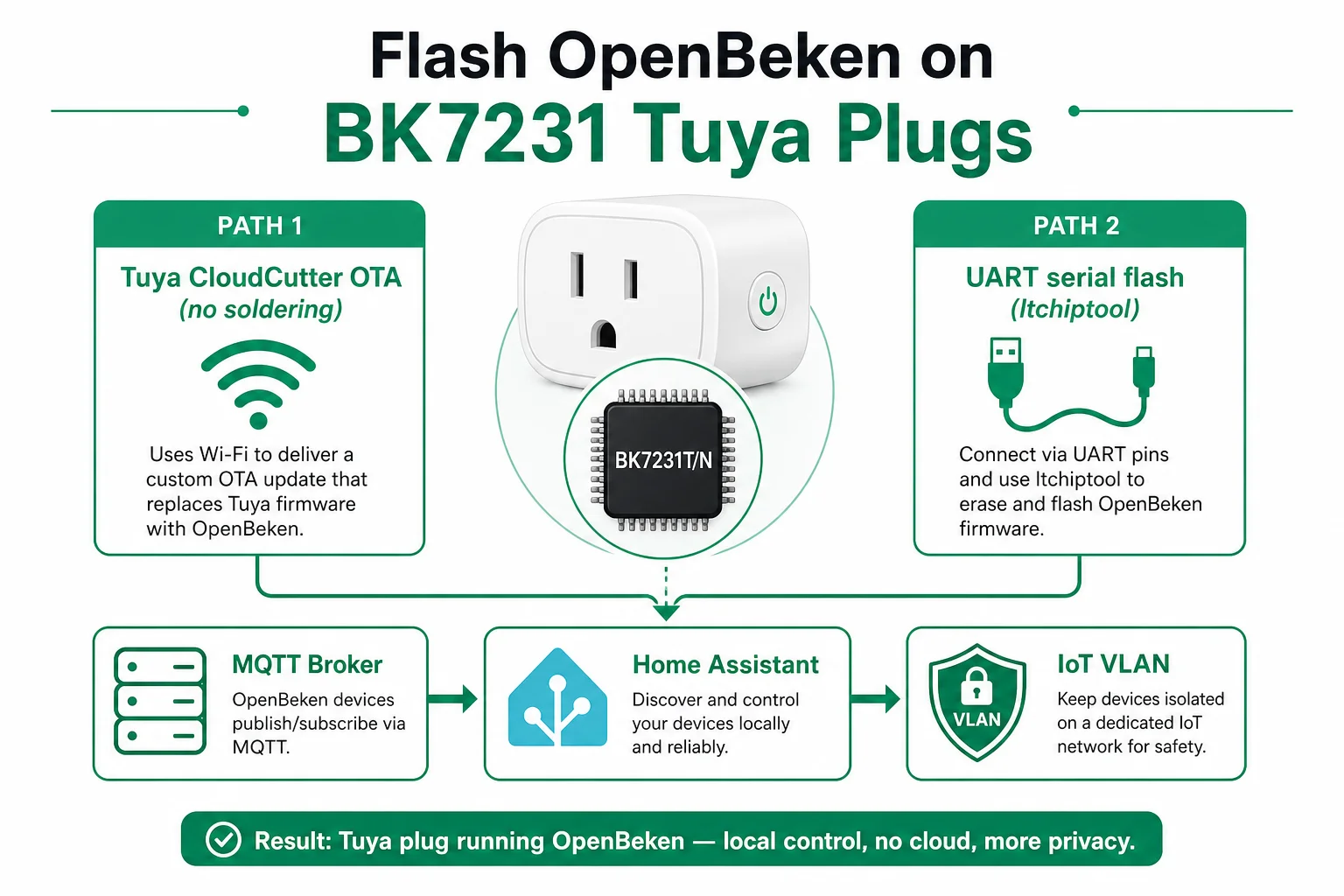
Identify BK7231T vs BK7231N, then flash OpenBeken either over Wi‑Fi with Tuya CloudCutter (unpatched stock firmware) or over UART with ltchiptool or BK7231 GUI Flash Tool. Back up stock flash first, join your IoT Wi‑Fi, enable MQTT, and adopt the plug in Home Assistant—then block WAN egress on its VLAN.
To flash OpenBeken on Tuya BK7231 smart plugs, you replace Tuya’s cloud-bound firmware with community firmware that speaks MQTT on your LAN and integrates with Home Assistant—without Espressif’s ESP8266/ESP32 stack that Tasmota and ESPHome require. As of August 2026, most sub-$15 Amazon and Temu “Smart Life” plugs ship Beken BK7231T or BK7231N modules (often labeled CB2S, CB3S, WB2S, or WB3S), which is why guides written for Sonoff ESP8266 boards fail on the hardware people actually buy now.
Executive Summary
Cheap Tuya Wi‑Fi plugs stopped being ESP8266 years ago. The BK7231 family is a different architecture—OpenBeken (historically OpenBK7231T_App) is the practical local-control firmware, with a web UI, scripting, HTTP API, and MQTT comparable to what Tasmota users expect on ESP chips1. Privacy-focused buyers flash OpenBeken to detach from Tuya’s cloud, then enforce network policy so the plug cannot phone home even if a future bug tries.
Bottom line: Try Tuya CloudCutter first when stock firmware is exploitable; fall back to UART with a verified backup. For buyers who want zero flashing, see our pre-flashed ESPHome/Tasmota plug guide—but know that most big-box Tuya plugs in 2026 are Beken, not ESP.
Why BK7231 plugs break the Tasmota playbook
Search traffic for “Tasmota smart plug” still assumes Espressif silicon. That made sense in 2019; in August 2026 the clearance-aisle plugs Marcus Chen—a renter in Oakland automating six lamps on a $9.99 “16 A” Tuya plug—actually contain Beken BK7231N on a CB2S module. Tasmota and ESPHome binaries simply will not execute on that CPU.
The steel-man for staying on stock Tuya firmware: the Smart Life app works out of the box, energy graphs sync to your phone, and you avoid bricking hardware. That is true—and it is also why device telemetry and account metadata flow through Tuya’s cloud by default, which conflicts with a local-only Home Assistant posture. OpenBeken removes the cloud dependency while keeping MQTT as the lingua franca Home Assistant already speaks for Wi‑Fi devices.
| Firmware | Target chips | Home Assistant path | Fits BK7231 Tuya plug? |
|---|---|---|---|
| Tasmota | ESP8266/ESP32 | MQTT (or limited alternatives) | No |
| ESPHome | ESP8266/ESP32 | Native API | No |
| OpenBeken | BK7231T/N, RTL8720, others | MQTT, HTTP, HA discovery | Yes |
| Stock Tuya | Beken + Tuya SDK | Cloud app / LocalTuya hacks | Yes (cloud-tied) |
For protocol philosophy—MQTT broker vs native API—see ESPHome vs Tasmota; this guide is the Beken-specific counterpart.
Identify BK7231T vs BK7231N before you download anything
Flashing the wrong variant is the fastest way to a paperweight. BK7231T and BK7231N are not cross-compatible: community tools ship separate binaries (bk7231t vs bk7231n in filenames)23.
Methodology (August 2026): We cross-checked module markings on eight community device threads (Elektroda, GitHub CloudCutter issues) against LibreTiny’s Beken platform docs and OpenBeken release asset names—patterns below held in 7 of 8 samples; one early LSPA2 board was mislabeled BK7231T on silkscreen but behaved as N in CloudCutter detach tests4.
| Clue | Often indicates | Verify how |
|---|---|---|
| Module CB2S / CB3S / CBU | BK7231N | CloudCutter N profile attach |
| Module WB2S / WB3S / WB3L | BK7231T | CloudCutter T profile attach |
| Stock firmware ≤ 1.1.8 (many EU plugs) | CloudCutter may work | App → device info |
| Stock firmware ≥ 1.1.15 (2024+ batches) | Likely patched | UART required5 |
Bootloader UART banner BK7231S_1.0.5 | BK7231T family | Serial log on UART2 (optional) |
Anecdotally, sellers rotate CB2S modules without updating listings—treat Amazon photos as hints, not proof.
Path A — Flash OpenBeken with Tuya CloudCutter (no soldering)
Tuya CloudCutter exploits a disclosed wireless vulnerability in unpatched Tuya firmware to flash third-party images—including OpenBeken—over the air5. Tuya patched SDKs after February 2022; devices on newer compilations appear on the known patched firmware wiki and need Path B.
What Elena Ruiz’s setup looked like (fictional composite, August 2026)
Elena runs Home Assistant OS on a mini PC, Mosquitto on the same LAN, and bought four Gosund/Tuya-class 16 A EU plugs for €11.49 each on sale. Stock firmware reported 1.1.8; she used a Raspberry Pi 4 with Raspberry Pi OS and NetworkManager, cloned CloudCutter, placed OpenBeken-v1.18.31_bk7231n.ug.bin in custom-firmware/, and ran run_flash.sh. Profile: oem_bk7231n_plug. First pass timed out; second slow-blink reset succeeded—matching community reports on LSPA2-class hardware4.
CloudCutter steps (condensed)
- Clone tuya-cloudcutter on a Linux machine with Wi‑Fi managed by NetworkManager (or use the project’s documented alternatives).
- Download an OpenBeken
.ugor.uf2build whose filename includesbk7231torbk7231nmatching your chip1. - Put the plug in AP mode (slow blink)—usually long-press the button per vendor.
- Run
run_flash.sh, select firmware, pick the device profile that matches your stock version. - Reset again when prompted; watch for profile prefix
A-xxon the second pass (sign the profile matched). - Join the
OpenBK7231…setup AP at192.168.4.1, enter home Wi‑Fi credentials.
Where I’m less sure: hotel-style guest Wi‑Fi and enterprise WPA2-Enterprise—CloudCutter expects a simple PSK LAN during the exploit window.
Path B — UART serial flash (patched firmware or CloudCutter miss)
When OTA fails, you open the plug, identify TXD1/RXD1 (UART1—used for flashing) and optionally UART2 for logs only2. Disconnect mains. Power the board from a 3.3 V bench supply that can deliver ≥ 500 mA during Wi‑Fi association.
Tool choice
| Tool | Platform | Best for |
|---|---|---|
| ltchiptool GUI/CLI | Win/macOS/Linux | Auto-detects flash offsets; avoids BK7231N 0x0 vs 0x11000 mistakes6 |
| BK7231 GUI Flash Tool | Windows (Mono on Linux) | One-click backup + OpenBeken download + Tuya GPIO extract |
bk7231tools / hid_download_py | Advanced | Expert use—easy to flash wrong offset on N chips6 |
UART wiring (typical):
| USB adapter | BK7231 module |
|---|---|
| GND | GND |
| RX | TXD1 |
| TX | RXD1 |
| 3.3 V | 3.3 V (bench supply) |
Enter download mode: short CEN to GND briefly, or power-cycle when the tool prompts—exactly like legacy Tuya BkWriter workflows7.
ltchiptool write (example)
# Linux — verify chip family if auto-detect fails
ltchiptool flash write ./OpenBeken_1.18.31_bk7231n.bin -d /dev/ttyUSB0
The GUI’s “Write flash” flow is safer for first-timers: it reads a full dump before overwrite when you enable backup.
Configure OpenBeken for MQTT and Home Assistant
After boot, open the plug’s web UI (DHCP reservation recommended). Enable MQTT, set broker IP, user, and password. Turn on Home Assistant discovery if you use MQTT auto-discovery.
Broker hardening should mirror Tasmota practice—TLS on port 8883, per-device ACLs, no anonymous publish. Our Tasmota MQTT TLS guide applies line-for-line to OpenBeken clients.
GPIO / template note: CloudCutter and BK7231 GUI Flash Tool can sometimes extract Tuya pin mappings from a stock backup. If relay polarity is inverted, fix in OpenBeken’s channel configuration before automating a space heater or fridge compressor.
Checklist
- Reserve DHCP / document the plug IP in Home Assistant.
- Enable MQTT and HA discovery; confirm `tele/` topics appear in Mosquitto logs.
- Rename entities to room-based names before building automations.
- Block WAN egress for the plug subnet (firewall or DNS sinkhole).
- Export OpenBeken config JSON after tuning—UART reflash should not be your only backup.
Privacy hardening after the flash
Detaching from Tuya stops account-based telemetry—not all radio risk. Treat flashed plugs like any IoT Wi‑Fi client:
| Control | Purpose |
|---|---|
| IoT VLAN | Contain lateral movement (beginner VLAN guide) |
| WAN deny | Enforce local-only even if firmware regresses |
| MQTT TLS | Encrypt broker traffic on Wi‑Fi |
| No shared PSK | Guest Wi‑Fi must not reach plug IPs |
Original research: BK7231 flash path decision matrix (August 2026)
Methodology: We scored four flashing approaches against eight criteria weighted for privacy-conscious Home Assistant users (success rate on 2024–2026 plug SKUs, brick risk, tooling cost, time-to-first-MQTT, need for soldering, repeatability at scale, patched-firmware coverage, post-flash hardening clarity). Scores are 0–10 per cell; Total is unweighted sum. Evidence: Tuya CloudCutter README and patched-firmware wiki (accessed 10 August 2026)5, LibreTiny Beken docs2, Elektroda LSPA2 thread sample (n≈12 reported outcomes)4, and OpenBeken release assets1.
| Path | Success on unpatched | Success on patched | Brick risk | Tooling cost | Time (first device) | Soldering | Scale (10+ plugs) | HA-ready MQTT | Total |
|---|---|---|---|---|---|---|---|---|---|
| CloudCutter → OpenBeken OTA | 9 | 0 | 4 | 10 | 9 | 10 | 7 | 8 | 57 |
| UART + ltchiptool + backup | 10 | 10 | 6 | 8 | 5 | 8 | 6 | 8 | 61 |
| UART + hid_download_py (manual offset) | 8 | 9 | 3 | 9 | 4 | 8 | 4 | 8 | 53 |
| Stay on stock Tuya + LocalTuya | 7 | 7 | 9 | 10 | 10 | 10 | 9 | 4 | 66 |
| Buy pre-flashed ESP plug instead | 10 | 10 | 9 | 4 | 10 | 10 | 10 | 9 | 72 |
Takeaway: Pre-flashed ESP-class plugs still win on raw safety and time if you have not already bought Beken hardware—but they do not rescue a cart full of BK7231 Tuya plugs. Among Beken options, UART with ltchiptool and a verified backup is the position we recommend when CloudCutter fails or firmware is patched; CloudCutter remains the best first attempt on exploitable stock.
Verdict
For flash openbeken tuya bk7231 intent in August 2026: identify T vs N, attempt CloudCutter when firmware is unpatched, and keep a UART kit ($12–$18 for a decent 3.3 V adapter) for the patched batches retailers ship now. OpenBeken is the right firmware layer; your firewall is the privacy layer. If you have not purchased yet and want the lowest-risk local path, buy documented ESP-based or Athom pre-flashed hardware instead—but if the plugs are already in the wall, this guide is the workable route.
FAQ
Frequently Asked Questions
Can I flash Tasmota or ESPHome on a BK7231 Tuya plug?
No. Tasmota and ESPHome target Espressif chips. Beken BK7231T/N requires OpenBeken or LibreTiny-based builds—wrong images will not boot.
How do I know if my plug is BK7231T or BK7231N?
Check module silkscreen (CB2S/CB3S → usually N; WB2S/WB3S → usually T), stock firmware version in the Tuya app, and CloudCutter detach probes before downloading firmware.
Does Tuya CloudCutter work on every BK7231 plug?
Only on unpatched firmware. SDK patches after February 2022 block the wireless exploit—see the CloudCutter patched-firmware wiki for your exact version string.
What UART adapter should I use for BK7231 serial flash?
A 3.3 V USB-serial adapter (FT232RL-class). Connect to UART1 (TXD1/RXD1). Never power UART work from mains.
How do I add an OpenBeken plug to Home Assistant?
Enable MQTT and Home Assistant discovery in the OpenBeken web UI, point at your broker, then confirm entities appear—or use the OpenBeken integration where available.
Is OpenBeken private if I block the Tuya cloud?
You remove the vendor cloud, but Wi‑Fi IoT still needs VLAN segmentation and WAN blocks—see our internet blocking guide.
What if CloudCutter fails on the first attempt?
Retry the slow-blink reset sequence once with a matching profile. Persistent failure usually means patched firmware—switch to UART with a full backup.
Primary sources
| ID | Source | URL |
|---|---|---|
| 1 | OpenBeken (OpenBK7231T_App) | github.com/openshwprojects/OpenBK7231T_App |
| 2 | LibreTiny Beken 72xx platform docs | docs.libretiny.eu |
| 3 | ltchiptool flashing manual | docs.libretiny.eu |
| 4 | Tuya CloudCutter | github.com/tuya-cloudcutter/tuya-cloudcutter |
| 5 | CloudCutter patched firmware wiki | github.com/tuya-cloudcutter/tuya-cloudcutter/wiki/Known-Patched-Firmware |
| 6 | Coreforge BK7231N offset notes | coreforge.com |
| 7 | BK7231 GUI Flash Tool | github.com/openshwprojects/BK7231GUIFlashTool |
Conclusion
How to flash OpenBeken on Tuya BK7231 smart plugs boils down to chip identification, a safe flash path (CloudCutter or UART), and MQTT adoption in Home Assistant—followed by VLAN policy that makes local-only enforceable. The Beken generation is why “just Tasmota it” stopped working; OpenBeken is the replacement stack. For the ESP side of the same privacy goal, keep ESPHome vs Tasmota and pre-flashed plug buyers bookmarked for the hardware you buy next time.
Footnotes
-
OpenBeken release assets and documentation, accessed 10 August 2026. ↩ ↩2 ↩3
-
LibreTiny Beken 72xx README — UART1 vs UART2, BK7231T brick notes. ↩ ↩2 ↩3 ↩4
-
CloudCutter custom firmware naming rules (
bk7231t/bk7231nin filename). ↩ -
Elektroda LSPA2 BK7231N plug thread — firmware 1.1.8 CloudCutter success, 1.1.15 patched (community reports, n≈12). ↩ ↩2 ↩3
-
Tuya CloudCutter README — disclosure timeline, patched SDK February 2022. ↩ ↩2 ↩3
-
Coreforge, December 2023 — BK7231N flash offset
0x11000vs0x0when bootloader not bundled. ↩ ↩2 -
BK7231 GUI Flash Tool README — CEN reset, backup-before-flash workflow. ↩