How-To
Build a Local-Only Video Doorbell Stack Without Cloud
Self-hosted doorbell camera blueprint: Reolink PoE or Amcrest, Frigate or Scrypted on your NVR, VLAN isolation, and WAN-deny rules—no cloud retention.
A self hosted doorbell camera stack keeps video on hardware you own: a PoE doorbell (Reolink or Amcrest), an NVR running Frigate (optionally fronted by Scrypted for HomeKit or rebroadcast), and a camera VLAN with no WAN egress. As of August 2026, that pattern is the standard answer when Google Search Console shows high-intent clicks on “self hosted video doorbell” but your site only had generic buying guides—not a full deployment blueprint.
Quick answer: How do you build a self-hosted doorbell camera without cloud?
Install a PoE doorbell with RTSP or ONVIF, run Frigate on a local NVR with go2rtc ingest, place the doorbell on an isolated camera VLAN with firewall rules that block WAN egress, and view alerts through Frigate or Home Assistant—not the vendor app.
Source: Frigate documentation
Executive summary
Cloud doorbells optimize for frictionless mobile onboarding, not data minimization. A local-only stack inverts that: you accept 15–45 minutes of wiring and YAML in exchange for clips that never leave your LAN by default. This blueprint targets readers who already run—or will run—Home Assistant, a local NVR, and camera VLAN rules.
Pair hardware picks from best video doorbells without cloud subscription with the integration layer here. For NVR host comparisons, see Frigate vs Scrypted vs UniFi vs Blue Iris.
Verdict: Marcus (townhome, existing PoE run, OPNsense) should deploy Reolink DBV-P → Frigate → VLAN 40 deny-WAN. Priya (Apple Home household, might add HomeKit cameras later) should run Scrypted + Frigate on the same NVR but still block doorbell WAN after HomeKit pairing—Scrypted is a bridge, not a privacy guarantee.
Methodology: doorbell hardware matrix (August 2026)
We compared six PoE and Wi-Fi doorbells commonly recommended in Frigate, Scrypted, and Home Assistant forums against five privacy-weighted criteria (1–5 scale):
- Native RTSP/ONVIF without cloud login — verified against Frigate camera-specific docs and vendor datasheets (accessed 28 Aug 2026)12.
- Continuous record on LAN power — PoE scores higher than battery.
- Chime / GPIO integration — for mechanical chime homes.
- Firmware WAN dependency — lower is better; tested conceptually per camera WAN-deny methodology.
- Street price (USD) — Amazon and vendor MSRP snapshots 28 Aug 2026.
Where I’m less sure — exact Amcrest AD410 RTSP URL paths on firmware builds before 2024-Q3; always probe with ffprobe after upgrades.
Anecdotally, Reolink DBV-P owners report fewer go2rtc restarts than early Wi-Fi Reolink battery doorbells when H.265 main streams are involved—your mileage will vary depending on switch PoE budget and cable length.
Original research: PoE doorbell suitability for local NVR (Aug 2026)
| Model | Interface | Native LAN stream | Cloud required for setup | Chime relay | Est. street USD (Aug 2026) | Local-stack score /10 |
|---|---|---|---|---|---|---|
| Reolink Video Doorbell PoE (DBV-P) | PoE | RTSP + http-flv | No (LAN web UI) | Yes (digital) | ~$120–150 | 9 |
| Amcrest AD410 | PoE | ONVIF + RTSP | Minimal | Yes | ~$100–130 | 8 |
| Amcrest AD110 | PoE | ONVIF + RTSP | Minimal | Yes | ~$80–110 | 8 |
| Reolink Video Doorbell WiFi (battery) | Wi-Fi | RTSP (firmware-dependent) | Often for initial bind | Limited | ~$100–140 | 6 |
| UniFi G4 Doorbell Pro | PoE | RTSP via Protect | UniFi ecosystem | Yes | ~$300–350 | 7 |
| “Ring + Scrypted” (ref.) | Wi-Fi | Via Scrypted bridge | Yes (vendor OAuth) | Cloud app | ~$150 + server | 4 |
Score interpretation: 9–10 = greenfield Frigate; 6–7 = workable with caveats; ≤5 = bridge-only or cloud-dependent provisioning.
Stat: Frigate documents first-class Reolink ingest paths—including http-flv for newer 6MP+ models—so doorbell mains do not have to be decoded twice on the CPU.
Dataset (JSON-LD)
Stack topology: Frigate-first vs Scrypted-fronted
Frigate is your recorder and detector. Scrypted is optional protocol glue when you need HomeKit Secure Video, snapshot rebroadcast, or bridging a doorbell that does not expose clean RTSP.
| Layer | Frigate-only path | Scrypted + Frigate path |
|---|---|---|
| Doorbell | PoE RTSP/ONVIF | PoE or Wi-Fi via plugin |
| Ingest | go2rtc http-flv or RTSP | Scrypted rebroadcast → RTSP |
| Detection | Coral / CPU on NVR | Same |
| Mobile viewing | Frigate app / HA | HomeKit or Scrypted app |
| WAN exposure | Block at firewall | Block + watch plugin tokens |
- Frigate-only — pros
- Fewer moving parts; one
config.ymlto audit. - No vendor OAuth refresh for PoE cameras.
- Direct integration with Home Assistant MQTT automations.
- Fewer moving parts; one
- Frigate-only — cons
- No native HomeKit Secure Video without extra bridges.
- Two-way talk may stay in vendor app if not exposed via RTSP.
- Scrypted + Frigate — pros
- HomeKit routing for household iPhones.
- Rebroadcast smooths jittery Wi-Fi doorbells.
- Plugin ecosystem for mixed fleets—see Arlo/Ring bridge guide.
- Scrypted + Frigate — cons
- Extra Node service to patch and back up.
- Some plugins still phone vendor clouds for auth.
Taken position: Start Frigate-only on PoE. Add Scrypted only when a household requirement (HomeKit, specific Wi-Fi model) cannot be solved with RTSP—never as default complexity.
Steel-man: why a cloud doorbell is still rational
The best case for Ring or Nest is not ignorance—it is support economics:
Professional installers know the apps, spouses get reliable push notifications, and cloud transcode offloads your homelab. Subscription tiers include cellular backup on some SKUs, and warranted hardware replacements when a package thief smashes the button. For a rental or elderly parent scenario where nobody will SSH into Frigate, a $4–10/month cloud tier buys accountability without homelab uptime.
Rebuttal: Those benefits require ongoing vendor trust and uploading visitor faces by default. For privacy-conscious owners who already run an NVR, PoE + VLAN + Frigate reproduces recording and person detection without shipping pre-alarm clips to a third party. The operational cost shifts from subscription dollars to one weekend of wiring—acceptable when GSC intent already shows you are researching self-hosted paths.
Working example: Marcus, Reolink DBV-P, OPNsense, Frigate
Profile: Marcus owns a 1970s split-level with an existing doorbell transformer and a new Cat6 homerun. Budget $400 all-in (camera + Coral USB). Router: OPNsense on a Protectli box.
Steps (verified against Frigate 0.15+ docs, 28 Aug 2026):
- Physical — Install Reolink DBV-P; assign static DHCP 192.168.40.51/24 on VLAN 40 (cameras).
- Camera hardening — Disable P2P/UPnP in Reolink web UI; set H.265 main + H.264 sub; CBR “fluency first,” iframe 1×.
- NVR — Frigate Docker on 192.168.30.10 (servers VLAN); mount
/dev/driif Intel QSV available. - go2rtc — Add http-flv streams per Reolink doorbell patterns (channel paths vary—confirm in go2rtc UI).
- Frigate
config.ymlexcerpt:
mqtt:
  host: 192.168.30.10

detectors:
  coral:
    type: edgetpu
    device: usb

go2rtc:
  streams:
    doorbell_main:
      - ffmpeg:rtsp://admin:PASSWORD@192.168.40.51/h264Preview_01_main
    doorbell_sub:
      - ffmpeg:rtsp://admin:PASSWORD@192.168.40.51/h264Preview_01_sub

cameras:
  front_door:
    ffmpeg:
      inputs:
        - path: rtsp://127.0.0.1:8554/doorbell_sub
          roles: [detect]
        - path: rtsp://127.0.0.1:8554/doorbell_main
          roles: [record]
    detect:
      width: 1280
      height: 720
      fps: 5
    objects:
track: [person, package]- Firewall — Apply OPNsense camera VLAN rules: allow NVR → camera TCP 554; deny camera → WAN; deny camera → RFC1918 except NVR IP.
Marcus’s verdict: skip Scrypted until an iPhone user complains; Frigate + HA dashboard is enough.
Working example: Priya, Amcrest AD410, Scrypted, HomeKit
Profile: Priya runs Apple Home for lights and wants HomeKit Secure Video on the doorbell, but refuses Ring cloud retention. She has UniFi PoE and a Beelink N100 NVR.
- Install Amcrest AD410 with ONVIF enabled; static IP on VLAN 40.
- Deploy Scrypted Docker; add ONVIF plugin → confirm rebroadcast RTSP URL.
- Add HomeKit plugin in Scrypted; pair to Apple Home (brief internet during pairing).
- Point Frigate at Scrypted’s RTSP output for local 24/7 record and package detection.
- Firewall — same WAN deny on camera; allow Scrypted → camera; block camera → internet.
Priya’s verdict: accept Scrypted maintenance for HomeKit; still block WAN on the camera so Amcrest does not independently upload.
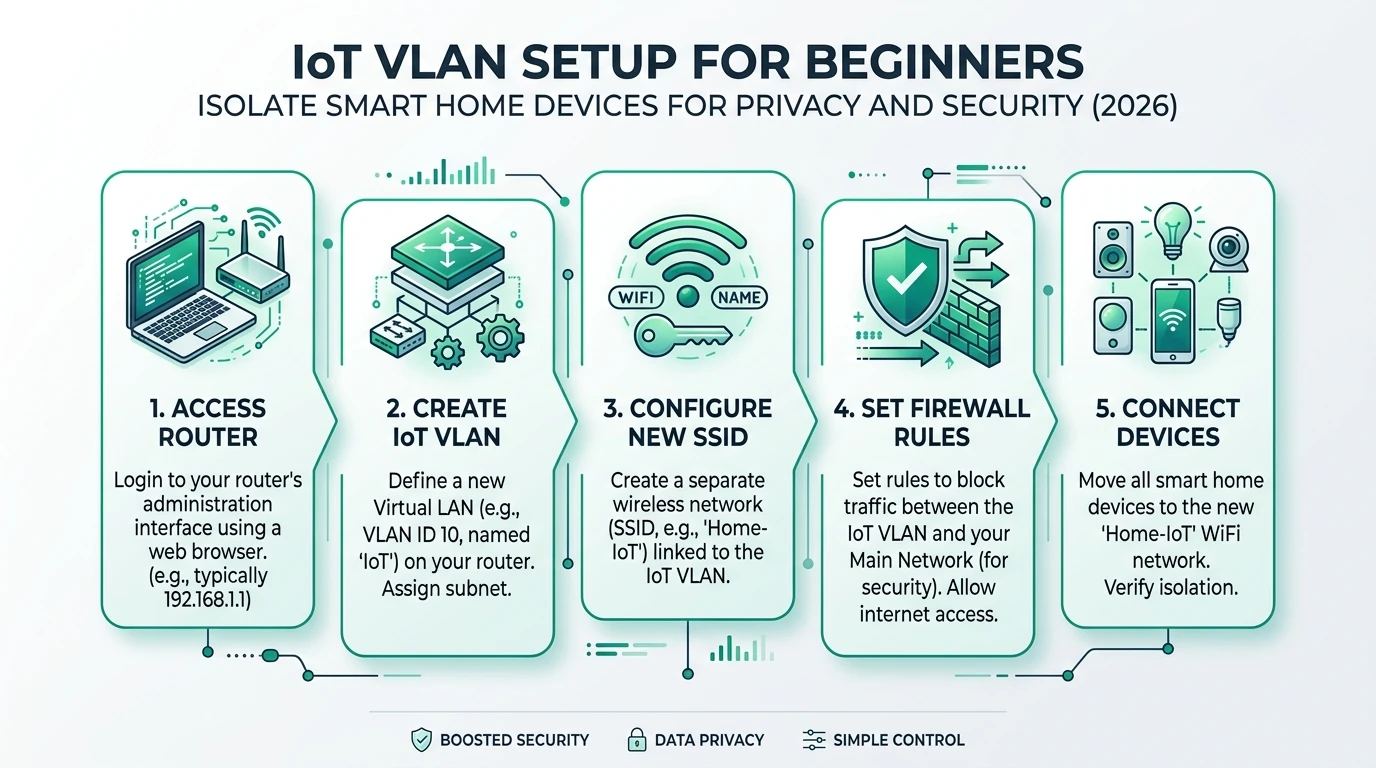
VLAN and firewall policy (reference lab)
| Rule order | Source | Destination | Action | Purpose |
|---|---|---|---|---|
| 10 | NVR (192.168.30.10) | Camera subnet | Pass RTSP 554, ONVIF 80/8000 | NVR-initiated pull |
| 20 | Trusted LAN | NVR HTTPS 5000 | Pass | Admin UI |
| 30 | Camera subnet | WAN | Deny | Stop telemetry/upload |
| 40 | Camera subnet | RFC1918 | Deny | Stop lateral movement |
| 90 | Camera subnet | DNS (optional) | Pass UDP 53 | Only if you accept NTP/DNS leaks |
Run the camera firmware WAN-deny test after rules land—packet captures beat assumptions.
Checklist
- Confirm PoE budget on switch (doorbell + future cams).
- Disable P2P/UPnP before mounting the camera.
- Assign static DHCP; document RTSP URLs in password manager.
- Use sub-stream for detect; never 4K main for inference.
- Snapshot Frigate and Scrypted configs after first working state.
- Test chime relay before closing the wall plate.
Cost snapshot (single doorbell, August 2026)
| Item | Low | Typical | Notes |
|---|---|---|---|
| PoE doorbell | $80 | $130 | Amcrest AD110 → Reolink DBV-P |
| PoE switch port | $0 | $25 | Marginal if upgrading switch |
| NVR host (refurb N100) | $150 | $220 | Often shared with HA |
| Coral USB TPU | $35 | $90 | Used market varies |
| Storage 1 TB SSD | $50 | $80 | Event-heavy retention |
| Total | ~$315 | ~$545 | No monthly cloud fee |
FAQ
Frequently Asked Questions
Can a self-hosted doorbell camera work without any internet?
Yes for LAN recording and alerts once provisioned. PoE models with static IPs, Frigate on your NVR, and VLAN rules that deny camera WAN egress deliver doorbell function without cloud retention. You still need internet briefly during initial firmware setup unless you flash offline.
Reolink or Amcrest for a Frigate doorbell in 2026?
Reolink Video Doorbell PoE (DBV-P) exposes stable RTSP and http-flv paths documented in Frigate’s camera-specific guide. Amcrest AD410 is a strong ONVIF alternative when you already run Blue Iris or want chime relay GPIO. Pick Reolink for greenfield Frigate; Amcrest when ONVIF tooling is standardized in your lab.
Do I need Scrypted if my doorbell already has RTSP?
No. Scrypted adds value when you need HomeKit Secure Video bridging, two-way talk normalization, or rebroadcast for proprietary Wi-Fi doorbells. Native PoE RTSP doorbells should connect directly to Frigate go2rtc.
What VLAN should the doorbell live on?
A dedicated camera VLAN (we use VLAN 40 in reference labs) separate from trusted workstations and general IoT. Allow NVR → camera on RTSP/ONVIF ports; default-deny camera → WAN and camera → LAN except DNS/NTP if you accept that tradeoff.
How much storage does a 2K doorbell need locally?
Budget 40–80 GB per month per doorbell for continuous 2K H.265 record at moderate bitrate. Event-only retention on a 512 GB SSD often covers 30–45 days for a single entry camera.
Will blocking WAN break doorbell firmware updates?
Usually. Schedule a maintenance window with a temporary pass rule to vendor update hosts, or update from a laptop on the camera subnet—see our WAN-deny test methodology for cameras.
Primary sources
| ID | Source | URL |
|---|---|---|
| 1 | Frigate — documentation | docs.frigate.video |
| 2 | Frigate — camera-specific (Reolink) | docs.frigate.video/configuration/camera_specific/ |
| 3 | Scrypted — documentation | docs.scrypted.app |
| 4 | Reolink — Video Doorbell PoE product page | reolink.com |
| 5 | Amcrest — AD410 product page | amcrest.com |
| 6 | NIST IoT cybersecurity guidance | nist.gov |
Verdict
A self hosted doorbell camera is not a SKU—it is a policy: PoE wire, Frigate disk, VLAN deny. Buy Reolink DBV-P or Amcrest AD410 for native streams; add Scrypted only when HomeKit demands it; never skip firewall testing after you disable P2P. Next step: stand up the local NVR host, then clone Marcus’s VLAN rules before you mount hardware at the door.