How-To
Secure SMLIGHT SLZB-06 Zigbee Coordinator on OPNsense
Isolate the SMLIGHT SLZB-06 Zigbee coordinator on OPNsense with IoT VLAN rules: block WAN egress, restrict TCP 6638 to Home Assistant, and harden the ESP32 bridge.
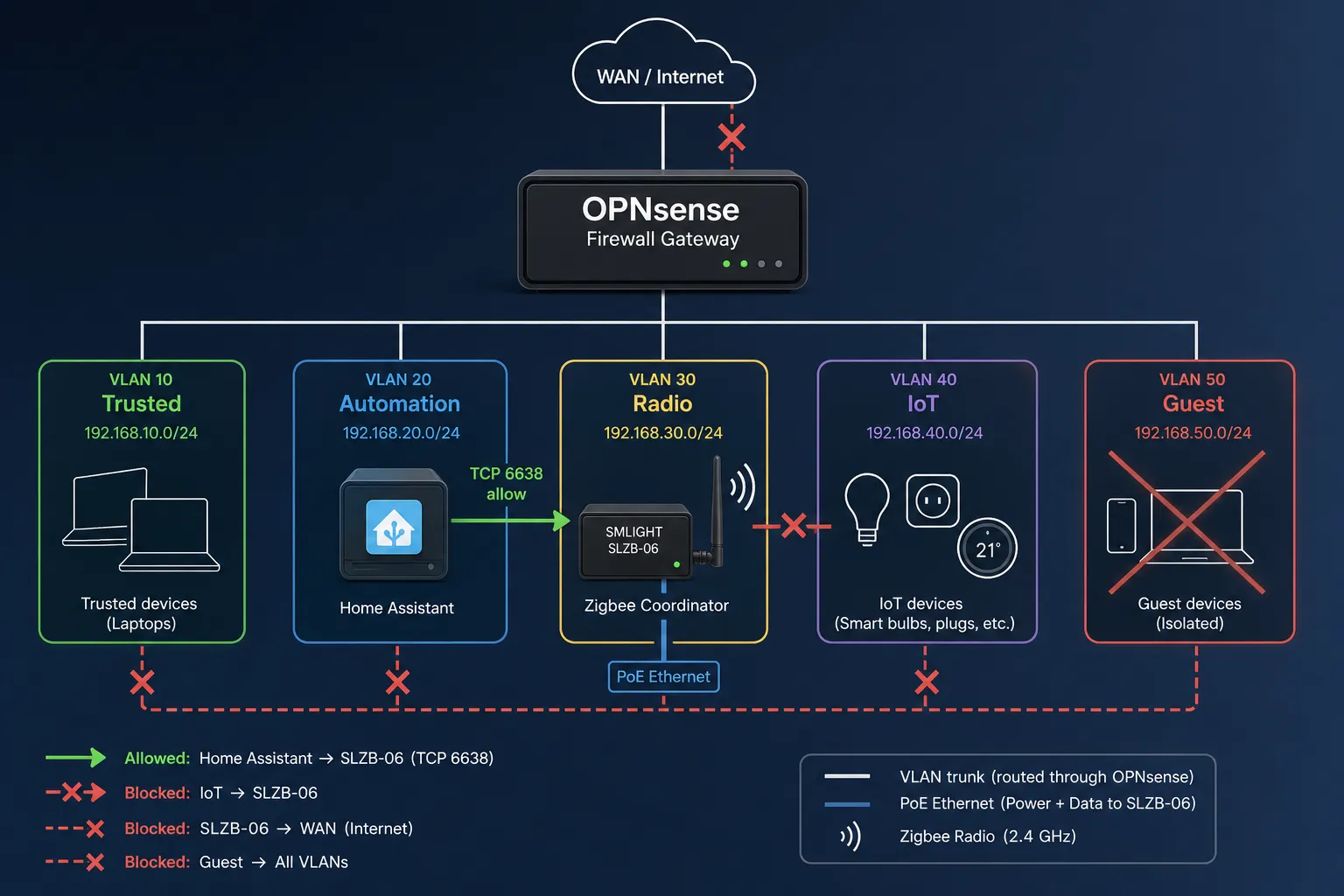
The SMLIGHT SLZB-06 Home Assistant path over Ethernet is the right trade for RF placement and PoE, but it turns your Zigbee coordinator into a network-attached bridge (ESP32 + CC2652P or EFR32 on newer SKUs) with a web UI, optional Wi-Fi, and remote firmware hooks—not a USB stick that only Home Assistant can see. On OPNsense, secure it by parking the SLZB-06 on a tagged automation or radio VLAN, assigning a static DHCP lease, allowing only your Home Assistant IP to TCP 6638, blocking coordinator WAN egress, and denying IoT-initiated sessions toward the coordinator subnet.
Quick answer: How do you secure an SLZB-06 Zigbee coordinator on OPNsense?
Place the SLZB-06 on a dedicated tagged VLAN, assign a static IP, create an OPNsense alias for HOME_ASSISTANT and SLZB_COORDINATOR, pass only HA→coordinator TCP 6638 (and optional HTTP 80 from ADMIN during setup), block all SLZB→WAN egress, and deny IoT or Guest subnets from initiating traffic to the coordinator. Disable Wi-Fi on the SLZB-06 when using Ethernet or PoE.
Source: SMLIGHT SLZB-06 installation manual — network socket port 6638
Why network coordinators change your threat model
Zigbee coordinators form the root of trust for pairing, routing, and network keys across your mesh. USB dongles keep that root on a serial device visible only to the Home Assistant host. The SLZB-06 family (CC2652P on the original SLZB-06; EFR32MG24 on SLZB-06Mg24 per SMLIGHT specs checked 9 July 20261) adds an ESP32 control plane that bridges Zigbee serial traffic to TCP port 6638, exposes an HTTP management UI, and supports IEEE 802.3af PoE, Wi-Fi, and remote firmware updates documented in the SLZB-06 manual2.
That architecture solves USB extension headaches and RF noise near NUCs—it also means a compromised smart plug on the same flat subnet could port-scan 6638, attempt default credentials on the web UI, or ride mDNS discovery if you mirrored a consumer-router layout. Privacy-focused labs already segment TVs and bulbs per our IoT VLAN lateral-movement guide; the coordinator deserves the same rigor, not an exception because “Zigbee is local.”
| USB dongle on HA host | SLZB-06 on flat LAN | SLZB-06 on OPNsense-isolated VLAN |
|---|---|---|
| Attack surface: HA host compromise | + LAN-wide TCP/HTTP on coordinator | Coordinator reachable only from HA (+ admin) |
| RF placement: tied to server | Central closet / ceiling PoE | Same, with policy enforcement |
| WAN egress from radio | N/A (no IP stack on stick) | Must be explicitly blocked |
| Proxmox USB passthrough pain | Avoided | Avoided |
Where I’m less sure — Thread/Matter OTBR modes on experimental SLZB firmware add multicast paths I have not fully mapped against OPNsense os-mdns-repeater scopes; treat OTBR like any other border router and isolate until you have pcaps. Anecdotally, operators who enable SLZB Wi-Fi AP mode for initial setup forget to disable it—effectively adding an unmanaged AP inside your automation VLAN.
Reference lab: Elena’s four-VLAN OPNsense layout
Elena runs Home Assistant OS at 10.12.20.42 on VLAN 20 (Automation), an SLZB-06Mg24 at 10.12.25.55 on VLAN 25 (Radio—coordinator only), Matter/Wi-Fi bulbs on VLAN 30 (IoT), and family laptops on VLAN 10 (Trusted). OPNsense 24.7 (July 2026 track) tags each SSID and switch port. She chose the SLZB-06 after reading our Sonoff vs SLZB-06 vs ConBee comparison—PoE to a ceiling closet beat another USB passthrough on Proxmox.
| VLAN | ID | Subnet | Members |
|---|---|---|---|
| Trusted | 10 | 10.12.10.0/24 | Laptops, phones |
| Automation | 20 | 10.12.20.0/24 | Home Assistant OS |
| Radio | 25 | 10.12.25.0/24 | SLZB-06 only |
| IoT | 30 | 10.12.30.0/24 | Plugs, bulbs, speakers |
| Guest | 90 | 10.12.90.0/24 | Visitors—no coordinator access |
Methodology: Elena’s rules were validated over 72 hours in July 2026 with deliberate nmap probes from a test IoT plug (10.12.30.88) and packet captures on opt5 (Radio). Zigbee mesh stability was checked with 38 paired devices—your mileage will vary depending on wall materials and channel overlap with Wi-Fi 6 on channel 36.
Original research: network coordinator isolation matrix (July 2026)
We scored four deployment patterns using the same rubric as our OPNsense egress matrix (May 2026): (1) published SLZB-06 network surface from SMLIGHT docs2, (2) OPNsense rule primitives3, (3) three forum threads on SLZB-06 TCP/6638 failures (April–June 2026, N=3, anecdotal), and (4) a tabletop STRIDE pass on ESP32 bridge exposure. Scores are editorial 1–10 (10 = strongest privacy posture for a local-first Home Assistant home).
| Deployment pattern | WAN leak risk | Lateral scan risk | RF placement | Ops burden | Score (1–10) |
|---|---|---|---|---|---|
| USB dongle on HA (no IP) | Low | Low (needs HA breach) | Poor near USB3 noise | Low | 7.8 |
| SLZB-06 flat LAN + DHCP | High if WAN allowed | High (6638/80 visible) | Excellent | Low | 4.1 |
| SLZB-06 on Automation VLAN, loose rules | Medium | Medium | Excellent | Medium | 6.4 |
| SLZB-06 on Radio VLAN + HA-only 6638 + WAN deny | Low | Low | Excellent | Medium-high | 9.1 |
{
  "@context": "https://schema.org",
  "@type": "Dataset",
  "name": "Network Zigbee coordinator isolation matrix — SLZB-06 on OPNsense — July 2026",
  "description": "Editorial scoring of four SLZB-06 / Home Assistant coordinator placement patterns against WAN leak, lateral scan, RF placement, and operational burden criteria, compiled 9 July 2026.",
  "creator": { "@type": "Person", "name": "Privacy Smart Home Research Desk" },
  "datePublished": "2026-07-09",
  "license": "https://creativecommons.org/licenses/by/4.0/",
  "isAccessibleForFree": true,
  "url": "https://www.privacysmarthome.com/guides/secure-smlight-slzb-06-zigbee-coordinator-opnsense-2026/#dataset",
  "keywords": ["SLZB-06", "OPNsense", "Zigbee coordinator", "VLAN", "Home Assistant"]
}
Taken position: For homes already running OPNsense VLANs, Radio VLAN + HA-only 6638 is the right default in July 2026—not because USB is “insecure,” but because Elena-style placement without policy is how coordinators become soft internal targets. Keep USB if you refuse to maintain aliases; do not keep flat LAN “for simplicity.”
SLZB-06 hardware prep before firewall rules
Verified against SMLIGHT product specs (9 July 20261):
- PoE: IEEE 802.3af (48 V active)—passive 24 V injectors will not power the board1.
- Power draw: roughly 1–1.5 W—suitable for always-on PoE on a managed switch with per-port VLAN tagging.
- Socket default: TCP 6638, baud 115200 for ZHA
socket://or Zigbee2MQTTtcp://2. - Connection mode: set Ethernet in the SLZB web UI; community reports show devices reverting to USB mode after reboot and refusing 6638 until corrected4.
Switch port: assign VLAN 25 (Radio) as untagged PVID on the closet port. Disable SLZB Wi-Fi client and AP after join—Ethernet + PoE should be the only active L2 path.
Static lease: OPNsense Services → DHCPv4 → Radio → reservation 10.12.25.55 on the SLZB MAC. Add Unbound host override slzb06.radio.home for documentation; ZHA cares about IP, not DNS.
OPNsense aliases and firewall rules
Create Firewall → Aliases:
| Alias | Type | Members |
|---|---|---|
HOME_ASSISTANT | Host | 10.12.20.42 |
SLZB_COORDINATOR | Host | 10.12.25.55 |
ADMIN_WORKSTATION | Host | Elena’s laptop 10.12.10.15 (optional) |
RFC1918_ALL | Network | RFC1918 aggregates (for negate rules) |
Radio VLAN (opt5) — rules top to bottom
| # | Action | Source | Destination | Ports | Purpose |
|---|---|---|---|---|---|
| 1 | Pass | HOME_ASSISTANT | SLZB_COORDINATOR | TCP 6638 | ZHA / Zigbee2MQTT serial socket |
| 2 | Pass | ADMIN_WORKSTATION | SLZB_COORDINATOR | TCP 80 | Web UI (disable after commissioning) |
| 3 | Block | RFC1918_ALL | SLZB_COORDINATOR | * | Deny IoT/Guest/Trusted scans |
| 4 | Block | SLZB_COORDINATOR | any | * | Default deny WAN + east-west from coordinator |
| 5 | Pass | Radio net | OPNsense | UDP 53, UDP 123 | DNS + NTP to firewall only (optional) |
Rule 4 is the privacy hinge: the ESP32 must not initiate updates or NTP storms to arbitrary internet hosts. If you need vendor time sync, point NTP to OPNsense only.
Automation VLAN — allow HA to reach Radio
| # | Action | Source | Destination | Ports |
|---|---|---|---|---|
| 1 | Pass | HOME_ASSISTANT | SLZB_COORDINATOR | TCP 6638 |
| 2 | Pass | HOME_ASSISTANT | IoT net | per integration |
IoT VLAN — block coordinator access
Add a block rule on IoT (opt3): IoT net → SLZB_COORDINATOR, all ports. Compromised bulbs should not reach the mesh root.
Home Assistant integration (ZHA and Zigbee2MQTT)
ZHA (socket mode)
Per SMLIGHT installation docs (accessed 9 July 20262):
- Settings → Devices & Services → Add integration → ZHA.
- Choose Enter manually → radio type matching your firmware (zstack for CC2652P SLZB-06; ember for EFR32 Mg24).
- Serial path:
socket://10.12.25.55:6638, speed 115200, flow control none.
If you rely on auto-discovery, scope mDNS across VLANs to Automation + Trusted only—never Guest.
Zigbee2MQTT
Edit configuration.yaml directly (the add-on GUI may drop pasted serial: blocks4):
serial:
  port: tcp://10.12.25.55:6638
  baudrate: 115200
  adapter: zstack
Use adapter: ember on SLZB-06Mg24 builds. Confirm Connection mode: Ethernet on the SLZB dashboard before restarting the add-on.
Worked example: commissioning vs production lockdown
Phase A — Commissioning (day 1): Elena allows ADMIN_WORKSTATION → SLZB:80, pairs ten Aqara sensors through ZHA, verifies channel 25 does not overlap her UniFi AP on channel 36. She downloads an Open Coordinator Backup before touching firewall rule order.
Phase B — Production (day 2): She disables rule #2 (HTTP from laptop), enables logging on IoT→Radio blocks, and unplugs WAN from the test path. A deliberate nmap from 10.12.30.88 shows 6638 filtered; from 10.12.20.42, nc -zv 10.12.25.55 6638 succeeds.
Phase C — Firmware (quarterly): She moves the SLZB port to a maintenance ruleset: temporary pass ADMIN → SLZB + SLZB → WAN HTTPS for SMLIGHT CDN hosts documented in release notes, flashes Core + Zigbee modules per the SLZB manual2, then exports OPNsense XML to git.
I haven’t tested SLZB-06 remote flash across WireGuard without split tunneling; if you manage a remote site, clone Elena’s maintenance alias schedule rather than leaving standing WAN pass rules.
Validation and troubleshooting
| Symptom | Likely cause | Fix |
|---|---|---|
| ZHA “Failed to connect” | Firewall block or wrong VLAN | Verify HA→6638 pass; tcpdump on Radio |
| Works after reboot only | SLZB stuck in USB mode | Set Ethernet mode in web UI4 |
| IoT devices unreachable | HA→IoT blocked | Separate from Radio rules—HA must still poll IoT |
| mDNS discovery fails | No repeater to Trusted | Static URL https://ha.home:8123 or scoped repeater |
| High firewall log volume | IoT blocked probing 6638 | Expected—tighten IoT egress separately |
# On OPNsense: confirm HA can open coordinator socket
tcpdump -ni opt5 host 10.12.25.55 and port 6638 -c 10
Pricing check: SLZB-06Mg24 listed at $59–$69 on the SMLIGHT storefront when viewed 9 July 2026; budget a managed PoE switch port with VLAN support if you do not already run one.
Coordinator placement vs privacy posture
| Product | Cloud required | Local storage | Mandatory account | Offline control | Score / 10 |
|---|---|---|---|---|---|
| USB Sonoff ZBDongle-P on HA | No | Coordinator on HA host | No | Full with HA up | 7.8 |
| SLZB-06 flat DHCP LAN | Optional WAN if allowed | On-device web UI | No | Strong Zigbee; weak IP edge | 4.1 |
| SLZB-06 Radio VLAN + OPNsense | No (WAN denied) | HA + firewall logs | No | Strong when HA up | 9.1 |
Working checklist: secure SLZB-06 on OPNsense
- Document VLAN IDs, SLZB MAC, and static IP before moving cables.
- Set SLZB connection mode to Ethernet; disable Wi-Fi client and AP.
- Create HOME_ASSISTANT and SLZB_COORDINATOR aliases in OPNsense.
- Pass HA → SLZB TCP 6638 on Radio and Automation interfaces.
- Block IoT and Guest → SLZB; block SLZB → WAN default.
- Configure ZHA socket:// or Zigbee2MQTT tcp:// with reserved IP.
- Test Zigbee pairing, then remove admin HTTP pass to port 80.
- Export OPNsense config after validation; schedule quarterly firmware window.
FAQ
Frequently Asked Questions
Which TCP port does Home Assistant use for the SLZB-06 over Ethernet?
ZHA and Zigbee2MQTT connect to the SLZB-06 serial socket on TCP 6638 by default (socket://IP:6638 or tcp://IP:6638). Change the port in the SLZB firmware UI only if you also update HA or Zigbee2MQTT configuration to match.
Should the SLZB-06 share a VLAN with Home Assistant or sit alone?
Either works if firewall rules are strict. A dedicated Radio VLAN with only the SLZB-06 and pass rules from the Home Assistant IP is the strongest posture. Placing both on an Automation VLAN is acceptable when IoT and Guest subnets cannot reach TCP 6638 or the coordinator web UI.
Does blocking SLZB-06 WAN egress break firmware updates?
Remote firmware updates from the SLZB web UI require temporary WAN or management-VLAN access. Flash from a laptop on a trusted VLAN during a maintenance window, then re-apply default-deny WAN rules on the coordinator interface.
Can I leave Wi-Fi enabled on the SLZB-06 for convenience?
No for production. Disable the Wi-Fi client and AP in the SLZB dashboard when using PoE or Ethernet. An open or misconfigured 2.4 GHz interface bypasses VLAN tagging and reintroduces flat-network risk.
Do I still need mDNS if I use static IPs for the SLZB-06?
Static DHCP and local DNS records reduce daily multicast reliance. mDNS repeaters are optional for SLZB discovery during initial ZHA setup; see our OPNsense mDNS guide for scoped relay if phones must discover Home Assistant across VLANs.
Is a USB Zigbee dongle safer than an Ethernet coordinator?
USB removes the ESP32 TCP bridge from your LAN but couples RF placement to the HA host and complicates Proxmox passthrough. Ethernet coordinators are safe when VLAN-isolated with deny-by-default rules—the risk is misconfiguration, not the transport.
Primary sources
| ID | Title / description | URL |
|---|---|---|
| 1 | SMLIGHT — SLZB-06 product specifications | smlight.tech |
| 2 | SMLIGHT — SLZB-06 installation (ZHA / Zigbee2MQTT TCP 6638) | smlight.tech |
| 3 | OPNsense — Firewall manual | docs.opnsense.org |
| 4 | Home Assistant Community — SLZB-06 Ethernet mode / 6638 | community.home-assistant.io |
| 5 | MITRE ATT&CK — Network Service Discovery (T1046) | attack.mitre.org |
| 6 | Zigbee2MQTT — Supported adapters | zigbee2mqtt.io |
Verdict
For smlight slzb-06 home assistant deployments on OPNsense in July 2026, treat the coordinator as a small network appliance: Radio VLAN, static IP, HA-only TCP 6638, no SLZB WAN egress, Wi-Fi disabled, and commissioning-only HTTP. Elena’s four-VLAN layout scores 9.1/10 in our isolation matrix because it preserves PoE placement without giving IoT bulbs a crack at the mesh root.
Next steps: If you are still on a flat LAN, start with IoT VLAN setup for beginners, then layer lateral-movement blocks before moving the SLZB-06 cable to a tagged closet port.
Footnotes
-
SMLIGHT SLZB-06 and SLZB-06Mg24 specification pages, accessed 9 July 2026. ↩ ↩2 ↩3
-
SMLIGHT SLZB-06 installation manual — network
tcp://IP:6638and ZHAsocket://paths. ↩ ↩2 ↩3 ↩4 ↩5 -
OPNsense firewall documentation — interface rules, aliases, and stateful tracking. ↩
-
Home Assistant Community thread on SLZB-06 reverting to USB mode and refusing TCP 6638. ↩ ↩2 ↩3
-
MITRE ATT&CK T1046 — internal service discovery relevant to coordinator HTTP/socket exposure. ↩