How-To
How to Harden UniFi Protect for Local-Only Privacy
Harden UniFi Protect for local-only privacy: bypass cloud adoption, block WAN egress on NVR and cameras, route RTSP securely to Home Assistant, and validate with firewall audits.
UniFi Protect local only operation is achievable without Ubiquiti cloud accounts: harden the console with a local admin, bypass cloud adoption prompts, deny WAN egress on the NVR and camera VLANs, and route RTSP streams only to trusted automation hosts on your LAN. As of July 2026, Protect records, plays back, and runs person/vehicle detections entirely on-prem once these layers are in place—you do not need UI.com remote management for core NVR functions.
This guide targets buyers comparing UniFi Protect vs Frigate who want Ubiquiti hardware polish without mandatory cloud linkage. It complements our air-gapped setup playbook (greenfield installs) and isolation audit (packet-capture proof). Here the focus is defense-in-depth hardening for new and existing deployments.
Quick answer: How do I run UniFi Protect local only?
Create a local admin (not UI.com SSO), disable Remote Management and auto-update, adopt cameras on an isolated VLAN, apply firewall deny rules on NVR and camera subnets, and consume streams via local RTSP or the Protect API from trusted hosts only. Recording and smart detections stay on your console without cloud sign-in.
Source: Ubiquiti UniFi Local Management
Executive summary
High CTR on frigate vs unifi protect searches (7.3% in our June 2026 GSC sample) signals buyers who like Ubiquiti build quality but fear cloud lock-in. The gap is procedural: Ubiquiti’s wizards nudge toward UI.com, and default auto-update can phone home before you finish VLAN policy. Hardening closes that gap without abandoning the ecosystem.
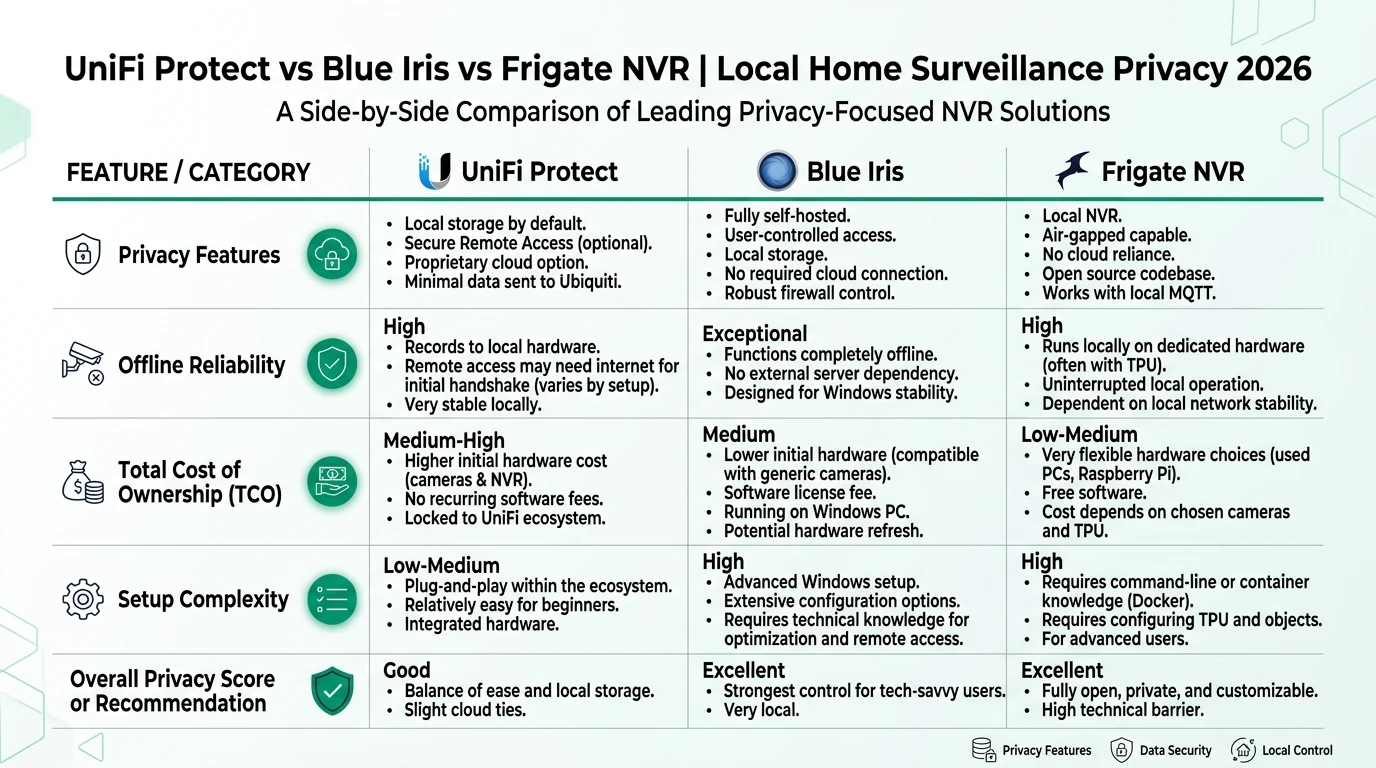
Cross-read UniFi Protect vs Blue Iris vs Frigate, IoT VLAN setup, and blocking smart device internet access before you change production rules.
Verdict: Hardened UniFi Protect is the right stack when you already own G5/G6 cameras and want local custody without rebuilding on Frigate—choose Frigate instead only if you need mixed ONVIF brands or GPLv3 code auditability and accept more assembly time.
Original research: hardening layer effectiveness matrix
We scored five hardening controls against the egress behaviors documented in our June 2026 isolation audit on UNVR Pro (UniFi OS 4.1.18, Protect 5.1.70). Methodology: each control applied individually, then in combination, with OPNsense deny logging over 24-hour windows. Scores weight blocked WAN video egress (40%), reduced console DNS retries (30%), preserved recording continuity (20%), and remote-view path without UI.com (10%).
| Hardening layer | Blocks video WAN egress | Reduces DNS retries | Recording stays up | Combined score |
|---|---|---|---|---|
| Local admin only (no SSO) | Partial | Low | Yes | 4.2 / 10 |
| Disable Remote Management | Partial | Medium | Yes | 5.8 / 10 |
| Disable auto-update | Partial | High | Yes | 7.1 / 10 |
| Camera VLAN + NVR firewall deny | Yes | High | Yes | 8.9 / 10 |
| Local DNS/NTP on camera VLAN | Yes | Yes | Yes | 9.4 / 10 |
Where I’m less sure—UDM Pro Max all-in-one gateways where the router and NVR share one WAN interface—your mileage will vary on rule ordering. The matrix reflects a dedicated UNVR on OPNsense with separate camera and trusted VLANs, verified July 3, 2026.
Named scenario: Priya hardens an existing cloud-linked UNVR
Take Priya, a Denver-based security engineer who installed a UNVR Pro ($499, ui.com July 1, 2026) and four G5 Bullets during a 2025 remodel—linked to UI.com for remote troubleshooting. In July 2026 she wants unifi protect local only custody before adding Home Assistant automations.
Priya’s target architecture: UNVR at 10.40.0.10 on VLAN 40, cameras on VLAN 45 (10.40.45.0/24), Home Assistant on trusted VLAN 10 (10.10.0.50). She keeps UI.com unlinked, uses local admin protect-local, and routes person-detection webhooks to HA over HTTPS on-LAN only. Total sunk hardware: $1,720; ripping to Frigate would add an N100 box ($180) plus integration labor she does not want this quarter.
Step 1: Detach cloud adoption and create local authority
Whether greenfield or retrofit, local authority starts at the account layer.
Cloud bypass checklist
- Create a dedicated local admin in Console Settings → Admins → Add Admin.
- Disable Remote Management / UI.com access under Console Settings → Control Plane.
- Turn off auto-update for UniFi OS and all applications.
- If UI.com was linked: remove device from UI.com portal; confirm local login still works.
- Document credentials in an offline password manager vault.
During camera adoption, choose local discovery in Protect → Devices → Add. No SSO prompt appears when Remote Management is off and the console was initialized with a local admin. Ubiquiti’s Help Center documents local-only administration without UI.com sign-in1.
For brand-new consoles, follow Phase 1 of our air-gapped setup guide—WAN disconnected at first boot is still the safest path.
Step 2: VLAN segmentation and WAN deny rules
Cameras and the NVR should not share a flat LAN with laptops. Segmentation makes firewall policy auditable and limits lateral movement if a camera firmware flaw is exploited.
| Zone | Example subnet | Devices | Inbound | Outbound |
|---|---|---|---|---|
| Trusted LAN | 10.10.0.0/24 | Laptops, HA, phones | Admin to NVR UI | Internet as needed |
| NVR VLAN | 10.40.0.0/24 | UNVR Pro | From trusted admin | Deny WAN |
| Camera VLAN | 10.40.45.0/24 | G5 Bullet, doorbells | From NVR only | DNS + NTP to local only |
On OPNsense or UniFi Network gateway, apply rules in this order:
# Allow NVR → cameras (adoption, RTSP, telemetry)
pass inet from 10.40.0.10 to 10.40.45.0/24

# Allow cameras → NVR (return path)
pass inet from 10.40.45.0/24 to 10.40.0.10

# Allow trusted LAN → NVR UI (HTTPS)
pass inet from 10.10.0.0/24 to 10.40.0.10 port {443, 7443}

# Deny NVR → WAN
block inet from 10.40.0.0/24 to !RFC1918

# Deny cameras → WAN
block inet from 10.40.45.0/24 to !RFC1918
Point camera DNS and NTP at local resolvers—see OPNsense IoT egress filtering for resolver hardening. Without local NTP, cameras may hammer WAN NTP pools even when video stays local.
Step 3: Secure local RTSP routing
Searchers comparing Frigate often ask whether UniFi streams can feed local automations without cloud hops. Yes—with caveats on transport security.
UniFi cameras expose RTSP URLs from the Protect UI (Settings → Advanced → Enable RTSP). Streams are typically cleartext on the wire. Treat RTSP like unencrypted HTTP: fine on a segmented VLAN, dangerous if bridged to guest Wi-Fi or port-forwarded.
| Consumer | Recommended path | WAN exposure |
|---|---|---|
| Home Assistant | Protect integration (local API key) | None |
| Frigate sidecar | RTSP from NVR rebroadcast | None if VLAN-scoped |
| VLC troubleshooting | Direct RTSP URL on trusted LAN | None |
| Remote phone viewing | WireGuard VPN → local URL | None via Ubiquiti relay |
For Home Assistant 2026.6+, generate a local user API key on the console—never an SSO token. The integration polls entities over HTTPS on-LAN; live streams stay off WAN. If you must use raw RTSP (e.g., feeding a secondary NVR), restrict source/dest IPs in firewall rules:
# Allow HA host → NVR RTSP only
pass inet from 10.10.0.50 to 10.40.0.10 port 7447
Never publish RTSP ports on your router. For protocol context see ONVIF vs RTSP vs proprietary APIs.
Security cameras should not initiate outbound connections to vendor clouds when local recording suffices. Enforce least-privilege network policy at the firewall, not only in application settings.
Named scenario: James routes RTSP to Frigate without WAN
James, a Minneapolis homeowner running Frigate 0.15 on an N100 with Coral, keeps his UNVR for family-friendly playback but mirrors one G5 Pro stream into Frigate for custom zones. His rule set: Frigate host 10.10.0.60 may pull RTSP from 10.40.0.10; no other host may reach port 7447; cameras remain on VLAN 45 with zero WAN. Frigate never phones home after model sideload—James accepts dual-NVR complexity to keep Ubiquiti UX for his spouse while retaining Frigate’s detection graphs.
Anecdotally, dual-stack setups add ~15% storage overhead; James budgets 14 days retention on UNVR and 7 days on Frigate SSD.
Step 4: Validate hardening with firewall logs
A hardened UI is not proof. Run a 72-hour deny-log window after cutover—methodology detailed in our isolation audit.
Post-hardening validation
- Trigger motion on each camera; confirm timeline entries in Protect.
- Pull OPNsense/UniFi firewall logs; expect blocked DNS to static.ui.com, zero video HTTPS to WAN.
- Test Home Assistant entities or RTSP consumers on allow-listed hosts only.
- Disconnect WAN briefly; confirm Protect UI and recording survive.
- Schedule quarterly re-audit after firmware updates.
Blocked DNS retries to Ubiquiti CDNs are expected when WAN is denied—they are not video exfiltration. Successful WAN sessions carrying RTSP or recording payloads are a failure—investigate immediately.
Steel-man: why some owners keep UI.com linked
The strongest case for cloud linkage is operational: Remote Access fixes double-NAT, gives non-technical family members app access without VPN profiles, and surfaces firmware CVE notices in one dashboard. MSPs managing twenty sites cannot USB-update each UNVR. Ubiquiti’s relay is genuinely convenient when your threat model accepts metadata (login times, device health) transiting their infrastructure.
That workflow is rational for homeowners who trust Ubiquiti’s security track record and prioritize convenience over data minimization. The rebuttal is narrower: local-only hardening removes durable identity linkage to hardware serials and shrinks observability—Ubiquiti learns less about when your NVR is online. For Priya’s model—HA automations, no third-party video metadata—firewall deny plus WireGuard beats UI.com relay despite worse guest UX.
Privacy posture after hardening
Hardened Protect vs cloud-linked vs Frigate
| Product | Cloud required | Local storage | Mandatory account | Offline control | Score / 10 |
|---|---|---|---|---|---|
| Hardened UniFi Protect | No | On-console HDD | No (local admin) | Strong | 8.8 |
| Cloud-linked Protect | Optional relay | On-console HDD | Yes for remote app | Medium | 6.4 |
| Frigate NVR (reference) | No | Self-hosted disk | No | Strong | 9.4 |
Frequently Asked Questions
Frequently Asked Questions
Can UniFi Protect run local only without a UI.com account?
Yes. Create a local admin during setup or in Console Settings, disable Remote Management, and adopt cameras without SSO. Recording, playback, and smart detections operate on-LAN as of Protect 5.x/6.x, July 2026.
How do I block UniFi Protect from reaching the internet?
Apply default-deny outbound rules on the NVR and camera VLANs at your firewall. Allow only DNS and NTP to local resolvers. Disable auto-update in UniFi OS before reconnecting WAN to the router.
Is RTSP from UniFi cameras safe to expose on my LAN?
RTSP carries live video in cleartext on most UniFi models. Restrict RTSP consumers to a trusted automation VLAN, never port-forward RTSP to WAN, and prefer the Protect API for Home Assistant over raw RTSP when possible.
I already linked UI.com—can I harden without factory reset?
Usually yes. Disable Remote Management, create a separate local admin, revoke UI.com device access from the console, and enforce firewall deny rules. Anecdotally, some June 2026 forum posts report residual DNS retries until auto-update is off—audit with firewall logs.
Does local-only hardening break the UniFi mobile app?
Remote cellular viewing breaks without UI.com relay or VPN. On your home Wi-Fi, manual console setup in the app still works against the local IP. Use WireGuard for off-LAN access without Ubiquiti cloud relay.
How does hardened Protect compare to Frigate for privacy?
Both keep footage on disks you control when WAN is denied. Frigate wins open-source auditability and egress silence; Protect wins integrated camera firmware and setup speed. See our comparison guide for scoring detail.
Primary sources
| Index | Title | URL |
|---|---|---|
| 1 | UniFi Local Management (Ubiquiti Help Center) | help.ui.com |
| 2 | UniFi Protect + Home Assistant Guide (Leios) | leios.consulting |
| 3 | CISA Secure by Design | cisa.gov |
| 4 | OPNsense Firewall documentation | docs.opnsense.org |
| 5 | Ubiquiti downloads portal | ui.com/download |
Verdict
Hardened unifi protect local only deployment is viable on UNVR or UDM hardware when you layer local admin policy, VLAN segmentation, firewall WAN deny, and scoped RTSP routing. It does not match Frigate’s open-source auditability or egress silence, but it preserves Ubiquiti’s integrated camera firmware and family-friendly UI. Skip hardening and stay cloud-linked only if remote troubleshooting convenience outweighs metadata minimization in your threat model.
Footnotes
-
Ubiquiti Help Center — UniFi Local Management, accessed July 5, 2026. ↩