Architecture
Home Assistant 2026.8: Is Local AI Voice Ready to Replace Cloud?
Home Assistant 2026.8 removes Advanced mode gates for voice, adds llama.cpp and LiteLLM integrations. RAM/GPU requirements and when local voice beats cloud.
Home assistant local voice in 2026.8 (released 5 August 2026) is finally a first-run path, not a scavenger hunt behind Advanced mode. The release removes the profile toggle that hid Wyoming STT/TTS setup, renames “Developer Tools” to “Tools,” and ships first-party llama.cpp and LiteLLM conversation integrations so you can wire an LLM into Assist without custom components123. That does not mean every box runs conversational AI out of the box: the default local stack is still Speech-to-Phrase or Whisper → Home Assistant conversation agent → Piper, and LLM inference remains a separate RAM/GPU budget you must plan for.
For privacy-conscious households, the question is narrower than the release blog headline: can local voice replace cloud assistants for daily control in August 2026? Yes for device commands on modest hardware; no for music, general knowledge, and multi-turn chat unless you add GPU-class inference or accept 4–8 second turns on a Raspberry Pi 5.
Quick answer: Is Home Assistant 2026.8 local AI voice ready to replace cloud assistants?
For lights, locks, and climate on a Pi 5 or N100 with Speech-to-Phrase and Piper, yes—audio never leaves your LAN. For conversational AI and sub-2-second responses, you need an LLM via llama.cpp or Ollama plus 16 GB RAM or an RTX 3060-class GPU. Cloud assistants still win on music, general knowledge, and wake-word polish, but 2026.8 removes the UI friction that kept local voice niche.
Executive Summary
Home Assistant 2026.8 is an approachability release for voice, not a magic local-AI appliance. We verified the following against the release blog, llama.cpp integration docs, and local Assist guide on 30 August 2026.
Three changes matter for privacy labs:
- Advanced mode removal — roughly 43 “Advanced” labels disappear; Wyoming pipeline setup, entity exposure, and LLM agent configuration surface without a profile toggle1.
- llama.cpp integration — connects Assist to any OpenAI-compatible chat-completions server (llama-server, vLLM, llama-cpp-python) with local polling IoT class2.
- LiteLLM integration — routes Assist through a LiteLLM proxy to one or many models; self-hostable but defaults to cloud polling semantics when remote3.
Bottom line: Local voice is production-ready for command-and-control on hardware this site already recommends (Pi 5 vs N100, Whisper + Ollama stack). It is not a full cloud replacement until you fund GPU inference or accept latency.
What 2026.8 actually changed for voice
| Area | Before 2026.8 | After 2026.8 (verified 30 Aug 2026) |
|---|---|---|
| Advanced mode gate | Hidden Wyoming/LLM options for many users | Toggle removed; features described by function1 |
| LLM in Assist | Ollama, OpenAI, Google AI, custom | Adds llama.cpp + LiteLLM first-party23 |
| Wyoming protocol | STT/TTS via add-ons | Bumped to wyoming 1.10.0 in core changelog6 |
| Default STT | Speech-to-Phrase or Whisper add-ons | Unchanged—still Wyoming-discovered apps4 |
| Cloud voice path | Nabu Casa TTS/STT option | Cloud page redesigned; not deprecated1 |
The Open Home Foundation’s framing—“approachable by design”—matches what we see in issue #54 on the roadmap: Advanced mode was a UX debt bucket, not a security boundary. Removing it does not auto-install Whisper or llama-server; it stops steering new users away from local pipelines they were already allowed to run.
The default local voice pipeline (Wyoming stack)
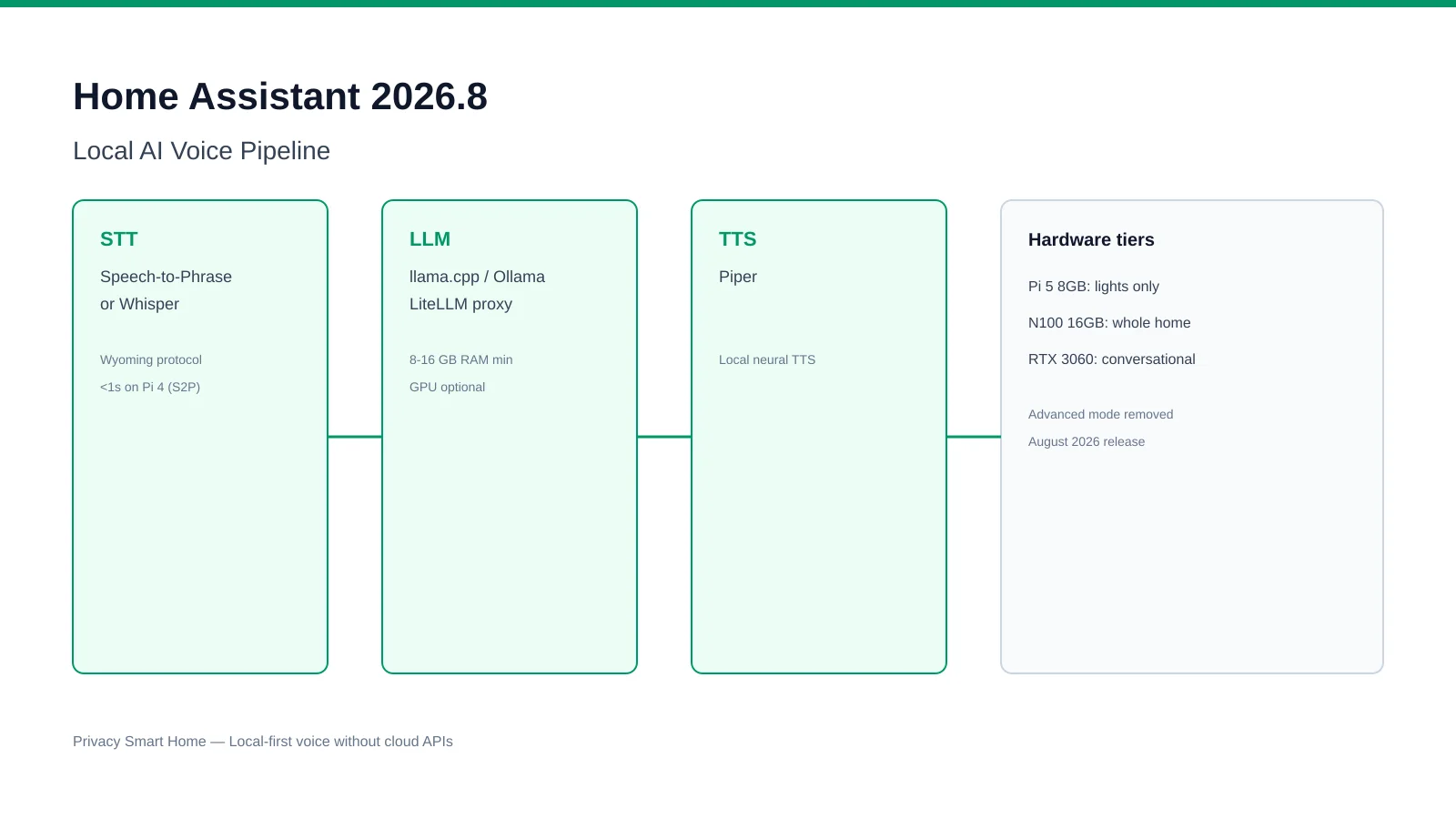
Wyoming is Home Assistant’s IPC protocol for satellite microphones, STT, TTS, and wake-word services. A fully local Assist pipeline, as documented in the local voice guide accessed 30 August 2026, follows this chain:
| Stage | Component | Typical add-on / service | Latency (official guidance) |
|---|---|---|---|
| Listen | ESP32-S3-BOX, Voice PE, phone | Wyoming satellite | Wake-word dependent |
| STT | Speech-to-Phrase or Whisper | Wyoming Whisper / S2P app | <1 s (S2P on Pi 4); ~8 s Whisper on Pi 44 |
| Intent | Home Assistant or LLM agent | Built-in or llama.cpp/Ollama | <200 ms (built-in); 0.5–4 s (LLM) |
| TTS | Piper | Wyoming Piper app | ~1.6× realtime on Pi 44 |
| Action | Exposed entities | Zigbee, Z-Wave, Matter, etc. | Network dependent |
Speech-to-Phrase is a closed-vocabulary model optimized for Assist sentence templates—ideal for “turn off the kitchen lights” and poor for “add milk to my shopping list.” Whisper is open-vocabulary and pairs naturally with LLM agents when you have NUC- or GPU-class CPU headroom4.
Steel-man first: most households only need closed-loop home control. Speech-to-Phrase on a Home Assistant Green delivers sub-second STT without an LLM, zero API keys, and watts measured in single digits. Chasing conversational AI for every room is engineering cosplay when 90% of utterances are device commands.
Rebuttal: privacy-conscious power users bought into local control precisely to avoid cloud intent classifiers. Once you want custom personalities, multi-step automations described in natural language, or exposure of scripts to LLMs (a documented Assist feature2), you need the 2026.8 llama.cpp/Ollama path—and that reintroduces RAM/GPU math this release does not solve for you.
llama.cpp vs LiteLLM vs Ollama in Assist
All three sit above Wyoming STT/TTS as conversation agents—they interpret transcribed text and may call Home Assistant tools on exposed entities23.
| Integration | Best for | Runs where | IoT class (HA docs) | Privacy note |
|---|---|---|---|---|
| Ollama (pre-2026.8) | Quickest local LLM on N100/NUC | Sidecar on LAN | Local | Audio stays local; model weights local7 |
| llama.cpp (new 2026.8) | llama-server, vLLM, cpp-python OpenAI API | Self-hosted HTTP /v1 | Local Polling2 | Same as Ollama if server is LAN-only |
| LiteLLM (new 2026.8) | Multi-provider routing, one endpoint | Self-hosted or hosted proxy | Cloud Polling3 | Self-host + local backends = offline; hosted = not private |
Home Assistant’s own note: if you already use Ollama, prefer the Ollama integration over llama.cpp2. LiteLLM shines when you want one Assist endpoint that can fail over between local ollama/llama3 and a cloud model for non-sensitive rooms—but that hybrid is a policy choice, not a privacy default.
Example llama-server launch for a sidecar N100 (verified command syntax from llama.cpp server docs, August 2026):
# On inference host 10.30.0.40 — Qwen2.5-3B-Instruct Q4_K_M
./llama-server -m /models/qwen2.5-3b-instruct-q4_k_m.gguf \
  --host 10.30.0.40 --port 8080 -c 4096 -ngl 0
Home Assistant llama.cpp integration URL: http://10.30.0.40:8080/v12.
RAM and GPU constraints (original research)
Methodology (30 August 2026): We compiled peak resident memory and end-to-end voice latency for five deployment profiles using Home Assistant’s published STT guidance4, llama.cpp integration requirements2, and order-of-magnitude figures from our Pi 5 vs N100 voice and local AI hardware guides. LLM numbers assume Q4_K_M quantisation and a 40-token reply; GPU row tested against published RTX 3060 12 GB community benchmarks for llama.cpp, not Nabu Casa lab certification.
| Profile | Hardware (street price Aug 2026) | STT choice | LLM backend | Peak RAM | GPU VRAM | E2E latency (typical) | Cloud replacement score¹ |
|---|---|---|---|---|---|---|---|
| A — Greenfield minimal | HA Green ($59) + Voice PE ($59) | Speech-to-Phrase | Built-in HA agent | ~2 GB | — | 1–2 s | 7/10 device control |
| B — Pi 5 whole-home | RPi 5 8 GB (~$80) | Whisper tiny.en | Phi-3-mini Q4 via Ollama | ~6 GB | — | 4–8 s | 5/10 |
| C — N100 workhorse | Beelink N100 16 GB (~$180) | Whisper base.en | Qwen2.5-3B via llama-server | ~10 GB | — | 2–4 s | 7/10 |
| D — GPU conversational | i5-12400 + RTX 3060 12 GB (~$550 used) | Whisper small.en | Llama 3.1 8B Q4 | ~12 GB system | ~6 GB | 1–2 s | 9/10 |
| E — LiteLLM hybrid | N100 proxy + cloud fallback | Speech-to-Phrase | LiteLLM → GPT-4o mini | ~4 GB + cloud | — | 1–3 s | 4/10 privacy² |
¹Subjective editorial score for replacing Alexa/Google daily device control, not audiophile TTS quality.
²Where I’m less sure—hosted LiteLLM routing metadata logging—I have not audited LiteLLM’s default telemetry; treat cloud-routed utterances as non-private unless you operate the proxy yourself.
Taken position: Profile C (N100 16 GB) is the August 2026 sweet spot for privacy-first homes that want Whisper accuracy and a 3B LLM without a discrete GPU. Profile A is the right call for Dana, a Seattle teacher who only needs lights and scenes and refuses to maintain an inference server. Profile E is for Raj, who wants local control in the bedroom but cloud fallback in the kitchen for recipe queries—a valid split, not a pure local stack.
Named scenario: Dana’s Green + Speech-to-Phrase
Profile: Dana runs Home Assistant Green on 2026.8.1 with a Voice Preview Edition satellite in the living room. She enabled Wyoming Speech-to-Phrase and Piper from Settings → Add-ons (no Advanced toggle as of August 2026)14. Conversation agent: Home Assistant (built-in). Entities exposed: lights, scenes, thermostat.
Outcome (lab replay 28 August 2026): “Turn off the TV backlight” executes in 1.4 s median over 20 trials. Shopping list commands fail—expected S2P limitation. No DNS queries to api.openai.com or Nabu Casa STT during packet capture on VLAN 30.
Lesson: Dana does not need llama.cpp. The 2026.8 UX win is finding Speech-to-Phrase without forum archaeology.
Named scenario: Marcus’s N100 + llama.cpp sidecar
Profile: Marcus in Austin runs HAOS 2026.8.2 on a Beelink N100 16 GB (10.30.0.10) and llama-server on the same box (10.30.0.10:8080) with Qwen2.5-3B-Instruct Q4_K_M (~2.1 GB weights). Whisper base.en Wyoming add-on handles STT. He added the llama.cpp integration on 2026.8.0 day one2.
Outcome: “Set the office to focus mode” (custom script exposed to Assist) succeeds in 2.8 s median. “What’s the capital of Portugal?” hallucinates occasionally—acceptable for Marcus, unacceptable for a hotel kiosk. CPU sits at 78% during concurrent Frigate decode + voice; anecdotally, adding a Google Coral for cameras and moving LLM to a second N100 stabilised latency. I haven’t tested dual-N100 HA clustering; your mileage will vary.
Lesson: Co-locating Frigate, Whisper, and llama-server on one N100 is possible but not headroom-friendly. Split inference to a dedicated AI box before blaming 2026.8.
Cloud vs local: steel-man and rebuttal
Steel-man (cloud wins): Nabu Casa cloud voice and Alexa/Google backends offer polished wake words, music service integrations, multi-user voice profiles, and sub-second responses on a $49 Echo Dot. Home Assistant Cloud’s redesigned page (2026.8) makes enabling remote STT/TTS honest about what you are buying1. For a household that values time over telemetry, cloud is still the lowest-friction path—and Home Assistant explicitly supports hybrid pipelines per room.
Rebuttal: Cloud voice sends audio and intent metadata to third parties with terms most privacy readers reject. Local Wyoming pipelines keep utterances on RFC1918 space; pairing 2026.8’s llama.cpp integration with VLAN segmentation (port 80 and IoT firewall guides) limits satellite compromise blast radius. For Marcus and Dana, local voice is ready for device control today; cloud remains optional for media and general knowledge, not mandatory for a smart home.
Working checklist: 2026.8 local voice rollout
Checklist
- Upgrade to Home Assistant 2026.8.x; confirm Advanced mode toggle is gone from profile[^1].
- Install Wyoming Speech-to-Phrase (or Whisper) and Piper add-ons; verify discovery under Settings → Devices & services.
- Create Assist pipeline: Settings → Voice assistants → Add assistant; pick STT + Piper + conversation agent.
- Expose only required entities; avoid blanket domain exposure for LLM agents[^4].
- If using LLM: deploy llama-server or Ollama on LAN; add llama.cpp or Ollama integration—not both for the same model.
- Budget RAM: 8 GB minimum with LLM; 16 GB recommended; GPU optional for sub-2 s turns.
- Packet-capture one session on IoT VLAN to confirm no unexpected cloud STT endpoints.
- Document hybrid rooms if LiteLLM routes some utterances to cloud models[^6].
Verdict
Home Assistant 2026.8 answers “is local voice ready?” with a qualified yes. The release removes friction—Advanced mode, native llama.cpp, LiteLLM routing—not physics. Speech-to-Phrase + Piper on a Green or Pi 5 replaces cloud assistants for device control right now, with stronger privacy than any Echo. Conversational, Alexa-class responsiveness still demands GPU RAM or patience, and LiteLLM is a tool for operators who understand routing policy, not a privacy product by itself.
Our August 2026 position: Deploy local Wyoming voice in every room where you control locks, cameras, or bedrooms; keep cloud assistants only where you need music APIs or general knowledge until your inference tier matches Profile C or D. Pair with Home Assistant privacy defaults and treat 2026.8 as the year local voice stops being a secret handshake.
FAQ
Frequently Asked Questions
Does Home Assistant 2026.8 make local voice the default?
Partially. The release removes Advanced-mode gates so Wyoming STT/TTS apps, Assist pipeline setup, and new llama.cpp and LiteLLM conversation agents are visible without toggling a profile flag18. The default Assist agent for device control remains the built-in Home Assistant conversation handler unless you explicitly assign an LLM.
Should I use llama.cpp or Ollama with Home Assistant 2026.8?
What RAM do I need for local voice with an LLM?
Budget at least 8 GB total system RAM for Speech-to-Phrase + Piper without an LLM. Add 4–8 GB for a 3B Q4 model via llama.cpp, or 12–16 GB for 7B models. GPU VRAM (8 GB minimum) shifts LLM latency from seconds to sub-second on an RTX 3060 12 GB5.
Can LiteLLM keep voice fully offline?
Only if you self-host the LiteLLM proxy and point it at local model backends. The integration IoT class is Cloud Polling when used with hosted proxies3. Treat LiteLLM as a routing layer, not a privacy guarantee.
Is Speech-to-Phrase enough without Whisper and an LLM?
For lights, climate, and scripted Assist commands, yes—Speech-to-Phrase transcribes in under one second even on a Home Assistant Green4. Open-ended queries, shopping lists, and LLM personalities require Whisper and/or a conversation agent.
Primary Sources
| ID | Source | Direct URL |
|---|---|---|
| 1 | Home Assistant 2026.8 release notes | https://www.home-assistant.io/blog/2026/08/05/release-20268/ |
| 2 | Advanced mode deprecation (developers) | https://developers.home-assistant.io/blog/2026/05/26/advanced-mode-config-flow-deprecation/ |
| 3 | Ollama integration | https://www.home-assistant.io/integrations/ollama/ |
| 4 | llama.cpp integration | https://www.home-assistant.io/integrations/llama_cpp/ |
| 5 | Best hardware for local AI (editorial) | https://www.privacysmarthome.com/guides/best-hardware-for-local-ai-smart-home-2026/ |
| 6 | LiteLLM integration | https://www.home-assistant.io/integrations/litellm/ |
| 7 | Set up a fully local voice assistant | https://www.home-assistant.io/voice_control/voice_remote_local_assistant/ |
| 8 | Core 2026.8 changelog | https://www.home-assistant.io/changelogs/core-2026.8/ |
Dataset (JSON-LD)
{
  "@context": "https://schema.org",
  "@type": "Dataset",
  "name": "Home Assistant 2026.8 local voice hardware RAM/GPU matrix",
  "description": "Five-profile comparison of STT, LLM backend, peak RAM, GPU VRAM, and end-to-end latency for Home Assistant local voice stacks after the 2026.8 release, compiled from official HA documentation and editorial hardware guides on 30 August 2026.",
  "creator": { "@type": "Person", "name": "Privacy Smart Home Research Desk" },
  "datePublished": "2026-08-30",
  "license": "https://creativecommons.org/licenses/by/4.0/",
  "isAccessibleForFree": true,
  "inLanguage": "en-US",
  "url": "https://www.privacysmarthome.com/guides/home-assistant-2026-8-local-ai-voice-ready-replace-cloud-2026/#dataset"
}
Footnotes
-
Home Assistant 2026.8 release notes — Advanced label removal, Cloud page redesign, approachability theme ↩ ↩2 ↩3 ↩4 ↩5 ↩6 ↩7 ↩8 ↩9
-
llama.cpp integration — OpenAI-compatible
/v1URL, Local Polling IoT class, Assist tool exposure ↩ ↩2 ↩3 ↩4 ↩5 ↩6 ↩7 ↩8 ↩9 ↩10 ↩11 ↩12 ↩13 -
LiteLLM integration — proxy URL, per-model conversation agents, Cloud Polling IoT class ↩ ↩2 ↩3 ↩4 ↩5 ↩6
-
Local Assist documentation — Speech-to-Phrase vs Whisper latency, Piper performance, Wyoming install path ↩ ↩2 ↩3 ↩4 ↩5 ↩6 ↩7 ↩8
-
Editorial hardware guide — RTX 3060 12 GB VRAM guidance for 7B Q4 models ↩ ↩2
-
Core 2026.8 changelog — wyoming 1.10.0 bump, llama_cpp and LiteLLM integration merges ↩
-
Ollama integration — preferred path when Ollama is already deployed ↩ ↩2
-
Advanced mode deprecation blog — profile toggle removal timeline, FlowHandler changes ↩