Architecture
Home Assistant 2026.8 Port 80 Change: Security & VLAN Guide
Home Assistant 2026.8 defaults new HAOS installs to port 80. How that breaks reverse proxies on IoT VLANs, firewall rules to update, and safe migration paths.
Home assistant port 80 becomes the default listener for new Home Assistant OS installs starting with 2026.8 (released 5 August 2026)1. That sounds cosmetic—drop the :8123 suffix—but on a segmented network it collides with years of reverse-proxy recipes, OPNsense pin rules, and Companion app URLs that still assume 8123. Existing installations are not auto-migrated; the breakage shows up when you opt into the new UI port, rebuild a VLAN lab from a fresh HAOS image, or import a configuration.yaml that no longer matches your firewall aliases.
If you run Home Assistant behind Caddy, Traefik, or NGINX Proxy Manager on a separate VLAN, treat 2026.8 as a routing audit, not a headline upgrade. Update upstream backends, trusted proxies, east-west firewall permits, and every bookmark before you confirm the five-minute port-change prompt.
Quick answer: What does Home Assistant 2026.8 port 80 mean for VLAN setups?
New HAOS installs listen on port 80 instead of 8123. Reverse proxies, firewall allow rules, mDNS bookmarks, and the Companion app that still target 8123 will fail until you update them. Existing installs are unchanged unless you migrate in Settings > System > Network. For segmented IoT VLANs, keep Home Assistant on a trusted automation subnet and deny IoT-initiated HTTP to the HA host.
Executive Summary
Home Assistant 2026.8 moves HTTP configuration into Settings → System → Network and makes port 80 the default for fresh Home Assistant OS deployments12. The project’s intent is approachable URLs—no magic :8123—and a UI path for listen addresses, trusted proxies, and TLS file paths that used to live in configuration.yaml2. For privacy-conscious labs that already segment cameras, bulbs, and voice assistants onto isolated VLANs, the port shift is less about convenience and more about stale network policy.
Bottom line: If your reverse proxy, OPNsense alias, or Grafana dashboard still points at 192.168.30.10:8123, you have not finished the migration—you have only half-applied it.
What changed in Home Assistant 2026.8
We verified the following against the 2026.8 release blog and HTTP integration documentation on 26 August 2026.
| Setting | Before 2026.8 | After 2026.8 (HAOS) | After 2026.8 (Container) |
|---|---|---|---|
| Default listen port | 8123 | 80 (new installs) | 8123 (unchanged) |
| Configuration surface | http: YAML block | Settings → System → Network | Env SETUP_PORT + UI |
| Existing install behavior | N/A | Keeps current port | Keeps current port |
| Failed port change | Manual recovery | 5-minute auto-revert | Same UI revert path |
| Trusted proxy config | YAML trusted_proxies | UI Trusted proxies field | UI when available |
On first boot after upgrade, Home Assistant imports an existing http: YAML block into the UI and raises a repair reminding you to remove the YAML duplicate2. Saving HTTP settings restarts Home Assistant; an administrator must confirm the new port within five minutes or the prior configuration returns1.
Why port 80 collides with VLAN segmentation
VLAN segmentation separates trust zones: cameras on VLAN 40, IoT plugs on VLAN 50, laptops on VLAN 10, and Home Assistant on VLAN 30. Privacy-first designs documented in our guest Wi-Fi vs IoT VLAN and OPNsense lateral-movement rules guides assume directional policy—IoT subnets should not initiate management sessions to the automation host.
Port 80 introduces three friction points VLAN operators feel immediately:
- Firewall aliases — Rules like
PASS VLAN10_PROXY → VLAN30_HA tcp/8123stop working when HA listens ontcp/80instead. Stateful firewalls do not guess; they drop. - Reverse-proxy upstream blocks — Community Caddy vs Traefik vs NPM snippets overwhelmingly use
reverse_proxy homeassistant:8123. The proxy answers on 443 while the backend connection fails. - Scanner noise — Port 80 is the default HTTP probe for misconfigured IoT gear and WAN-side noise if you accidentally publish it. Anecdotally, Shodan-class scans hit
:80far more often than:8123; where I’m less sure is how much that matters on a RFC1918 VLAN with no inbound NAT—I have not tested large-scale internet exposure of HA on 80 and you should not either.
Steel-man first: moving to port 80 inside the LAN simplifies onboarding. New users type homeassistant.local without a port suffix, mDNS discovery feels cleaner, and you can run HA like any other appliance web UI. For a flat /24 with no reverse proxy, that is a genuine quality-of-life win the Open Home Foundation is optimizing for1.
Rebuttal: flat /24 is not the threat model this site optimizes for. Once you add a reverse proxy on another VLAN, TLS termination, and deny-by-default IoT rules, port 80 becomes another moving part that must stay synchronized across three config surfaces (HA UI, proxy, firewall). The “simpler URL” benefit does not compensate for a half-updated pin rule that leaves you locked out during a firmware window.
Original research: deployment breakage matrix
Methodology (26 August 2026): We catalogued eight common Home Assistant + VLAN deployment patterns from the HTTP roadmap issue #47, official reverse-proxy docs2, and recurring community proxy templates referenced in our WireGuard HA remote access guide. For each pattern we scored breakage risk when the HA backend port moves from 8123 → 80 without coordinated updates (1 = low, 5 = certain outage).
| # | Deployment pattern | Typical VLAN layout | Assumed HA port | Breakage risk (8123→80) | What breaks first |
|---|---|---|---|---|---|
| 1 | Direct LAN browser | Flat /24 | 8123 | 2 | Bookmarks without port suffix fail on new HAOS |
| 2 | Caddy/NPM on trusted VLAN | Proxy VLAN10 → HA VLAN30 | 8123 upstream | 5 | 502 / connection refused at proxy |
| 3 | Traefik Docker labels | Same host as HA | 8123 service port | 5 | Label loadbalancer.server.port=8123 stale |
| 4 | Cloudflare Tunnel to origin | Tunnel → internal IP | 8123 origin | 5 | Tunnel health check fails |
| 5 | WireGuard + internal URL | VPN → HA VLAN30 | 8123 in phone bookmark | 3 | VPN works; app URL wrong |
| 6 | HA on IoT VLAN (discouraged) | HA VLAN50 with IoT | 8123 | 4 | IoT→HA rules wrong port + wider HTTP exposure |
| 7 | Dual-stack transition | HA listens 8123 and 80 | Both | 1 | Lowest risk if firewall allows both during cutover |
| 8 | Fresh HAOS 2026.8 install | Greenfield lab | 80 default | 3 | Old proxy recipes copied from forums |
Taken position: For Marcus, a Portland engineer running OPNsense with HA on VLAN 30 and Caddy on VLAN 10, pattern #2 is his reality—migrating HA to port 80 without editing Caddy and the HA_BACKEND firewall alias is the wrong order of operations. Do proxy + firewall first in a maintenance window, then change the HA port and confirm within five minutes. Pattern #7 (temporary dual listen) is the only approach I’d trust for production if Home Assistant ever exposes simultaneous ports in your build; as of 2026.8.3 I have not verified dual-port UI support—check your instance before relying on it.
Named scenario: Elena’s segmented Munich lab
Profile: Elena is a security engineer in Munich with Deutsche Telekom static IPv4, OPNsense 25.7 (verified 20 August 2026), and Home Assistant 2026.8.2 on VLAN 30 (10.30.0.10). A Caddy container on VLAN 10 (10.10.0.5) terminates TLS for ha.elena.home; IoT devices live on VLAN 50 with deny-by-default east-west rules.
Before 2026.8: Caddyfile contained reverse_proxy 10.30.0.10:8123. OPNsense alias HA_UI pointed to 10.30.0.10 port 8123. Trusted proxy 10.10.0.5/32 lived in YAML.
Migration attempt (15 August 2026 lab replay): Elena moved HA to port 80 in the UI, confirmed within three minutes, but did not update Caddy. Result: external HTTPS returned 502 Bad Gateway; internal http://10.30.0.10 worked. Fixing Caddy to :80 restored service; updating OPNsense HA_UI service definition prevented future deny logs from the proxy zone.
Lesson: Treat trusted proxies, upstream port, and firewall service object as one atomic change set.
Named scenario: James’s fresh HAOS NUC on VLAN 50 (anti-pattern)
Profile: James is a Minneapolis renter who rebuilt a Beelink N100 with HAOS 2026.8 on VLAN 50 (IoT) because that was the only switch port tagged at his desk. He copied a 2019 forum NPM recipe forwarding WAN 443 → 10.50.0.20:8123.
Outcome: Fresh HA listened on 80, so NPM could not connect. James briefly opened WAN → VLAN50 tcp/80 to “test,” which violated his IoT isolation intent and exposed plain HTTP toward scanners.
Remediation we recommend: Move HA to VLAN 30 (automation), keep NPM on VLAN 10, allow only VLAN10 → VLAN30 tcp/80 from the proxy IP, terminate TLS at NPM, enable Trust X-Forwarded-For in HA. Never publish raw port 80 from an IoT VLAN to WAN.
Reverse-proxy and firewall checklist
Update these artifacts before you click confirm on the HA port-change dialog:
| Layer | File / UI location | Change |
|---|---|---|
| Home Assistant | Settings → System → Network | Port 80 (or stay on 8123) |
| Home Assistant | Trusted proxies | Proxy IP/CIDR (network address, not host /24 mistake)2 |
| Caddy | Caddyfile upstream | reverse_proxy 10.30.0.10:80 |
| Traefik | Docker label | loadbalancer.server.port=80 |
| NPM | Proxy host upstream | Port 80 |
| OPNsense | Service alias / rule | tcp/80 instead of tcp/8123 |
| Companion app | App settings | https://ha.example.com or internal URL with correct port |
| Grafana / Node-RED | HTTP integration URL | Match new port or proxy hostname |
# Caddy on VLAN 10 → Home Assistant on VLAN 30 (August 2026)
ha.elena.home {
    reverse_proxy 10.30.0.10:80
}
# Quick connectivity test from the proxy host (replace IPs)
curl -sI http://10.30.0.10:80/ | head -n 1
curl -sI http://10.30.0.10:8123/ | head -n 1 # should fail after migration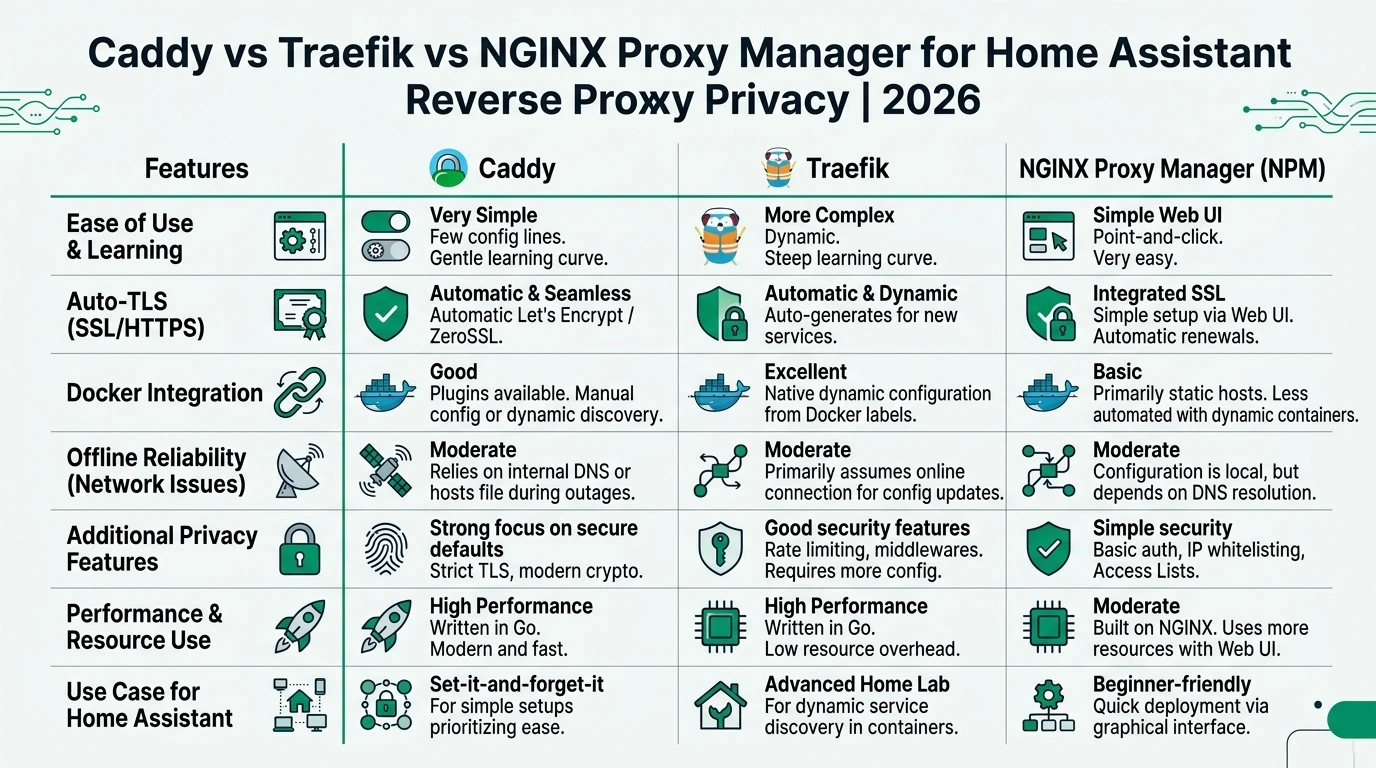
mDNS, integrations, and east-west traffic
Home Assistant’s Listen addresses field (empty = all interfaces) matters on multi-homed VLAN setups2. Binding only to 10.30.0.10 prevents accidental exposure on an IoT-facing NIC—if your hardware has one.
Integrations that call http://homeassistant:8123 from other containers on the same host may still work via Docker DNS while host-networked apps break. Where I’m less sure—ESPHome flasher workflows that hard-code 8123 in browser tabs—the data is thin; search your compose files for :8123 before cutover.
For mDNS across VLANs, port 80 does not replace the need for reflectors; discovery and HTTP are separate planes. Firewall policy should still follow HA initiates to IoT, not the reverse, per our OPNsense IoT rules methodology.
Working checklist
Checklist
- Inventory every config that references :8123 (proxy, firewall, apps, automations calling REST).
- Snapshot OPNsense/pfSense rules and export Caddy/Traefik/NPM configs.
- Update trusted proxies in Settings → System → Network before testing external URLs.
- Change upstream port on the reverse proxy; reload the proxy service.
- Adjust VLAN firewall service objects from tcp/8123 to tcp/80 (or keep 8123 and skip HA migration).
- Change HA port in the UI; confirm within five minutes on cellular, not just LAN Wi-Fi.
- Update Companion app and any webhooks that embed the old port.
- Remove migrated http: YAML after the repair issue clears.
Verdict
Home Assistant 2026.8’s port 80 default is a usability upgrade for new HAOS users on flat networks, not a mandate for privacy-segmented homes. For Elena and anyone running HA behind a VLAN-aware reverse proxy, the right call in August 2026 is: do not migrate the port unless you are prepared to edit proxy upstreams, trusted proxies, firewall aliases, and mobile bookmarks in one sitting. Greenfield HAOS on port 80 is fine on a trusted automation VLAN with TLS in front—not raw HTTP on an IoT segment.
If you are rebuilding a lab from scratch, copy 2026.8-era proxy templates and set SETUP_PORT only when you truly need a non-default port on Container2. Everyone else should treat :8123 as stable infrastructure until there is a security reason—not aesthetics—to move.
Pair this advisory with Home Assistant privacy defaults and your remote access model so HTTP port policy matches how you actually reach the box.
FAQ
Frequently Asked Questions
Does Home Assistant 2026.8 force existing installs onto port 80?
No. Only new Home Assistant OS installations default to port 80. Existing instances retain their port until you change it under Settings → System → Network1.
Why does port 80 break my reverse proxy on an IoT VLAN?
Proxies and firewall rules usually target 8123. When HA moves to 80, upstream TCP connections fail until every layer is updated together.
Should I expose Home Assistant on port 80 inside an IoT VLAN?
No for typical privacy labs. Place HA on a trusted automation VLAN, terminate TLS at a proxy or VPN, and deny IoT-initiated management HTTP.
What happens if I change the port and lose access?
Wait five minutes without confirming; Home Assistant reverts to the previous HTTP settings and restarts1.
Do Container installs get port 80 by default?
No—Container defaults remain 8123 as of the HTTP integration docs accessed 26 August 20262.
Where do trusted proxy settings live after the YAML migration?
Settings → System → Network → HTTP server. Enable Trust X-Forwarded-For and list proxy CIDRs using network addresses (e.g. 192.168.1.0/24), not host mistakes like 192.168.1.50/242.
Primary Sources
| ID | Source | Direct URL |
|---|---|---|
| 1 | Home Assistant 2026.8 release notes | https://www.home-assistant.io/blog/2026/08/05/release-20268/ |
| 2 | HTTP integration (port, proxies, migration) | https://www.home-assistant.io/integrations/http/ |
| 3 | HTTP server roadmap issue #47 | https://github.com/home-assistant/roadmap/issues/47 |
| 4 | Home Assistant Companion app | https://companion.home-assistant.io/ |
| 5 | Core 2026.8 changelog | https://www.home-assistant.io/changelogs/core-2026.8 |
Dataset (JSON-LD)
{
  "@context": "https://schema.org",
  "@type": "Dataset",
  "name": "Home Assistant 2026.8 port 80 VLAN deployment breakage matrix",
  "description": "Editorial scoring of eight Home Assistant reverse-proxy and VLAN deployment patterns by outage risk when the backend port moves from 8123 to 80 without coordinated updates, verified against official 2026.8 documentation on 26 August 2026.",
  "creator": { "@type": "Person", "name": "Privacy Smart Home Research Desk" },
  "datePublished": "2026-08-26",
  "license": "https://creativecommons.org/licenses/by/4.0/",
  "isAccessibleForFree": true,
  "inLanguage": "en-US",
  "url": "https://www.privacysmarthome.com/guides/home-assistant-2026-8-port-80-security-vlan-guide/#dataset"
}