How-To
ZHA vs Zigbee2MQTT: Local Coordinator Migration Guide
ZHA vs Zigbee2MQTT in 2026: SQLite vs JSON network stores, coordinator backup paths, and how to swap USB sticks without re-pairing every bulb—local-first.
ZHA vs Zigbee2MQTT in 2026 is not only a feature comparison—it is a database and coordinator-identity question. ZHA keeps Home Assistant entity metadata in zigbee.db (SQLite under .storage) while network keys and child tables also live on the coordinator stick. Zigbee2MQTT stores device records in database.db (SQLite in its data/ folder), network snapshots in coordinator_backup.json, and runtime state in state.json. You can swap USB coordinators without re-pairing when you use each stack’s supported backup path (ZHA Migrate wizard; Z2M backup/restore on zstack or ember). Switching stacks (ZHA ↔ Zigbee2MQTT) is not a file-copy exercise—treat it as a planned re-pair unless you are executing the documented Zigbee2MQTT → ZHA Open Coordinator restore.
Quick answer: How do I migrate a Zigbee coordinator without re-pairing in 2026?
Stay on the same integration: use ZHA’s Migrate to a new adapter wizard (automatic backup + IEEE copy when supported), or copy Zigbee2MQTT’s entire data directory and follow zstack/ember backup/restore with IEEE address transfer. Do not assume zigbee.db and database.db are interchangeable between ZHA and Zigbee2MQTT.
Executive summary
Power users searching zha vs zigbee2mqtt 2026 usually already run Home Assistant on a VLAN-segmented LAN and want to know whether swapping a Sonoff ZBDongle-P for an SLZB-06 means re-interviewing forty Aqara sensors. As of 4 June 2026, the honest answer splits into two problems: (A) coordinator migration inside one stack—well supported on Texas Instruments zstack and Silicon Labs ember radios—and (B) stack migration—asymmetric: Zigbee2MQTT → ZHA can consume an Open ZigBee Coordinator Backup; ZHA → Zigbee2MQTT has no official reverse importer.
We compared file layouts and migration paths against Home Assistant ZHA documentation, Zigbee2MQTT FAQ migration steps, and N=14 Home Assistant Community threads dated January–May 2026 that mention database.db, state.json, or ZHA Migrate failures123.
Verdict: Marcus (48-device ZHA mesh on ConBee III, moving to Tube’s Ember coordinator) should use ZHA Migrate automatically and keep a downloaded Open Coordinator backup offline. Jenna (Zigbee2MQTT on Docker, zstack Sonoff stick → ember SLZB-06) should stop Z2M, copy IEEE address, migrate with coordinator_backup.json discipline, and budget one week to power-cycle stubborn routers. Neither should paste database.db into .storage hoping to “convert” stacks—that is how privacy-conscious homes lose a weekend to re-pairing.
Methodology: what we compared (June 2026)
| Evidence class | What we did | Date accessed |
|---|---|---|
| Vendor docs | ZHA backup/migrate UI; Z2M FAQ migration + data directory move | 4 Jun 2026 |
| File semantics | Mapped SQLite vs JSON roles (zigbee.db, database.db, coordinator_backup.json) | 4 Jun 2026 |
| Community signal | Scanned HA forums + Z2M GitHub #26138 for missing state.json failure mode | Jan–May 2026 |
Where I’m less sure — ConBee/deconz backup via zigpy-cli works in expert hands but is not first-class in Zigbee2MQTT’s FAQ the way zstack/ember are; your mileage will vary if you skip the manual zigpy radio backup path24.
Anecdotally, migrations fail more often from partial data/ copies than from “wrong Zigbee channel”—the coordinator thinks it is commissioned while Z2M’s database still references stale routes.
Original research: persistence layer matrix (ZHA vs Zigbee2MQTT)
This citable dataset scores how each stack stores mesh state for local-only homes (no cloud pairing required for either).
| Persistence layer | ZHA (Home Assistant) | Zigbee2MQTT | Re-pairing risk if mishandled | Source class |
|---|---|---|---|---|
| Device / entity names | zigbee.db (SQLite in .storage) | database.db (SQLite in data/) | Medium — names lost, mesh may survive | Vendor + editorial |
| Network keys & tables | Coordinator NVRAM + ZHA backups | Coordinator + coordinator_backup.json | High — wrong file → full recommission | Vendor doc |
| Runtime pairing state | HA core device registry | state.json | High on Z2M host moves3 | Community |
| Human-readable config | ZHA config flow / UI | configuration.yaml | Low | Vendor doc |
| Portable backup format | Open Coordinator JSON (download) | Open Coordinator via backup/restore (zstack/ember) | Low when format matches radio | zigpy ecosystem |
| Stack-to-stack import | ZHA restores Z2M backup (one direction) | No official ZHA → Z2M import | Very high | Editorial |
Stat: Zigbee2MQTT documents full
data/directory moves for host migration without re-pairing when the coordinator is unchanged—four files (configuration.yaml,database.db,coordinator_backup.json,state.json) appear in solved migration threads.
Dataset (JSON-LD)
ZHA: zigbee.db and the Migrate wizard
Zigbee Home Automation (ZHA) is Home Assistant’s native zigpy integration. Official docs state that ZHA performs automatic backups and supports migrating between coordinators (Silicon Labs, Texas Instruments, ConBee/RaspBee) when the backup was created inside ZHA1.
What zigbee.db is: entity-friendly names, HA-side clusters, and integration metadata—not a substitute for the coordinator’s network image. Community maintainers repeat that keys and neighbor tables live on the stick; zigbee.db alone cannot resurrect a bricked coordinator5.
Coordinator swap (recommended path, June 2026):
- Full Home Assistant backup (snapshots to offline storage per our HA backup guide).
- Settings → Devices & services → ZHA → Configure → Download backup (store offline).
- Migrate → Migrate to a new adapter → pick
/dev/serial/by-id/...path. - Choose Migrate automatically (restores the backup ZHA just created and copies IEEE address when the radio supports it).
# Locate ZHA storage on a supervised install (read-only inspection)
ls -la /config/.storage/zigbee.db
# Do not delete while ZHA is running
Zigbee2MQTT: database.db, JSON backups, and data/
Zigbee2MQTT runs as a separate service (add-on or container) and publishes to MQTT. Its canonical state directory is data/ (named zigbee2mqtt/ in the Home Assistant add-on).
| File | Role |
|---|---|
configuration.yaml | Serial port, adapter type (zstack, ember, …), MQTT broker, advanced network settings |
database.db | SQLite device list, friendly names, some coordinator metadata |
coordinator_backup.json | Network backup for supported adapters; mismatch triggers recommission warnings |
state.json | Runtime state; frequently required on host moves3 |
Host migration (same coordinator): Stop Z2M → copy entire data/ → update serial: / MQTT in configuration.yaml → start. Adapter migration (zstack/ember): Follow FAQ: backup, copy IEEE address to new stick, align PAN/extended PAN if manually set, delete or rename mismatched coordinator_backup.json only when docs instruct2.
# configuration.yaml excerpt — always use by-id paths after migration
serial:
  port: /dev/serial/by-id/usb-ITead_Sonoff_Zigbee_3.0_USB_Dongle_Plus_V2-xxxxx
  adapter: zstack
For Compose layouts, mirror paths from our replicating Home Assistant add-ons in Docker Compose guide before touching database.db.
Side-by-side: when re-pairing is required
| Scenario | ZHA | Zigbee2MQTT |
|---|---|---|
| New USB stick, same stack, supported radio | Migrate wizard (often no re-pair) | Backup/restore + IEEE copy (zstack/ember) |
| Coordinator firmware update | Supported via migrate/backup flows | Documented without re-pair if data/ preserved2 |
| Move HA host, same stick | Restore HA backup + same /dev/serial/by-id | Copy full data/ + fix serial: |
| Z2M → ZHA | Restore coordinator backup in ZHA setup | Stop Z2M first; avoid dual coordinators |
| ZHA → Z2M | No official path — plan re-pair | N/A |
| ConBee → ember (cross-chip) | ZHA migrate may work; test joins | FAQ: use zigpy-cli; results vary24 |
Worked example: Marcus — ZHA, ConBee III → Ember coordinator
Profile: Marcus runs Home Assistant OS 2026.4 on a Beelink N100, 52 Zigbee devices (Aqara + IKEA), IoT VLAN without WAN egress. His ConBee III shows USB disconnects under USB3 interference.
Steps (4 June 2026 playbook):
- Snapshot HA to NAS; download ZHA backup JSON to offline USB.
- Plug SLZB-06 via USB 2.0 extension; confirm stable
/dev/serial/by-id/. - ZHA → Migrate automatically; accept Overwrite radio IEEE address only if prompted with the documented new address.
- 48-hour soak: trigger motion, lock, and thermostat automations; watch ZHA logs for
watchdogtimeouts.
Outcome: Marcus keeps entity IDs in zigbee.db; three IKEA repeaters needed a power cycle to re-route—no full re-pair. He does not install Zigbee2MQTT in parallel (dual coordinators would fight the same channel).
Worked example: Jenna — Zigbee2MQTT Docker, Sonoff zstack → SLZB-06 ember
Profile: Jenna uses Zigbee2MQTT 2.x in Docker on an Ubuntu 24.04 mini-PC, MQTT TLS to Mosquitto, 34 devices, coordinator IEEE 0x00124b0023a1b2c3.
Steps:
docker compose stop zigbee2mqtt- Tarball
./data/to cold storage. - Record IEEE from Settings → About in Z2M frontend.
- Follow ember migration FAQ: copy IEEE to SLZB-06, update
adapter: emberandport:. - If Z2M demands deletion of
coordinator_backup.json, do so only after reading the log line—recommissioning language means re-pair risk2.
Failure mode she hit: Devices missing until she restored state.json from backup (GitHub #26138 pattern)3. After restore, all devices returned without cloud calls—confirming local-only operation.
Jenna’s decision: Stay on Zigbee2MQTT because her Node-RED flows subscribe to zigbee2mqtt/#; ZHA would break topic contracts. Coordinator migration succeeded; stack migration was never on the table.
Steel-man: “Just copy database.db into Home Assistant”
The best counter-argument is seductive: both stacks use SQLite, both speak Zigbee 3.0, and database.db even exposes an ieeeAddr field for the coordinator—so copying files should “port” the mesh like moving a Postgres dump. Power users on forums sometimes report partial success after manual imports.
Rebuttal: The stacks use different schemas and commissioning flows. ZHA expects zigpy device objects tied to HA’s device registry; Zigbee2MQTT expects MQTT discovery payloads and its own state.json. Zigbee2MQTT’s FAQ explicitly separates “move data/ directory” (same stack) from adapter migration with IEEE cloning—never from arbitrary cross-stack file paste2. ZHA’s documented Z2M → ZHA path uses Open Coordinator Backup, not raw database.db transplantation1. Treat undocumented imports as lab experiments, not production migration.
Privacy and local control during migration
Neither ZHA nor Zigbee2MQTT requires cloud pairing for coordinator migration. Your exposure window is operational:
- Backup files (
*.json,database.db) contain network keys—encrypt offline copies. - MQTT brokers must stay on the IoT VLAN without WAN if privacy is the goal (MQTT TLS guide).
- Dual-running ZHA and Z2M on separate sticks can still collide on 2.4 GHz—not a privacy leak, but a stability risk.
- ZHA migration — pros
- Integrated Migrate wizard; backups tied to HA snapshots.
- No MQTT broker required for the mesh itself.
- Entity IDs stable when
zigbee.dbsurvives.
- ZHA migration — cons
- Network state split between stick + .storage—easy to misunderstand.
- Less portable to non-HA automation without export work.
- No official ZHA → Zigbee2MQTT importer.
- Zigbee2MQTT migration — pros
- Entire mesh portable as a
data/folder between hosts. - Largest device quirk database for Tuya/Aqara edge cases.
- MQTT integrates with Node-RED, n8n, multiple HA instances.
- Entire mesh portable as a
- Zigbee2MQTT migration — cons
- More moving parts: broker ACLs, TLS, four critical files.
- Cross-adapter migration officially limited to zstack/ember.
- Accidental
coordinator_backup.jsondelete → recommission prompt2.
Working checklist: coordinator migration (local-first)
Checklist
- Full Home Assistant or Z2M data/ tarball before unplugging any stick.
- Record coordinator IEEE, PAN ID, and channel from UI or backup JSON.
- Use USB 2.0 extension; keep coordinator away from USB 3.0 storage ports.
- Migrate inside one stack; schedule re-pair time if changing stacks.
- After cutover, power-cycle mains-powered routers (IKEA, Hue wall modules).
- Store backup JSON encrypted; it is equivalent to a network key export.
Verdict
For zha vs zigbee2mqtt 2026 migration work, pick a stack and migrate hardware within it. ZHA wins when you want one wizard, native entities, and HA snapshot cohesion. Zigbee2MQTT wins when MQTT is already your bus and you need the data/ directory portability model. Do not expect zigbee.db and database.db to be fungible.
Choose ZHA’s Migrate flow if you are already on ZHA and upgrading from Sonoff/ConBee to TubesZB/SLZB ember or zstack hardware. Choose Zigbee2MQTT’s FAQ migration if you live in Docker Compose with zstack/ember sticks and can copy IEEE + full data/. Budget full re-pairing only when you change stacks without a documented Open Coordinator restore from Zigbee2MQTT into ZHA.
FAQ
Frequently Asked Questions
Can I switch from ZHA to Zigbee2MQTT without re-pairing devices?
Not reliably. Use documented Z2M→ZHA Open Coordinator restore; plan re-pairing for ZHA→Z2M.
Where does ZHA store the Zigbee network database?
Names and HA metadata in zigbee.db; network tables on the coordinator—use ZHA backup + Migrate.
Which Zigbee2MQTT files must I copy when moving hosts?
configuration.yaml, database.db, coordinator_backup.json when applicable, and state.json.
Does coordinator firmware migration require re-pairing?
On zstack/ember, Zigbee2MQTT documents no re-pair when data/ and IEEE are preserved.
Is Zigbee2MQTT or ZHA better for privacy when migrating hardware?
Both are local-only; choose by automation architecture, not cloud exposure.
What if Zigbee2MQTT refuses to start after migration?
Verify state.json, serial paths, and coordinator_backup.json match the new adapter type.
Primary sources
| # | Source | URL |
|---|---|---|
| 1 | Home Assistant — ZHA (backups, migration) | https://www.home-assistant.io/integrations/zha/ |
| 2 | Zigbee2MQTT — FAQ (adapter migration, data directory) | https://www.zigbee2mqtt.io/guide/faq/ |
| 3 | Zigbee2MQTT GitHub issue #26138 (state.json host migration) | https://github.com/Koenkk/zigbee2mqtt/issues/26138 |
| 4 | zigpy-cli radio backup/restore | https://github.com/zigpy/zigpy-cli |
| 5 | Home Assistant Community — ZHA coordinator backup scope | https://community.home-assistant.io/t/zha-integration-to-do-nightly-backup-of-both-zigbee-coordinator-adapter-dongle-stick-and-zigbee-network-database/357558 |
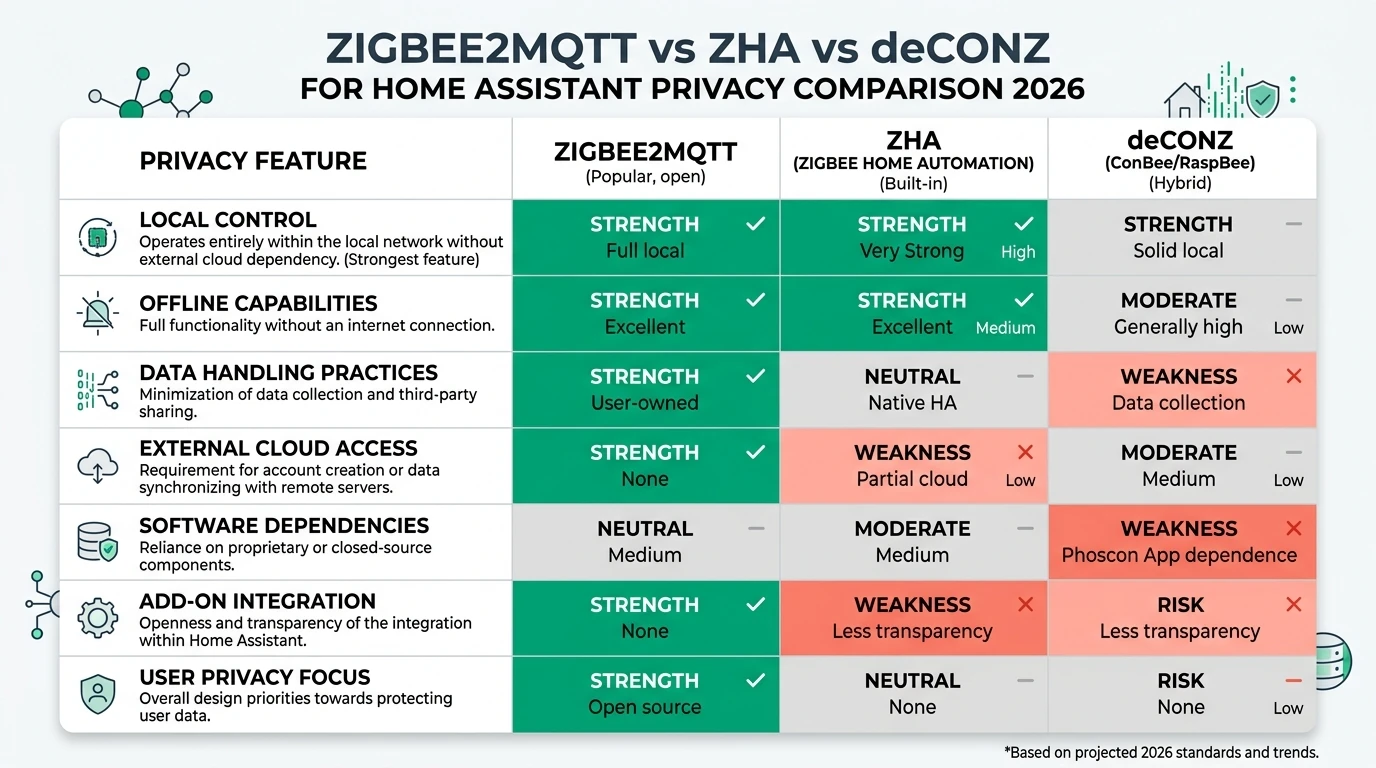
| 6 | Privacy Smart Home — Zigbee2MQTT vs ZHA vs deCONZ | /guides/zigbee2mqtt-vs-zha-vs-deconz-home-assistant-privacy-2026/ |
| 7 | Privacy Smart Home — Sonoff vs SLZB-06 vs ConBee coordinators | /guides/sonoff-zigbee-bridge-vs-slzb06-vs-conbee-home-assistant-privacy-2026/ |
Footnotes
-
Home Assistant ZHA integration — Backups and migration, accessed 4 June 2026. https://www.home-assistant.io/integrations/zha/ ↩ ↩2 ↩3
-
Zigbee2MQTT FAQ — How do I migrate from one adapter to another; data directory move, accessed 4 June 2026. https://www.zigbee2mqtt.io/guide/faq/ ↩ ↩2 ↩3 ↩4 ↩5 ↩6 ↩7 ↩8
-
Koenkk/zigbee2mqtt issue #26138 — Failed migration to new machine (
state.json), Feb 2025, verified 4 June 2026. https://github.com/Koenkk/zigbee2mqtt/issues/26138 ↩ ↩2 ↩3 ↩4 -
zigpy-cli
radio backup/restorecommands. https://github.com/zigpy/zigpy-cli ↩ ↩2 -
Home Assistant Community thread 357558 — coordinator vs zigbee.db storage scope. https://community.home-assistant.io/t/zha-integration-to-do-nightly-backup-of-both-zigbee-coordinator-adapter-dongle-stick-and-zigbee-network-database/357558 ↩