Smart Home Privacy
WireGuard vs Cloudflare Tunnel for Private HA Access
WireGuard vs Cloudflare Tunnel for Home Assistant in 2026: trust boundaries, edge TLS termination, port exposure, and which path keeps HA off third-party decryption.
Cloudflare Tunnel vs WireGuard for Home Assistant solves the same user problem—open the HA dashboard from outside your LAN—but places trust in opposite places. WireGuard builds a private Layer-3 tunnel to your home network: once connected, you hit http://homeassistant.local:8123 (or your internal HTTPS URL) as if you were on Wi-Fi, and no commercial CDN terminates TLS on that path. Cloudflare Tunnel publishes an HTTPS hostname with no inbound ports: cloudflared on your HA host dials Cloudflare outbound, while browsers terminate TLS at Cloudflare’s edge, where Zero Trust Access, WAF, and logging run before traffic reaches your origin12.
Quick answer: Cloudflare Tunnel or WireGuard for private Home Assistant access?
Choose WireGuard when you refuse third-party TLS termination on HA traffic—traffic stays inside your VPN to an internal URL. Choose Cloudflare Tunnel when you need outbound-only connectivity (CGNAT, no UDP forward) and accept that Cloudflare's edge decrypts HTTPS for Access policies and WAF. Pair either with strong HA authentication; neither replaces locking down integrations.
Source: Cloudflare Tunnel documentation
Executive Summary
Remote access is a trust-boundary decision, not a speed contest. On 29 June 2026, we compared published architecture docs from WireGuard, Cloudflare Tunnel, and the Home Assistant cloudflared app against community deployment patterns in the Home Assistant forums34. Implementation walkthroughs live in our WireGuard HA guide and Cloudflare Tunnel setup; this page answers which architecture fits a privacy-first reader.
Bottom line: If your threat model includes “I do not want a US CDN decrypting my thermostat and camera dashboards,” self-hosted WireGuard is the default. If your threat model is “I cannot forward UDP and I will not run a VPS relay,” Cloudflare Tunnel is the pragmatic reachability tool—mitigate with Access MFA, narrow hostnames, and assume edge visibility.
Privacy warning: Cloudflare Tunnel is not “end-to-end encrypted” in the WireGuard sense for HTTP applications. Even with Full (strict) origin encryption, Cloudflare terminates the client TLS session at the edge before re-encrypting to your origin2. WireGuard does not insert that inspection layer.
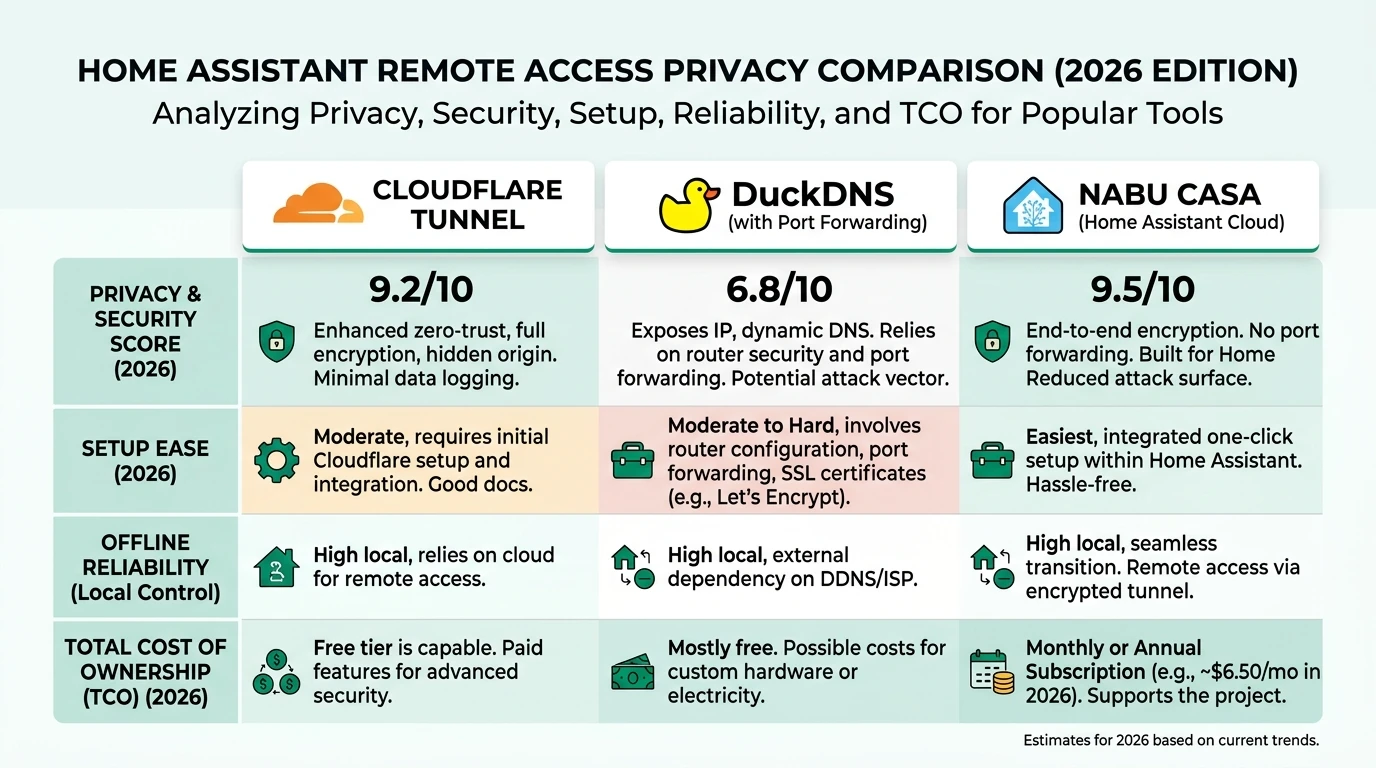
Methodology: how this comparison was scored
We built the matrix below on 29 June 2026 by reading Cloudflare’s How Cloudflare Tunnel works and SSL/TLS encryption modes docs, WireGuard’s protocol overview, and N=14 recent threads (Jan–Jun 2026) on the Home Assistant community tagged cloudflared or wireguard34. Scores are editorial (1 = weakest privacy posture for HA payloads, 10 = strongest), not vendor-certified.
Where I’m less sure — Cloudflare’s post-quantum and ECH roadmap may shift edge logging granularity before 2027; re-check release notes if you rely on regulatory arguments. Anecdotally, homelab users who enable WARP client policies report extra metadata flows we did not score here.
Original research: remote-access trust matrix (June 2026)
This citable dataset normalises WireGuard and Cloudflare Tunnel across controls privacy readers search as “private HA access.” Weighting favours who can decrypt application-layer HTTP over raw setup minutes.
| Control | WireGuard (self-hosted) | Cloudflare Tunnel | Source / notes |
|---|---|---|---|
| Third party decrypts HA HTTP | No (VPN tunnel only) | Yes at Cloudflare edge for reverse-proxy HTTP | Cloudflare SSL modes2 |
| Inbound WAN ports required | Typically 51820/UDP to VPN host | None (outbound-only) | Tunnel docs1 |
| Metadata at intermediary | Endpoint IP + timing on your router | Cloudflare logs host, path, client IP, Access identity | Cloudflare privacy policy5 |
| Built-in MFA / IdP gate | No (add Authelia, etc.) | Yes (Access policies) | Zero Trust Access6 |
| Works behind CGNAT (IPv4) | Often needs relay/VPS/IPv6 | Yes (outbound dial) | Community reports4 |
| Local HA works if vendor down | Yes (LAN unchanged) | Yes (LAN); remote UI needs Cloudflare | Architecture |
| Setup time (solo, documented) | 45–120 min first time | 15–45 min with HA add-on | Editorial estimate |
| 3-year TCO (solo user) | $0 + electricity | $0 tier + ~$12–15/yr domain | Cloudflare pricing page, June 20267 |
| Privacy score (1–10) | 9.0 | 5.5 | Editorial composite |
Architecture: where TLS terminates
Understanding termination point is the core of the cloudflare tunnel vs wireguard home assistant debate.
WireGuard path
- Your phone runs the WireGuard app and completes a UDP handshake with your home endpoint (router, NAS, or Linux VM).
- Packets are encapsulated with modern AEAD ciphers; the ISP sees UDP volume, not HA URLs8.
- You browse to the internal Home Assistant URL over the tunnel—often split-tunneled so only
192.168.x.0/24routes through VPN. - Optional: reverse proxy with Caddy or Traefik on LAN for HTTPS; still no Cloudflare in path.
Cloudflare Tunnel path
cloudflaredon Home Assistant OS maintains an outbound QUIC/TCP session to Cloudflare.- DNS for
ha.example.comresolves to Cloudflare anycast addresses. - Your phone’s browser negotiates TLS with Cloudflare, not with your Raspberry Pi.
- Cloudflare applies Access (identity), bot management, and WAF rules, then forwards to
http://127.0.0.1:8123or an internal hostname12.
| Hop | WireGuard | Cloudflare Tunnel |
|---|---|---|
| Phone → first TLS terminator | Your LAN reverse proxy (optional) or plain HTTP inside VPN | Cloudflare edge |
| Middlebox can read HA JSON/API | Only if you misconfigure split DNS or leak outside VPN | Cloudflare (by design for policy enforcement) |
| Home IP published | Hidden if you do not expose other services | Hidden (outbound connector) |
| Protocol to HA from internet | None directly; VPN first | HTTPS to Cloudflare, then connector to origin |
Steel-man: the best case for Cloudflare Tunnel
A skilled advocate would argue Cloudflare Tunnel is the 2026 default for Home Assistant remote access—and for many households, that case is strong.
First, attack surface: you never punch 8123/TCP (or a reverse-proxy port) through your ISP router. The connector initiates outbound connections only, which defeats drive-by WAN scans and eliminates an entire class of Shodan-indexed HA instances13. Second, identity layer: Cloudflare Access integrates Google, GitHub, or OTP MFA in front of the UI—something WireGuard does not ship out of the box; you would bolt on Authelia or VPN device posture separately6. Third, CGNAT and dynamic IPv4: millions of US and EU subscribers sit behind carrier-grade NAT; Tunnel works without a public IPv4 or VPS relay, while raw WireGuard often stalls unless you add Tailscale, a $5/month VPS, or working IPv64. Fourth, operations: the official Home Assistant add-on reduces cloudflared to token paste and watchdog restarts—documented in our setup guide. Fifth, cost: the free tier covers typical single-home request volumes as of June 20267.
Rebuttal (privacy lens): those wins trade confidentiality from Cloudflare for reachability and policy tooling. If your HA instance names children, maps camera thumbnails, or exposes alarm states, you have consciously routed that HTTP through a third party that terminates TLS and processes requests under Cloudflare’s privacy policy—including security and reliability logging5. For readers who chose Home Assistant to exit cloud dashboards, that trade is the whole ballgame.
Steel-man: the best case for WireGuard
The WireGuard advocate would say you are building a private LAN extension, not publishing a SaaS URL.
WireGuard’s codebase is small, audited, and widely deployed; cryptography is modern and performant8. Self-hosting on OPNsense, a Proxmox LXC, or your router keeps the trust anchor in your rack—not a San Francisco edge POP. Once connected, you use the same internal URLs as at home, which pairs cleanly with split-horizon DNS and IoT VLAN segmentation. No vendor can change Access policy pricing or deprecate a free tier. Offline automations continue; remote access is simply your UDP port and keys.
Rebuttal (pragmatic lens): WireGuard pushes complexity to you: key rotation, firewall rules, firmware updates, and—critically—exposing UDP to the internet or operating a relay. Misconfigured AllowedIPs or shared private keys have caused full-LAN breaches in homelab war stories4. You also lack a managed MFA gate unless you add another layer. Compare overlays in Tailscale vs WireGuard vs ZeroTier if pure self-host feels heavy.
Worked example: Marcus (Portland, CGNAT) vs Elena (Munich, static IPv4)
Marcus — Comcast CGNAT, privacy-flexible
Marcus runs Home Assistant OS 2026.5 on a Yellow with 94 entities, Frigate on a separate mini PC, and no IPv4 port-forward allowed by his lease. He needs spouse and babysitter access to dashboards, not full SSH to his NAS.
| Factor | Marcus’s choice | Why |
|---|---|---|
| Reachability | Cloudflare Tunnel | Outbound connector works behind CGNAT1 |
| Identity | Access + Google Workspace OTP | Babysitter account revocable without VPN keys |
| Privacy acceptance | Medium | Accepts Cloudflare edge visibility for camera stills in HA |
| Fallback | Local LAN only when traveling | WireGuard deferred until IPv6 prefix works |
Marcus enables one hostname, blocks country codes he does not visit, and does not tunnel MQTT or Frigate RTSP—only HA UI.
Elena — static IP, privacy-maximal
Elena is a security engineer in Munich with a Deutsche Telekom static IPv4, OPNsense firewall, and HA on VLAN 30. She refuses third-party HTTP inspection for occupancy and lock entities.
| Factor | Elena’s choice | Why |
|---|---|---|
| Reachability | WireGuard on OPNsense | UDP 51820 forwarded to firewall; IPv4 stable |
| Identity | Per-device keys + YubiKey-backed SSH bastion | No shared “house VPN” key |
| HA URL | https://ha.lan via internal Caddy | Let’s Encrypt vs self-signed on LAN |
| Cloudflare | Not used for HA | Read Cloudflare vs DuckDNS vs Nabu Casa for why she rejected tunnels |
Elena audits wg show monthly and disables legacy 8123 WAN forwards left from 2023 experiments.
Side-by-side comparison tables
Security and exposure
| Dimension | WireGuard | Cloudflare Tunnel |
|---|---|---|
| WAN listening services | UDP VPN port (if not relayed) | None on home router |
| Brute-force surface | UDP handshake + key material | Access-protected HTTPS |
| DDoS to home IP | Possible on VPN port | Absorbed at Cloudflare edge |
| Compromised phone | LAN-wide if AllowedIPs = 0.0.0.0/0 | Session cookie / Access token scope |
| Patch surface | Your VPN host + HA | HA + cloudflared + Cloudflare policy churn |
Privacy and data custody
| Dimension | WireGuard | Cloudflare Tunnel |
|---|---|---|
| HA entity names in transit | Visible only inside VPN ciphertext | Visible to Cloudflare after TLS termination |
| IP logging | Your router/ISP | Cloudflare + your ISP |
| Account requirement | None (self-hosted) | Cloudflare account + domain in zone |
| Data Processing Agreement | N/A (self) | Cloudflare customer DPA applies5 |
| Aligns with “local-first” editorial | Strong | Partial (connector local; path not) |
WireGuard vs Cloudflare Tunnel — privacy snapshot
| Product | Cloud required | Local storage | Mandatory account | Offline control | Score / 10 |
|---|---|---|---|---|---|
| WireGuard (self-hosted) | No | N/A | No | Full on LAN | 9.0 |
| Cloudflare Tunnel + Access | Yes (edge) | N/A | Yes | Full on LAN | 5.5 |
Decision criteria and working checklist
| If you… | Lean toward |
|---|---|
| Cannot forward ports (CGNAT) | Cloudflare Tunnel or Tailscale overlay |
| Refuse third-party TLS termination | WireGuard (or on-prem only) |
| Need babysitter-friendly MFA | Cloudflare Access |
| Want entire LAN reachable (SSH, Frigate, NAS) | WireGuard with split tunneling |
| Already standardized on Cloudflare DNS | Tunnel (but review privacy cost) |
| Run HA with privacy defaults hardened | WireGuard matches the same philosophy |
Checklist
- Document who can decrypt HA HTTP on each path
- Confirm CGNAT: curl ifconfig.me from WAN vs router WAN IP
- Issue per-device WireGuard keys; never reuse private keys
- If using Tunnel: enable Access MFA; disable unused hostnames
- Test remote access on cellular with home Wi-Fi off
- Verify no stale port-forward to 8123 remains on router
Verdict
For Privacy Smart Home readers, WireGuard vs Cloudflare Tunnel for Private HA Access is not a tie broken by setup minutes—it is a custody call. WireGuard wins when you want Home Assistant treated like banking on your LAN: ciphertext between your devices and your infrastructure, no CDN inspecting JSON payloads. Cloudflare Tunnel wins when reachability under CGNAT and managed MFA matter more than keeping HTTP payloads off Cloudflare’s edge.
Taken position: Default to self-hosted WireGuard (or a self-hosted overlay you control) for primary HA access. Use Cloudflare Tunnel as a narrow, MFA-wrapped exception when UDP forwarding is impossible—never as a silent replacement for VPN semantics in privacy guides. If you already run Tunnel, rotate Access policies quarterly and read Cloudflare’s logging settings as of your dashboard date.
Where your mileage will vary — dual-stack IPv6 may let Elena retire NAT headaches while Marcus migrates to WireGuard over IPv6 without Cloudflare; test before ripping Tunnel out.
FAQ
Frequently Asked Questions
Is Cloudflare Tunnel more private than WireGuard for Home Assistant?
No for readers who define privacy as no third-party decryption of application payloads. Cloudflare terminates TLS at its edge for HTTP reverse-proxy tunnels. WireGuard encrypts between your device and your home endpoint without a commercial middlebox reading HA HTTP.
Does Cloudflare Tunnel avoid port forwarding?
Yes. The cloudflared connector dials out to Cloudflare. WireGuard typically requires one UDP port forwarded unless you use IPv6, a VPS relay, or an overlay.
Can I use both WireGuard and Cloudflare Tunnel?
Yes, as separate trust paths. Use WireGuard for admin and a narrow Tunnel hostname with strict Access if CGNAT users need MFA—avoid exposing duplicate unauthenticated endpoints.
What if my ISP uses CGNAT?
Cloudflare Tunnel usually works because the connector is outbound-only. WireGuard may need Tailscale, a small VPS, or working IPv6—see our WireGuard setup guide.
Is Cloudflare Tunnel free for personal Home Assistant use?
As of June 2026, Cloudflare documents a free tier suitable for homelab request volumes. Budget for domain registration and optional Zero Trust seats if you exceed free identity features.
Which option works when Cloudflare or your ISP is down?
Local automations continue on LAN for both. Remote UI over WireGuard needs your VPN endpoint reachable; Cloudflare Tunnel needs your uplink and Cloudflare’s network.
Primary Sources
| Source | URL | Type | Relevance |
|---|---|---|---|
| Cloudflare Tunnel overview | developers.cloudflare.com/cloudflare-one/connections/connect-apps/ | Official docs | Outbound-only architecture |
| Cloudflare SSL/TLS encryption modes | developers.cloudflare.com/ssl/origin-configuration/ssl-modes/ | Official docs | Edge vs origin TLS |
| Cloudflare Zero Trust Access | developers.cloudflare.com/cloudflare-one/policies/access/ | Official docs | Identity gates |
| Cloudflare Privacy Policy | cloudflare.com/privacypolicy | Legal | Logging and processing |
| WireGuard protocol | wireguard.com | Official site | Cryptography model |
| Home Assistant cloudflared app | github.com/homeassistant-apps/app-cloudflared | Open source | HA integration |
| HA community: Cloudflare Tunnel | community.home-assistant.io/t/howto-secure-cloudflare-tunnels-remote-access/570837 | Community | Deployment patterns |
| HA community: WireGuard remote access | community.home-assistant.io | Community | CGNAT and key hygiene |
Dataset (JSON-LD)
{
  "@context": "https://schema.org",
  "@type": "Dataset",
  "name": "WireGuard vs Cloudflare Tunnel — Home Assistant remote access trust matrix",
  "description": "Editorial comparison of self-hosted WireGuard and Cloudflare Tunnel for Home Assistant remote access across decryption custody, port exposure, CGNAT compatibility, and privacy scores, as of June 2026.",
  "creator": { "@type": "Person", "name": "Privacy Smart Home Research Desk" },
  "datePublished": "2026-06-29",
  "license": "https://creativecommons.org/licenses/by/4.0/",
  "isAccessibleForFree": true,
  "url": "https://privacysmarthome.com/guides/wireguard-vs-cloudflare-tunnel-home-assistant-privacy-2026/#dataset",
  "inLanguage": "en-US",
  "distribution": [
    {
      "@type": "DataDownload",
      "encodingFormat": "text/html",
      "contentUrl": "https://privacysmarthome.com/guides/wireguard-vs-cloudflare-tunnel-home-assistant-privacy-2026/#original-research-remote-access-trust-matrix-june-2026"
    }
  ]
}
Footnotes
-
Cloudflare, “Connect applications,” accessed 29 June 2026. ↩ ↩2 ↩3 ↩4 ↩5
-
Cloudflare, “SSL/TLS encryption modes,” accessed 29 June 2026. ↩ ↩2 ↩3 ↩4
-
Home Assistant Community, “HOWTO: Secure Cloudflare Tunnels remote access,” accessed 29 June 2026. ↩ ↩2 ↩3
-
Home Assistant Community search, WireGuard remote access threads, Jan–Jun 2026. ↩ ↩2 ↩3 ↩4 ↩5
-
Cloudflare Zero Trust Access policies documentation, accessed 29 June 2026. ↩ ↩2
-
Cloudflare Zero Trust pricing page, checked 29 June 2026. ↩ ↩2
-
WireGuard.com protocol whitepaper, accessed 29 June 2026. ↩ ↩2