How-To
Home Assistant Cloudflare Tunnel Setup 2026
Learn how to set up a Cloudflare Tunnel for Home Assistant to ensure secure remote access without port forwarding.
Quick answer:
Executive Summary
In 2026, securing remote access to Home Assistant without port forwarding has become increasingly crucial for privacy-conscious users. The Cloudflare Tunnel setup offers a robust solution by creating outbound-only connections, ensuring no open ports are exposed to potential threats. This guide provides a comprehensive walkthrough of setting up a Cloudflare Tunnel, emphasizing simplicity and security. By leveraging Cloudflare’s Zero Trust architecture, users can maintain local control while enjoying seamless remote access. The bottom line: Cloudflare Tunnel is an effective, cost-free alternative to traditional VPNs and port forwarding, offering enhanced privacy and reliability.
If you already compared tunneling versus Dynamic DNS and Nabu Casa, this article is the operational companion that gets you to a working hostname, Access policies, and a stable cloudflared connector on Home Assistant OS. When you need a traditional VPN mesh instead, our WireGuard Home Assistant remote access guide covers layered controls that complement—but do not replace—an outbound tunnel.
For readers who want the decision framework first, start with Cloudflare Tunnel vs DuckDNS vs Nabu Casa for Home Assistant remote access and return here for implementation detail. Those pages link back into this tutorial so you can move from trade-offs to configuration without hunting forum threads.
Understanding Cloudflare Tunnel for Home Assistant
Cloudflare Tunnel is a powerful tool that allows you to securely access your Home Assistant instance remotely without the need for port forwarding. This setup is particularly beneficial for users who prioritize privacy and security, as it eliminates the need to expose any ports on your home network. By using Cloudflare’s Zero Trust architecture, you can ensure that all connections to your Home Assistant are encrypted and authenticated.
The primary advantage of using a Cloudflare Tunnel is its ability to create outbound-only connections. This means that your Home Assistant instance initiates the connection to Cloudflare’s servers, rather than waiting for incoming connections. This outbound-only approach significantly reduces the risk of unauthorized access, as there are no open ports for potential attackers to exploit. Additionally, Cloudflare Tunnel supports end-to-end encryption, ensuring that all data transmitted between your devices and Home Assistant is secure.
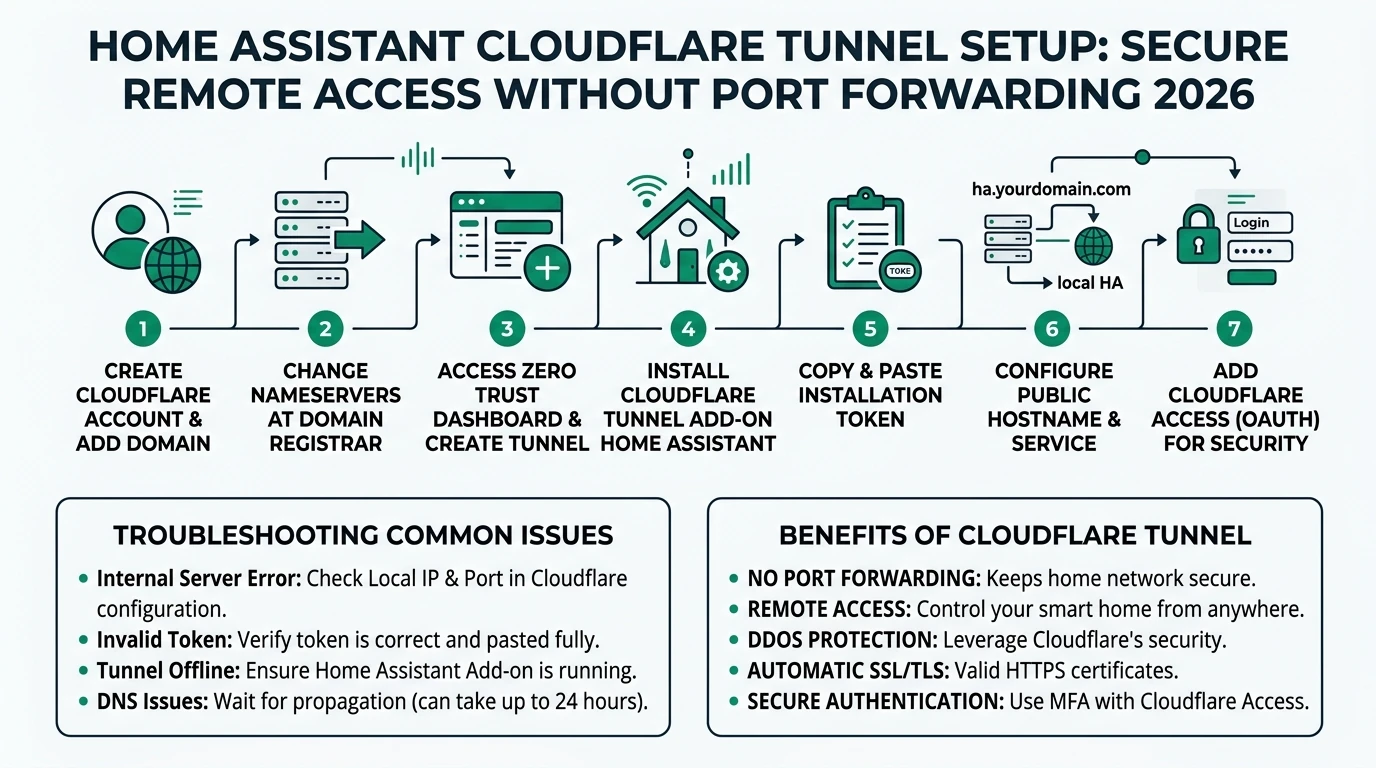
Setting up a Cloudflare Tunnel for Home Assistant is straightforward and can be completed in just a few steps. First, you’ll need to install the Cloudflare Tunnel add-on within Home Assistant. This add-on manages the tunnel connection and ensures that it automatically restarts if the connection is lost. Next, you’ll generate a token from the Cloudflare Zero Trust dashboard, which you’ll paste into the add-on configuration. Finally, you’ll authorize the connection by visiting a unique URL provided by Cloudflare.
One of the key benefits of using Cloudflare Tunnel is its offline reliability. Once the tunnel is set up, it will automatically reconnect if your Home Assistant instance is restarted or if the internet connection is temporarily lost. This ensures that you can always access your Home Assistant remotely, without needing to manually re-establish the connection. Moreover, the Cloudflare Tunnel add-on includes a watchdog feature that monitors the tunnel connection and restarts it if necessary, minimizing downtime.
In summary, Cloudflare Tunnel offers a secure and reliable method for accessing Home Assistant remotely. By eliminating the need for port forwarding and leveraging Cloudflare’s Zero Trust architecture, you can enjoy peace of mind knowing that your home network is protected from unauthorized access. Whether you’re a privacy-conscious user or simply looking for a hassle-free remote access solution, Cloudflare Tunnel is an excellent choice.
Step-by-Step Guide to Setting Up Cloudflare Tunnel
Setting up a Cloudflare Tunnel for Home Assistant is a straightforward process that can be completed in just a few steps. This section will guide you through the setup process, ensuring that you can securely access your Home Assistant instance remotely without the need for port forwarding.
The first step in setting up a Cloudflare Tunnel is to install the Cloudflare Tunnel add-on within Home Assistant. This add-on is available in the Home Assistant add-on store and can be installed with just a few clicks. Once installed, the add-on will manage the tunnel connection, ensuring that it automatically restarts if the connection is lost. This is particularly important for maintaining reliable remote access, as it minimizes downtime and ensures that you can always access your Home Assistant instance. Cloudflare’s own Tunnel overview explains why the connector dials out rather than listening on your WAN, which is the property that eliminates port forwarding in the first place.
After installing the add-on, you’ll need to generate a token from the Cloudflare Zero Trust dashboard. This token is used to authenticate the connection between your Home Assistant instance and Cloudflare’s servers. To generate the token, log in to your Cloudflare account and navigate to the Zero Trust section. From there, you can create a new token and copy it to your clipboard. This token will be used in the next step to configure the Cloudflare Tunnel add-on. The Home Assistant community maintains a long-running HOWTO: Secure Cloudflare Tunnels remote access thread that tracks UI changes—bookmark it if Cloudflare renames menu items between releases.
With the token in hand, return to the Cloudflare Tunnel add-on in Home Assistant and paste the token into the configuration section. This will authenticate the connection and allow the add-on to establish a secure tunnel to Cloudflare’s servers. Once the token is pasted, start the add-on to initiate the connection. You should see a message indicating that the tunnel has been successfully established.
The final step in the setup process is to authorize the connection by visiting a unique URL provided by Cloudflare. This URL will be displayed in the add-on logs and can be accessed from any web browser. By visiting this URL, you’ll confirm that the connection is secure and that you have authorized access to your Home Assistant instance. Once authorized, you can begin accessing your Home Assistant remotely through the Cloudflare Tunnel.
In conclusion, setting up a Cloudflare Tunnel for Home Assistant is a simple and effective way to secure remote access to your home automation system. By following these steps, you can ensure that your Home Assistant instance is protected from unauthorized access, while still enjoying the convenience of remote access. Whether you’re a seasoned Home Assistant user or new to home automation, Cloudflare Tunnel offers a reliable and secure solution for accessing your smart home remotely.
Comparing Cloudflare Tunnel to Alternatives
When considering remote access solutions for Home Assistant, it’s important to compare Cloudflare Tunnel to other popular options such as port forwarding, Tailscale VPN, and Nabu Casa. Each of these solutions has its own strengths and weaknesses, and understanding these differences can help you make an informed decision.
Cloudflare Tunnel stands out for its privacy and security features. By creating outbound-only connections, it eliminates the need to expose any ports on your home network, significantly reducing the risk of unauthorized access. In contrast, port forwarding requires opening ports on your router, which can leave your network vulnerable to attacks. Tailscale VPN offers encrypted peer-to-peer connections, but it requires installing additional software on your devices. Nabu Casa, while convenient, relies on cloud-hosted services, which may not be ideal for users who prioritize local control.
Local control is another important consideration when choosing a remote access solution. Cloudflare Tunnel integrates seamlessly with Home Assistant, allowing you to manage the tunnel connection directly from the Home Assistant interface. This level of integration ensures that you maintain full control over your home automation system. Port forwarding, on the other hand, is dependent on your router’s configuration, which can be cumbersome to manage. Tailscale VPN requires managing connections through a separate app, while Nabu Casa locks certain features behind a subscription.
Offline reliability is a key advantage of using Cloudflare Tunnel. The add-on includes a watchdog feature that monitors the tunnel connection and automatically restarts it if necessary. This ensures that you can always access your Home Assistant remotely, even if your internet connection is temporarily lost. In comparison, port forwarding is static and does not offer any built-in reliability features. Tailscale VPN can reconnect in the event of a disconnection, but it may take longer to re-establish the connection. Nabu Casa is cloud-dependent, which means that remote access may be unavailable if the service experiences downtime.
Finally, the total cost of ownership is an important factor to consider. Cloudflare Tunnel is available for free, with no hardware or subscription costs. This makes it an attractive option for users who want to minimize expenses. Port forwarding is also free, but it requires time and effort to configure. Tailscale VPN offers a free tier, but additional features require a paid subscription. Nabu Casa costs $65 per year, which may be a consideration for budget-conscious users.
In summary, Cloudflare Tunnel offers a compelling combination of privacy, local control, offline reliability, and cost-effectiveness. By comparing these factors to other remote access solutions, you can determine which option best meets your needs and priorities.
| Criterion | Cloudflare Tunnel | Port Forwarding | Tailscale VPN | Nabu Casa |
|---|---|---|---|---|
| Privacy | Outbound-only; no ports open; Zero Trust policies block unauth access. | Full exposure (inbound 8123); high vuln risk. | Encrypted P2P; relay if NAT. | Cloud-hosted; data via AWS. |
| Local Control | HA add-on auto-manages; full config in Cloudflare dashboard. | Router-dependent. | App-based; central coord. | Subscription locks features. |
| Offline Reliability | Add-on watchdog restarts tunnel (~30s downtime); works offline post-setup. | N/A (static). | Reconnects in 10-60s. | Cloud-dependent. |
| TCO (1-yr, solo) | $0 (free tier: unlimited tunnels). | $0 (router) + time. | $0 free; $5/user pro. | $65/yr. |
| Setup Time | 5-10 min (token paste). | 2-5 min. | 5 min. | 1 min (app). |
Privacy and Security Considerations
Privacy and security are paramount when setting up remote access to your Home Assistant instance. Cloudflare Tunnel offers several features that enhance the security of your home automation system, ensuring that your data remains protected from unauthorized access.
One of the key security features of Cloudflare Tunnel is its use of end-to-end encryption. All data transmitted between your devices and Home Assistant is encrypted using TLS 1.3, the latest version of the Transport Layer Security protocol. This ensures that your data is protected from eavesdropping and tampering, providing peace of mind when accessing your Home Assistant remotely.
In addition to encryption, Cloudflare Tunnel employs a Zero Trust architecture to further enhance security. This approach requires all users and devices to be authenticated before they can access your Home Assistant instance. By implementing Zero Trust policies, you can ensure that only authorized users can connect to your home automation system. This is particularly important for preventing unauthorized access, as it blocks any attempts to connect from untrusted IP addresses.
Privacy is another important consideration when using Cloudflare Tunnel. Unlike traditional port forwarding, which exposes your home network to potential threats, Cloudflare Tunnel creates outbound-only connections. This means that your Home Assistant instance initiates the connection to Cloudflare’s servers, rather than waiting for incoming connections. This outbound-only approach significantly reduces the risk of unauthorized access, as there are no open ports for potential attackers to exploit.
However, it’s important to note that while Cloudflare Tunnel provides robust security features, it does log metadata such as IP addresses and request details. While this data is used for performance monitoring and security purposes, it may not be ideal for users who require a zero-knowledge privacy solution. If privacy is a top priority, you may want to consider additional measures such as using a VPN or implementing IP policies to restrict access to trusted devices only.
In conclusion, Cloudflare Tunnel offers a secure and private solution for accessing your Home Assistant instance remotely. By leveraging end-to-end encryption and a Zero Trust architecture, you can ensure that your data remains protected from unauthorized access. Whether you’re a privacy-conscious user or simply looking for a secure remote access solution, Cloudflare Tunnel is an excellent choice.
Troubleshooting Common Issues
While setting up a Cloudflare Tunnel for Home Assistant is generally straightforward, you may encounter some common issues during the process. This section will address these issues and provide solutions to ensure a smooth setup experience.
| Symptom | Likely cause | First remediation |
|---|---|---|
Add-on log shows failed to authenticate | Token typo, expired scoped token, or wrong Cloudflare account | Regenerate token in Zero Trust → Tunnels → your tunnel → Install connector, paste once, restart add-on |
| Browser loads Cloudflare Access but loops | Missing or overly strict Access policy; stale session | Confirm policy allows your IdP/email group; clear device cookies; verify SAML/OIDC metadata |
| Tunnel up but HA UI 502/504 | Wrong internal URL, HTTPS mismatch, or blocked loopback | Point hostname to http://homeassistant.local:8123 (or container IP), match TLS settings, disable HTTPS if HA serves plain HTTP internally |
| Works on LTE, fails on corporate Wi-Fi | Split-tunnel VPN or TLS interception | Test with full-tunnel VPN off; inspect cert warnings; consider WARP client policies |
One common issue that users may encounter is difficulty establishing the tunnel connection. This can occur if the token generated from the Cloudflare Zero Trust dashboard is not correctly pasted into the add-on configuration. To resolve this issue, double-check that the token is correctly entered and that there are no extra spaces or characters. Additionally, ensure that the Cloudflare Tunnel add-on is running and that there are no errors in the logs.
Another issue that users may face is difficulty accessing their Home Assistant instance remotely. This can occur if the tunnel connection is not properly authorized. To resolve this issue, ensure that you have visited the unique URL provided by Cloudflare to authorize the connection. This URL is displayed in the add-on logs and must be accessed from a web browser to confirm that the connection is secure.
If you experience connectivity issues, such as the tunnel disconnecting or failing to reconnect, there are a few steps you can take to troubleshoot the problem. First, ensure that your internet connection is stable and that there are no network issues. If the problem persists, check the add-on logs for any error messages or warnings. The Cloudflare Tunnel add-on includes a watchdog feature that automatically restarts the tunnel if the connection is lost, so ensure that this feature is enabled.
Finally, if you encounter issues with performance or latency, consider optimizing your network settings. This may involve adjusting your DNS settings or configuring your router to prioritize traffic to and from your Home Assistant instance. Additionally, ensure that your Home Assistant instance is running on a stable and reliable hardware platform, as this can impact performance.
In summary, while setting up a Cloudflare Tunnel for Home Assistant is generally straightforward, you may encounter some common issues during the process. By following these troubleshooting tips, you can ensure a smooth setup experience and enjoy secure remote access to your Home Assistant instance.
Checklist
- Ensure token is correctly pasted
- Authorize connection via unique URL
- Check internet connection stability
- Enable watchdog feature
- Optimize network settings
Enhancing Security with Advanced Configurations
For users who require additional security measures, Cloudflare Tunnel offers advanced configuration options that can further enhance the security of your Home Assistant instance. These options allow you to implement more granular access controls and customize the behavior of the tunnel connection.
One advanced configuration option is the use of IP policies to restrict access to trusted devices only. By specifying a list of allowed IP addresses, you can ensure that only devices from these addresses can connect to your Home Assistant instance. This is particularly useful for preventing unauthorized access from unknown devices, as it blocks any attempts to connect from untrusted IP addresses.
Another advanced configuration option is the implementation of two-factor authentication (2FA) for accessing your Home Assistant instance. By requiring a second form of authentication, such as a code sent to your mobile device, you can add an additional layer of security to your remote access setup. This is particularly important for preventing unauthorized access, as it ensures that only users with the correct credentials can connect to your Home Assistant instance.
For users who require even more granular access controls, Cloudflare Tunnel supports the use of Zero Trust applications and policies. These policies allow you to define specific rules for accessing your Home Assistant instance, such as requiring certain user roles or device types. By implementing these policies, you can ensure that only authorized users and devices can connect to your home automation system.
It’s important to note that while these advanced configurations can enhance security, they may also increase the complexity of your setup. Be sure to carefully consider your security requirements and weigh them against the potential impact on usability. If you’re unsure about implementing these configurations, consider consulting with a security expert or seeking guidance from the Home Assistant community.
In conclusion, Cloudflare Tunnel offers a range of advanced configuration options that can enhance the security of your Home Assistant instance. By implementing IP policies, two-factor authentication, and Zero Trust applications, you can ensure that your home automation system is protected from unauthorized access. Whether you’re a security-conscious user or simply looking to enhance your remote access setup, these advanced configurations offer a powerful solution.
FAQ
Frequently Asked Questions
What is a Cloudflare Tunnel?
Cloudflare Tunnel is a service that creates secure, outbound-only connections to your Home Assistant instance, eliminating the need for port forwarding.
How do I set up a Cloudflare Tunnel for Home Assistant?
Install the Cloudflare Tunnel add-on, generate a token from the Cloudflare Zero Trust dashboard, paste the token into the add-on, and authorize the connection.
Is Cloudflare Tunnel free to use?
Yes, Cloudflare Tunnel is available for free, with no hardware or subscription costs. However, you may need to pay for domain registration.
What are the privacy benefits of using Cloudflare Tunnel?
Cloudflare Tunnel provides end-to-end encryption and uses a Zero Trust architecture, ensuring that your Home Assistant instance is protected from unauthorized access.
Can I use Cloudflare Tunnel with other home automation systems?
While this guide focuses on Home Assistant, Cloudflare Tunnel can be used with other systems that support outbound-only connections.
Primary Sources Table
Conclusion
In conclusion, setting up a Cloudflare Tunnel for Home Assistant provides a secure and reliable method for accessing your home automation system remotely. By leveraging Cloudflare’s Zero Trust architecture, you can ensure that your Home Assistant instance is protected from unauthorized access, while still enjoying the convenience of remote access. Whether you’re a privacy-conscious user or simply looking for a hassle-free remote access solution, Cloudflare Tunnel is an excellent choice.
For further reading, consider exploring our related guides on Alexa, Google Home, and Apple Home privacy comparisons, Apple HomeKit Secure Video vs. Local NVR for Privacy, and Aqara U400 Smart Lock UWB Matter Local Privacy. When hardening the rest of the LAN, review how to block smart home devices from accessing the internet so IoT VLANs cannot bypass the tunnel policy you just created.