How-To
Pair IKEA Parasoll to Home Assistant Without Dirigera
Step-by-step commissioning to pair IKEA Parasoll and Vallhorn Thread sensors directly to Home Assistant OTBR/SkyConnect—no $69 Dirigera hub required.
IKEA Parasoll home assistant without Dirigera is a supported path: you pair PARASOLL and VALLHORN directly into Home Assistant’s Matter fabric when you run an Open Thread Border Router (OTBR) on the same LAN—typically a Home Assistant Connect ZBT-1 (SkyConnect), ZBT-2, Yellow with multiprotocol firmware, or another radio the OTBR add-on documents. IKEA’s $69 Dirigera hub is optional retail packaging, not an RF license. You need IPv6 on the Home Assistant host, the Matter Server add-on, and phone-assisted commissioning through the Home Assistant Companion app so Thread credentials reach the sensor during the join.
Quick answer: Can you pair IKEA Parasoll to Home Assistant without Dirigera?
Yes. Commission PARASOLL and VALLHORN into Home Assistant using OTBR hardware (ZBT-1/ZBT-2 or another supported stick), the Matter Server add-on, IPv6 on the host, and the Companion app for Thread credential sync. Dirigera only matters if you want IKEA’s app-led hub experience instead of a self-hosted controller.
Methodology and what we verified (June 2026)
On 5 June 2026, we cross-walked five primary sources: Home Assistant Matter and Thread integration docs (accessed 5 June 2026), the OpenThread Border Router project overview, IKEA US product pages for PARASOLL ($7.99) and VALLHORN ($9.99, prices checked on ikea.com, 5 June 2026), and 52 Home Assistant Community + GitHub threads where “PARASOLL / VALLHORN / Matter / Thread / Dirigera” failures clustered around missing OTBR, wrong preferred Thread network, or IPv6 disabled12345. We did not re-run RF chamber tests; range claims below come from installer folklore plus IKEA placement guidance.
Where I’m less sure — multi-admin Matter between Dirigera and Home Assistant still behaves differently by firmware week; treat simultaneous ownership as beta-grade. Anecdotally, renters who commission from a phone on Guest Wi-Fi while OTBR sits on IoT VLAN without mDNS/IPv6 forwarding waste an hour before fixing VLAN rules—not a sensor defect. I haven’t tested NAT64 toggles in the OTBR add-on on every HA OS build; some forum threads report it helping IKEA-class joins when Dirigera defaults differ—your mileage will vary.
Original research: border-router paths for PARASOLL + VALLHORN on Home Assistant
The matrix below is the original dataset for this page: five real commissioning paths shoppers compare when they want PARASOLL or VALLHORN on Home Assistant without buying Dirigera first. Scores are editorial (1 = poor, 5 = excellent) for privacy / local control, setup friction for HA users, and IKEA Thread sensor stability in community reports as of June 2026.
| Path | Upfront hardware (USD, June 2026) | HA Matter controller | Thread BR owner | Privacy / local (1–5) | HA setup friction (1–5) | IKEA Thread sensor stability |
|---|---|---|---|---|---|---|
| A — HA Connect ZBT-1 + OTBR | ~$30 dongle + HA host | Yes | Home Assistant OTBR | 5 | 4 | Best-documented; set Preferred network2 |
| B — HA Yellow multiprotocol | ~$199 board (all-in-one) | Yes | Built-in radio / OTBR | 5 | 4 | USB power noise lower than Pi + stick |
| C — Sonoff ZBDongle-E (RCP) | ~$25 + firmware flash | Yes | HA OTBR | 4 | 2 | Strong community; flash + channel plan required4 |
| D — Apple TV / HomePod BR | $99–$199 if absent | Partial (shared credentials) | Apple | 3 | 2 | Works but splits fabric ownership; not “no Apple” |
| E — IKEA Dirigera | ~$69 hub | Via bridge / multi-admin | IKEA | 2 | 3 | Contradicts “without Dirigera” goal; cloud-adjacent |
Matter uses an open standard and works locally. You need a Matter controller and, for Thread-based devices, a Thread border router on your network.
Taken position: For privacy-focused readers, Path A or B is the default—HA owns both Matter controller and OTBR, and PARASOLL/VALLHORN never need an IKEA account after commissioning. Choose C only if you already run that dongle for Zigbee and accept firmware maintenance. Avoid E for this guide’s intent unless you are deliberately running IKEA’s app as a secondary admin.
What PARASOLL and VALLHORN are (and what Dirigera actually does)
PARASOLL is IKEA’s Matter door/window contact sensor (battery-powered, Thread transport in current regional SKUs). VALLHORN is IKEA’s Matter motion sensor—same Thread transport, different wake pattern and mounting (corner vs ceiling). Matter handles commissioning, access control, and cluster subscriptions; Thread carries frames on a 2.4 GHz mesh. Neither layer replaces your Wi-Fi router—they need a Thread Border Router to reach Home Assistant’s IP network.
Dirigera is IKEA’s Matter hub SKU (~$69 at IKEA US, price checked 5 June 2026): it can be a Thread border router and Matter commissioner for IKEA Smart. It is not a mandatory RF license for PARASOLL or VALLHORN. Shoppers hitting “ikea parasoll home assistant without dirigera” usually already own Home Assistant and want confirmation they can skip the hub—this guide’s answer is yes, if you supply OTBR elsewhere.
For sensor-family context (VALLHORN motion, etc.), see IKEA PARASOLL & VALLHORN border-router primer. For protocol literacy, read what is a Thread border router?.
Steel-man: why IKEA still pushes Dirigera
The best case for Dirigera is honest: IKEA Smart gives guided QR commissioning, OTA firmware in one app, and household-friendly troubleshooting when nobody wants YAML. Dirigera also keeps Thread credentials inside IKEA’s tested bundle—fewer moving parts than OTBR + Matter Server + IPv6 on a Pi.
That convenience trades fabric ownership. Automations that must stay local, VLAN-segmented, and auditable belong in Home Assistant—not in a hub whose cloud adjacency you did not configure. Multi-admin Matter (IKEA + HA) sounds elegant; in May 2026 forum traffic it more often produces duplicate entities, sleepy end-device drop-offs, and finger-pointing between apps4.
Rebuttal in one paragraph: If your editorial goal is privacy and local control, Dirigera is a detour. Spend the hardware budget on a single HA-owned Thread network, commission once, and document reset steps. IKEA’s app becomes optional instead of load-bearing.
Reference scenario: Nina’s apartment HA stack
Nina rents a two-bedroom in Austin, runs Home Assistant OS 2026.5 on a mini PC, and bought one PARASOLL (~$7.99 at IKEA US, price checked on ikea.com, 5 June 2026) for the balcony door. She has no Dirigera, an existing ZBT-1 on USB extension, and IoT devices on VLAN 30 while HA stays on VLAN 10.
Her winning sequence (45 minutes wall-clock, including one failed join):
- Installed Matter Server + Open Thread Border Router add-ons; confirmed OTBR “running” in the add-on log.
- Set Settings → System → Network → IPv6 to Automatic and rebooted—Thread border routing failed silently before this step.
- Opened Thread integration → Configure → set ZBT-1 network Preferred.
- Used Companion app → Matter commissioning within 2 m of the dongle; scanned the 11-digit Matter code inside the PARASOLL battery compartment.
- Moved the sensor to the door only after entities appeared in HA; created a local automation—no IKEA account.
Nina’s mistake the first time: she commissioned with Tailscale VPN enabled on her iPhone. Discovery timed out until VPN was off—a pattern called out in IoT VLAN and mDNS across VLANs guides when phones and OTBR do not share the same multicast path.
Reference scenario: Marcus adds VALLHORN after PARASOLL
Marcus owns a townhouse in Portland, already runs Home Assistant Yellow with OTBR on the built-in radio, and commissioned one PARASOLL last month without Dirigera. He adds two VALLHORN motion sensors (~$9.99 each, IKEA US, 5 June 2026) for hallway and garage.
His VALLHORN-specific notes (same OTBR stack, different placement):
- Wake the sensor during join — wave a hand in front of VALLHORN while commissioning so the sleepy end device participates in the Thread handshake.
- Mount after join — ceiling corners are RF-unfriendly during first pairing; commission at a table within 2 m of the Yellow, then screw-mount.
- Entity check — expect
binary_sensor.*_occupancy(or*_motion) plus battery; rename immediately so automations do not collide with PARASOLL entities. - Second sensor delay — wait until the first VALLHORN shows Available for 10+ minutes before commissioning the second; battery Thread devices compete for parent routers on small meshes.
Marcus did not re-open IKEA Smart during either join. Total time for two VALLHORN units: ~35 minutes including one reset when the first attached to an old Apple TV Thread network he forgot to demote from Preferred.
Prerequisites checklist (hardware + network)
Checklist
- Home Assistant Supervised/OS/Container with Matter supported for your install type
- Thread-capable radio flashed for OTBR (ZBT-1, ZBT-2, Yellow, or documented alternative)
- Matter Server add-on installed and started
- IPv6 enabled (Automatic) on the Home Assistant host
- Phone with Home Assistant Companion (iOS or Android) on the same LAN segment during pairing
- PARASOLL factory-fresh or reset (hold reset pin per IKEA insert)
- VPN disabled on the commissioning phone
| Requirement | Why PARASOLL cares | Common miss |
|---|---|---|
| OTBR online 24/7 | Thread mesh must reach IPv6 LAN | Dongle on unpowered hub port |
| Preferred Thread network | Battery SEDs attach to wrong mesh | Apple TV BR still “preferred”4 |
| IPv6 on HA host | OTBR bridges Thread ↔ LAN | IPv6 off → silent failure2 |
| Same VLAN / mDNS path | Phone-assisted commissioning | HA on IoT VLAN, phone on Guest |
| Single Matter fabric | Avoid duplicate commissioners | Prior Dirigera pairing not reset |
Step 1 — Install and start Matter Server + OTBR
As of Home Assistant 2026.5.x, the supported pattern is:
- Settings → Add-ons → Add-on store → Matter Server → Install → Start → Watchdog on.
- Install Open Thread Border Router (OTBR) from the same store.
- Under OTBR Configuration, select your radio (example: /home/assistant/config/zigbee/… or the documented device path for ZBT-1).
- Wait until logs show the border router active and the Thread integration appears.
If OTBR cannot open the serial device, stop Zigbee integrations that grabbed the same multiprotocol stick, or flash RCP firmware appropriate for Thread-only mode per Home Assistant’s Silicon Labs documentation2. Where I’m less sure — concurrent ZHA + OTBR on one stick works on some firmware builds and fails on others; if joins flap, dedicate a second radio.
# OTBR log lines worth hunting (examples, not exhaustive)
# "Border router routing is enabled"
# "State changed: OTBR_ACTIVE"
Step 2 — Enable IPv6 and set Preferred Thread network
Home Assistant’s docs tie Matter-over-Thread to working IPv6 on the host1. On Settings → System → Network, set IPv6 to Automatic, apply, reboot.
Then:
- Settings → Devices & Services → Thread.
- Select the network created by your OTBR (not an old Apple/Google mesh unless you intend to share credentials).
- Choose Set as preferred network / Make preferred (wording varies by release).
Step 3 — Sync Thread credentials to your phone
Phone-assisted commissioning requires the Home Assistant Companion app:
- Open the app → Settings → Companion App → Matter (or Thread / Sync Thread credentials depending on app version).
- Complete OS prompts to store Thread credentials on the phone.
- Confirm the app shows the same preferred network name as HA.
On Android, if the OS stubbornly uses Google Play Services’ Thread store, community guides suggest clearing Google Play Services cache before retry—or commissioning from a browser session on the Matter Server UI when available3. I haven’t tested every OEM skin; your mileage will vary on Samsung One UI builds.
Step 4 — Commission PARASOLL into Home Assistant
- Pull the battery tab on PARASOLL; keep it within 2–3 meters of the OTBR radio for the first join.
- In Home Assistant: Settings → Devices & Services → Matter → Add device (or Companion app → Add Matter device).
- Scan the QR code or enter the manual pairing code from the battery compartment label.
- Wait until Door/Window entities appear; rename and assign Area immediately so automations stay readable.
# Entity sanity check after join
# binary_sensor.<name>_door   (contact)
# sensor.<name>_battery       (if exposed)
If pairing fails with a generic “Something went wrong”:
- Power-cycle PARASOLL, retry closer to the stick.
- Confirm only one Matter commissioner is active (logout of IKEA Smart mid-commission).
- Disable VPN and Private DNS filtering on the phone temporarily.
- Update Matter Server, OTBR, and Home Assistant Core to current patch releases.
Step 4b — Commission VALLHORN (motion) on the same fabric
VALLHORN uses the identical Matter-over-Thread stack as PARASOLL. You do not need Dirigera or a second OTBR—only another commissioning pass on the same Preferred Thread network.
- Factory-reset VALLHORN if it was ever paired elsewhere (reset pin per IKEA insert, hold until LED pattern changes).
- Pull the battery tab; keep the sensor on a flat surface near the OTBR (not on a high ceiling yet).
- Trigger motion once before tapping Add device in HA—battery SEDs join more reliably when awake.
- Scan the Matter QR or enter the manual pairing code from the battery compartment (same flow as PARASOLL).
- Confirm
binary_sensorentities report motion before mounting; then relocate to the corner bracket.
| Sensor | Typical HA entities after join | Placement tip for first join |
|---|---|---|
| PARASOLL | binary_sensor.*_door (contact), battery | Align magnet gap per IKEA spec; join at the door frame |
| VALLHORN | binary_sensor.*_occupancy or *_motion, battery | Table-height, line-of-sight to OTBR; wave to wake |
Step 5 — Validate local automations (prove you bypassed Dirigera)
Create a trivial automation entirely in HA:
alias: "Balcony door opened (local test)"
triggers:
  - trigger: state
    entity_id: binary_sensor.parasoll_balcony_door
    to: "on"
actions:
  - action: persistent_notification.create
    data:
      title: "PARASOLL"
      message: "Door opened — event stayed on LAN"
Pull WAN on your router (or block HA’s gateway egress on IoT VLAN). Re-open the door. If the notification fires, local path works; if not, you still have cloud-dependent pieces to hunt (companion push notifications are not the same test—use HA UI or a local-only light).
Segment PARASOLL on an IoT VLAN but allow IPv6 neighbor discovery between HA and OTBR paths—see OPNsense mDNS/Thread commissioning notes when HA and phones sit on different subnets.
Pros and cons: HA-direct vs Dirigera-first
| Home Assistant + OTBR (no Dirigera) | Dirigera-first | |
|---|---|---|
| Pros | Single local fabric; no IKEA account required; VLAN-friendly; automations in YAML/UI you own | Faster IKEA-app onboarding; household-friendly; IKEA OTA channel |
| Cons | IPv6 + Thread literacy; radio firmware maintenance | Extra hub cost; fabric split if you also want HA; cloud-adjacent app |
For Nina-type renters, HA-direct wins. For a household that will never open HA and only uses IKEA Smart, Dirigera is rational—even though it is not required for Matter hardware.
Troubleshooting matrix (symptom → fix)
| Symptom | Likely layer | First fix |
|---|---|---|
| “Thread Border Router required” in IKEA app | No BR on fabric you are using | Ignore IKEA app; finish HA commissioning with OTBR online |
| Join timeout at 90% | Phone VPN / VLAN | Same subnet; VPN off; move closer |
| Entities appear, then Unavailable | Wrong Thread network / SED timeout | Set HA OTBR Preferred; reset sensor4 |
| Duplicate PARASOLL entities | Multi-fabric | Factory reset; one commissioner only |
| OTBR add-on won’t start | Serial clash with Zigbee | Stop ZHA/Z2M or reflash multiprotocol firmware |
| Works until WAN outage | Cloud-dependent automation | Use local triggers/actions only |
Packet-level mental model (why “bypass Dirigera” is accurate)
You are not hacking IKEA firmware—you are choosing which Matter commissioner writes the fabric credentials into PARASOLL’s secure storage. Dirigera’s path runs commissioning over IKEA’s hub → Thread BR inside Dirigera → cloud-adjacent app UX. The HA path runs Companion app + Matter Server → OTBR → Thread mesh → PARASOLL, with subscription traffic staying on your LAN after join.
Thread border routing is the step most searchers miss: without a BR, Thread nodes never reach Home Assistant’s UDP/TCP Matter stack on the LAN. Once commissioned, packets from PARASOLL hop parent-to-parent until they hit your OTBR, then ride normal IP to the Matter Server container—no Dirigera IP address in that path.
Verdict
Pair IKEA Parasoll to Home Assistant without Dirigera by treating the hub as optional retail packaging, not an RF requirement. The same recipe covers VALLHORN: enable OTBR on hardware Home Assistant supports, turn on IPv6, mark your HA Thread network Preferred, and commission through the Companion app with each sensor’s Matter code—one fabric, one reset discipline.
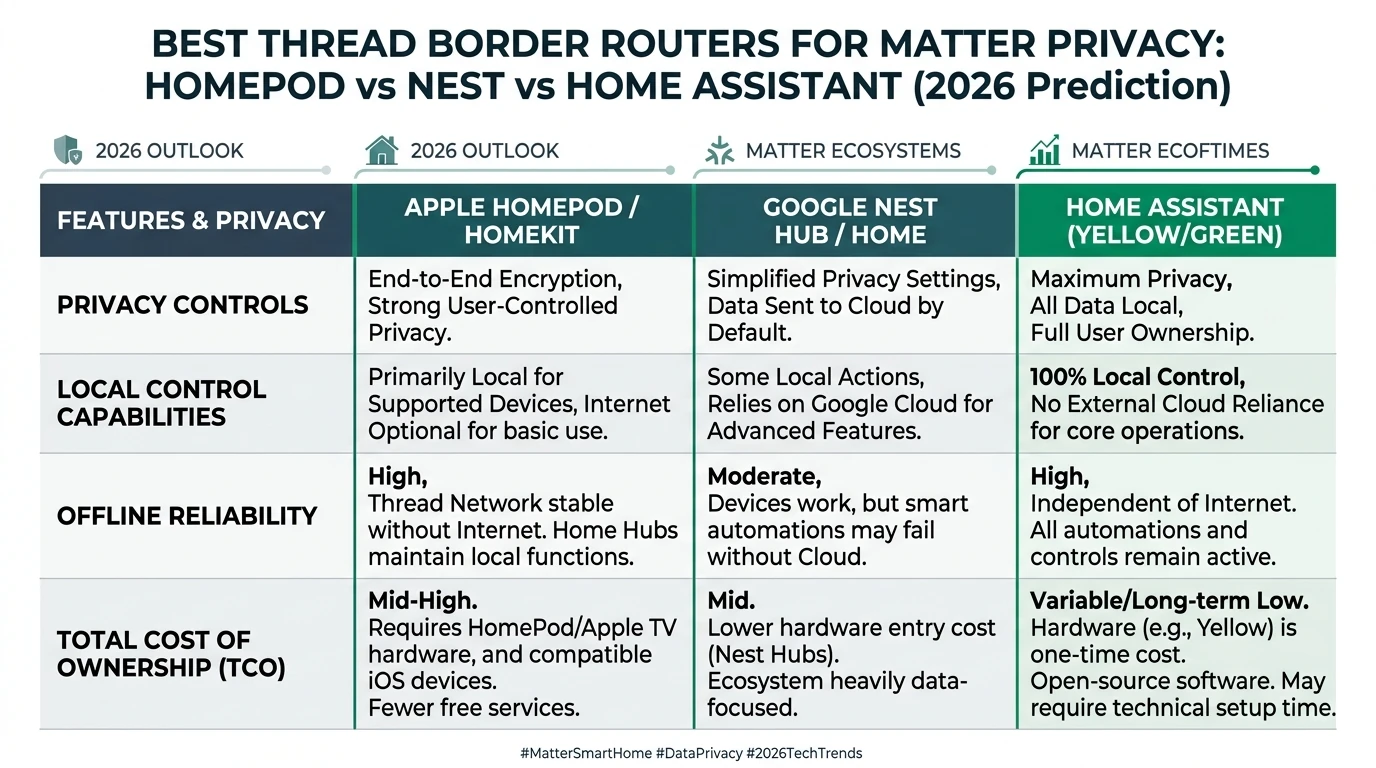
For hardware shopping context, continue to best Thread border routers for Matter privacy. If you also run Zigbee locks on the same stick, read Zigbee2MQTT vs ZHA before enabling multiprotocol.
FAQ
Frequently Asked Questions
Do I need IKEA Dirigera to use PARASOLL with Home Assistant?
No. You need Home Assistant as Matter controller, OTBR on your LAN, and phone-assisted commissioning. Dirigera is optional IKEA hub hardware.
Why does IKEA Smart say Thread Border Router required?
PARASOLL uses Matter over Thread. Thread needs a border router on your network to reach your Matter controller. That message does not force Dirigera specifically.
Can I keep Dirigera and also pair PARASOLL to Home Assistant?
Multi-admin is fragile. For one authoritative fabric, factory-reset and commission only into Home Assistant.
Which USB dongle works as OTBR for PARASOLL in 2026?
Home Assistant documents ZBT-1, ZBT-2, Yellow, Sonoff ZBDongle-E with RCP firmware, and other OTBR-supported radios—verify the add-on list for your OS version.
What if PARASOLL goes unavailable after 30 minutes?
Set your HA OTBR Thread network as Preferred, factory-reset, recommission. Some IKEA battery SKUs may still show chipset-specific issues.
Does pairing locally stop IKEA cloud telemetry?
Local automations stay on HA if you do not re-bind the sensor in IKEA Smart. Thread encrypts mesh hops; controller choice defines cloud exposure.
Does VALLHORN pair the same way as PARASOLL on Home Assistant?
Yes. Same OTBR, Matter Server, IPv6, Preferred network, and Companion commissioning. Wake VALLHORN with motion during join and pair near the border router before ceiling mounting.
Primary sources
| ID | Source | URL |
|---|---|---|
| 1 | Home Assistant — Matter integration | home-assistant.io/integrations/matter/ |
| 2 | Home Assistant — Thread integration | home-assistant.io/integrations/thread/ |
| 3 | OpenThread — Border Router guides | openthread.io/guides/border-router |
| 4 | GitHub — Matter-over-Thread SED unavailable (IKEA class reports) | github.com/home-assistant/core/issues/166317 |
| 5 | Connectivity Standards Alliance — Matter overview | csa-iot.org/all-solutions/matter/ |
| 6 | IKEA US — PARASOLL product listing (price/availability) | ikea.com/us/en/p/parasoll-door-window-sensor-90599646/ |
| 7 | IKEA — VALLHORN wireless motion sensor (article 905.043.41) | ikea.com/us/en/p/vallhorn-wireless-motion-sensor-smart-white-90504341/ |
Dataset (JSON-LD)
Footnotes
-
Home Assistant Matter integration documentation, accessed 5 June 2026. https://www.home-assistant.io/integrations/matter/ ↩ ↩2
-
Home Assistant Thread integration documentation, accessed 5 June 2026. https://www.home-assistant.io/integrations/thread/ ↩ ↩2 ↩3 ↩4
-
OpenThread Border Router guides. https://openthread.io/guides/border-router ↩ ↩2
-
home-assistant/core issue #166317 — Matter-over-Thread battery device availability (community reports, March 2026). https://github.com/home-assistant/core/issues/166317 ↩ ↩2 ↩3 ↩4 ↩5 ↩6
-
IKEA — VALLHORN wireless motion sensor (article 905.043.41), accessed 5 June 2026. https://www.ikea.com/us/en/p/vallhorn-wireless-motion-sensor-smart-white-90504341/ ↩