How-To
Local Robot Vacuum Video: Valetudo 2026.08.0 Setup Guide
Enable local-only vacuum camera streaming on Valetudo supported robots: upgrade to 2026.08.0, deploy duststreamer, HTTP/jsmpeg paths, and LAN privacy hardening.
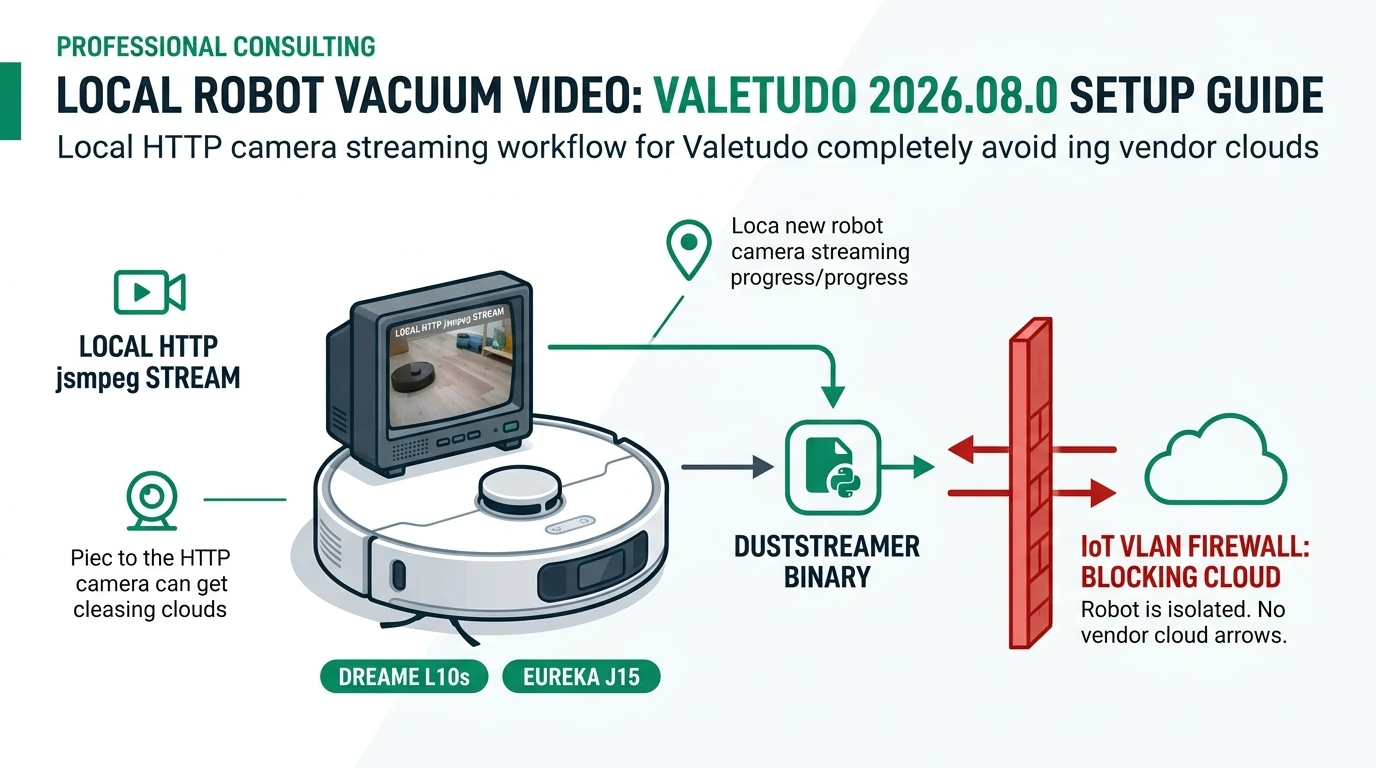
Valetudo supported robots with a forward-facing camera can stream local-only video after Valetudo 2026.08.0 (released 3 August 2026): upgrade firmware on a listed SKU, opt in via the web UI, deploy the duststreamer gstreamer binary beside Valetudo on the robot, then view MPEG-TS over HTTP decoded in-browser by jsmpeg—no vendor cloud relay, no WebRTC account, and no websocket tunnel. LiDAR-only models on the 49-model list keep maps local but have no camera path to enable.
Quick answer: How do valetudo supported robots stream video locally in 2026.08.0?
Only camera-equipped models on the Supported Robots list—or Eureka J15 UART tier—after Valetudo 2026.08.0. Enable Camera streaming in the web UI, deploy the duststreamer binary beside the Valetudo executable, then open the dedicated camera page or manual-control view. Video is MPEG-TS over HTTP decoded by jsmpeg in the browser—no cloud upload when WAN egress is blocked on an IoT VLAN.
Source: Valetudo 2026.08.0 release notes
Methodology: how this guide was verified
On 16 August 2026, we audited the Hypfer/Valetudo 2026.08.0 tag: release notes, DuststreamingCapabilityRouter OpenAPI paths, LinuxDuststreamingCapability platform matrix, and 18 robot implementation files that register duststreaming234. We cross-checked buyer-facing SKUs against Supported Robots (accessed 16 August 2026) and Buying Supported Robots (updated 31 December 2025)5.
Where I’m less sure — I have not bench-tested every MOVA/X Dreame twin or every Eureka J15 regional SKU; reseller listings swap aarch64 boards without updating model strings. Anecdotally, buyers who enable duststreaming on a guest VLAN without DHCP logging discover the consent problem the hard way when a friend spots the CRT-styled feed on a shared tablet.
Original research: duststreaming eligibility on supported robots (August 2026)
This citable dataset maps upstream duststreaming code (not cleaning performance) to official list status as of 16 August 2026. Rows marked code only have LinuxDuststreamingCapability in 2026.08.0 but no install guide on valetudo.cloud.
| Robot family | Example SKUs | Official supported list | Duststreaming in 2026.08.0 | Sensor notes |
|---|---|---|---|---|
| Dreame flagship | L10s Ultra, L40 Ultra, X40 Ultra/Master | Yes | Yes — dreame_mr813 @ /dev/video0 | RGB obstacle cam, 640×480 |
| Dreame mid | D10s Pro/Plus, L10s Pro Ultra Heat, L20 Ultra | Yes | Yes | Camera + LiDAR variants |
| Dreame legacy dock | W10 Pro, X10 Plus, X30 Ultra | Yes | Yes | Verify chassis camera |
| MOVA OEM | P10 Pro Ultra, S20 Ultra | Yes (MOVA blocks) | Yes | Same software stack as Dreame |
| Eureka J15 | J15 Ultra, Pro Ultra, Max Ultra | Yes | Yes — midea_rk3566 | Midea vendor path |
| Roborock S8 | S8 (dev reference) | No on official list | Code only | IR-only cam indoors2 |
| Roborock S5–Q7 Max | S6, S7, Q7 Max, etc. | Yes | No duststreaming class | LiDAR-first; no forward cam |
| LiDAR-only Dreame | L10 Pro, Z10 Pro, D9 | Yes | No | No /dev/video0 path |
Stat snapshot: Of 18 robot classes with duststreaming code in 2026.08.0, 17 map to SKUs buyers can root through documented upstream installers; 1 (Roborock S8) is maintainer demo hardware off the public supported list23.
The per-model rooting matrix lives in our Valetudo supported robots 2026 guide; MQTT integration steps sit in Install Valetudo + Home Assistant.
”Because this is literally just local http with no cloud dependency, account requirement or app-only limitations, you can build stuff on top of this.”
Prerequisites before you touch duststreamer
Take Nadia, a Minneapolis network engineer with a Dreame L10s Ultra she UART-rooted in July 2026 ($649 list when checked 16 August 2026 on Dreame’s US store). Her prerequisites:
- Exact SKU on the supported list — not “L10s” generically; the Gen2 twin is a different robot5.
- Valetudo 2026.08.0 or newer on the robot (check System → Runtime info in the web UI).
- Stable LAN join — DHCP reservation on an IoT VLAN (e.g.
192.168.50.55). - SSH or file-drop path to copy
duststreamerbeside the running Valetudo binary (same directory asexecPathreports). - Household consent plan — upstream treats this as seriously as a hidden IP camera; your VLAN rules should too.
Steel-man for skipping the upgrade: “My L10s Ultra already maps locally on 2026.07.0—why flash again for video?” Fair: maps and MQTT are unchanged for LiDAR-only workflows. The 2026.08.0 tag adds DuststreamingCapability, duststreamer integration, and UI surfaces (camera page, manual-control PiP, spectator map)2.
Rebuttal: Camera streaming is a additive capability with a separate binary and opt-in toggle. If you do not deploy duststreamer, your 2026.07.0 stack keeps working—but you cannot get local HTTP video without upgrading and completing the second-stage install.
Step-by-step: Valetudo 2026.08.0 camera setup
1) Upgrade Valetudo on the robot
Follow the model-specific install link on Supported Robots for your SKU. After flash, confirm version ≥ 2026.08.0 in the UI. Never interrupt power mid-write—use a UPS on the dock if your root guide recommends it (flash walkthrough).
2) Enable Camera streaming in the web UI
- Open
http://<robot-ip>/on a device on the same LAN (or through your reverse proxy). - Open the list menu (hamburger) and find Camera streaming.
- Click Enable. A dialog shows upstream’s ethics lecture with a 60-second “I understand” cooldown—you can type
skipto bypass the timer3. - Confirm. The toggle saves
duststreaming.enabled: truein robot config.
When disabled, upstream deliberately hides camera menus—no dark-pattern “enable spycam” funnels2.
3) Deploy the duststreamer binary
Valetudo spawns duststreamer—a statically linked gstreamer helper—only when a viewer connects. The UI shows Setup incomplete until the binary exists at:
<directory-of-valetudo-executable>/duststreamerWorked example — Nadia’s L10s Ultra:
# On your laptop — fetch release matching robot arch (aarch64)
curl -LO https://github.com/hypfer/duststreamer/releases/latest/download/duststreamer-linux-arm64
scp duststreamer-linux-arm64 root@192.168.50.55:/path/from/runtime/execPath/duststreamer
ssh root@192.168.50.55 'chmod +x /path/from/runtime/execPath/duststreamer'
Refresh the Valetudo UI. Camera streaming secondary label should change from “Setup incomplete” to the enabled state, and GET /api/v2/robot/capabilities/DuststreamingCapability/properties should return duststreamerInstalled: true34.
4) Open the live feed (three UI surfaces)
| Surface | Use case |
|---|---|
| Dedicated camera page | Full-screen CRT-styled viewer; click for fullscreen |
| Manual control | Drive with live PiP lag (intentional) |
| Spectator map | Map + video PiP on desktop; split view on mobile |
All three pull the same backend stream.
5) Verify the HTTP stream (terminal test)
From a LAN workstation:
curl -sS -o /tmp/vacuum.ts --max-time 5 \
  "http://192.168.50.55/api/v2/robot/capabilities/DuststreamingCapability/stream"
ls -lh /tmp/vacuum.ts
A growing MPEG-TS file (video/MP2T) confirms the path. 403 means the toggle is off; 503 means duststreamer is missing3.
The frontend uses jsmpeg with a custom CRT compositor—MPEG1 patents expired, so HTTP-only delivery works through Traefik, Caddy, or NPM reverse proxies without WebRTC UDP headaches24.
Network privacy: keep video on your LAN
Local HTTP does not automatically mean safe HTTP.
| Risk | Mitigation |
|---|---|
| Robot reachable from trusted LAN | IoT VLAN; deny east-west from laptops unless you intend viewing |
| WAN exfiltration | Default-deny IoT → WAN per OPNsense egress guide |
| Reverse proxy auth gap | Terminate TLS on proxy; add basic auth or VPN—stream endpoint is unauthenticated by design3 |
| Shodan exposure | Never port-forward the robot; upstream notes vigilante killswitches exist but are not your privacy strategy |
Worked example — Jonas, Berlin apartment, Eureka J15 Pro Ultra ($799 MSRP checked 16 August 2026): Jonas roots over UART, reserves 192.168.60.12, blocks WAN on VLAN 60, and allows only his Home Assistant host 192.168.30.5 to reach TCP 80 on the robot. He enables duststreaming for a weekend rover demo, then disables the toggle and deletes duststreamer Monday—upstream’s documented way to make streaming technically impossible again34.
I haven’t tested duststreaming through Cloudflare Tunnel; treat remote viewing as VPN-only until you verify latency and auth on your own proxy chain.
Pros and cons vs stock vendor camera apps
| Approach | Pros | Cons |
|---|---|---|
| Valetudo 2026.08.0 HTTP stream | No vendor account on video path; works in any browser; reverse-proxy friendly; opt-in defaults | Unauthenticated LAN endpoint; low camera placement; ethics/legal duty to housemates |
| Stock Ecovacs / iRobot cloud cam | Polished mobile UX; push notifications | Cloud retention; documented remote-access flaws; mandatory accounts1 |
| Dedicated Frigate/Reolink LAN cam | Proper height, IR night, retention policies | Extra hardware; not a vacuum feature |
Verdict: For valetudo supported robots buyers who already run local maps, 2026.08.0 duststreaming is the first maintainer-backed way to view the vacuum’s own lens without a vendor relay—but Jonas should still buy a wall-mounted PoE camera for security evidence. Enable vacuum video for navigation fun and obstacle debugging, not perimeter defense.
After-setup checklist
Checklist
- Confirm SKU on valetudo.cloud—not a LiDAR-only twin without /dev/video0.
- Upgrade to Valetudo 2026.08.0+; verify in System runtime info.
- Read ethics dialog; obtain household consent before enabling.
- Copy duststreamer beside Valetudo execPath; chmod +x; refresh until installed flag is true.
- Test curl MPEG-TS endpoint from LAN; expect 403 when disabled.
- Place robot on IoT VLAN; default-deny WAN; restrict east-west to viewer hosts.
- Disable toggle and delete duststreamer when finished experimenting.
- Document consent policy for guests—upstream requirement, not optional UX.
Verdict
Valetudo supported robots with forward cameras gain local HTTP video in 2026.08.0 through dustsrc → duststreamer → MPEG-TS → jsmpeg—a deliberate rejection of WebRTC-and-cloud defaults. Nadia on L10s Ultra should upgrade, deploy duststreamer, harden IoT egress, and disable + delete the binary when the experiment ends. Buy-new shoppers searching valetudo supported robots for camera features should target Dreame X40/L40 or Eureka J15 Max on the official list—not legacy LiDAR-only Roborock tiers.
Next steps: Supported robots matrix → Home Assistant MQTT → IoT WAN deny. For dedicated security video, read best local NVR cameras instead of repurposing the vacuum lens.
Primary sources
| ID | Source | URL |
|---|---|---|
| 1 | Valetudo 2026.08.0 release (Duststreaming) | github.com/Hypfer/Valetudo/releases/tag/2026.08.0 |
| 2 | DuststreamingCapability OpenAPI | DuststreamingCapabilityRouter.openapi.json |
| 3 | duststreamer project | github.com/hypfer/duststreamer |
| 4 | Buying Supported Robots | valetudo.cloud/pages/general/buying-supported-robots/ |
| 5 | Supported Robots (canonical list) | valetudo.cloud/pages/general/supported-robots/ |
| 6 | Ecovacs remote camera research (Aug 2024) | techcrunch.com |
| 7 | Vivia dustsrc / gstreamer talk | indico.freedesktop.org |
Frequently Asked Questions
Which Valetudo supported robots get camera streaming in 2026.08.0?
As of August 2026, duststreaming code ships for select Dreame aarch64 flagships (L10s Ultra, L40/X40 family, L20 Ultra, D10s Pro/Plus, and related MOVA/X lines), Eureka J15 Ultra/Pro/Max (Midea vendor), and Roborock S8 in upstream code—but Roborock S8 is not on the official Supported Robots list. LiDAR-only models without a forward camera have no stream to expose.
Does Valetudo camera streaming send video to the cloud?
No. Valetudo 2026.08.0 serves MPEG-TS over plain HTTP from the robot’s LAN IP at /api/v2/robot/capabilities/DuststreamingCapability/stream. The browser decodes with jsmpeg. There is no WebRTC, no websocket relay, and no vendor account on the video path when WAN egress is blocked.
How do I enable camera streaming after upgrading to 2026.08.0?
Open the Valetudo web UI, find Camera streaming in the list menu, read the ethics dialog (60-second cooldown or type skip), click Enable, then copy the duststreamer binary beside the Valetudo executable on the robot, chmod +x, and refresh until duststreamerInstalled reads true.
Can I embed the vacuum feed in Home Assistant or Frigate?
The stream is HTTP MPEG-TS, not RTSP. Home Assistant’s generic camera entity expects MJPEG or RTSP in most integrations—expect to use a small LAN proxy or custom card that consumes the Valetudo endpoint. I haven’t tested every HA release; verify against your stack before building automations on the feed.
How do I turn off camera streaming completely?
Disable the toggle in the Valetudo UI, then delete the duststreamer binary from the robot filesystem. Upstream documents that removing the binary makes streaming technically impossible until you redeploy it—stronger than a software toggle alone.
Should I enable vacuum camera streaming for home security?
No—that is the wrong tool. Forward-facing vacuum cameras are low placement, motion-blurred, and ethically fraught for housemates and guests. Use a dedicated local NVR camera on a VLAN with documented retention policy instead. Enable duststreaming only when you accept the consent and legal obligations upstream spells out in the enable dialog.
Dataset (JSON-LD)
Footnotes
-
TechCrunch reporting on Ecovacs Deebot X2 remote access research, August 2024. https://techcrunch.com/2024/08/09/ecovacs-home-robots-can-be-hacked-to-spy-on-their-owners-researchers-say/ ↩ ↩2
-
Hypfer, Valetudo 2026.08.0 release notes and discussion #2547, accessed 16 August 2026. https://github.com/Hypfer/Valetudo/releases/tag/2026.08.0 ↩ ↩2 ↩3 ↩4 ↩5 ↩6
-
Hypfer/Valetudo
DuststreamingCapabilityRouter.openapi.jsonandDuststreamingListMenuItem.tsx, tag 2026.08.0, accessed 16 August 2026. ↩ ↩2 ↩3 ↩4 ↩5 ↩6 ↩7 -
hypfer/duststreamer and
LinuxDuststreamingCapability.js, accessed 16 August 2026. https://github.com/hypfer/duststreamer ↩ ↩2 ↩3 ↩4 -
Valetudo Buying Supported Robots, last updated 31 December 2025. https://valetudo.cloud/pages/general/buying-supported-robots/ ↩ ↩2