Smart Home Privacy
IoT Security for Renters: VLAN, TLS, DNS Hardening 2026
IoT security for renters in 2026: guest Wi-Fi, isolation patterns, TLS, DNS privacy, and crypto-minded habits without owning the router.
Quick answer: How can renters harden IoT without landlord router access?
Insert a router you control upstream of ISP gear or run a travel-router subnet, segment IoT onto guest SSIDs with AP isolation, force DNS through Pi-hole or AdGuard Home with DoH/DoT upstream, and use TLS on MQTT or ESPHome APIs. Combine with non-destructive installs from our no-drill renter guide.
Source: NIST IoT device cybersecurity guidance (consumer summary)
Executive Summary
Renters searching for IoT security, cryptography-oriented habits, or guest-network isolation usually hit the same wall: you do not own the demarcation point. The DSL/fiber gateway stays in a closet with a landlord sticker, VLAN tabs are greyed out, and Roommate Risk sits on the same broadcast domain as your Home Assistant host.
This guide translates crypto-minded network hygiene—TLS, DNS privacy, least-privilege zones—into renter-realistic moves: travel routers, segmented SSIDs, encrypted DNS forwarders, and automation hygiene without drilling holes or breaching lease terms.
Bottom line: You may not get enterprise VLANs, but you can still own the trust boundary immediately around your stack. Pair hardware isolation with application-layer encryption for MQTT and broker ACLs so a compromised plug cannot lateral-move into cameras.
Threat Model: What Renters Actually Face
Apartment and house renters contend with:
- Shared broadcast domains when landlord Wi-Fi is the only uplink.
- Sticky DHCP leases that surprise you after plugging in new IoT gear.
- Roommate or guest laptops on the same SSID as MQTT brokers.
- ISP-supplied routers that phone home with coarse telemetry.
Nation-state adversaries are unlikely; curious neighbors, malware on guests’ phones, and cloud APIs that overshare are not. Align controls to those actors: isolate IoT, block noisy telemetry domains, rotate credentials when subletters leave.
Layer 0 — Physical and Lease Reality
Before dropping VLAN diagrams, read your lease about attach points to ISP hardware. Many agreements allow a consumer router behind the modem; some forbid anything that “replaces” ISP gear. When in doubt, use your own AP in router mode with WAN sourced from a landlord LAN port—document MAC addresses so you can revert cleanly when moving out.
Non-destructive sensor installs belong with our no-drill renter smart home checklist so you retain deposit leverage while still running Thread or Zigbee coordinators near windows.
Layer 1 — Network Segmentation Without Corporate Switches
Travel Router or Upstream Firewall
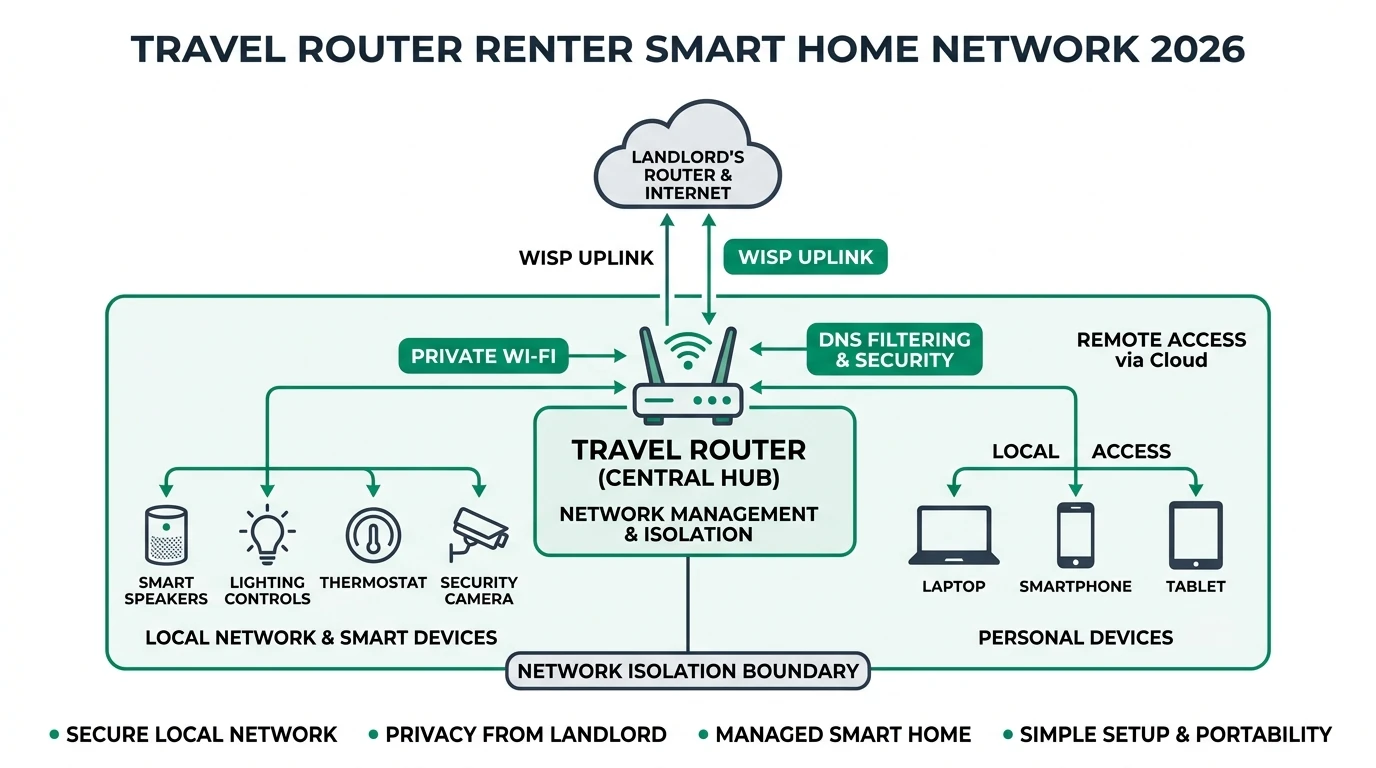
If you can place a WAN cable into the landlord router’s LAN, your travel router becomes the policy enforcement point: DHCP for your private RFC1918 island, firewall rules, DNS redirection, and optional WireGuard or Tailscale exit on a management VLAN analog.
See the dedicated walkthrough for topology diagrams in travel router renter networking.
Guest Wi-Fi and AP Isolation
When upstream control is impossible, create IoT-only SSIDs on hardware you bought. Enable AP/client isolation so cameras cannot ARP-scan laptops. Downside: some casting protocols break—acceptable trade for security-sensitive users.
Compare conceptual VLAN vs guest SSID tradeoffs in guest Wi-Fi vs IoT VLAN.
Layer 2 — DNS Privacy and Filtering for Renters
DNS is the cheapest telemetry choke point. Run AdGuard Home or Pi-hole on a Raspberry Pi or mini PC you control; point IoT DHCP scopes to that resolver; forward to DoH/DoT upstream so the landlord ISP sees fewer plaintext queries.
Rationale: many plugs beacon vendor REST endpoints hourly. Blocking at DNS does not stop hard-coded IPs, but it eliminates the bulk of noisy analytics with minimal CPU.
Cross-read Pi-hole vs AdGuard Home for stack selection.
Layer 3 — TLS and Application Crypto for LAN Protocols
MQTT
Deploy TLS on 8883, per-device credentials, and ACLs so thermostats cannot publish to home/locks/#. Pair with our Tasmota MQTT TLS recipe when flashing outlets.
ESPHome & Home Assistant API
Prefer encrypted transports where hardware allows; keep API keys out of git—use secrets.yaml or OS keychains when syncing configs across roommates’ laptops.
Remote Access
Never expose raw Home Assistant ports. Prefer Cloudflare Tunnel, WireGuard, or Tailscale per our remote access comparison.
Layer 4 — Operational Habits (The Human Crypto Layer)
- Inventory devices like our privacy audit workflow—renters move often; export CSV before lease end.
- Disable cloud accounts you no longer need; factory reset before selling gear.
- Segment subtenant phones: guest SSID without MDNS reflection into IoT.
- Patch Zigbee/Thread coordinators when landlord power blinks; brownouts corrupt NV backups.
Checklist
- Confirm lease allows your router or AP placement
- Create IoT-only SSID with client isolation
- Run DNS filtering with encrypted upstream forwarding
- Enable MQTT TLS + broker ACLs
- Turn VPN off during Matter commissioning
- Document DHCP ranges before move-out
Putting It Together With Broader Renter Guides
Layer segmentation advice here extends the lifestyle guidance in smart home for renters—privacy there focuses on device selection; this article focuses on network cryptography and isolation when the building wiring is not yours.
FAQ
Frequently Asked Questions
Can renters achieve “cryptography-grade” IoT isolation without owning the apartment router?
Often yes, by placing a router you control upstream (WAN port into the landlord LAN), using travel-router mode, or isolating devices on your own SSID with client isolation while keeping sensitive workloads off shared landlord Wi-Fi. Full VLAN control may require cooperation or your own internet drop.
Is guest Wi-Fi enough to separate smart cameras from laptops?
Guest SSIDs help but quality varies. True isolation requires AP firmware that blocks client-to-client traffic and prevents IoT from reaching your NAS. Pair guest networks with DNS filtering (Pi-hole or AdGuard Home) on a device you control.
Should renters use VPNs on their phones while commissioning Matter?
Turn VPNs off during Matter or Thread commissioning—discovery uses multicast and IPv6 helpers that break when tunnelled. Re-enable VPN after pairing for daily browsing if desired.
How does TLS apply to MQTT or ESPHome in a rental?
Treat LAN encryption as defense-in-depth: MQTT over TLS on port 8883, ESPHome native API over TLS where supported, and broker ACLs so a compromised bulb cannot publish to locks. Renters still physical-security USB sticks and laptops against roommate threats.
What is the lowest-friction DNS privacy upgrade?
Run AdGuard Home or Pi-hole on a Raspberry Pi or router you administer, force IoT VLAN DNS to that resolver, and forward to encrypted upstreams (DoH/DoT). Document blocked domains when devices misbehave.