How-To
Travel Router Renter Smart Home Network 2026
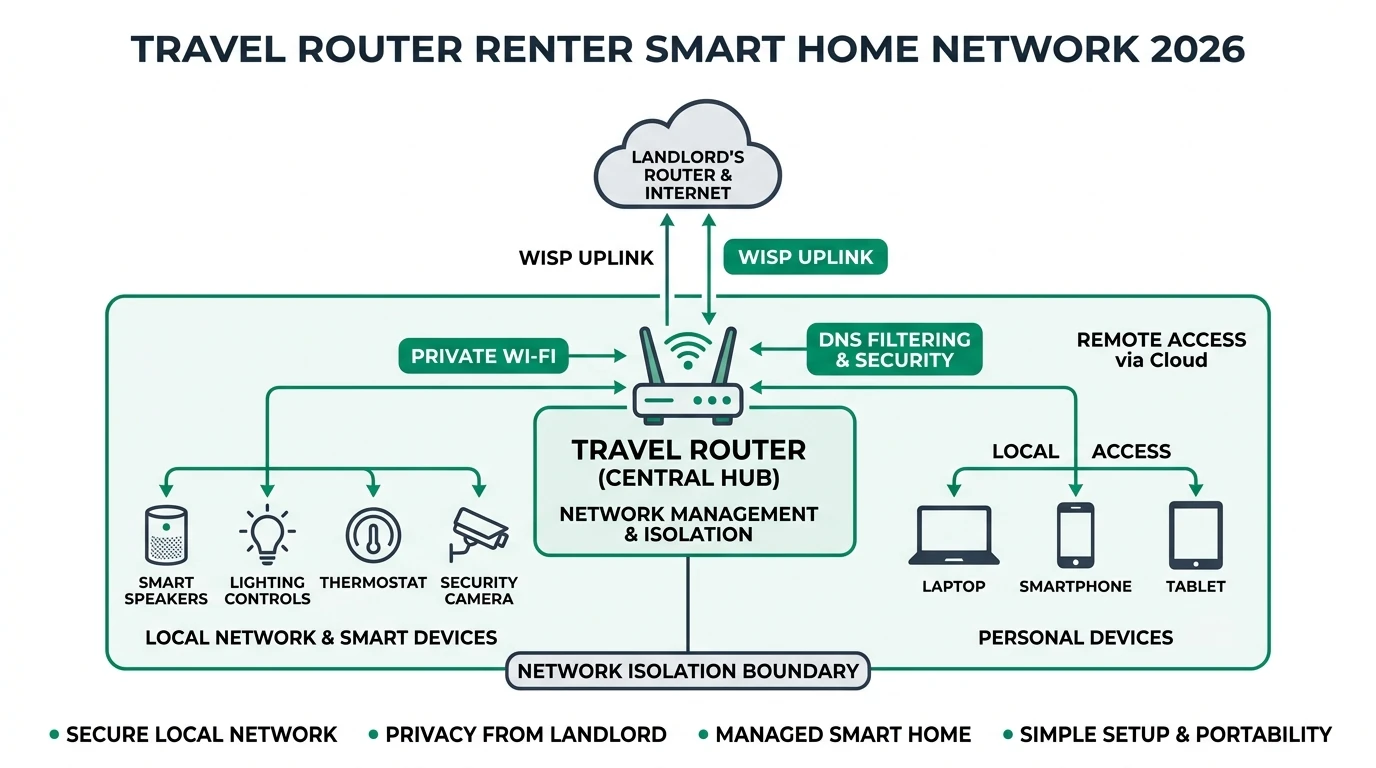
Isolate renter IoT on a travel-router LAN: WISP uplink, DNS filtering, and privacy without landlord router admin—OpenWrt-friendly segmentation for apartments.
Quick answer: How can renters isolate smart home devices without landlord router access?
Connect a travel router in WISP or repeater mode to the rental Wi-Fi, place all IoT devices on the travel router’s LAN, enforce DNS filtering or AdGuard-style blocking on that subnet, and use VPN exit only when you choose—your phones and laptops can stay on a separate SSID or bypass the travel router if you prefer.
Source: OpenWrt documentation
Executive Summary
Our general renters guide covers device choices. This guide covers network topology when you cannot configure VLANs on the landlord’s gateway—pattern aligns with guest vs IoT isolation but uses portable hardware.
Bottom line: A travel router running OpenWrt (or vendor firmware with VLANs) is the smallest box that creates a policy boundary you control.
Why a travel router
| Problem in rentals | Travel-router approach |
|---|---|
| No admin on ISP CPE | You own the downstream router |
| Cannot run Ethernet drops | Wi-Fi uplink (WISP) to landlord SSID |
| Mixed trust devices | Separate SSID for IoT vs phones |
Topology options
| Mode | How it works | Tradeoff |
|---|---|---|
| WISP / repeater | Travel router connects to landlord Wi-Fi as WAN | Double-NAT; acceptable for IoT |
| Tethering | LTE USB as WAN | Data caps |
| Ethernet WAN | If you have one RJ45 jack | Best performance |
DNS and blocking
Point the travel router’s DHCP DNS to AdGuard Home or Pi-hole—compare Pi-hole vs AdGuard. Then apply internet blocking patterns for cameras and plugs that phone home excessively.
Physical placement
| Tip | Reason |
|---|---|
| Central shelf placement | Better Wi-Fi to IoT |
| Away from microwave | Reduces 2.4 GHz interference |
| Label SSIDs | Roommates do not join the IoT SSID by mistake |
Policy table (example)
| SSID | Devices | Internet |
|---|---|---|
HOME-IOT | Plugs, bulbs, speakers | Block known telemetry domains |
HOME-TRUST | Laptop, phone | Full or VPN split |
Checklist
- Confirm lease allows personal Wi-Fi equipment.
- Document landlord SSID credentials in a password manager.
- After enabling WISP, verify IoT devices get DHCP from the travel router.
- Run DNS leak tests from a laptop on the IoT SSID.
- Keep firmware updated—travel routers are still routers.
FAQ
Frequently Asked Questions
Will double NAT break gaming or video calls?
Keep low-latency devices off the IoT SSID; double NAT mainly hurts inbound hosting, not typical browsing.
Can I use VLANs inside the travel router?
Many OpenWrt images support software VLANs to separate Wi-Fi radios—advanced but powerful.
What if the landlord changes the Wi-Fi password?
Update the WISP client settings once; IoT devices are unchanged if they only know your SSID.
Is this better than a mesh extender?
Extenders often flatten networks; a router gives you policy and DNS control.
Does this replace a VPN?
No—add WireGuard on your trusted clients for remote access; IoT stays isolated.
Primary sources
| ID | Source | URL |
|---|---|---|
| 1 | OpenWrt | openwrt.org |
Conclusion
A travel router is the renter-friendly way to get IoT segmentation without landlord keys to the CPE. Pair it with DNS policy and clear SSID discipline, then fold device choices from our renters privacy guide into a coherent defense-in-depth setup.