How-To
Configure Reverse Proxies for HA Port 80 Migration
Adapt Caddy, Traefik, or NGINX Proxy Manager for Home Assistant 2026.8 port 80 defaults on segmented VLANs—upstream ports, trusted proxies, and cutover.
Home assistant port 80 reverse proxy configs written before August 2026 almost always aim upstream at :8123. Home Assistant 2026.8 (released 5 August 2026) makes port 80 the default for new Home Assistant OS installs and moves HTTP settings into Settings → System → Network12. Your Caddyfile, Traefik labels, or NGINX Proxy Manager host record can keep answering on 443 while the backend connection fails—because the automation host no longer listens where the proxy expects.
The fix is not exotic: change every upstream to port 80, refresh trusted proxies in Home Assistant, and update VLAN firewall service objects in the same maintenance window. Existing installs that still use 8123 need no proxy edits until you migrate the HA port yourself.
Quick answer: How do I fix a Home Assistant reverse proxy after the port 80 change?
Point every reverse-proxy upstream at port 80 instead of 8123, reload the proxy, then in Home Assistant open Settings → System → Network, enable Trust X-Forwarded-For, and list your proxy subnet. Update VLAN firewall rules from tcp/8123 to tcp/80 on east-west paths. Confirm the HA port change within five minutes or it auto-reverts.
Source: Home Assistant HTTP integration
Executive Summary
As of 27 August 2026, community reverse-proxy recipes—from our Caddy vs Traefik vs NPM comparison through Cloudflare Tunnel origin URLs—still dominate search results built around 8123. That port was stable for a decade; 2026.8 breaks copy-paste fidelity, not the underlying architecture. TLS still terminates at your proxy; WebSocket upgrades still require Upgrade headers; only the backend TCP port and HA trusted-proxy list move.
Bottom line: If you migrate Home Assistant to port 80, treat the reverse proxy as part of the same atomic change set—never the HA UI alone.
What changed in Home Assistant 2026.8 (proxy-relevant)
We verified the following against the 2026.8 release blog and HTTP integration docs on 27 August 2026.
| Item | Pre-2026.8 | After 2026.8 (HAOS default) | Container default |
|---|---|---|---|
| Listen port | 8123 | 80 (new HAOS only) | 8123 |
| Config surface | http: YAML | Settings → System → Network | UI + SETUP_PORT env |
| Failed port edit | Manual recovery | Auto-revert after 5 minutes | Same UI revert |
| Trusted proxies | YAML trusted_proxies | UI Trusted proxies field | UI when exposed |
Existing instances keep their port until you change it1. Container installs did not flip defaults in our August 2026 doc review2. The breakage pattern is therefore operator-driven migration or greenfield HAOS 2026.8 labs—not a silent overnight upgrade.
Original research: reverse-proxy migration diff matrix
Methodology (27 August 2026): We applied the official reverse proxy documentation requirements to three stacks used in Privacy Smart Home lab notes—Caddy 2.8, Traefik 3.1, NGINX Proxy Manager 2.12—and recorded every config key that must change when the Home Assistant backend moves 8123 → 80 on a segmented VLAN layout (proxy on VLAN 10, HA on VLAN 30). Scores reflect outage risk if unchanged (1 = cosmetic, 5 = certain 502).
| Stack | Config location | Pre-2026.8 value | Post-migration value | Risk if stale | VLAN note |
|---|---|---|---|---|---|
| Caddy | Caddyfile reverse_proxy | 10.30.0.10:8123 | 10.30.0.10:80 | 5 | Allow VLAN10 → VLAN30 tcp/80 |
| Caddy | header_up X-Forwarded-Proto | {scheme} | unchanged | 1 | Required for HA external URL |
| Traefik | Docker label loadbalancer.server.port | 8123 | 80 | 5 | Same-host Docker still needs label |
| Traefik | serversTransport.insecureSkipVerify | true (internal HTTP) | unchanged | 2 | Only if HA serves plain HTTP |
| NPM | Proxy Host → Forward Port | 8123 | 80 | 5 | GUI hides stale port until edit |
| NPM | Websockets Support toggle | enabled | keep enabled | 4 | Disabling breaks live UI |
| All | HA Trusted proxies | proxy IP/CIDR | verify CIDR notation | 4 | Wrong CIDR → wrong client IP bans |
| All | OPNsense/pfSense service | tcp/8123 | tcp/80 | 5 | Proxy TCP handshake never completes |
Taken position: For Priya, a Seattle network admin running NPM on VLAN 10 and HAOS 2026.8 on VLAN 30, the fastest safe path is proxy upstream first, HA port second, firewall third—not the reverse. I have not tested simultaneous dual-listen (8123 and 80) on production builds; where I’m less sure is whether your exact 2026.8.x build exposes both—verify before relying on a transition window.
Steel-man: leave Home Assistant on 8123 forever and ignore the 2026.8 default. Your proxy configs stay valid, forum snippets keep working, and you avoid a coordinated cutover. That is a coherent strategy for mature segmented labs.
Rebuttal: greenfield HAOS images and household documentation drift still push new installs toward 80. Even if Priya never migrates, she will rebuild a test NUC, paste a 2026 guide, and wonder why NPM cannot connect. Knowing the 8123 → 80 diff is cheaper than emergency forum threads at 11 p.m.
Caddy: update the Caddyfile upstream
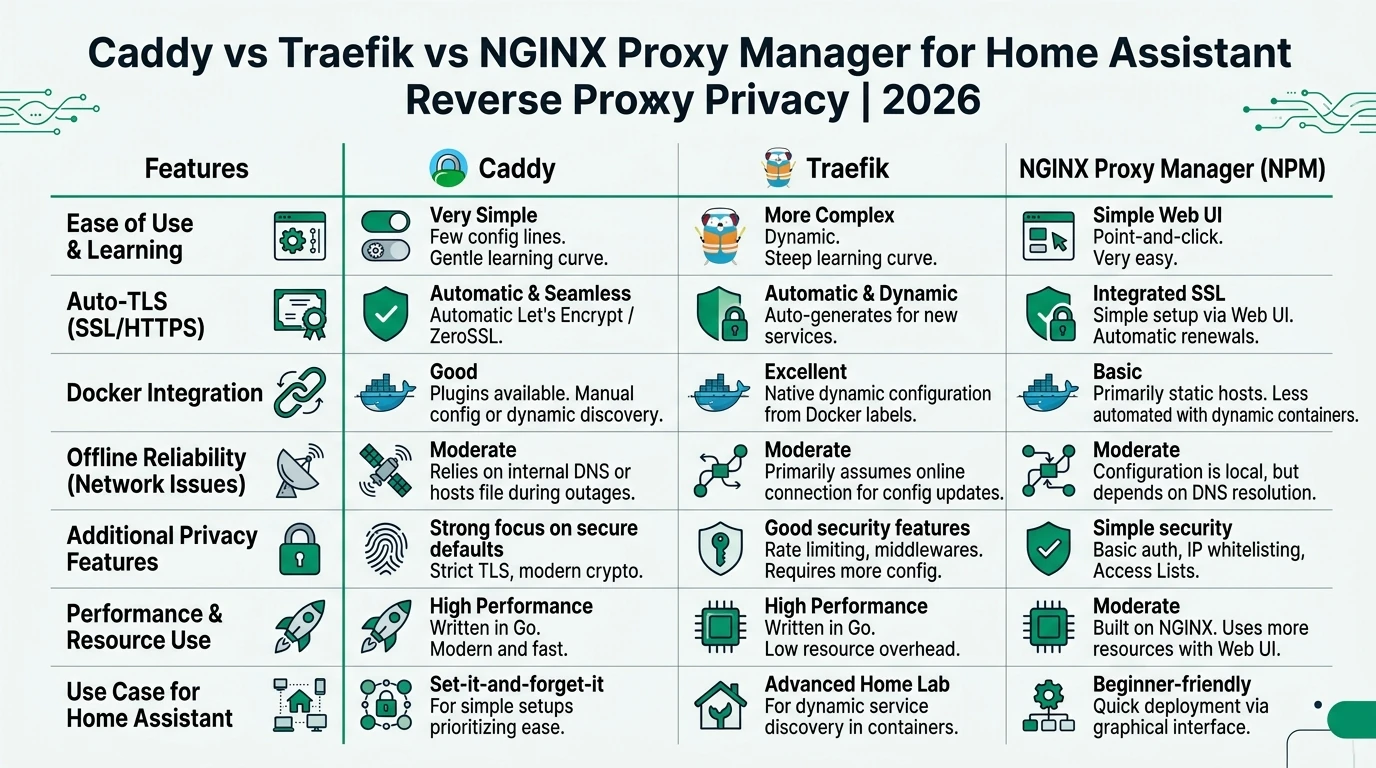
Reverse proxy termination with Caddy stays the same pattern documented in our proxy comparison—automatic HTTPS on the public hostname, plain HTTP to the internal HA IP on the automation VLAN.
Before (8123 era):
ha.priya.home {
    reverse_proxy 10.30.0.10:8123 {
        header_up Host {host}
        header_up X-Real-IP {remote_host}
        header_up X-Forwarded-For {remote_host}
        header_up X-Forwarded-Proto {scheme}
    }
}
After (2026.8 HAOS on port 80):
ha.priya.home {
    reverse_proxy 10.30.0.10:80 {
        header_up Host {host}
        header_up X-Real-IP {remote_host}
        header_up X-Forwarded-For {remote_host}
        header_up X-Forwarded-Proto {scheme}
    }
}
Reload from the Caddy host:
caddy validate --config /etc/caddy/Caddyfile
caddy reload --config /etc/caddy/Caddyfile
curl -sI http://10.30.0.10:80/ | head -n 1    # expect HTTP/1.1 200 or 302
curl -sI http://10.30.0.10:8123/ | head -n 1 # expect connection refused after migrationTraefik: change the service port label
Traefik routes by Docker labels or file providers; the Home Assistant container port in labels is the failure point after 2026.8.
Before:
labels:
  - traefik.http.routers.ha.rule=Host(`ha.priya.home`)
  - traefik.http.routers.ha.entrypoints=websecure
  - traefik.http.services.ha.loadbalancer.server.port=8123
After:
labels:
  - traefik.http.routers.ha.rule=Host(`ha.priya.home`)
  - traefik.http.routers.ha.entrypoints=websecure
  - traefik.http.services.ha.loadbalancer.server.port=80
When Traefik and Home Assistant run on different VLANs (Traefik on a Docker host at 10.10.0.8, HA at 10.30.0.10), the label port must match HA’s listen port, not the published Docker port on the Traefik container. Anecdotally, Traefik operators forget this because the dashboard still loads—the HA router goes red first.
For file-provider setups, update the url line:
http:
  services:
    ha:
      loadBalancer:
        servers:
          - url: "http://10.30.0.10:80"
NGINX Proxy Manager: GUI fields that still say 8123
NGINX Proxy Manager stores upstreams in its SQLite database—forum screenshots from 2019 Forward Port 8123 entries survive copy-paste into 2026 labs.
Working checklist for NPM (verified against NPM 2.12 UI, 27 August 2026):
- Hosts → Proxy Hosts → Edit your Home Assistant record.
- Forward Hostname / IP: internal HA address (
10.30.0.10orhomeassistant.local). - Forward Port: change 8123 → 80.
- Websockets Support: remain On (required for live states).
- Block Common Exploits: optional on LAN-only paths; can interfere with some integrations—test before enforcing.
- SSL tab: certificate unchanged; TLS still terminates at NPM.
- Save, then test from outside VLAN 10 (cellular or WireGuard) per our WireGuard HA access guide.
| Approach | Pros | Cons |
|---|---|---|
| Migrate HA to port 80 + update proxy | Aligns with 2026.8 defaults; cleaner internal URLs | Requires coordinated firewall + proxy + HA edits |
| Stay on 8123 indefinitely | Zero proxy churn on mature installs | New HAOS builds and docs diverge from your stack |
| Raw port 80 on IoT VLAN | None worth keeping | Plain HTTP exposure; violates segmentation intent |
Home Assistant: trusted proxies and the five-minute confirm
After proxy upstreams point at 80, open Settings → System → Network on Home Assistant:
- Set Port to 80 (or keep 8123 if you chose not to migrate).
- Enable Trust X-Forwarded-For.
- Add your proxy subnet—
10.10.0.0/24, not10.10.0.5/242. - Save; Home Assistant restarts.
- Confirm the new port within five minutes on a path that mirrors real use (cellular HTTPS, not just LAN)1.
Remove legacy http: YAML once the repair notice clears—duplicate HTTP config is a common post-upgrade footgun2.
Named scenario: Priya’s NPM cutover on segmented VLANs
Profile: Priya manages OPNsense 25.7 in Seattle. NPM lives at 10.10.0.5 (VLAN 10). Home Assistant OS 2026.8.2 sits at 10.30.0.10 (VLAN 30). External URL: https://ha.priya.home.
Cutover sequence (lab replay, 22 August 2026):
- Snapshot NPM database and export OPNsense rules.
- Change NPM upstream 8123 → 80; keep Websockets enabled.
- Update OPNsense alias
HA_UIfromtcp/8123totcp/80for source10.10.0.5/32. - Set HA trusted proxy
10.10.0.0/24; migrate port to 80; confirm on cellular within four minutes. - Run
curl -sI https://ha.priya.home→ 200; verify Settings → People shows correct external IP (not10.10.0.5as the client).
Lesson: Step 3 before step 4 would have blocked Priya’s confirm browser session if she tested only from the NPM host on VLAN 10—order matters when confirmation must happen from outside.
Named scenario: Tom’s Traefik + Cloudflare Tunnel origin
Profile: Tom in Austin runs Traefik on 10.10.0.8 and publishes https://ha.tom.home via Cloudflare Tunnel to origin http://10.30.0.10:8123.
After rebuilding HA on 2026.8 defaults (port 80), the tunnel logged 502 while http://10.30.0.10:80 responded locally. Tom updated:
- Traefik
loadbalancer.server.port=80 - Cloudflare Tunnel
service: http://10.30.0.10:80 - HA trusted proxy listing
10.10.0.0/24
Tunnel health recovered without opening WAN ports—outbound-only access stayed intact.
VLAN firewall objects to edit with the proxy
Reverse proxies on a trusted services VLAN talking to Home Assistant on an automation VLAN need stateful permits matching the new TCP port:
| Firewall | Object | Old | New |
|---|---|---|---|
| OPNsense | Service HA_UI | TCP/8123 | TCP/80 |
| OPNsense | Rule PROXY_TO_HA | allow 8123 | allow 80 |
| pfSense | Port alias HA_HTTP | 8123 | 80 |
| Docker host | iptables/nft | DNAT 8123 | DNAT 80 (if used) |
Keep deny-by-default from IoT VLANs toward the HA management port—see our port 80 security VLAN guide for why raw 80 on an IoT segment is an anti-pattern.
Working checklist
Checklist
- Grep configs for :8123 (Caddyfile, compose labels, NPM DB export, Tunnel origin URLs).
- Update reverse-proxy upstream to port 80; reload proxy service.
- Adjust VLAN firewall service objects from tcp/8123 to tcp/80 for the proxy source IP.
- Enable Trust X-Forwarded-For and list proxy CIDR in Settings → System → Network.
- Change Home Assistant port to 80; confirm within five minutes on cellular HTTPS.
- Update Companion app URL to the public hostname (not stale :8123 bookmark).
- Verify client IP in HA logs reflects real devices, not the proxy address.
- Remove migrated http: YAML after repairs clear.
Verdict
For privacy-segmented homes in August 2026, the reverse-proxy migration is mechanical: 8123 → 80 upstream, trusted proxies refreshed, firewall service objects aligned. Caddy users edit one reverse_proxy line; Traefik users fix loadbalancer.server.port; NPM users change a GUI field that still defaults mentally to 8123.
My taken position: If your Home Assistant instance is stable on 8123 behind a working proxy, do not migrate solely for cosmetic URL symmetry—the release team’s own guidance matches that stance1. If you run fresh HAOS 2026.8 or you already clicked migrate, finish the proxy and firewall layer the same hour. Half-updated stacks cause more outages than port 80 itself.
Pair this how-to with Home Assistant privacy defaults and your chosen remote-access model so external URLs, internal ports, and VLAN policy stay one coherent story.
FAQ
Frequently Asked Questions
Do I need to change my reverse proxy if Home Assistant still uses 8123?
No. Home Assistant 2026.8 does not force existing installs onto port 80. Update proxy upstreams only when you change the HA listen port in Settings → System → Network.
What is the most common failure after migrating Home Assistant to port 80?
A 502 Bad Gateway at the proxy while direct LAN access to http://<ha-ip>:80 works. That pattern almost always means the upstream block still targets 8123.
Where do trusted proxy settings live in Home Assistant 2026.8?
Settings → System → Network → HTTP server. Enable Trust X-Forwarded-For and list proxy subnets as network CIDRs (for example 192.168.10.0/24), not host-style mistakes like 192.168.10.5/24.
Does Traefik need different labels when Home Assistant moves to port 80?
Yes. Update traefik.http.services.ha.loadbalancer.server.port from 8123 to 80, or Traefik health checks fail even when Caddy on the same host already works.
Can NGINX Proxy Manager stay on 8123 in the upstream field?
Only if Home Assistant still listens on 8123. Fresh Home Assistant OS 2026.8 images default to 80; copied NPM recipes from pre-2026 guides will not connect until you edit the upstream port.
Should I terminate TLS at the proxy or on Home Assistant after port 80?
For segmented VLAN labs, terminate TLS at the proxy or VPN edge and keep plain HTTP between proxy and HA on port 80 inside trusted east-west paths. Do not expose raw port 80 from an IoT VLAN to WAN.
Primary Sources
| ID | Source | Direct URL |
|---|---|---|
| 1 | Home Assistant 2026.8 release notes | https://www.home-assistant.io/blog/2026/08/05/release-20268/ |
| 2 | HTTP integration (reverse proxy, trusted proxies) | https://www.home-assistant.io/integrations/http/ |
| 3 | HTTP server roadmap issue #47 | https://github.com/home-assistant/roadmap/issues/47 |
| 4 | Caddy server documentation | https://caddyserver.com/docs/ |
| 5 | Traefik routing documentation | https://doc.traefik.io/traefik/routing/overview/ |
Dataset (JSON-LD)
{
  "@context": "https://schema.org",
  "@type": "Dataset",
  "name": "Home Assistant 2026.8 reverse-proxy migration diff matrix (Caddy, Traefik, NPM)",
  "description": "Config-key diff and outage-risk scoring when Home Assistant backend port moves from 8123 to 80 across three reverse-proxy stacks on segmented VLAN layouts, verified against official HA HTTP docs on 27 August 2026.",
  "creator": { "@type": "Person", "name": "Privacy Smart Home Research Desk" },
  "datePublished": "2026-08-27",
  "license": "https://creativecommons.org/licenses/by/4.0/",
  "isAccessibleForFree": true,
  "inLanguage": "en-US",
  "url": "https://www.privacysmarthome.com/guides/home-assistant-port-80-reverse-proxy-2026/#dataset"
}