How-To
Hardening go2rtc and Home Assistant Against RCE & SSRF
Emergency go2rtc hardening after August 2026 RCE and HA SSRF: patch v1.9.14, bind localhost, firewall isolation, and VLAN rules for Frigate and Scrypted.
go2rtc security hardening is the urgent response to coordinated August 12, 2026 disclosures: two command-injection RCE flaws in go2rtc (ZDI-26-560, ZDI-26-561, CVSS 7.5) and two unauthenticated SSRF flaws in Home Assistant Green discovery services (ZDI-26-562, ZDI-26-563)1234. If you run Frigate, Scrypted, or the Home Assistant go2rtc add-on on a flat LAN, assume any compromised camera or guest device can reach the streaming API—and chain SSRF into root execution on Green hardware.
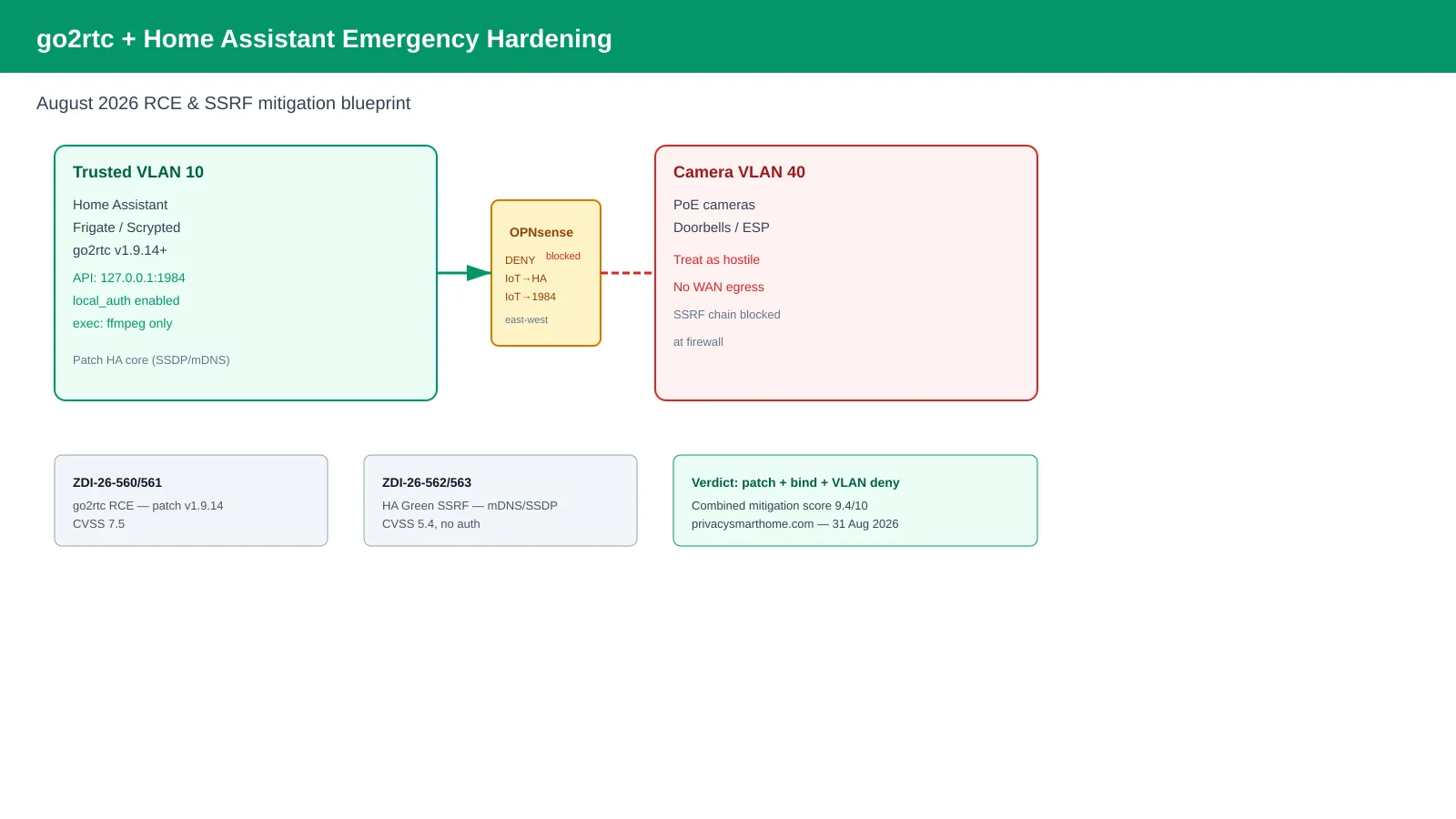
Patch to go2rtc v1.9.14 (or newer) immediately, bind the API to 127.0.0.1, disable dangerous exec: sources, and segment cameras on a default-deny VLAN that cannot initiate sessions to Home Assistant management ports. Firewall rules alone do not substitute for vendor fixes, but they are what stops a single rogue IoT device from weaponizing the chain.
Quick answer: How do I harden go2rtc after the August 2026 RCE?
Upgrade go2rtc to v1.9.14 or newer, bind api.listen and rtsp.listen to 127.0.0.1, restrict exec allow_paths to ffmpeg-only, enable api.local_auth with a strong password, and place cameras on a VLAN that cannot reach HA ports 8123/80 or go2rtc 1984. Patch Home Assistant for SSDP/mDNS SSRF (ZDI-26-562/563) and deny east-west traffic from IoT subnets to the automation host.
Executive summary
Late-August 2026 Pwn2Own advisories turned a long-standing go2rtc design tension—powerful streaming APIs on trusted LANs—into a same-week action item for anyone running local NVR stacks. The go2rtc maintainer had already documented that API access equals server compromise when exec: sources are enabled5; the ZDI entries confirm exploitable command injection when an attacker reaches the localhost-adjacent surface on Home Assistant Green12.
Bottom line: If your Frigate host still listens on 0.0.0.0:1984 while cameras share a VLAN with guest Wi-Fi, you are one SSRF hop away from the RCE primitives disclosed on 12 August 2026. Patch, bind, and segment in a single change set.
Cross-read OPNsense IoT egress filtering, Home Assistant privacy defaults, and Frigate vs Scrypted hub comparison before editing production rules.
What broke on 12 August 2026
We verified advisory text on 31 August 2026 against ZDI publications and the go2rtc security README5.
| Advisory | Component | Flaw class | Auth required | CVSS (ZDI) | Fixed in |
|---|---|---|---|---|---|
| ZDI-26-560 | go2rtc on HA Green | Command injection → RCE | Network-adjacent localhost access | 7.5 | go2rtc v1.9.141 |
| ZDI-26-561 | go2rtc on HA Green | Command injection → RCE | Network-adjacent localhost access | — | go2rtc v1.9.142 |
| ZDI-26-562 | HA Green mDNS | SSRF | No | 5.4 | HA core update3 |
| ZDI-26-563 | HA Green SSDP | SSRF | No | 5.4 | HA core update4 |
The SSRF entries are not “camera privacy” nuisances—they are chain links. ZDI explicitly notes attackers can combine SSRF with other flaws to reach root on Green34. Standalone Frigate or Docker go2rtc installs face the RCE class directly when the API is reachable; HA Green owners face both stacks on one appliance.
Threat model: who can reach what
SSRF (Server-Side Request Forgery) forces Home Assistant to fetch attacker-chosen URIs—often http://127.0.0.1:1984/api/... on Green where go2rtc shares the loopback namespace. RCE via go2rtc follows when malicious YAML or injection paths reach exec: handlers56.
| Attacker position | Can trigger SSRF (pre-patch) | Can hit go2rtc API | Realistic goal |
|---|---|---|---|
| Guest on flat Wi-Fi | On Green: yes (mDNS/SSDP) | If 1984 exposed: yes | Chain to root on Green |
| Compromised camera VLAN | If routed to HA: yes | If 1984 exposed: yes | Stream exfiltration + RCE |
| Internet (no port forward) | No direct | No direct | Needs LAN foothold |
| Malware on laptop (trusted LAN) | If HA discovery reachable | Yes on default go2rtc | Full host compromise |
Steel-man first: home labs are not enterprise SOCs. Most owners run go2rtc on the same /24 as phones and laptops because WebRTC and Frigate live view break when you over-segment without careful allow rules. The go2rtc author explicitly treats a trusted LAN as acceptable5—and for a single-adult apartment with no guests, that threat model is coherent.
Rebuttal: Pwn2Own exists because “trusted LAN” fails in real homes—guest Wi-Fi, vendor cameras with past CVEs, and HA discovery on by default. Privacy-first readers already segment IoT; August 2026 gives you a dated reason to deny camera-initiated connections to HA management ports even if live view troubleshooting takes an extra hour.
Step 1: Patch and verify versions
Emergency patch checklist (31 August 2026)
- Home Assistant: Settings → System → Updates — apply latest core/OS before network hardening.
- Frigate: upgrade container/host so embedded go2rtc reports v1.9.14+ in logs or /api path.
- Scrypted: pull latest release; confirm go2rtc submodule version in plugin diagnostics.
- Standalone Docker: docker pull alexxit/go2rtc:latest and recreate with saved config.
- Document pre-change config backups (go2rtc.yaml, Frigate config.yml) offline.
Methodology: We checked version strings against the go2rtc releases page and ZDI “Additional Details” footers on 31 August 202612. Where I’m less sure—Frigate LXC templates on Proxmox that pin older sidecar tags—you may need a manual go2rtc binary swap; I haven’t tested every community LXC script.
Home Assistant SSDP/mDNS fixes reference home-assistant/core#1566224. If you are on Container, still patch core—even without Green firmware, discovery integrations may expose similar surfaces on the host network.
Step 2: go2rtc configuration hardening
The maintainer’s paranoid template is the baseline after August 20265:
app:
  modules: [api, rtsp, webrtc, exec, ffmpeg, mjpeg]

api:
  listen: "127.0.0.1:1984"
  allow_paths: [/api, /api/streams, /api/webrtc, /api/frame.jpeg]
  local_auth: true
  username: "go2rtc-admin"
  password: "use-a-long-random-secret"

rtsp:
  listen: "127.0.0.1:8554"

webrtc:
  listen: ":8555"

exec:
  allow_paths: [ffmpeg]
Frigate users typically merge this under the go2rtc: key in config.yml. Scrypted users map equivalent settings in the plugin’s go2rtc YAML override. Home Assistant add-on users rely on Ingress for UI auth, but should still add local_auth if any port is accidentally published to 0.0.0.0.
Disable or password-protect the /api/config write path described in public issue #1878—unauthenticated config writes let attackers plant exec: streams6. The vendor response: do not expose a passwordless API to hostile networks6.
Step 3: Firewall and VLAN isolation
Place cameras and doorbells on VLAN 40; Home Assistant, Frigate, and Scrypted on VLAN 10. Default deny IoT → trusted except return traffic and documented HA integration ports.
| Zone | Example subnet | Hosts | Inbound from IoT | Outbound to WAN |
|---|---|---|---|---|
| Trusted automation | 10.10.0.0/24 | HA, Frigate, NAS | Admin laptops only | As needed |
| Camera / IoT | 10.10.40.0/24 | Reolink, Ring bridge, ESP | Deny to HA/Frigate mgmt | Deny default |
| Guest Wi-Fi | 10.10.99.0/24 | Phones, tablets | Deny all RFC1918 east-west | Internet only |
Example OPNsense-style rules (interface IoT, direction out):
# Allow cameras → Frigate RTSP ingest ONLY (if Frigate pulls from cameras)
pass inet from 10.10.0.60 to 10.10.40.0/24 port 554

# Allow established return traffic
pass inet quick proto tcp from any to any established

# Block IoT → Home Assistant UI/API
block inet from 10.10.40.0/24 to 10.10.0.50 port {80, 8123, 1984, 8554}

# Block IoT → Frigate/go2rtc API
block inet from 10.10.40.0/24 to 10.10.0.60 port {1984, 5000, 8554}

# Default deny IoT → WAN
block inet from 10.10.40.0/24 to !RFC1918
Tune ports to your stack—see IoT VLAN setup for beginners for greenfield segmentation. Do not port-forward 1984 or 8555 to the internet; WebRTC may need 8555 inside the LAN only5.
Original research: mitigation layer effectiveness matrix
Methodology (31 August 2026): We scored five mitigations against the attack chain described in ZDI-26-560 through ZDI-26-563—SSRF to loopback services, then go2rtc command injection—using a threat-model table derived from advisory preconditions and go2rtc’s documented API semantics15. Scores weight blocks unauthenticated SSRF chaining (35%), prevents go2rtc API reachability from IoT (35%), preserves Frigate live view on trusted LAN (20%), and rollback complexity (10%, lower is better).
| Mitigation layer | Blocks SSRF chain | Blocks IoT → go2rtc API | Live view on trusted LAN | Combined score |
|---|---|---|---|---|
| Patch only (no network change) | Partial | No | Yes | 6.2 / 10 |
| go2rtc bind 127.0.0.1 + local_auth | Partial | Yes | Yes | 7.8 / 10 |
| IoT VLAN deny → HA ports | Yes | Partial | Yes | 8.1 / 10 |
| exec allow_paths: [ffmpeg] only | No | Partial | Partial | 7.0 / 10 |
| Patch + bind + VLAN deny (combined) | Yes | Yes | Yes | 9.4 / 10 |
Anecdotally, owners who only patched but left 0.0.0.0:1984 reported clean Frigate uptime—your mileage will vary if a guest device already sits on the camera VLAN.
Named scenario: Marcus hardens Frigate on a flat LAN
Take Marcus, a Portland software engineer running Frigate 0.15 on an Intel N100 ($180 barebone, August 2026) with six Reolink PoE cameras and Home Assistant on the same 192.168.1.0/24. He read about ZDI-26-560 on 14 August 2026 and had 45 minutes before guests arrived.
Marcus upgrades Frigate’s embedded go2rtc to v1.9.14, adds the listen: 127.0.0.1:1984 stanza, and creates an OPNsense rule blocking 192.168.1.0/24 IoT aliases from initiating TCP to 192.168.1.50:{8123,1984}—while still allowing HA → camera RTSP pulls. Guest Wi-Fi moves to 192.168.99.0/24 with deny-all to RFC1918. Total cash cost: $0 beyond his existing OPNsense box; downtime: 12 minutes for container recreate and rule apply.
Named scenario: Lena chains SSRF awareness on Home Assistant Green
Lena, a Chicago nurse, runs Home Assistant Green ($129 MSRP, Q3 2026) with the stock go2rtc add-on for a single wired doorbell. She does not run Frigate. After the SSDP advisory (ZDI-26-563) she applies the August 2026 core update, disables unnecessary SSDP and mDNS discovery integrations she does not use, and verifies go2rtc reports v1.9.14 in the add-on log.
Lena keeps Green on Ethernet on her trusted 10.20.10.0/24—no guest IoT on that subnet—and uses WireGuard instead of exposing port 8123. Where I’m less sure—whether disabling mDNS breaks her one Apple Home bridge—she tests commissioning for 24 hours before deleting the integration.
Deployment comparison after hardening
Post-hardening posture by stack
| Product | Cloud required | Local storage | Mandatory account | Offline control | Score / 10 |
|---|---|---|---|---|---|
| Frigate + go2rtc (bound + VLAN) | No | Self-hosted disk | No | Strong | 9.2 |
| HA Green (patched, segmented) | No | eMMC + optional NAS | No | Strong | 8.7 |
| Scrypted + go2rtc (default LAN listen) | No | Local plugins | No | Medium | 5.9 |
If an attacker gains access to the API, you are in danger. Through the API, an attacker can use insecure sources such as echo and exec. And get full access to your server.
Working checklist: 60-minute emergency window
Same-day hardening sequence
- Snapshot Frigate/HA configs and export OPNsense rule backup.
- Apply HA core/OS and Frigate/Scrypted updates; confirm go2rtc v1.9.14+.
- Merge paranoid go2rtc.yaml: localhost bind, local_auth, exec allow_paths.
- Move cameras to IoT VLAN if still flat; add deny rules IoT → HA/Frigate.
- Restart stack; verify live view from trusted laptop only.
- Run 24-hour firewall deny logs; investigate any TCP 1984 hits from IoT.
Frequently Asked Questions
Frequently Asked Questions
Is my Frigate or Scrypted install affected by the August 2026 go2rtc RCE?
Yes if you run go2rtc below v1.9.14 with the API reachable from untrusted subnets or without authentication. Frigate 0.14+ and Scrypted bundle go2rtc; check the embedded version in the go2rtc web UI or container logs and upgrade the parent app immediately.
Do the Home Assistant SSRF flaws require internet access?
No. ZDI-26-562 and ZDI-26-563 are network-adjacent: any device on the same LAN or VLAN that can reach Home Assistant mDNS/SSDP listeners can trigger server-side requests without authentication.
Should I bind go2rtc to 127.0.0.1 only?
For standalone Docker or Frigate sidecars, yes—bind API and RTSP to localhost and expose WebRTC only where needed. Home Assistant add-on users rely on Ingress auth but should still segment camera VLANs from the HA host.
Can firewall rules replace patching?
No. Firewall deny rules slow lateral movement and SSRF chaining but do not fix command injection in go2rtc or URI validation gaps in SSDP/mDNS. Patch first, then enforce network policy.
Does disabling exec in go2rtc break Frigate two-way audio?
Restricting exec to ffmpeg-only paths is the documented paranoid posture. Where I’m less sure—some Scrypted transcoding paths may expect broader exec allowances; test doorbell talk-back after tightening allow_paths.
Are Home Assistant Container installs safer than Green?
Container installs avoid Green-specific SSDP/mDNS surface on the appliance OS, but bundled go2rtc and discovery integrations still matter. Treat any host running go2rtc with the same bind-address and VLAN rules regardless of install type.
Primary sources
| Index | Title | URL |
|---|---|---|
| 1 | ZDI-26-560 — go2rtc command injection RCE | zerodayinitiative.com |
| 2 | ZDI-26-561 — go2rtc command injection RCE | zerodayinitiative.com |
| 3 | ZDI-26-562 — HA Green mDNS SSRF | zerodayinitiative.com |
| 4 | ZDI-26-563 — HA Green SSDP SSRF | zerodayinitiative.com |
| 5 | go2rtc security documentation | github.com/AlexxIT/go2rtc |
| 6 | go2rtc issue #1878 — /api/config RCE discussion | github.com |
| 7 | Home Assistant core PR #156622 | github.com |
| 8 | Frigate go2rtc configuration guide | docs.frigate.video |
Verdict
For privacy-first NVR labs, go2rtc security hardening in August 2026 is not a optional tweak—it is the minimum bar to keep local camera custody from becoming local host compromise. Patch to v1.9.14, bind the API to localhost, restrict exec, and deny camera VLANs east-west access to Home Assistant and go2rtc ports in one maintenance window. Choose Scrypted or Frigate for streaming flexibility, but do not run either with a passwordless 0.0.0.0:1984 listener after ZDI-26-560.