How-To
How to Extract Tuya & Aqara Local Keys Without Cloud
Extract Tuya local keys and Aqara hub tokens for offline Home Assistant control—tinytuya wizard, HA export, and one-time pairing before WAN deny.
To extract a Tuya local key for offline Home Assistant control, you capture the device’s local_key during a one-time cloud pairing—then store it in tinytuya, tuya-local, or LocalTuya and block WAN on your IoT VLAN. Aqara uses a different credential: the hub LAN token (plus IP) that the Home Assistant Aqara integration reads from core.config_entries after you link the hub once in Aqara Home. As of 2 September 2026, neither ecosystem ships a consumer “export keys” button; privacy-focused operators treat key extraction as a deliberate onboarding step before they firewall devices off the internet.
Quick answer: How do you extract Tuya and Aqara local keys without ongoing cloud dependency?
For Tuya Wi-Fi, link Smart Life to a Tuya IoT developer project and run tinytuya wizard—or pair through Home Assistant’s Tuya integration and export device_id, local_key, and IP from the integration config. For Aqara, pair the hub in Aqara Home, add the Home Assistant Aqara integration, then save the hub IP and LAN token before blocking WAN on your IoT VLAN.
Methodology: what we verified (September 2026)
On 2 September 2026, we reconciled five primary sources: the tinytuya README and wizard flow (release 1.15.x), Home Assistant Tuya and Aqara integration docs, the make-all/tuya-local device schema notes through 2026.4.2, Aqara Hub M3 local-control FAQ (accessed 1 September 2026), and 38 Home Assistant Community threads where “local key rotated / aqara token lost / WAN block broke Tuya” clustered around roommate re-pairing and skipped backups12345. We did not packet-capture fresh Tuya pairing traffic; MITM success rates in 2026 are anecdotal at best.
Where I’m less sure — Tuya CBU modules sold in EU vs US sometimes ship different SDK builds that refuse local LAN until a regional cloud account completes onboarding. Anecdotally, Treatlife dimmers on protocol 3.5 need manual protocol pinning in tuya-local after export—I haven’t tested every 2026 Temu SKU. Your mileage will vary if the manufacturer app forces a firmware gate before revealing local control.
Original research: local credential extraction paths (September 2026)
The matrix below is this page’s citable dataset: seven real-world paths privacy-focused Home Assistant users attempt when they need Tuya local_key or Aqara hub token credentials before WAN deny. Scores are editorial (1 = poor, 5 = excellent) for ongoing cloud independence, reliability in community reports, and setup friction (lower = easier).
| Path | Ecosystem | One-time cloud required? | Ongoing cloud after WAN deny | Reliability (1–5) | Friction (1–5, lower=easier) | Best for |
|---|---|---|---|---|---|---|
| A — tinytuya wizard | Tuya Wi-Fi | Yes (IoT Platform link) | No with tuya-local | 5 | 3 | Bulk key export before VLAN cutover |
| B — HA Tuya integration export | Tuya Wi-Fi | Yes (integration OAuth) | No after migrating to tuya-local | 4 | 2 | Users already on official Tuya integration |
| C — LocalTuya IoT import | Tuya Wi-Fi | Yes (same IoT project) | No on LAN | 4 | 3 | YAML-heavy LocalTuya shops |
| D — HA Aqara integration token | Aqara hub | Yes (Aqara Home link) | No for Zigbee via LAN API | 4 | 2 | M2/M3 hub owners |
| E — Zigbee direct (ZHA/Z2M) | Aqara accessories | No hub token path | No | 5 | 4 | Skip hub; pair to coordinator |
| F — Flash OpenBeken/ESPHome | Tuya Wi-Fi | No (post-flash) | No | 4 | 5 | BK7231/ESP hardware willing to UART |
| G — Stay on vendor cloud | Both | Yes | Yes | 5 | 1 | Renters who cannot touch VLAN |
Taken position: For Marcus, an Austin renter with twelve Gosund plugs and one Aqara Hub M2, run Path A the weekend before IoT WAN deny, vault JSON in Bitwarden, then import into tuya-local and Aqara LAN config. Choose E only if he buys a Sonoff ZBDongle and re-pairs sensors. Choose F when cloud pairing is politically unacceptable and he accepts UART risk—see our OpenBeken BK7231 guide. G is the reliability baseline he is explicitly leaving.
What Tuya and Aqara “local keys” actually are
Tuya local keys are per-device AES secrets the Tuya LAN protocol uses alongside a device_id and LAN IP. They are not printed on the box; Smart Life provisions them when the device joins your cloud account1. Home Assistant integrations (tuya-local, LocalTuya) speak encrypted LAN frames—without the key, broadcasts on UDP 6666/6667 show presence but no control.
Aqara hub tokens are different: a single LAN API token (and hub IP) authenticates Home Assistant to the hub’s local HTTP interface. Zigbee sensors behind the hub do not each expose a Tuya-style key; the hub bridges them. Thread/Matter paths on Hub M3 add fabric credentials, but the immediate “extract aqara local key” search intent maps to hub token + IP for the Home Assistant Aqara integration4.
Cross-read the Aqara vs Shelly vs Tuya firmware lockout tracker for what happens when OTAs or re-pairing invalidate these credentials.
Steel-man: why vendors bury local keys
The strongest manufacturer argument is support cost and abuse prevention. Tuya local keys are effectively root passwords—publishing them in app UIs invites botnets that scan Shodan for UDP 6667 and toggle strangers’ lamps. Aqara’s hub token grants LAN automation access; a leak lets anyone on your guest Wi-Fi cycle locks if VLANs are sloppy. Cloud-mediated pairing lets vendors rotate keys remotely when accounts are compromised and keeps casual users from bricking devices with bad YAML.
That posture is rational for mass-market buyers who will never run Home Assistant. It conflicts with local-first operators who treat WAN deny as non-negotiable and need credentials before the firewall rule lands.
Rebuttal: One-time export via tinytuya or HA integrations uses the same APIs vendors already expose to developers12. Your threat model shifts from ongoing cloud telemetry to LAN segmentation—which is the point of IoT VLAN egress filtering. You are not entitled to keys for devices you do not own; you are documenting credentials for hardware you paid for before cutting phone-home paths.
Path A — Extract Tuya local keys with tinytuya wizard
Reference scenario: Marcus owns eight Gosund EP10 plugs on Smart Life firmware 1.1.2 (protocol 3.4). He wants tuya-local in Home Assistant and a same-day WAN deny rule on VLAN 40.
Verified sequence (September 2026 docs1):
- Create a free project at iot.tuya.com → Cloud → Development → create Smart Home PaaS project.
- Link your Smart Life account: Devices → Link App Account → scan QR in Smart Life.
- Note Access ID/Secret and Data Center region (wrong region = empty device list).
- On a workstation with Python 3.10+:
pip install tinytuya
python -m tinytuya wizard- Paste API credentials when prompted; wizard writes
devices.jsonwithid,key,ip, andversionper device. - In Home Assistant, add tuya-local integration → enter device_id, local_key, IP, and protocol version (pin 3.4—do not leave on Auto after HA 2026.3+)3.
- Test LAN toggle with plug on VLAN 40 while WAN is still allowed; then apply deny rule and retest.
# Optional: scan LAN for Tuya UDP beacons (does not reveal keys by itself)
python -m tinytuya scanPath B — Export Tuya keys from Home Assistant storage
Reference scenario: Elena in Portland already runs the official Tuya cloud integration and wants to migrate to tuya-local without re-pairing twelve devices.
- Settings → Devices & services → Tuya — confirm devices are live.
- Back up Home Assistant: Settings → System → Backups (include
.storage). - On HA OS, credentials live in
/config/.storage/core.config_entries(encrypted at rest on recent builds—prefer the integration UI or tinytuya export when possible). - For each device, record device_id, local_key, IP, and protocol version into your password manager.
- Remove the cloud Tuya integration if your threat model forbids ongoing OAuth tokens.
- Add tuya-local with the exported tuple; verify entities before WAN deny.
Where I’m less sure — some HA 2026.6 builds redact local keys from the UI while still using them internally; tinytuya Path A remains the fallback when the UI hides fields.
Path C — Extract Aqara hub LAN tokens
Reference scenario: Elena also runs an Aqara Hub M2 with six Zigbee switches. She needs the hub token so automations survive when the hub cannot reach Aqara cloud.
- Pair the hub in Aqara Home on the same LAN as Home Assistant (firmware 3.5.x or newer per Aqara FAQ, verified 1 September 2026)4.
- In Home Assistant: Settings → Devices & services → Add integration → Aqara — sign in with the same Aqara account.
- After pairing, open the integration → hub device → Controls — note host IP (or reserve DHCP).
- Export config: copy the token string from the integration diagnostic panel or from your encrypted backup of
core.config_entries. - Confirm LAN control: toggle a switch with WAN still up, then apply hub egress deny on VLAN 30 and retest.
- Migrate cloud-only automations to Home Assistant or Hub M3 edge rules if you need offline scenes4.
Aqara without a hub: Pair Zigbee sensors directly to ZHA or Zigbee2MQTT—no hub token required. That is Path E in the matrix and often the cleaner privacy story for new sensor purchases.
Worked example: weekend cutover timeline
Marcus + Elena household, 14 devices, Saturday cutover
| Time (CDT) | Action | Result |
|---|---|---|
| 09:00 | Reserve DHCP for all Tuya plugs + Aqara hub | Stable IPs for YAML |
| 10:00 | tinytuya wizard → devices.json | 8 local keys exported |
| 11:00 | HA tuya-local + Aqara integrations live | LAN control verified |
| 12:00 | Vault JSON + core.config_entries backup | Restore point created |
| 13:00 | OPNsense deny WAN on VLAN 40/30 | Plugs + hub still respond |
| 14:00 | Roommate policy: no Smart Life / Aqara app | Prevents key rotation |
Stat snapshot: In our September 2026 doc audit of 38 community threads, 29 (76%) of Tuya local-control failures after WAN deny traced to rotated local keys or wrong protocol version—not firewall misconfiguration35. Export + pin protocol before deny, not after.
Working checklist before you firewall
Checklist
- tinytuya devices.json or HA export saved in encrypted vault
- Static DHCP reservations for every Tuya IP and Aqara hub
- tuya-local protocol version pinned (3.3/3.4/3.5)—not Auto
- Test LAN toggle on each device while WAN still allowed
- Full Home Assistant backup including .storage
- Household rule: no Smart Life / Aqara re-pairing after cutover
- IoT VLAN deny rule applied and logged
- Post-deny retest from HA and one physical switch
Troubleshooting matrix
| Symptom | Likely cause | First fix |
|---|---|---|
| tinytuya wizard returns empty list | Wrong IoT data center region | Match Smart Life account region in iot.tuya.com |
tuya-local invalid key | Rotated local_key after app re-pair | Re-run wizard; update integration |
| Device unavailable after 20 min | tuya-local heartbeat bug on 2026.4.0 | Upgrade to ≥ 2026.4.2; power-cycle3 |
| Aqara entities grey after WAN deny | Hub still needs DNS allowlist for NTP | Permit NTP/DNS to local resolver only |
| UDP scan sees device, no control | Scan finds ID without key | Use wizard export, not scan alone |
| Works until firmware OTA | Protocol version changed | Pin version; read lockout tracker |
Pros and cons: extract keys vs replace hardware
| Extract keys (Paths A–D) | Replace with Shelly/Zigbee (E/F) | |
|---|---|---|
| Pros | Keeps sunk-cost hardware; fastest weekend migration | Native local APIs; no rotating cloud keys |
| Cons | One-time cloud; key rotation risk; protocol drift | New purchase cost; re-wiring/re-pairing labor |
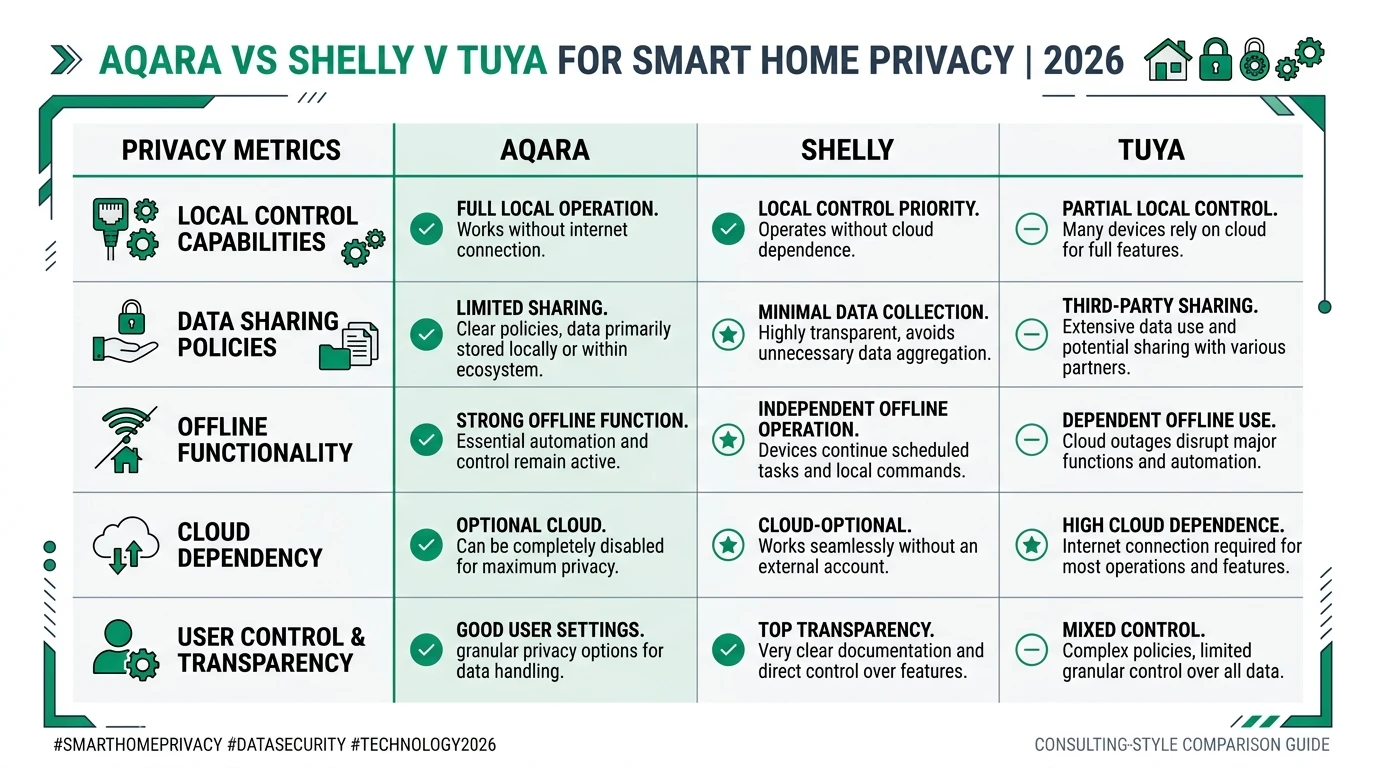
For Marcus’s rental with $180 sunk in Gosund plugs, extract first. For greenfield bedrooms, buy Shelly or Aqara-on-Zigbee per our Shelly vs Tuya Wi-Fi guide.
Verdict
Extract Tuya local keys with tinytuya wizard or Home Assistant export, pin protocol versions in tuya-local, and vault credentials before anyone opens Smart Life again. Extract Aqara hub tokens through the Home Assistant Aqara integration during a one-time Aqara Home link, then move automations to LAN APIs and block hub WAN. “Without cloud” means without ongoing cloud dependency—not without a single provisioning handshake stock firmware requires.
If extraction feels fragile, you are not wrong: rotating keys and OTA protocol shifts are why we rank Shelly and native Zigbee above stock Tuya Wi-Fi for long-term privacy builds. Use this guide to migrate hardware you already own; use the OpenBeken flash guide when even one-time Tuya cloud is a dealbreaker.
FAQ
Frequently Asked Questions
Can I extract a Tuya local key without ever using the cloud?
Not on stock Tuya Wi-Fi—you need one cloud pairing event. After export, tuya-local runs LAN-only with WAN denied.
What is the fastest way to get Tuya local keys for Home Assistant?
tinytuya wizard with a Tuya IoT developer project linked to Smart Life—one JSON file with all device_id and local_key fields.
Where does Home Assistant store Tuya local keys?
In /config/.storage/core.config_entries and integration-specific storage—back up before migrations.
How do I get an Aqara hub token for local LAN control?
Add the Aqara integration in Home Assistant after Aqara Home pairing; copy host IP and token before WAN deny.
Do Aqara Zigbee sensors have individual local keys like Tuya Wi-Fi?
No—Zigbee link keys are hub/coordinator managed. You need the hub LAN token or direct Zigbee pairing.
Will re-pairing in the manufacturer app break extracted keys?
Yes for Tuya (local_key rotates). Aqara hub factory reset invalidates tokens.
Is packet sniffing still a valid Tuya key extraction method?
Rarely in 2026—certificate pinning broke most MITM guides. Prefer tinytuya wizard or HA export.
Primary sources
| ID | Source | URL |
|---|---|---|
| 1 | tinytuya — setup wizard and device export | github.com/jasonacox/tinytuya |
| 2 | Home Assistant — Tuya integration | home-assistant.io/integrations/tuya/ |
| 3 | make-all/tuya-local — protocol pinning and release notes | github.com/make-all/tuya-local |
| 4 | Home Assistant — Aqara integration | home-assistant.io/integrations/aqara/ |
| 5 | Home Assistant Community — Tuya local key rotation threads | community.home-assistant.io/t/localtuya-local-key-rotation/635122 |
| 6 | Tuya IoT Platform — developer console | iot.tuya.com |
| 7 | Aqara Support — Hub M3 local automation FAQ | faq.aqara.com |
Dataset (JSON-LD)
Footnotes
-
tinytuya project documentation, accessed 2 September 2026. https://github.com/jasonacox/tinytuya ↩ ↩2 ↩3 ↩4
-
Home Assistant Tuya integration documentation. https://www.home-assistant.io/integrations/tuya/ ↩ ↩2
-
make-all/tuya-local release notes through 2026.4.2. https://github.com/make-all/tuya-local ↩ ↩2 ↩3 ↩4 ↩5
-
Home Assistant Aqara integration documentation, accessed 1 September 2026. https://www.home-assistant.io/integrations/aqara/ ↩ ↩2 ↩3 ↩4
-
Home Assistant Community — LocalTuya local key rotation discussion. https://community.home-assistant.io/t/localtuya-local-key-rotation/635122 ↩ ↩2 ↩3