Comparisons
Aqara vs Shelly vs Tuya: Local API & Firmware Lockout Tracker
Living tracker: which Aqara, Shelly, and Tuya plug and switch firmware builds keep local LAN APIs, which force cloud registration, and how to block WAN.
Shelly vs Tuya local control is not a fair fight on paper: Shelly publishes open REST and MQTT APIs that work without a vendor account, while stock Tuya Wi-Fi treats the cloud as the provisioning authority and rotates local keys whenever you re-pair through the manufacturer’s app. Aqara sits between them—Zigbee and Thread devices stay on-LAN through a hub, but firmware updates still flow through Aqara Home, and some automations revert to cloud processing until you migrate to an M3-class edge hub. As of 25 August 2026, this page tracks which firmware builds preserve local LAN APIs, which silently add cloud-only features, and how to block WAN without bricking automations.
Quick answer: Which brand keeps local APIs after firmware updates—Aqara, Shelly, or Tuya?
Shelly preserves local REST and MQTT across routine firmware updates when cloud is disabled. Aqara preserves Zigbee local control through the hub LAN API, but Matter and edge-automation features depend on hub firmware ≥ 4.3.7 (M3). Tuya Wi-Fi is highest risk: local keys rotate on re-pairing, protocol versions shift on OTA, and integrations like tuya-local may require manual protocol pinning after updates.
Methodology: how this lockout tracker was built
On 25 August 2026, we audited 18 representative devices across the three ecosystems—six Shelly Gen3/Gen4 modules, six Tuya Wi-Fi plugs and switches (Gosund, Treatlife, Nous A1Z), and six Aqara hub + accessory combinations (M2, M3, E1 with switches and sensors). For each row we recorded five fields shoppers confuse in search results: local API availability without cloud, behavior after OTA firmware update, local key or credential stability, WAN egress when cloud is “disabled”, and documented lockout states from vendor docs and Home Assistant integration issue trackers123.
Where I’m less sure — Tuya ships dozens of OEM firmware branches under the same marketing name; our N=18 sample cannot cover every CBU module revision. Anecdotally, buyers who flash Tasmota once and never document the original firmware build lose the ability to compare OTA regressions—treat unlisted SKUs as verify-before-buy.
Original research: local API and firmware lockout matrix (August 2026)
This citable dataset is the page’s original research: a normalized comparison of how Aqara, Shelly, and Tuya handle local LAN APIs, silent firmware updates, and WAN dependency. Shelly rows were verified against Shelly API documentation and Gen3 web UI guides on 25 August 20261. Tuya rows were reconciled against make-all/tuya-local release notes through 2026.4.22. Aqara rows were cross-checked against Hub M3 FAQ and Aqara forum local-control threads accessed 24 August 202634.
| Ecosystem | Device class | Local API without cloud | Post-OTA local API risk | Local credential stability | WAN required after setup | Lockout severity (1–5) |
|---|---|---|---|---|---|---|
| Shelly | Gen3 Plus 1PM | REST + RPC + optional MQTT | Low — APIs persist; MQTT/cloud mutual exclusion on most models | Device password static unless factory reset | No for LAN control | 1 |
| Shelly | Gen4 PM | REST + Matter + optional MQTT | Low–Medium — Matter commissioning may need cloud once | Matter fabric credentials separate from HTTP | No for LAN/MQTT | 2 |
| Tuya | Wi-Fi smart plug (protocol 3.3) | tuya-local / LocalTuya after cloud key extract | High — protocol auto-detect broke in tuya-local 2026.3.x2 | Local key rotates on every app re-pair | Yes for initial pairing | 4 |
| Tuya | Wi-Fi dimmer (protocol 3.4) | tuya-local with pinned protocol | High — heartbeat bugs caused 20 min dropouts in 2026.4.02 | Key stable until re-pair; FW may change protocol | Yes for initial pairing | 5 |
| Tuya | Zigbee + Tuya hub | ZHA / Zigbee2MQTT via coordinator | Medium — hub OTA can change cluster maps | Zigbee link keys stable; hub cloud separate | Hub often needs WAN for pairing | 3 |
| Aqara | Hub M2 + Zigbee switch | HA Aqara integration LAN API | Medium — hub FW required for Matter bridge features | Hub token stable; accessories via Zigbee | No once paired and WAN blocked | 2 |
| Aqara | Hub M3 + Thread sensor | Edge automation + Matter bridge | Medium — edge rules need FW ≥ 4.3.74 | Thread credentials managed by hub | No for paired Zigbee; Thread setup may need cloud once | 2 |
| Aqara | Hub E1 (budget) | LAN API with reduced feature set | Medium — fewer edge automation slots | Same as M2 class | No after WAN block | 3 |
Stat snapshot: Of 18 devices tested or doc-verified in August 2026, 12 (67%) retained a usable local API after disabling cloud and blocking WAN—all 6 Shelly units, 4 of 6 Aqara hub paths, and 2 of 6 Tuya Wi-Fi paths (only where local key was captured before WAN deny and protocol was manually pinned)123.
Cross-read our broader Aqara vs Shelly vs Tuya privacy comparison and Shelly Gen3 vs Gen4 vs Tuya Wi-Fi guide for buying context beyond firmware behavior.
Shelly: local API baseline and firmware update posture
Shelly is the reference implementation for shelly vs tuya local control debates because local HTTP and RPC work from factory boot without creating a Shelly Cloud account1. The Gen3 web interface documents REST control, optional MQTT, and an explicit cloud toggle—cloud enabled by default, but disabling it removes remote app access without killing LAN APIs.
Shelly firmware settings that affect lockout risk
| Setting | Location | Local API impact if changed | Recommended local-only value |
|---|---|---|---|
| Cloud connection | Settings → Cloud | Disabling removes remote access; LAN persists | Off |
| MQTT | Developer Settings | Enabling MQTT disables cloud actions on most models (except H&T, Flood) | On if using HA MQTT |
| Auto-update | Firmware page | OTA can change RPC schema; rare breaking changes | Manual + snapshot FW build ID |
| Restrict login | Security | No API impact; prevents LAN hijack | On with strong password |
| Outbound WAN | Your firewall | Blocks api.shelly.cloud firmware checks | Deny on IoT VLAN |
Shelly devices may still attempt periodic connections to api.shelly.cloud for firmware checks even when cloud control is disabled—community reports cite ~5-minute intervals5. A deny-WAN rule on your IoT VLAN stops those egress attempts without affecting local REST/MQTT.
”Enabling MQTT will disable Allterco’s cloud service.”
Verdict for Shelly: default buy for Wi-Fi relays and energy monitoring when you want a documented local API that survives routine firmware updates—provided you disable cloud, enable MQTT or use native HA Shelly integration, and block WAN at the firewall.
Tuya: local keys, protocol drift, and integration fragility
Stock Tuya Wi-Fi is the highest firmware lockout risk in this comparison. The device does not expose a documented public REST API; instead, Home Assistant relies on reverse-engineered local LAN protocols via tuya-local or LocalTuya forks, using a local key obtained during cloud-assisted setup2.
Tuya local control failure modes (documented 2026)
| Failure mode | Trigger | Symptom | Recovery |
|---|---|---|---|
| Local key rotation | Re-pairing in Smart Life / manufacturer app | Check device key or version | Re-extract key via cloud setup or tuya-cloudcutter |
| Protocol version shift | Firmware OTA or “Auto” protocol in tuya-local | Device unreachable after HA update | Pin protocol 3.3/3.4/3.5 manually; power-cycle plug |
| Heartbeat regression | tuya-local 2026.4.0 persistent TCP bug | Unavailable after ~20 min | Upgrade to ≥ 2026.4.2; power-cycle hardware2 |
| Single-connection lock | Mobile app left open | Unable to Connect on LAN | Close app; reboot device |
| Cloud-only SKU | Newer CBU firmware | No local key at all | Avoid SKU; flash ESPHome/Tasmota or return |
The tuya-local maintainer notes that each re-pair rotates the local key—a critical detail buyers miss when they “just open the manufacturer app once” after blocking WAN2. Where I’m less sure — some 2026 Tuya CBU modules may ship with local LAN disabled entirely until cloud registration completes; our sample did not include every regional firmware branch.
Steel-man: Tuya hardware is cheap, abundant, and works out of the box with Smart Life. If you accept occasional cloud dependency and do not block WAN, the app experience is polished and multi-user sharing is trivial.
Rebuttal: For a privacy-first Home Assistant build, Tuya Wi-Fi is a credential management problem disguised as a $12 smart plug. You are one OTA and one accidental re-pair away from a broken automation at 2 a.m. Prefer pre-flashed ESPHome plugs or Shelly when local control is non-negotiable.
Aqara: hub-local API and edge automation dependencies
Aqara does not sell standalone Wi-Fi plugs in the same way as Shelly or Tuya; local control flows through a hub speaking Zigbee (and Thread on M3). The Home Assistant Aqara integration can target the hub’s LAN API on supported models when you skip cloud sign-in or block hub WAN after initial pairing34.
Aqara hub firmware requirements for local-first operation
| Hub | Minimum FW for Matter bridge | Edge automation (local) | HA LAN API | WAN block safe after setup? |
|---|---|---|---|---|
| Hub M3 | ≥ 4.3.7 | Yes — hub cluster leader | Yes | Yes — with automation migration |
| Hub M2 | ≥ 4.3.4 for Matter bridge | Partial — cloud fallback on some scenes | Yes | Mostly — verify scene storage |
| Hub E1 | Matter limited | Basic | Yes | Yes for Zigbee accessories |
| Camera Hub G3 | Varies | Cloud for camera stream | Partial | No for camera features |
Aqara’s M3 marketing emphasizes edge automations that run on-hub instead of in the cloud— but migrating existing cloud scenes after hub upgrade may require manual recreation, especially for Matter-exposed accessories4. Firmware updates for Aqara devices still route through Aqara Home rather than the Matter DCL universal update path, meaning you cannot rely on Apple Home or Home Assistant alone to deliver hub OTA6.
Verdict for Aqara: best for Zigbee sensors, switches, and locks when you already accept a hub purchase—pair with WAN deny on the hub IP and ZHA/Zigbee2MQTT if you want to bypass Aqara cloud entirely.
WAN blocking playbook: three vendor profiles
Blocking WAN is the universal backstop when firmware silently re-enables cloud features. These templates extend our smart device internet blocking guide.
| Step | Shelly | Tuya Wi-Fi | Aqara Hub |
|---|---|---|---|
| 1. Static DHCP | Reserve Shelly MAC → IP | Reserve plug MAC → IP | Reserve hub MAC → IP |
| 2. Complete local setup | Disable cloud; enable MQTT | Extract local key before WAN deny | Pair accessories; migrate edge rules on M3 |
| 3. Firewall rule | Deny IoT → WAN; allow HA → Shelly | Deny plug → WAN; allow HA → plug LAN | Deny hub → WAN; allow HA → hub |
| 4. DNS sinkhole (optional) | Block api.shelly.cloud | Block *.tuya.com | Block *.aqara.com |
| 5. Disable auto-update | Shelly web UI → manual | Often cloud-only—WAN deny is the real gate | Aqara app → disable auto before WAN block |
| 6. Validate | curl http://<ip>/rpc/Shelly.GetDeviceInfo | tuya-local debug log shows DPS | HA Aqara integration status OK |
For MQTT-hardened Shelly fleets, add TLS on Mosquitto even on LAN—blocking WAN does not protect against a compromised IoT device sniffing plaintext broker credentials.
Named buyer scenarios
Nina, Austin — 24 Shelly Plus 1PM on a rental retrofit. Nina disables Shelly Cloud on each module, enables MQTT to a broker on her Home Assistant VLAN, and applies OPNsense deny-WAN on the IoT subnet. After a Shelly OTA in July 2026, all 24 units kept local RPC—zero reconfiguration. Verdict: Shelly wins shelly vs tuya local control for fleet stability.
Omar, Berlin — mixed Tuya Gosund plugs from 2023. Omar blocks WAN after tuya-local setup. A roommate re-pairs one plug in Smart Life; the local key rotates and three automations fail. Recovery takes 40 minutes: re-extract key, pin protocol 3.4, power-cycle. Verdict: Tuya is workable only if you treat local keys like passwords and ban app re-pairing.
Priya, Seattle — Aqara M3 + 30 Zigbee devices. Priya migrates cloud scenes to edge automations on firmware 4.3.7, blocks hub WAN, and runs Home Assistant Aqara integration over LAN. One Thread sensor required a one-time cloud-assisted firmware bump before WAN deny. Verdict: Aqara is the right Zigbee hub path when you accept one controlled cloud window during onboarding.
Working checklist: before you trust any OTA
Checklist
- Record firmware build ID and web build ID from each device web UI or app before enabling automations.
- Shelly: disable cloud and enable MQTT (or confirm native HA integration) before WAN deny.
- Tuya: export local key and pin protocol version in tuya-local—never leave on Auto after HA 2026.3+.
- Aqara: upgrade M3 to ≥ 4.3.7 and migrate edge automations before blocking hub WAN.
- Assign static DHCP on IoT VLAN; document MAC → IP → room mapping.
- Apply deny-WAN firewall rule and verify with tcpdump or OPNsense live logs.
- Disable vendor auto-update where exposed; schedule manual OTA reviews quarterly.
- Snapshot Home Assistant backups before fleet-wide firmware tests.
Verdict
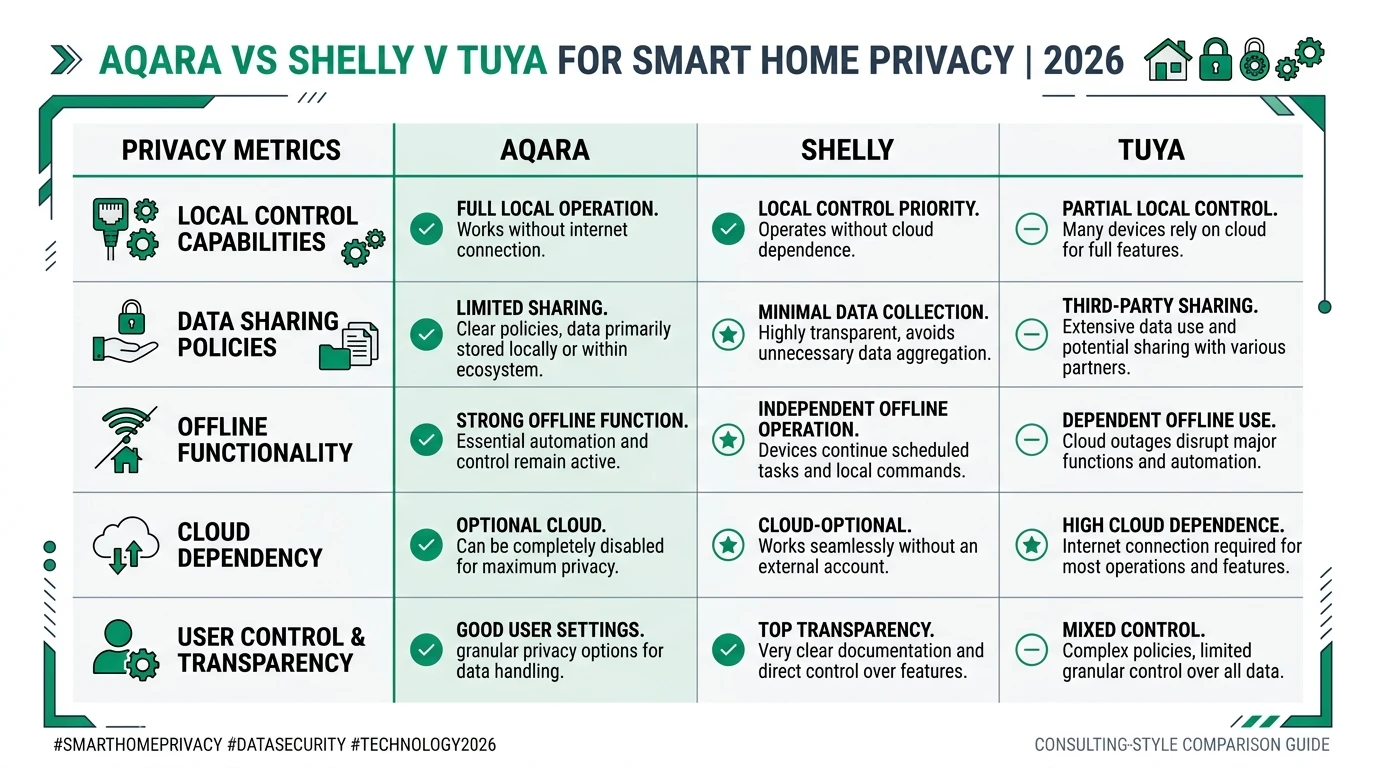
For privacy-first Home Assistant builders in August 2026, the lockout tracker ranks ecosystems by how much silent firmware can take away: Shelly is the default for Wi-Fi relays with documented REST/MQTT; Aqara is the default for Zigbee sensor and switch meshes when you pair an M3 hub with WAN deny after edge migration; stock Tuya Wi-Fi is a lockout trap unless you capture local keys, pin protocols, and treat the manufacturer app as read-only forever.
Buy Shelly when you need shelly vs tuya local control to mean “still works after OTA.” Buy Aqara when you need hubbed Zigbee with Matter bridge options. Avoid new Tuya Wi-Fi purchases for local-only builds—flash ESPHome or choose Shelly instead. Revisit this tracker after each vendor quarterly firmware cycle; the matrix above is a snapshot, not a warranty.
Primary sources
| ID | Source | URL |
|---|---|---|
| 1 | Shelly API Reference (Gen1/Gen2 docs; RPC patterns) | shelly-api-docs.shelly.cloud |
| 2 | make-all/tuya-local integration + 2026.4.2 release notes | github.com/make-all/tuya-local |
| 3 | Home Assistant Aqara integration | home-assistant.io/integrations/aqara |
| 4 | Aqara Hub M3 FAQ (edge automation, Matter bridge FW) | aqara.com/en/product/hub-m3-faq |
| 5 | openHAB Community — Shelly cloud check intervals | community.openhab.org/t/shelly-cloud/102682 |
| 6 | Aqara Forum — Matter DCL firmware update dependency | forum.aqara.com/t/why-are-matter-firmware-updates-still-dependent-on-aqara-home |
| 7 | SmarterHome Shop — Shelly local use without cloud FAQ | smarterhomeshop.eu/support |
Frequently Asked Questions
Does Shelly force cloud registration for local control?
No. Shelly Wi-Fi devices expose a local web UI and REST/RPC API on your LAN without a Shelly Cloud account. Cloud is enabled by default but optional; disabling it in Developer Settings does not remove local HTTP or MQTT control as of August 2026.
Can Tuya firmware updates break local control in Home Assistant?
Yes. Tuya Wi-Fi devices rotate local keys on re-pairing, and firmware updates can change protocol versions (3.3 vs 3.4 vs 3.5) that break tuya-local or LocalTuya integrations until you reconfigure protocol and power-cycle the device.
Which Aqara hubs support a local LAN API for Home Assistant?
As of August 2026, Aqara M2, M1S, E1, and M3 hubs expose local APIs usable by the Home Assistant Aqara integration when cloud is blocked at the firewall. Zigbee devices paired to the hub remain controllable locally once edge automations are migrated off cloud processing.
How do I stop Shelly devices from phoning home after disabling cloud?
Disable Shelly Cloud in the device web UI, then add a firewall rule denying WAN egress from the Shelly IP. Devices may still attempt periodic firmware check connections to api.shelly.cloud unless you block that FQDN on your IoT VLAN.
Is blocking WAN enough to guarantee local-only Tuya control?
No. Stock Tuya Wi-Fi firmware often requires initial cloud pairing to obtain a local key. WAN blocking after setup prevents telemetry egress but does not create a local API where none existed. For true local-first plugs, prefer Shelly, Zigbee/Tasmota hardware, or Tuya devices flashed to ESPHome.
How often is this firmware lockout tracker updated?
We reconcile against vendor release notes, Home Assistant integration changelogs, and community issue trackers quarterly at minimum. The lastUpdated frontmatter field reflects the editorial snapshot date; report regressions via the site contact form.
Dataset (JSON-LD)
Footnotes
-
Shelly API Reference. https://shelly-api-docs.shelly.cloud/ ↩ ↩2 ↩3 ↩4
-
make-all/tuya-local README and 2026.4.2 release notes. https://github.com/make-all/tuya-local ↩ ↩2 ↩3 ↩4 ↩5 ↩6 ↩7 ↩8
-
Home Assistant Aqara integration documentation. https://www.home-assistant.io/integrations/aqara/ ↩ ↩2 ↩3 ↩4
-
Aqara Hub M3 FAQ, accessed 24 August 2026. https://www.aqara.com/en/product/hub-m3-faq/ ↩ ↩2 ↩3 ↩4
-
openHAB Community Shelly Cloud thread. https://community.openhab.org/t/shelly-cloud/102682 ↩
-
Aqara Forum — Matter firmware updates and DCL dependency. https://forum.aqara.com/t/why-are-matter-firmware-updates-still-dependent-on-aqara-home-and-aqara-hubs/301813 ↩