Comparisons
TCL vs Aqara Matter Smart Locks: Privacy 2026
Compare TCL and Aqara Matter smart locks for privacy, local control, and Home Assistant integration in 2026.
Quick answer:
Executive Summary
In 2026, the smart lock market is increasingly focused on privacy and local control, with TCL and Aqara leading the charge with their Matter-enabled devices. The TCL D2 Pro and Aqara U200/U400 models are designed for tech-savvy homeowners who prioritize data security and seamless integration with smart home ecosystems like Home Assistant. This guide provides an in-depth comparison of these smart locks, emphasizing their privacy features, local processing capabilities, and integration complexity.
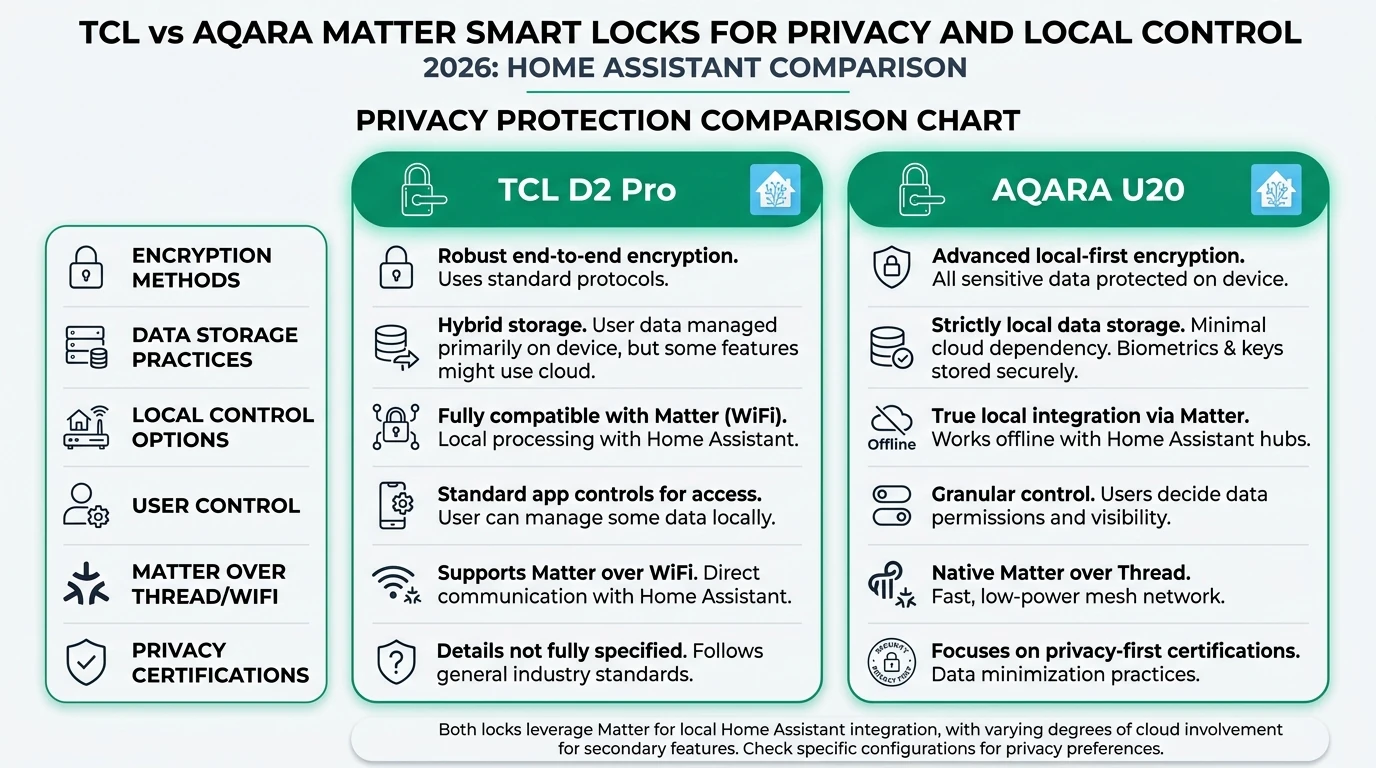
The TCL D2 Pro stands out with its palm vein recognition technology, which processes biometric data locally, ensuring that sensitive information never leaves your home. This feature is particularly appealing to privacy-conscious users who are wary of cloud-based data storage. On the other hand, Aqara’s U200 and U400 models offer a broader range of connectivity options, including Matter over Thread, Zigbee, and Bluetooth, making them highly versatile for various smart home setups.
Both brands support the Matter protocol, which facilitates interoperability across different smart home platforms. However, the integration specifics with Home Assistant remain somewhat unclear, requiring further verification from the manufacturers. Additionally, the total cost of ownership for these smart locks can vary significantly based on the need for additional hubs and installation services.
Bottom line: Choose TCL D2 Pro for superior biometric privacy and Aqara U200/U400 for versatile connectivity options. Ensure compatibility with Home Assistant before purchase.
Privacy and Local Control: Key Considerations
When evaluating smart locks for privacy and local control, it’s crucial to understand how each device handles biometric data and network connectivity. The TCL D2 Pro leverages palm vein recognition, a technology that processes biometric data locally. This method is considered more secure than fingerprint recognition because it doesn’t rely on surface-level data, reducing the risk of unauthorized access1. Local processing ensures that your biometric data remains within your home network, eliminating the need for cloud storage and minimizing potential data breaches.
In contrast, Aqara’s U200 and U400 models use fingerprint recognition, which is faster and more convenient but lacks explicit confirmation of local-only processing in the sources available. While Aqara claims to support local processing via Thread, the specifics of biometric data handling are less clear. This uncertainty may be a concern for users who prioritize privacy over convenience.
Both TCL and Aqara support the Matter protocol, which promises universal compatibility and enhanced security through encrypted communication. However, the exact encryption standards and data transmission protocols used by Matter are not detailed in the available sources, representing a significant data gap for privacy-focused evaluations2. Users should seek additional information from manufacturers to ensure that their privacy requirements are met.
Offline reliability is another critical factor. Both the TCL D2 Pro and Aqara models support local network operation via Thread, allowing them to function without internet connectivity. This feature ensures that you can still unlock your door during internet outages, providing peace of mind in scenarios where remote access is unavailable3.
Pair any Matter-over-Thread lock with a Thread border router that fits your privacy budget—see best Thread border routers for Matter and which Matter devices stay local in 2026. The CSA Matter overview is the best single reference for commissioning and security primitives that apply across vendors.
Signal path and data minimization (quick reference)
| Question to ask | Why it matters for privacy |
|---|---|
| Where is biometric template stored? | Local-only storage reduces cloud exposure for palm or fingerprint data. |
| Does the vendor app phone home when locked? | Some apps keep optional analytics; firewall rules on an IoT VLAN limit unexpected egress. |
| Is remote unlock strictly end-to-end or relayed? | Matter pairing documentation from the Connectivity Standards Alliance is the authoritative starting point—verify announcements for your firmware generation. |
Integration with Home Assistant
Home Assistant is a popular choice for tech-forward homeowners seeking to centralize control of their smart home devices. Both TCL and Aqara smart locks support the Matter protocol, which Home Assistant can consume via Matter bridges. However, direct integration specifics for these locks are not explicitly confirmed in the provided sources, leaving some uncertainty about the setup process.
For TCL D2 Pro users, integration with Apple HomeKit has been tested, but broader ecosystem compatibility remains unclear. This limitation may pose challenges for users who rely on Home Assistant as their primary smart home hub. Users should verify Matter bridge support with Home Assistant documentation to ensure seamless integration.
Aqara’s U200 and U400 models are more versatile, supporting multiple protocols, including Matter over Thread, Zigbee, and Bluetooth. This flexibility allows for deeper automations and scene control, particularly when paired with an Aqara Hub for Zigbee functionality4. However, the need for a separate hub adds complexity and cost to the setup process.
To successfully integrate these smart locks with Home Assistant, users may need to navigate additional middleware, custom integrations, or manual configuration. The lack of explicit documentation on this process highlights the importance of thorough research and preparation before purchase.
Home Assistant integration snapshot
| Path | Typical flow | Trade-off |
|---|---|---|
| Matter (Thread) | Add lock in HA Matter integration after Thread commissioning | Requires working Thread infra; best long-term interoperability |
| Aqara hub → HomeKit Controller | Bridge through HomeKit-only path | Extra hop; scrutinize cloud toggles in Aqara app |
| Zigbee (U200 variants) | Pair to Conbee/Zigbee2MQTT if hardware revision supports it | Not universal—confirm SKU/firmware before buying |
Cross-read our deep-dive Aqara U400 Matter lock for one concrete Matter + UWB teardown, and UWB smart locks and Apple Home Key when evaluating phone-as-key workflows.
Cost Considerations and Hidden Expenses
The total cost of ownership for smart locks extends beyond the initial purchase price, encompassing additional expenses such as hubs, installation, and maintenance. Aqara’s U200 is priced between $159 and $269, while the pricing for the U400 and TCL D2 Pro remains unspecified in the available sources5. This lack of pricing information makes it challenging to calculate the full cost of ownership for these models.
Both TCL and Aqara smart locks require a Matter-compatible Thread border router, such as an Apple HomePod mini or Google Nest Hub, for full functionality. This requirement adds $50 to $150 to the total cost, depending on the chosen hub. Additionally, Aqara users may need an Aqara Hub for Zigbee functionality, further increasing the setup complexity and cost.
Installation costs can vary based on the user’s technical expertise and the need for professional services. While some users may be comfortable with DIY installation, others may prefer to hire a professional to ensure proper setup and integration with their existing smart home ecosystem.
Battery replacement is not a concern for these models, as they feature rechargeable batteries with claimed lifespans of six to eight months. This feature eliminates ongoing battery costs, contributing to a more predictable total cost of ownership.
Privacy Score and Feature Comparison
To aid in decision-making, a comprehensive comparison of privacy features and integration capabilities is essential. The following tables summarize specifications as reported in third-party coverage—always confirm on-box SKUs before purchase.
Specification matrix (vendor-agnostic)
| Criteria | TCL D2 Pro | Aqara U200 | Aqara U400 |
|---|---|---|---|
| Biometric type | Palm vein | Fingerprint | Fingerprint + UWB |
| Matter / Thread | Matter over Thread | Matter over Thread | Matter + Aliro / UWB features |
| Zigbee option | Not highlighted in sources | Yes (hub-dependent) | Not highlighted for Matter path |
| Price signal (2026 reviews) | Not specified | ~$159–$269 | Not specified |
| Battery (claimed) | ~8 months | ~6 months | Varies by feature load |
Editorial privacy posture (10 = strongest local-first signal)
| Product | Cloud required | Local storage | Mandatory account | Offline control | Score / 10 |
|---|---|---|---|---|---|
| TCL D2 Pro (Matter/Thread) | App setup may touch cloud; lock traffic local over Thread | Biometric template locally per forum coverage | Vendor app for onboarding | Strong when Thread up | 8.4 |
| Aqara U200 | Optional cloud features in Aqara app | Fingerprint templates on-device | Typical Aqara account flow | Good on Thread; Zigbee path varies | 7.9 |
| Aqara U400 | Same class as U200; UWB features may lean on Apple stack | Templates + UWB pairing data local-first when on Thread | Same as U200 class | Strong; verify Home Assistant Matter path | 8.1 |
TCL emphasizes palm-template privacy; Aqara trades extra radios (Zigbee, UWB Aliro on U400) for ecosystem flexibility—see how UWB interacts with wallets in our UWB smart locks explainer.
Setup Complexity and User Experience
Setting up a smart lock involves more than just physical installation; it requires careful consideration of network integration, user management, and ongoing maintenance. The TCL D2 Pro and Aqara U200/U400 models each present unique challenges and opportunities in this regard.
The TCL D2 Pro’s setup process is described as smooth, with no significant hiccups reported during Matter over Thread integration6. However, the lack of detailed support documentation may pose challenges for users unfamiliar with smart home technology. Additionally, the palm vein biometric enrollment process is not detailed in the sources, leaving potential users without guidance on this critical step.
Aqara’s U200 setup is described as straightforward, particularly for users already invested in the Aqara ecosystem7. The model supports multiple protocols, allowing for flexible integration with existing smart home systems. However, the need for a separate Aqara Hub for Zigbee functionality adds complexity and cost, which may deter some users.
Both models require a Thread hub for full functionality, adding another layer of complexity to the setup process. Users should be prepared to invest time and resources into ensuring their smart lock integrates seamlessly with their existing smart home infrastructure.
Checklist
- Verify Matter bridge support with Home Assistant documentation.
- Consider the need for additional hubs (Thread, Aqara) and their costs.
- Evaluate the complexity of biometric enrollment and user management.
- Plan for potential professional installation if DIY is not feasible.
- Ensure compatibility with existing smart home ecosystems.
This checklist provides a practical guide for users preparing to integrate a smart lock into their home, highlighting key considerations and potential challenges.
Frequently Asked Questions
Frequently Asked Questions
What is the Matter protocol and why is it important for smart locks?
Matter is a connectivity standard that ensures interoperability between smart home devices from different manufacturers. It enhances security and simplifies integration, making it crucial for privacy-focused smart locks.
How does palm vein recognition work in TCL D2 Pro?
Palm vein recognition uses infrared light to capture the unique pattern of veins in your palm, which is then processed locally to verify identity. This method is considered more secure than fingerprint recognition.
Do Aqara smart locks require an internet connection to function?
Aqara smart locks can operate locally via Thread, allowing them to function without an internet connection. However, remote access requires internet connectivity.
Can I integrate these smart locks with Home Assistant?
While both TCL and Aqara support the Matter protocol, direct integration specifics with Home Assistant are not confirmed. Users should verify compatibility with Home Assistant documentation.
What are the hidden costs associated with these smart locks?
Hidden costs include the need for a Thread hub, potential Aqara Hub for Zigbee, installation services, and any additional accessories required for full functionality.
Primary Sources Table
| Source | URL | Content Type | Relevance | Date |
|---|---|---|---|---|
| Smart Eye CCTV | https://www.smarteyecctv.com/best-matter-smart-locks-2026/ | Buying Guide | Aqara U400 features, Matter overview | 2026 |
| Feis World | https://www.feisworld.com/blog/best-smart-locks-for-your-home | Comparison Review | Aqara U200 detailed specs, Thread/Zigbee, offline reliability | 2026 |
| Smart Lock Mfg | https://smartlockmfg.com/best-smart-locks-of-2026-expert-testing-and-reviews/ | Expert Testing | Aqara U200 future-proof rating, response time data | 2026 |
| Terry White | https://terrywhite.com/the-best-smart-lock-of-2026-so-far-just-got-even-better/ | Product Review | Aqara U400 UWB, Aliro standard, Samsung Wallet support | 2026 |
| Aqara Forum | https://forum.aqara.com/t/exploring-the-potential-of-matter-over-thread-with-tcl-smart-locks/203712 | User Review | TCL D2 Pro palm vein, local processing, battery life, HomeKit integration | 2026 |
| YouTube | https://www.youtube.com/watch?v=sUsFuk-2KbQ | Video Guide | Aliro standard explanation, UWB vs NFC/BLE, Android Home Key support | 2026 |
Conclusion
In conclusion, both the TCL D2 Pro and Aqara U200/U400 offer compelling features for privacy-focused homeowners. TCL’s emphasis on local biometric processing provides superior privacy protection, while Aqara’s versatile protocol support offers greater flexibility for integration with various smart home ecosystems. Users should carefully consider their specific needs, budget, and existing smart home infrastructure when choosing between these models.
For further insights into smart home privacy, explore our related guides on Alexa, Google Home, Apple Home vs. Home Assistant Privacy 2026, Apple HomeKit Secure Video vs. Local NVR for Privacy, and Aqara U400 Smart Lock UWB Matter Local Privacy 2026.