Smart Home Privacy
SmartThings vs Home Assistant: Privacy & Local Control 2026
Compare Samsung SmartThings and Home Assistant for privacy: cloud accounts, local execution, Matter/Thread, and which stack minimizes telemetry in 2026.
Quick answer: Which is better for privacy: SmartThings or Home Assistant?
Home Assistant wins for strict local-only operation and optional air-gapped installs. SmartThings offers easier onboarding but ties identity, automation history, and some device telemetry to Samsung’s cloud—acceptable only if you accept vendor-hosted control.
Source: Home Assistant documentation
Executive Summary
Samsung SmartThings and Home Assistant represent two philosophies: managed ecosystem versus self-hosted automation. SmartThings Station and compatible hubs run some automations locally, yet account authentication, remote access, and many integrations still traverse Samsung’s infrastructure1. Home Assistant executes automations on your hardware and can block outbound traffic while still controlling Matter, Zigbee, Z-Wave, and Wi-Fi devices2.
This guide compares account requirements, local execution, protocol coverage, and data exposure so you can pick the stack that matches your privacy budget. For VLAN segmentation context, read our guest Wi-Fi vs IoT VLAN guide; for Matter hub nuance, see which Matter devices are truly local.
Bottom line: Choose Home Assistant when you want maximum data sovereignty; choose SmartThings when you want polished hardware and can tolerate Samsung’s cloud as a control plane.
Account model and cloud dependency
SmartThings requires a Samsung account for setup, remote access, and many third-party integrations1. That account is the anchor for OAuth tokens, device inventory sync, and optional SmartThings Energy features. Home Assistant does not mandate a vendor account—you can install Home Assistant OS on a mini PC or Raspberry Pi and authenticate only to your LAN2.
| Dimension | SmartThings | Home Assistant |
|---|---|---|
| Mandatory vendor account | Yes (Samsung) | No |
| Remote access without vendor relay | Limited (ST app uses cloud path) | Yes (VPN, Tailscale, or your own TLS) |
| Auditability of outbound calls | Opaque client; hub firmware | Full firewall logs on your router |
SmartThings’ partial local execution is a real improvement for lighting and sensor rules, but policy and identity still live in the cloud. Home Assistant keeps configuration YAML and SQLite/MariaDB under your control unless you opt into third-party add-ons that phone home.
Local execution and offline reliability
When internet drops, SmartThings may still run cached local automations on supported hubs, but voice assistants, cloud-backed integrations, and geofencing typically fail3. Home Assistant continues to evaluate triggers, scenes, and scripts as long as power and LAN stay up—pair with local voice (local voice stack) for full offline UX.
| Scenario | SmartThings | Home Assistant |
|---|---|---|
| Internet outage | Partial local scenes; cloud-dependent integrations break | Full local automation if integrations are local |
| Power outage | Hub-dependent | Same; add UPS for HA hardware |
| Firmware brick risk | Vendor OTA | You control backups and rollback |
Protocol and ecosystem breadth
SmartThings supports Matter, Zigbee, Z-Wave (via hub), and many Wi-Fi cloud APIs. Home Assistant integrates 2,000+ integrations with many local options—MQTT, ESPHome, Tasmota, and direct REST4. If you need Philips Hue without Hue bridge cloud, HA often pairs directly; SmartThings typically expects vendor-approved paths.
Cross-reference Zigbee stacks in HA when you outgrow bundled hubs.
Remote access patterns that preserve privacy
Remote control is where architectures diverge. SmartThings mobile apps typically proxy through Samsung’s cloud APIs even when your phone is on LTE5. Home Assistant supports no-cloud paths: VPN into home (best VPN for smart home), Tailscale vs WireGuard, or Cloudflare Tunnel—each with distinct trust assumptions.
| Remote pattern | Data path | Best for |
|---|---|---|
| SmartThings app | Samsung cloud | Low setup friction |
| Home Assistant + VPN | Encrypted tunnel to LAN | Privacy-first households |
| Nabu Casa (optional) | HA cloud relay | Convenience without Samsung |
If you must use SmartThings remotely, segment the hub on an IoT VLAN with explicit DNS filtering (Pi-hole vs AdGuard) to reduce accidental telemetry endpoints.
Telemetry, logging, and third-party risk
Samsung collects usage analytics and crash diagnostics subject to its privacy policy; you can limit some toggles in the app, but you cannot compile SmartThings from source6. Home Assistant’s core is open source; telemetry is opt-in via analytics settings. Add-ons vary—treat each add-on as a supply-chain decision.
| Data type | SmartThings typical | Home Assistant typical |
|---|---|---|
| Automation state history | Cloud-backed history in app | Local Recorder DB |
| Device credentials | Samsung-managed tokens | Stored locally |
| Voice audio | N/A in ST hub alone; Alexa/Google if linked | Local STT if you configure it |
Security surface: updates, SSH, and supply chain
Home Assistant exposes SSH add-ons, Samba, and Terminal—powerful but risky if port-forwarded carelessly. SmartThings hides complexity, which reduces misconfiguration but also reduces transparency7. Treat HA like any server: automatic OS updates, key-based SSH, and no uPnP on your router.
| Hardening action | SmartThings | Home Assistant |
|---|---|---|
| Patch cadence | Vendor OTA | You schedule |
| Shell access | None (consumer) | Add-ons available |
| Audit logs | Limited export | Full journalctl + file access |
Migration and coexistence strategies
Many users run both: SmartThings for family-friendly UX and Home Assistant for advanced automations via MQTT bridges or Matter sharing. That duplicates attack surface—prefer a single control plane if privacy is paramount. Migration steps: export device lists, re-pair Zigbee to a new coordinator if moving fully to HA, and rebuild scenes in YAML or the UI.
Cost, skills, and time to value
SmartThings hardware bundles (Station, hubs) are turnkey but include subscription-adjacent services (optional plans). Home Assistant is free software but needs hardware ($35–$400+) and learning time. See hubs without mandatory cloud for a wider hub comparison.
Decision matrix
| If you prioritize… | Lean SmartThings | Lean Home Assistant |
|---|---|---|
| Fastest setup | ✓ | |
| Maximum privacy | ✓ | |
| Matter + Thread today | ✓ (Station) | ✓ (SkyConnect/Yellow) |
| Open source audit | ✓ |
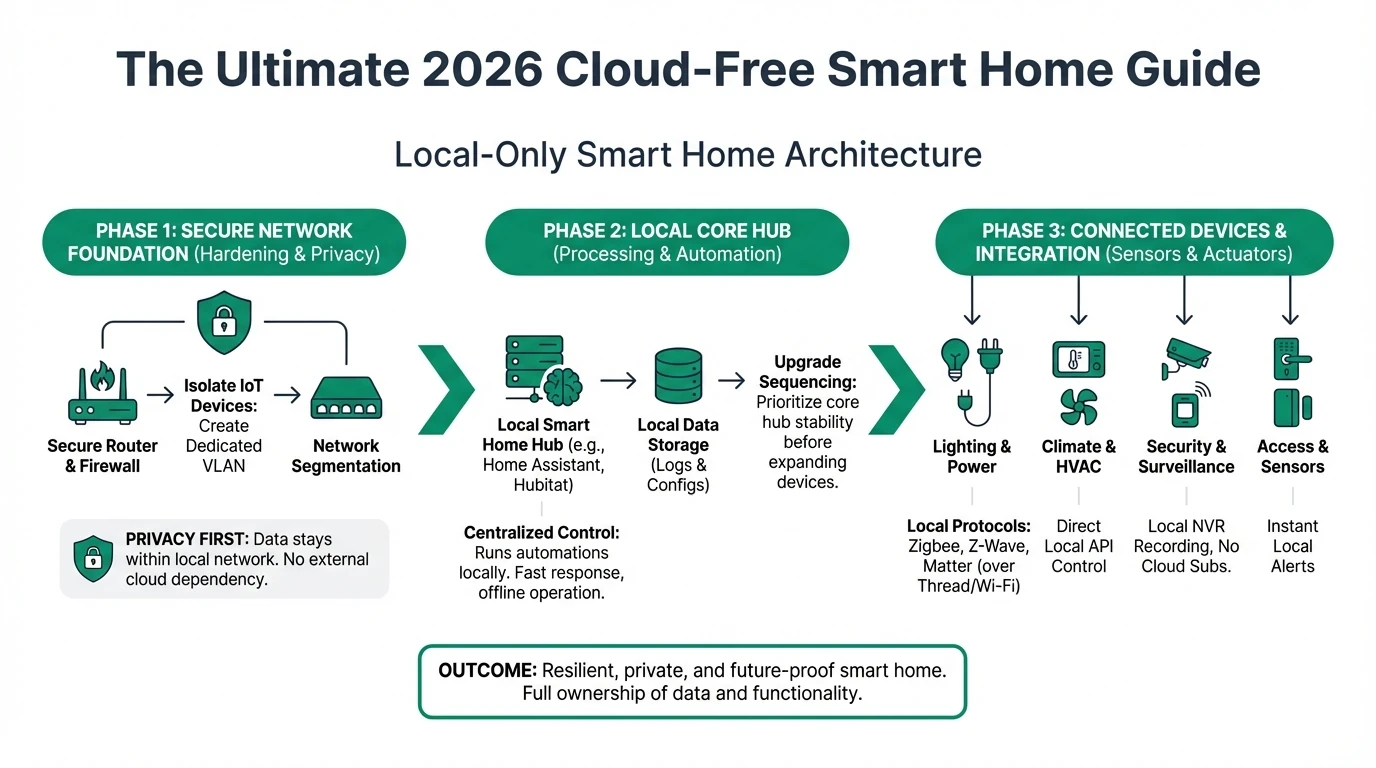
Checklist
- Decide if a Samsung account is acceptable for your household threat model.
- List must-have integrations and verify local-only paths in Home Assistant.
- Segment IoT onto a dedicated VLAN if you keep SmartThings.
- Enable local backups for Home Assistant and test restore quarterly.
- Document which automations must work during internet outages.
FAQ
Frequently Asked Questions
Can SmartThings run 100% offline?
No. Account authentication and many integrations require Samsung’s cloud services; only a subset of automations runs locally on supported hubs.
Is Home Assistant harder to secure than SmartThings?
You are responsible for OS patching, TLS, and network segmentation—higher effort, but you gain transparency and firewall-level control.
Does Matter make SmartThings as private as Home Assistant?
Matter improves interoperability but does not remove Samsung’s account layer or cloud analytics; local Matter control still depends on the controller you choose.
Can I use SmartThings devices only with Home Assistant?
Some devices can be re-paired to a universal Zigbee/Matter coordinator; others are firmware-locked—check device-specific community threads before buying.
Which is safer for camera storage?
Neither replaces an NVR—use Frigate or local NVR for video; avoid sending footage to hub clouds.
Primary sources
| ID | Source | URL |
|---|---|---|
| 1 | Home Assistant docs | home-assistant.io |
| 2 | Matter overview | Connectivity Standards Alliance |
| 3 | Samsung SmartThings | smartthings.com |
Conclusion
SmartThings remains a strong consumer platform with improving local execution, but privacy maximalists should plan on Home Assistant or accept Samsung’s cloud role. Start by inventorying integrations and mapping which require cloud APIs—then decide if split-tunnel VPN, VLAN isolation, or full migration fits your timeline.
Next step: if you choose Home Assistant, review HA vs openHAB vs HomeBridge for platform nuances before you flash hardware.
Footnotes
-
Samsung account and SmartThings cloud services are required for initial hub enrollment and many remote features per SmartThings user documentation. ↩ ↩2
-
Home Assistant can be installed without cloud accounts; outbound connections are configurable at the OS and integration level. ↩ ↩2
-
Local execution on SmartThings hubs varies by device type and firmware; cloud integrations fail offline. ↩
-
Home Assistant integration count and local-first options are documented in the official integrations directory. ↩
-
SmartThings mobile experience relies on cloud-backed APIs for most remote control flows per Samsung’s architecture. ↩
-
Samsung privacy policy governs analytics; Home Assistant analytics are opt-in from the UI. ↩
-
Closed firmware can be simpler for novices but harder to audit compared to open-source Home Assistant components. ↩