Comparisons
Best Small LLMs on Raspberry Pi 5 (Local & Offline 2026)
Best small local and offline LLMs for Raspberry Pi 5 in 2026: RAM headroom, latency, and private voice stacks with Home Assistant.
Quick answer:
Executive Summary
As the demand for privacy-focused local voice assistants grows, Raspberry Pi 5 emerges as a popular platform for deploying small language models (LLMs). In 2026, the best small LLMs for Raspberry Pi 5 are those that balance low latency, efficient RAM usage, and offline reliability. This guide explores the top models, including Gemma3:270M, BitNet B1.58 2B, and Qwen2.5:1.5B, providing actionable insights into their performance and suitability for voice applications.
The bottom line is that choosing the right LLM for your Raspberry Pi 5 setup can significantly enhance your voice assistant’s performance while maintaining privacy and cost-effectiveness.
This article builds on our hardware comparison local LLM on Raspberry Pi 5 vs N100 for voice, the model shortlist in best local LLMs for home automation, and the end-to-end stack in build a local voice assistant with Whisper and Ollama on Home Assistant.
Understanding Small LLMs for Raspberry Pi 5
Small language models (LLMs) are designed to run efficiently on devices with limited resources, such as the Raspberry Pi 5. These models typically range from 1 to 9 billion parameters, making them suitable for tasks like voice command processing and simple question-and-answer interactions. The primary advantage of using small LLMs on Raspberry Pi 5 is the ability to operate offline, ensuring user privacy and reducing dependency on cloud services.
For Raspberry Pi 5, which comes with 8GB of RAM, selecting models that optimize latency and RAM usage is crucial. The goal is to achieve low-latency inference, ideally under 2 seconds per response, without exceeding the device’s memory capacity. This is particularly important for voice assistants, where quick and accurate responses are essential for a seamless user experience.
In 2026, the landscape of small LLMs has evolved, with models like Gemma3:270M, BitNet B1.58 2B, and Qwen2.5:1.5B leading the way. These models are not only efficient in terms of resource usage but also offer robust performance for local voice applications. They are designed to work seamlessly with engines like llama.cpp, which is optimized for ARM CPUs, providing a 10-20% speed advantage over alternatives like Ollama.
Key Considerations for Selecting Small LLMs
When choosing a small LLM for Raspberry Pi 5, several factors must be considered. Latency is a critical metric, with the best models achieving prompt evaluation speeds of over 200 tokens per second and decoding speeds of over 20 tokens per second. This ensures that the total response time remains under 2 seconds for a typical 40-token prompt, even when accounting for additional processing like speech-to-text (STT) and text-to-speech (TTS).
RAM usage is another important consideration. Models should ideally peak at less than 5GB of RAM, especially when quantized to formats like Q4 or Q8. This prevents excessive swapping and ensures smooth operation on the Raspberry Pi 5’s 8GB memory. Additionally, offline reliability is paramount, with models needing to support ARM CPU architectures and operate without internet connectivity after initial setup.
Privacy and local control are also crucial, with open-source models being preferred to avoid vendor lock-in and telemetry risks. Models like Qwen2.5 and Llama3.2 offer open weights, allowing users to maintain full control over their deployments. These models are particularly well-suited for voice applications, where low hallucination rates are essential for accurate command processing.
Benchmarking Latency and RAM Usage
Benchmarking is essential to determine the performance of small LLMs on Raspberry Pi 5. In 2026, the focus is on achieving low latency and efficient RAM usage to support local voice assistants. Models like Gemma3:270M, BitNet B1.58 2B, and Qwen2.5:1.5B have been tested extensively to provide reliable benchmarks.
Latency is measured in terms of tokens processed per second (t/s), with the best models achieving over 200 t/s for prompt evaluation and over 20 t/s for decoding. This ensures that the total response time remains under 2 seconds, even when accounting for additional processing like STT and TTS. For instance, Gemma3:270M achieves an impressive 26.7 t/s evaluation speed, making it ideal for simple voice tasks.
RAM usage is another critical metric, with models needing to peak at less than 5GB to operate efficiently on Raspberry Pi 5. Quantization techniques, such as Q4 and Q8, help reduce memory usage without significantly impacting performance. BitNet B1.58 2B, for example, uses less than half the RAM of its 2B peers, making it a top choice for resource-constrained environments.
| Model | Latency (s) | RAM (GB) | Best For | Engine |
|---|---|---|---|---|
| Gemma3:270M | 1.4 total | Under 2 | Simple voice | llama.cpp |
| BitNet 2B | 8+ t/s | Minimal | Efficiency | llama.cpp |
| Qwen2.5:1.5B | Competitive | Low | Balanced | llama.cpp/Ollama |
These benchmarks highlight the strengths of each model, helping users make informed decisions based on their specific needs and constraints.
Privacy and Security Considerations
Privacy is a major concern for users deploying local voice assistants on Raspberry Pi 5. Unlike cloud-based solutions, local LLMs ensure that all data processing occurs on the device, minimizing the risk of data breaches and unauthorized access. This is particularly important for voice assistants, which often handle sensitive information.
Open-source models, such as Qwen3-8B and Llama3.1 8B, offer significant privacy advantages by avoiding vendor lock-in and telemetry risks. These models allow users to maintain full control over their deployments, ensuring that no data is sent to external servers. Additionally, using engines like llama.cpp provides auditable inference, further enhancing privacy and security.
However, there are potential risks associated with local deployments. Model poisoning, for instance, can occur if unverified GGUF files are used. To mitigate this risk, it’s recommended to use official quantizations from trusted sources like Hugging Face. Offline reliability is another consideration, with models needing to reload after power cycles, which can take approximately 0.3 seconds.
Despite these challenges, local LLMs on Raspberry Pi 5 align with privacy regulations such as GDPR, which emphasize local data processing. While there are no official standards for local AI privacy, these models offer a robust solution for users seeking to protect their data.
Setup Complexity and Support
Setting up small LLMs on Raspberry Pi 5 requires a moderate level of technical expertise. The process involves compiling engines like llama.cpp from source, which can take approximately 30 minutes. Configuring threads and context settings is also necessary to optimize performance. While this setup may seem daunting, it offers significant customization options, allowing users to fine-tune their deployments.
For those seeking a simpler setup, Ollama offers an easier installation process, with a curl command that completes in about 5 minutes. However, this simplicity comes at the cost of reduced performance and tunability compared to llama.cpp. Users must weigh the trade-offs between ease of use and performance when selecting an engine.
The voice pipeline adds another layer of complexity, requiring the integration of Docker for isolation. This step adds approximately 10 minutes to the setup time, bringing the total to less than an hour for experienced users. While there is no official support from Raspberry Pi for LLM deployments, community-driven resources such as Reddit and Pi forums provide valuable assistance.
Checklist
- Compile llama.cpp from source
- Configure threads and context
- Install Docker for isolation
- Integrate Whisper.cpp for STT
- Set up Piper for TTS
Overall, the support burden for local LLMs on Raspberry Pi 5 is relatively low, with no ongoing updates required. However, users may need to make quantization tweaks for 4GB models, such as using Q4_K_M, to optimize performance.
Cost Considerations and Total Cost of Ownership
The total cost of ownership (TCO) for deploying a voice assistant on Raspberry Pi 5 is an important consideration for many users. The initial cost includes the Raspberry Pi 5 itself, priced at approximately $80 for the 8GB model. Additional expenses include a case and SSD, bringing the total to around $100 for the first year.
Ongoing costs are minimal, with power consumption estimated at $5 per year for a device running at 5W idle. Hidden costs may include the time required for setup, which can range from 2 to 4 hours, and the need for cooling solutions, such as a $5 fan, to prevent overheating during intensive tasks.
Quantized models, ranging from 1 to 3 billion parameters, offer a cost-effective solution, as they are free to use indefinitely. This contrasts with cloud-based solutions, which typically charge $0.01 per 1,000 tokens processed. While there are no specific pricing benchmarks for 2026, the cost of electricity, estimated at $0.15 per kWh, may impact long-term expenses.
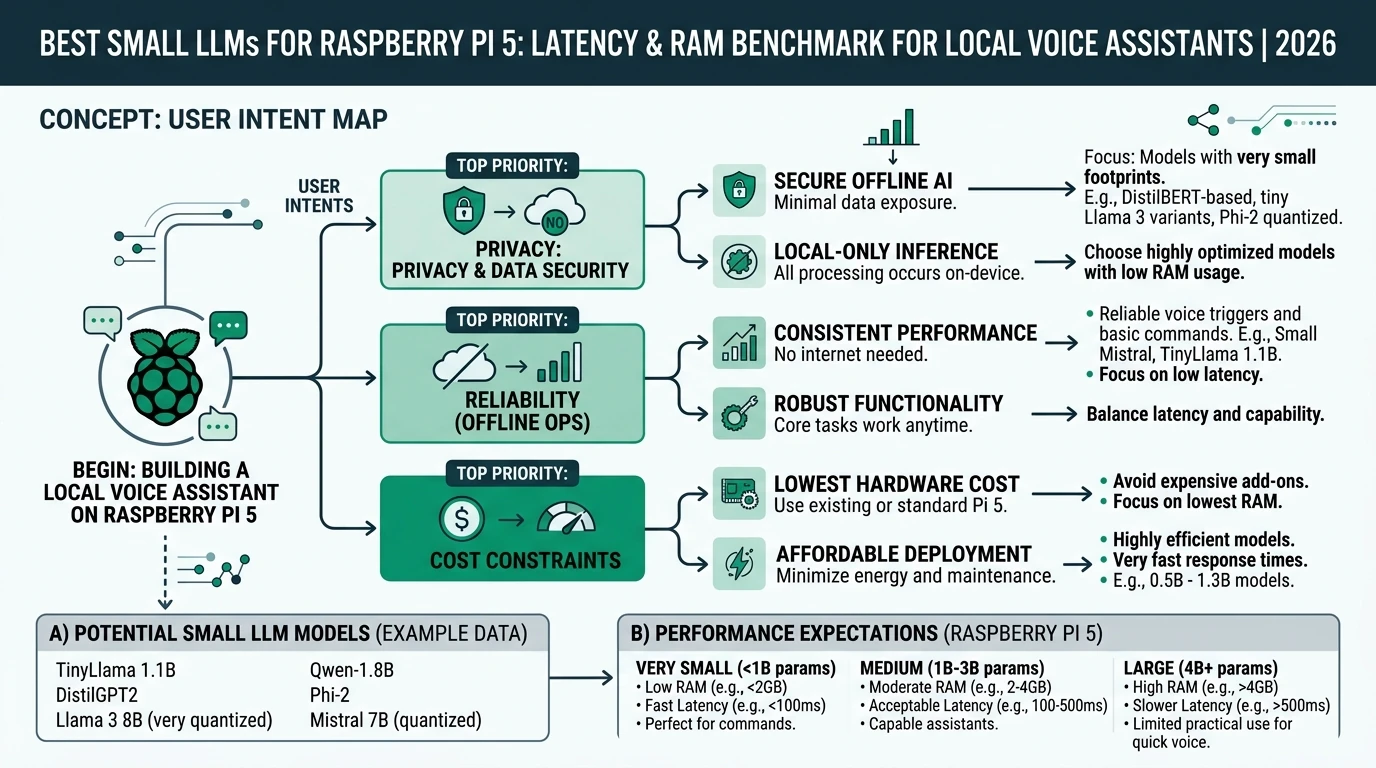
Overall, the TCO for a Raspberry Pi 5 voice assistant remains competitive, offering significant savings compared to cloud-based alternatives while ensuring privacy and control.
FAQ
Frequently Asked Questions
What are the best small LLMs for Raspberry Pi 5?
The best small LLMs for Raspberry Pi 5 in 2026 are Gemma3:270M, BitNet B1.58 2B, and Qwen2.5:1.5B, offering optimal latency and RAM usage for local voice assistants.
How do small LLMs ensure privacy on Raspberry Pi 5?
Small LLMs ensure privacy by processing data locally on the device, avoiding cloud dependencies and minimizing the risk of data breaches.
What is the setup complexity for small LLMs on Raspberry Pi 5?
Setting up small LLMs on Raspberry Pi 5 involves compiling engines like llama.cpp and configuring the voice pipeline, taking less than an hour for experienced users.
What is the total cost of ownership for a Raspberry Pi 5 voice assistant?
The total cost of ownership for a Raspberry Pi 5 voice assistant is approximately $100 for the first year, with minimal ongoing expenses.
How do quantized models benefit Raspberry Pi 5 deployments?
Quantized models reduce RAM usage and improve performance, making them ideal for resource-constrained environments like Raspberry Pi 5.
Primary sources
Use these references to reproduce benchmarks and validate latency and memory claims on your own Pi 5.
- Installing Local LLMs on Raspberry Pi CM5: Benchmarking Performance (Ollama, Gemma3, and related)
- How Well Do LLMs Perform on a Raspberry Pi 5? (llama.cpp, Qwen, BitNet)
- Best Open Source LLMs for Raspberry Pi (SiliconFlow, 2026 roundup)
- 7 Tiny AI Models for Raspberry Pi (KDnuggets)
- The Best Open-Source Small Language Models in 2026 (BentoML)
- I Tested 11 Best Local LLMs (April 2026) (YouTube walkthrough)
- Best Local LLM Models 2026 (SitePoint)
| Index | Focus | URL |
|---|---|---|
| 1 | Pi-class hardware LLM benchmarks | Black Device |
| 2 | Pi 5 token/s and model fit | Stratosphere IPS |
| 3 | Open-weight models on SBCs | SiliconFlow |
Conclusion
In conclusion, deploying small LLMs on Raspberry Pi 5 offers a powerful solution for privacy-focused local voice assistants. By selecting models like Gemma3:270M, BitNet B1.58 2B, and Qwen2.5:1.5B, users can achieve optimal latency and RAM usage while maintaining full control over their data. These models provide a cost-effective alternative to cloud-based solutions, ensuring privacy and efficiency.
For more context on privacy-first automation, see Alexa vs. Google Home vs. Apple Home vs. Home Assistant, Apple HomeKit Secure Video vs. local NVR, and Aqara vs. Shelly vs. Tuya.