Smart Home Privacy
Migrate Domoticz to Home Assistant Locally (2026)
Migrate Domoticz to Home Assistant locally: device inventory, MQTT/Zigbee handoff, automation porting, backups, and cutover testing without the cloud.
Quick answer: What is the safest way to migrate Domoticz to Home Assistant?
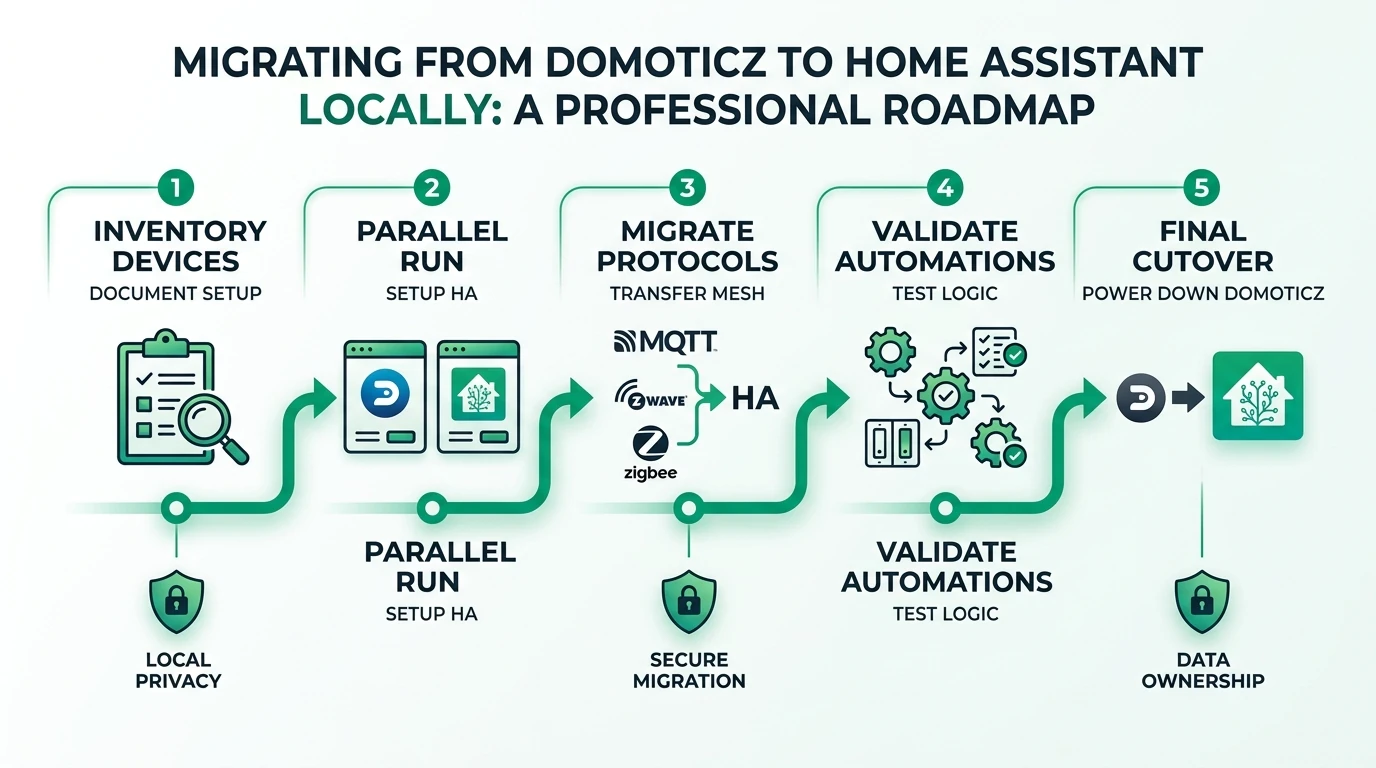
Run both systems in parallel on segmented networks: export a ruthless device and automation inventory, stand up Home Assistant with matching integrations (MQTT, Z-Wave JS, Zigbee2MQTT or ZHA), port automations in small batches, and cut traffic only after you validate states, scenes, and fail-safe alerts—especially smoke/lock flows.
Executive Summary
Switching controllers sounds simple until you remember your home is a live system: motion lights at 2am, radiator rules when APIs hiccup, and door locks you cannot afford to mis-order. Domoticz users often move to Home Assistant for breadth of integrations—Matter threads, modern Bluetooth proxies, ESPHome depth, and community blueprints—while still wanting Domoticz-style local sovereignty. This guide is not a philosophical comparison (see Domoticz vs Home Assistant); it is a migration runbook you can execute over a weekend plus soak time.
You will not find a magic “import Domoticz into Home Assistant” button that recreates every Lua/Blockly/DZVents nuance. Treat migration as refactoring production code: inventory dependencies, build equivalence tests, migrate in slices, and keep rollback artifacts (Domoticz backups, Z-Wave NVM dumps where applicable, Zigbee coordinator backups if your stack supports it).
Bottom line: Parallel-run Home Assistant beside Domoticz, migrate protocol silos (MQTT devices first, then Z-Wave, then Zigbee), and only decommission Domoticz when household-critical automations have survived a week of realistic traffic—including WAN outages if you care about offline behavior.
Phase 0 — Goals, risks, and success criteria
Before touching YAML, write down what “done” means. A pragmatic checklist:
- Household members cannot tell you “automations broke” during normal weeks
- Door locks, HVAC safety interlocks, and smoke/CO alerting either match or improve prior behavior
- No secrets (tokens, MQTT passwords) live in plaintext Discord screenshots
- You can rebuild Home Assistant from backup artifacts stored offline as well as on your NAS
Common failure modes:
- Migrating everything Sunday night without parallel validation
- Assuming Zigbee routing will reconstruct identically—it might, but plan for repairs
- Underestimating influx/outlier automations (holiday lighting, irrigation oddities)
- Letting MQTT topic chaos from years of Domoticz MQTT bridges leak into HA automations
| Risk | Mitigation |
|---|---|
| Lockouts or unsafe HVAC | Migrate in daytime windows; keep Domoticz rules active until verified |
| Zigbee instability | Minimize simultaneous coordinator changes; reduce Wi‑Fi overlap where possible |
| Topic storms | Namespace MQTT; throttle debugging |
| Partner frustration | Ship “silent” parity first, new features second |
Phase 1 — Ruthless inventory (devices, protocols, automations)
Export or document:
- Protocols in use: 433 MHz bridges, Z-Wave, Zigbee, Wi‑Fi LAN APIs, cloud-polling plugins you forgot about
- Device classes: sensors vs actuators vs composite virtual devices
- Automation triggers and implicit state (timers, sunset math, counter variables)
- Credentials: MQTT users, TCP/HTTP APIs, SSH to bridges
Domoticz plugins sometimes hid complexity; Home Assistant integrations are more explicit, which is good for privacy audits but bad if you never catalogued hidden cloud pulls. If a device only worked because Domoticz proxied a vendor cloud—decide now whether to replace hardware or accept a narrow cloud dependency rather than pretending the migration is fully local.
Cross-read which devices work without internet when evaluating stragglers that might still need polling endpoints.
Mapping Domoticz primitives to Home Assistant (mental model)
Domoticz and Home Assistant both model sensors, switches, scenes, and groups, but naming and discoverability differ. Use this mapping when you translate documentation tabs or forum threads to your new stack:
| Domoticz concept | Home Assistant analogue | Migration tip |
|---|---|---|
| Hardware sensor index | Entity IDs + device registry | Rename entities early; downstream automations key off IDs |
| Virtual switch | input_boolean or template switch | Document purpose; virtuals are easy to orphan |
| Group | Light/switch groups or areas | Prefer areas for dashboards; groups for cross-room scenes |
| Scene | scene entities | Recreate activation lists; watch transition times |
| Blockly / Lua / dzVents | YAML/UI automations, scripts, blueprints | Translate triggers first, optimize later |
| Polling HTTP | REST sensor / command_line | Prefer native integrations if available |
| MQTT in/out topics | MQTT integration / device discovery | Normalize topic tree before dual-writes |
Domoticz users sometimes lean on minimal UI discipline; Home Assistant’s UI is richer—use it to spot duplicate entities before you delete old hardware traces. If you relied on Notification blocks, rebuild them with explicit priorities: critical leak alarms should not share the same rate limits as “trash day” reminders.
Template sensors that referenced short device IDs often become template entities in Home Assistant. Keep math identical at first—even if the new syntax is verbose—then optimize once parity tests pass. Nothing hurts migration velocity like chasing subtle rounding differences in temperature hysteresis loops.
Phase 2 — Home Assistant install choice and bootstrap
Pick an installation method before you deep-link hardware:
- Home Assistant OS if you want the Supervisor path and simpler lifecycle (most migration-fatigued households)
- Container if Domoticz lived on Docker already and you like Compose—tie-in to the practical patterns in HA Container + Compose add-ons
During bootstrap:
- Set
http://homeassistant.local:8123style internal URLs first; add external access only after reverse proxy hardening - Create long-lived accounts for household dashboards; separate admin credentials
- Install backup integrations early (local snapshots + off-device copies)
| Path | Strength during migration |
|---|---|
| Home Assistant OS | Fast integration installs, easy Bluetooth |
| Home Assistant Container | Fits existing NAS Docker policy |
If you are unsure, read the tradeoffs in HA OS vs Container vs Supervised—your old Domoticz install style is a hint, not a mandate, for what will feel natural on day thirty.
Phase 3 — Integrations: MQTT, Z-Wave, Zigbee, and HTTP bridges
MQTT-first devices
Many Domoticz → MQTT device paths can be reattached with stable topics. Normalize MQTT in Home Assistant:
- One broker (Mosquitto/EMQX) with ACLs documented in your password manager
- Consistent discovery vs manual setups—pick intentionally; mixed modes confuse future you
- Retain flags audited—stale retained states cause ghost automations at 3am
Z-Wave
Use Z-Wave JS with a supported controller. If Domoticz owned the stick previously, you may need a controller shift strategy: exclude/include or controller backup/restore depending on vendor tooling—treat vendor docs as authoritative rather than this guide’s generic prose. Budget time; Z-Wave is never “just fifteen minutes.”
Zigbee
Choose one primary stack: Zigbee2MQTT or ZHA, informed by stack comparison. Migrating Zigbee networks without a coordinator backup can imply re-pairing; schedule accordingly.
HTTP/REST bridges
Recreate scripted HTTP calls as REST commands or small Python helpers only if necessary. Prefer native integrations when they exist locally—each bespoke script is future debt.
433 MHz bridges and “misc RF” gear
If Domoticz controlled blinds or sensors through generic 433 MHz transceivers, confirm whether Home Assistant exposes those bridges through ESPHome, rtl_433, MQTT gateways, or vendor-specific integrations. There is no universal importer—budget time to relearn pulse timing quirks. When you cannot replicate a bridge locally, you face the same fork as cloud gadgets: replace hardware or keep a tiny Domoticz sidecar you explicitly firewall (last resort).
Matter and Thread readiness
If you avoided Matter in Domoticz-era builds, Home Assistant may become your first serious exposure. Thread border routers and Matter commissioning deserve their own project window—do not pair brand-new Matter locks mid-migration while Zigbee healing is unstable. Background reading: Matter hubs local vs cloud and Matter 2 local angles.
Utility meters, history graphs, and energy dashboards
Domoticz plots were “good enough” for many households; Home Assistant invites deeper analytics. During migration, avoid rebuilding every chart—parity first:
- Recreate utility meter patterns if you tracked per-circuit energy via pulse counters
- Use statistics cards only after entities report stable units (kW vs kWh errors derail comparisons)
- Keep historical Domoticz exports (CSV/SQL) if you need legal or landlord evidence later; Home Assistant’s recorder is not a forensic archive without tuning
Tune recorder retention so you do not balloon SQLite on underpowered hosts—see Recorder backends if you outgrow defaults.
Phase 4 — Porting automations (DZVents/Lua/Blockly → HA patterns)
Think in terms of triggers, conditions, actions:
- Time-based automations map cleanly to HA triggers; watch timezone/DST edge cases
- State machines with several booleans often become input_boolean helpers or timer entities—cleaner than nested if-chains
- Notification paths: route through local LAN services before cloud push providers when privacy is paramount
Port priority:
- Safety-adjacent (smoke alerts, leak valves, lock schedules)
- Climate comfort loops with hysteresis
- Lighting convenience
- Cosmetic scenes
Keep Domoticz rules active until each HA automation has a validation note (“observed Nov 4, WAN offline test OK”).
Scripts vs automations: when to use script:
Use scripts for sequences you manually trigger or reuse across automations (“movie night lighting”). Keep automations thin—call scripts for long ordered steps so logs stay readable. This mirrors how experienced Domoticz users factored dzVents helpers, but Home Assistant’s UI makes premature spaghetti obvious—refactor when you exceed ~15 nodes mentally.
Presence, geofencing, and guest modes
If Domoticz presence relied on router DHCP hacks or single-phone pings, rebuild presence with multiple corroborating sensors (BLE beacons, Wi-Fi connectivity hints, or manual house-guest toggles). Overfitting to one phone MAC address creates angry family dynamics when iOS randomizes Wi-Fi identifiers or Android powers down background tasks.
Backups, rollback drills, and evidence you can actually restore
Migration optimism ends the first time someone discovers backups were empty tarballs pointed at the wrong path. Before decommissioning Domoticz:
- Export Domoticz database + scripts off-box (encrypted object storage or offline disk)
- Take Home Assistant full configuration snapshots after each milestone
- Perform a fire drill: restore HA backup to a spare Pi or laptop container; log how long it takes and what broke
Document credentials separately—restoring YAML without MQTT passwords wastes hours. This sounds basic because it is basic, and basic steps still get skipped when excitement about new dashboards exceeds patience.
| Artifact | Why it matters |
|---|---|
Domoticz .db + scripts | Last-resort rollback if HA experiments go sideways |
Home Assistant .tar backups | Fast rebuild on replacement hardware |
| Zigbee coordinator backup (if supported) | Avoid re-pairing marathon |
| Z-Wave NVM export (vendor-specific) | Same story for Z-Wave mesh |
| MQTT ACL files | Prevents mystery “offline” clients post-restore |
Phase 5 — Validation, soak testing, and cutover
Run a structured test matrix:
- Cold boot both gateways (if still parallel), ensure HA restores states sensibly
- WAN disconnect test: lights, motion, locks still sane?
- Rapid toggle tests for debounced sensors that used to chatter in Domoticz
- Mobile UI parity for housemates—angry users rollback migrations
When stable:
- Export final Domoticz backup to cold storage
- Document MQTT topic map and integration list in your notes repo
- Remove Domoticz from startup only after a agreed soak window (7–14 real-world days is reasonable for complex homes)
Checklist
- Inventory every protocol, credential, and automation with owners named.
- Install Home Assistant with backups before attaching radios.
- Normalize MQTT topics and broker ACLs before migrating triggers.
- Migrate safety-critical automations first with daytime rollback windows.
- Run WAN-off tests on locks, HVAC, and leak automations.
- Soak-test dashboards with non-admin household accounts.
- Archive Domoticz backups offline after successful cutover.
FAQ
Frequently Asked Questions
Is there a one-click Domoticz to Home Assistant importer?
Not in the unified sense most users want. Expect to rebuild integrations and automations with equivalents. Some MQTT devices reconnect trivially; proprietary bridges may need replacement or different integrations.
Should I move radios to Home Assistant immediately?
Only when you understand how each radio’s controller state is preserved. For Z-Wave and Zigbee, research controller backup and re-pairing costs before unplugging sticks from Domoticz.
Can I keep Domoticz read-only while testing Home Assistant?
Yes, and you often should—run read-only monitoring until HA automations match. Avoid writing duplicate commands to actuators from both systems simultaneously unless you enjoy race conditions.
How long should parallel operation last?
For simple MQTT homes, a few days can suffice. For multi-radio, multi-floor homes with fragile Zigbee routing, budget 1–2 weeks of soak time and explicit household sign-off.
Will Home Assistant use more resources than Domoticz?
Often yes—feature richness has a cost. Size CPU/RAM conservatively; containers on underpowered NAS devices can struggle with simultaneous Bluetooth proxies and video AI—plan hardware using best hardware for local AI and related guides if you stack heavy services.
Primary Sources Table
| ID | Source | Direct URL |
|---|---|---|
| 1 | Home Assistant — onboarding and installation | https://www.home-assistant.io/installation/ |
| 2 | Home Assistant — Z-Wave JS documentation | https://www.home-assistant.io/integrations/zwave_js/ |
| 3 | Zigbee2MQTT — getting started | https://www.zigbee2mqtt.io/guide/getting-started/ |
| 4 | Domoticz wiki — backup and migration concepts | https://www.domoticz.com/wiki/ |
| 5 | ESPHome — MQTT API (for mixed fleets) | https://esphome.io/components/mqtt.html |
Conclusion
Domoticz served you with lightweight local automation; Home Assistant gives you a larger integration surface at the price of complexity. Migration rewards patience: parallel runs, protocol-sliced phases, and explicit validation beat “big bang” cutovers every time. When the smoke tests pass and housemates stop noticing the infrastructure, you have rebuilt privacy-first control on a platform that will track standards like Matter more aggressively.
Continue with Domoticz vs Home Assistant for the product decision framing, HA Container Compose patterns if you are Docker-first, and Zigbee stack choices before you touch coordinator firmware during migration week.